
JOYING JY-HT145N4
JOYING Car Radio Instruction Manual
Model: JY-HT145N4 for Honda Civic 2016-2021
1. Introducción
This manual provides comprehensive instructions for the installation, operation, maintenance, and troubleshooting of your JOYING Android 13 Car Stereo. Please read this manual thoroughly before using the product to ensure proper functionality and to maximize your user experience.

Image 1.1: The JOYING Car Radio displaying its CarPlay interface, showcasing the large 9-inch screen and integrated controls.
2. Configuración e instalación
The JOYING Car Radio is designed for a plug-and-play installation in Honda Civic models from 2016 to 2021. It supports factory features such as the reverse camera, steering wheel controls, and USB ports, utilizing the supplied necessary cables.
2.1 Supported Factory Features
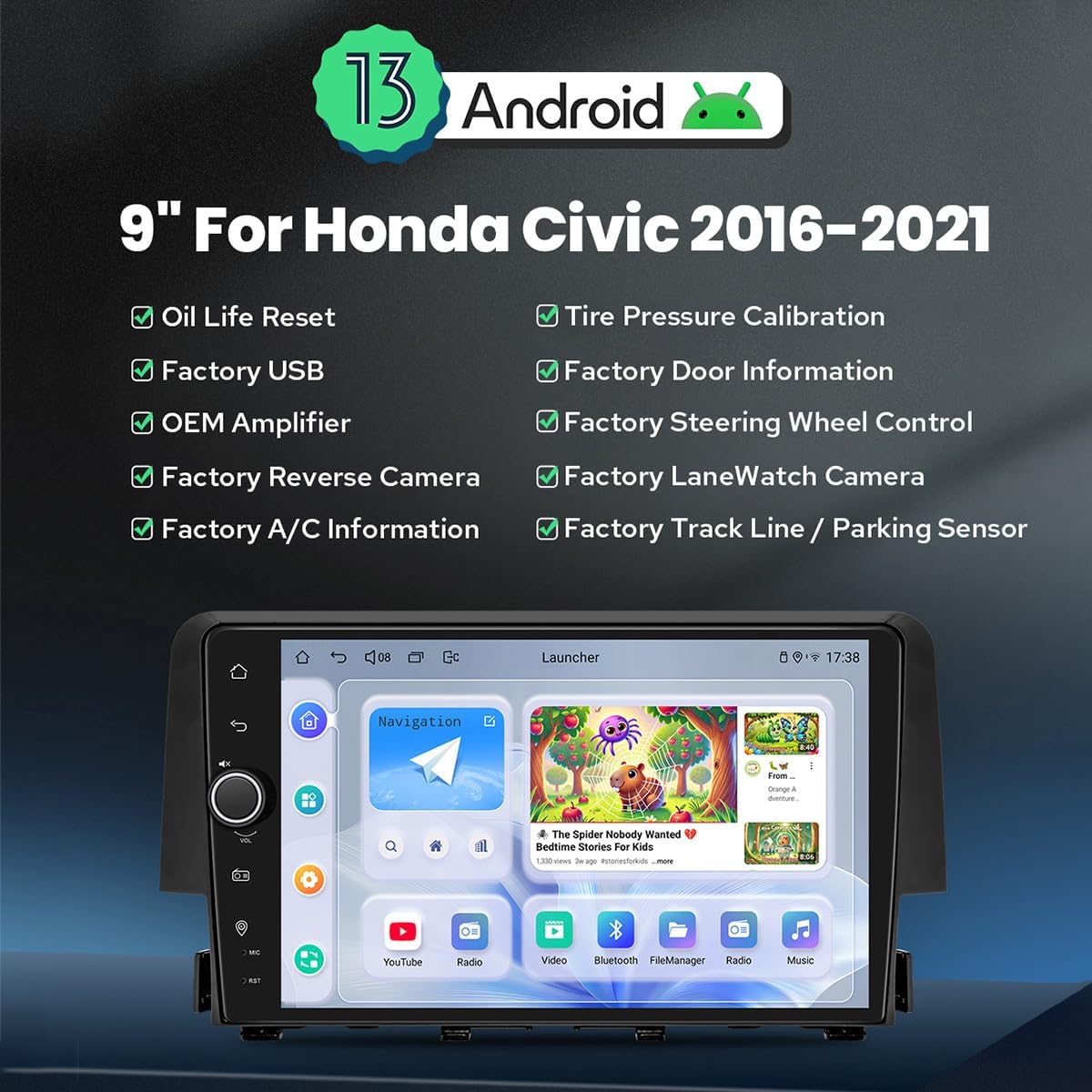
Imagen 2.1: Másview of Android 13 features and supported factory integrations for Honda Civic 2016-2021, including Oil Life Reset, Factory USB, OEM Amplifier, Factory Reverse Camera, Factory A/C Information, Tire Pressure Calibration, Factory Door Information, Factory Steering Wheel Control, Factory LaneWatch Camera, and Factory Track Line / Parking Sensor.
2.2 Selección del arnés de cableado
This model offers three different wiring harnesses (A, B, C) to ensure compatibility with various factory radio configurations. It is crucial to select the correct harness for your vehicle. If unsure, please consult a photo of your factory radio's rear connections.

Image 2.2: A guide illustrating the three different wiring harnesses (A, B, C) and their corresponding factory radio connections. Choose 'Wire Harness A' for specific factory radios, 'Wire Harness B' for another type, and 'Wire Harness C' for a third type, which includes a power ampinterfaz más duradera.
2.3 Factory-Look Integration
The head unit is designed to seamlessly integrate into your Honda Civic's dashboard, maintaining a factory-like appearance.

Image 2.3: Demonstrates the factory-look style of the head unit when installed in a car dashboard, with smaller images showing successful installation in various Honda Civic dashboard configurations.
3. Instrucciones de funcionamiento
3.1 Fast Boot
After the initial boot-up (approximately 30-40 seconds), the system will start up instantly and enter the user interface within 2 seconds upon turning the car key.
3.2 Funciones de audio
The unit features a TDA7851 DSP Chip, a 48-Band Graphic Equalizer, and 4x50W Max Output Power for high-quality sound. It also provides Optical Fiber and Coaxial Digital Outputs for direct connection to external amplifiers, ensuring ultimate sound quality.

Image 3.1: Illustrates the high-quality sound capabilities, highlighting the TDA7851 DSP Chip, 48-Band Graphic Equalizer, and 4x50W Max Output Power. It also shows the various audio outputs including 4 Audio Outputs, 1 SUB Output, Fiber Optical Output, SPDIF Coaxial Output, and Center Channel Output, supporting aftermarket ampsalvavidas.
3.3 Connectivity: 4G, Carplay & Android Auto
The built-in 4G module allows internet access by inserting a SIM card (note: cannot make phone calls or send SMS). The unit supports FDD-LTE and TDD-LTE bands. Built-in Carplay and Android Auto enable seamless integration with your mobile phone via USB cable or Bluetooth, allowing access to navigation, phone calls, and music on the larger screen.

Image 3.2: Demonstrates the built-in Carplay and Android Auto features, showing how a mobile phone can connect via USB or Bluetooth to display phone apps on the car radio's screen for navigation, calls, and music.
3.4 Navegación GPS
Equipped with precise GPS engines and antennas for accurate positioning and faster real-time navigation. Supports offline maps where data can be downloaded and saved to the stereo. Mobile phone map data can also be synchronized via Carplay/Android Auto.
3.5 Multitarea en pantalla dividida
The unit supports split-screen functionality, allowing you to run two applications simultaneously, such as navigation and video playback.

Image 3.3: Illustrates the split-screen multitasking feature, showing steps to activate it: 1. Tap the recent apps icon. 2. Find the app to run in split-screen, click the app icon to bring up the split-screen button, and tap it. 3. The first app selected will display on the left side, then choose the second app in recent apps.
3.6 Configuraciones personalizadas
Customize your experience with features like changeable car boot logos, customizable wallpapers, adjustable screen brightness, and changeable button colors.

Image 3.4: Shows various personalized setting options including Car Boot Logo, Customizable Wallpapers, Adjustable Screen Brightness, and Changeable Button Color, allowing users to tailor the interface to their preferences.
3.7 Otras funciones
The unit includes additional functionalities such as AM/FM Radio, Hands-free Calling, Picture-in-Picture (PiP), 3 USB Ports, Micro SD Card Slot, and a 4G SIM Card Slot.

Image 3.5: Displays icons representing other key features of the car radio: Fast Boot, GPS Navigation, AM/FM Radio, Hands-free Call, Picture-in-Picture, 3 USB Ports, Micro SD Card Slot, and 4G SIM Card Slot.
4. Mantenimiento
4.1 Sistema de enfriamiento
The unit features an upgraded dual heat sink design for superior heat dissipation, improved temperature control, and enhanced performance stability. A fan will automatically activate if the CPU temperature or radio volume exceeds a set warning value to prevent overheating.

Image 4.1: Illustrates the upgraded cooling system with a dual heat sink design and a fan, explaining how it helps dissipate heat and maintain stable performance by automatically activating when CPU temperature or volume exceeds a set threshold.
4.2 WiFi Signal
An independent WiFi antenna ensures stable signal quality and provides fast and smooth internet access, supporting 802.11a/b/g/n/AC standards across 2.4GHz/5GHz spectral bands.

Image 4.2: Highlights the upgraded WiFi signal capabilities, featuring an independent WiFi antenna for stable signal quality and fast internet access, supporting 802.11a/b/g/n/AC standards and 2.4GHz/5GHz bands.
5. Solución de problemas
If you encounter any issues with your JOYING Car Radio, please refer to the following general troubleshooting steps:
- Sin energía: Revise todas las conexiones eléctricas y los fusibles. Asegúrese de que el encendido del vehículo esté activado.
- Sin sonido: Verify speaker connections. Check volume levels and audio output settings. Ensure external ampLos ificadores se encienden si se utilizan.
- Problemas con la señal GPS: Asegúrese de que la antena GPS esté correctamente instalada y tenga una vista clara. view del cielo.
- La pantalla táctil no responde: Intente reiniciar la unidad. Si el problema persiste, podría ser necesario restablecer la configuración de fábrica (consulte el menú de configuración).
- Problemas de conectividad Bluetooth: Asegúrese de que el Bluetooth esté activado tanto en la unidad como en el dispositivo. Intente desvincular y volver a vincular los dispositivos.
For more detailed troubleshooting or persistent issues, please contact JOYING customer support.
6. Especificaciones
| Característica | Especificación |
|---|---|
| Número de modelo | JY-HT145N4 |
| Tamaño de la pantalla | 9 pulgadas |
| Sistema operativo | Androide 13 |
| Capacidad de almacenamiento de memoria | 64 GB |
| Peso del artículo | 6 libras |
| Dimensiones del paquete | 13 x 9 x 8 pulgadas |
| Tecnología de conectividad | Bluetooth, Wi-Fi, USB, Ethernet |
| Características especiales | Touchscreen, Bluetooth, GPS, 4G Module, Carplay, Android Auto, Split-screen |
| Modo de salida de audio | Stereo, Optical Fiber, Coaxial Digital |
| País natal | Porcelana |
6.1 Size and Rear Ports

Image 6.1: Displays the dimensions of the 9-inch radio unit and a detailed view of its rear ports, including connections for camera, WiFi, GPS, 4G, USB, optical, and audio outputs.
7. Contenido del paquete
Los siguientes artículos están incluidos en el paquete de su producto:
- Radio de 9" x1
- Single Din Cage x1
- Left & Right Bracket x1
- Antena WiFi x1
- Antena GPS x1
- Antena 4G x2
- Micrófono externo x1
- USB cable x2
- Cable de realidad aumentada x1
- Cable plano de pantalla x1
- Cable de alimentación x1
- Manual de usuario x1
Image 7.1: Visual representation of the items included in the package, such as the radio unit, single DIN cage, mounting brackets, various antennas, external microphone, USB cables, AR cable, screen ribbon cable, power cable, and user manual.
8. Accesorios opcionales
Enhance your JOYING Car Radio experience with these optional accessories (not included in the standard package):
- OBD2 (ASIN: B076CD78HT): Se conecta a través de Bluetooth para recuperar datos en tiempo real y códigos de problemas de la computadora de su vehículo.
- AR Front Camera (ASIN: B0CBX4N6V8): Graba automáticamente la carretera principal en segundo plano mientras conduce.
- AR Rear Camera (ASIN: B0CBX39S8M): Cambia automáticamente a la pantalla inversa al dar marcha atrás con el vehículo.
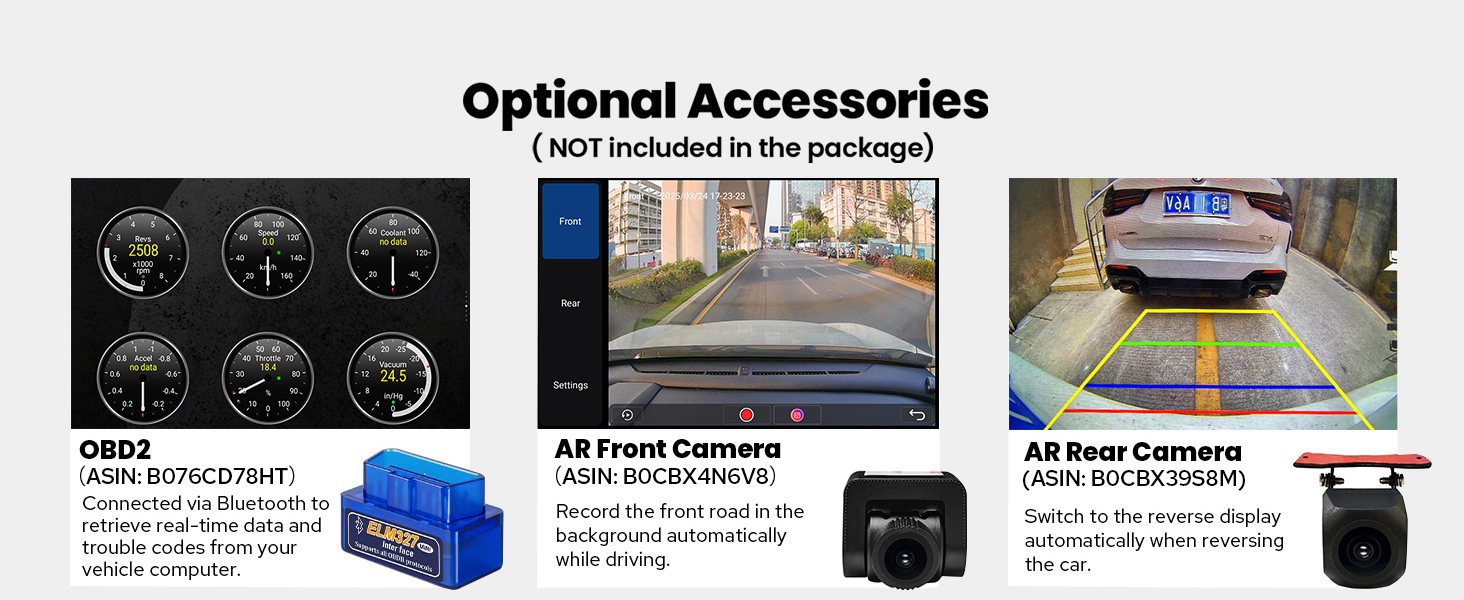
Image 8.1: Shows optional accessories available for purchase, including an OBD2 scanner, an AR Front Camera, and an AR Rear Camera, with brief descriptions of their functions.
9. Garantía y soporte
Your JOYING Car Radio comes with a Garantía de 2 años Desde la fecha de compra. Esta garantía cubre defectos de fabricación y garantiza que el producto cumple con los estándares de rendimiento especificados.
For technical support, warranty claims, or any inquiries, please visit the official JOYING Store or contact their customer service through the platform where you purchased the product.
JOYING Store Link: https://www.amazon.com/stores/JOYINGAndroidCarStereo/page/571C1208-4291-4DEC-85CC-AD53925CD824
Ask a question about this manual
Ask about setup, troubleshooting, compatibility, parts, safety, or missing instructions. Manuals+ will review the question and use this page’s manual context to help answer it.