
1. Información de seguridad
Please read all instructions carefully before installation and use. Improper installation or operation may cause damage to the device or vehicle, and may void the warranty. Always prioritize safe driving practices. Do not operate the device in a way that distracts you from the road.
- Instalación profesional recomendada: Debido a la complejidad de los sistemas eléctricos de los automóviles, se recomienda encarecidamente una instalación profesional.
- Fuente de alimentación: Asegúrese de que el dispositivo esté conectado a una fuente de alimentación de 12 V CC con conexión a tierra negativa.
- Alambrado: Double-check all wiring connections before powering on the unit to prevent short circuits or damage.
- Temperatura de funcionamiento: Evite exponer el dispositivo a temperaturas extremas o luz solar directa durante períodos prolongados.
2. Producto terminadoview
The JOYING JY-TT158N4 is a 9-inch Android car stereo designed for Toyota Land Cruiser Prado 120 and Lexus GX470 models from 2004-2009. It features a high-resolution touchscreen, integrated CarPlay and Android Auto, a physical volume knob, and robust hardware for an enhanced in-car experience.

Figura 2.1: Frente view of the JOYING JY-TT158N4 car stereo.
Características principales:
- Compatibilidad del vehículo: Specifically designed for Toyota Land Cruiser Prado 120 & Lexus GX470 (2004-2009), compatible with JBL amplifier and factory steering wheel controls.
- Arranque rápido: Quick startup, entering the user interface in approximately 2 seconds after the initial boot.
- Salida de audio: Optical Fiber and Coaxial Digital Output for high-quality sound with external ampsalvavidas.
- Módulo 4G incorporado: Supports SIM card for internet access (data only, no calls/SMS).
- Navegacion GPS: Precise GPS with included antenna, supporting offline maps and synchronization with phone map data via CarPlay/Android Auto.
- CarPlay y Android Auto: Built-in support for seamless smartphone integration via USB or Bluetooth.
- Configuraciones personalizadas: Customizable car boot logos, wallpapers, and button colors.
- Sistema de enfriamiento: Dual heat sink design with automatic fan control to prevent overheating.
3. ¿Qué hay en la caja?
El paquete incluye los siguientes componentes:
- 9" radio unit (x1)
- Jaula Din Simple (x1)
- Soporte izquierdo y derecho (x1)
- Antena WiFi (x1)
- Antena GPS (x1)
- Antena 4G (x2)
- Micrófono externo (x1)
- Cable USB (x2)
- Cable de realidad aumentada (x1)
- Cable plano de pantalla (x1)
- Cable de alimentación (x1)
- Manual de usuario (x1)

Figura 3.1: Representación visual de los componentes incluidos.
4. Instalación
The JOYING JY-TT158N4 is designed for plug-and-play installation in compatible Toyota Land Cruiser Prado 120 and Lexus GX470 models (2004-2009). No cutting of factory cables is required. Ensure the vehicle's power is disconnected before beginning installation.
4.1. Comprobación de compatibilidad del vehículo
Verify that your vehicle's dashboard matches the compatible models to ensure proper fitment.
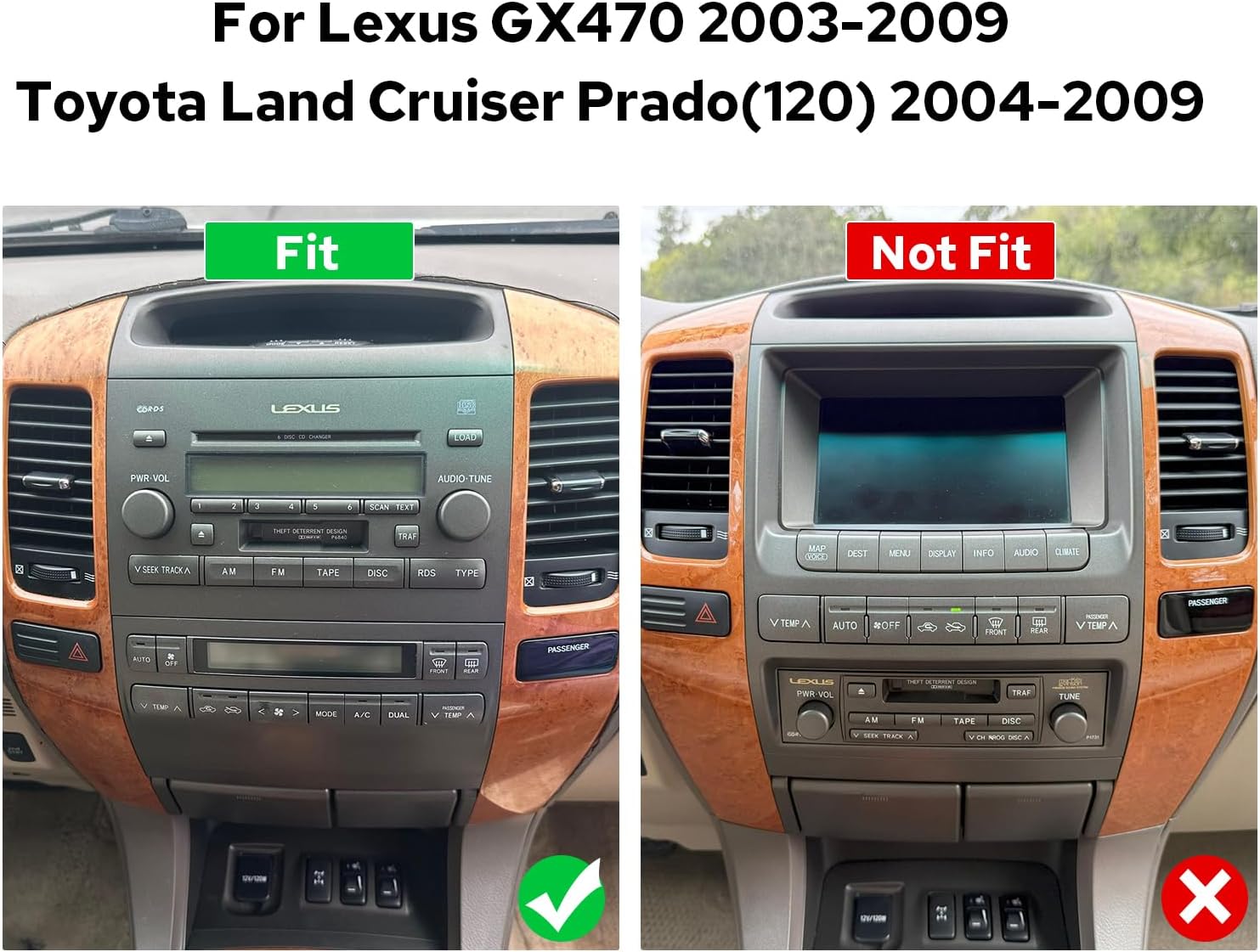
Figure 4.1: Comparison of compatible and incompatible dashboards.
4.2. Conexiones de cableado
Connect the provided cables to the corresponding ports on the car stereo and your vehicle's wiring harness. Ensure all connections are secure.

Figura 4.2: Posterior view of the car stereo with various ports and connections.
4.3. AR Camera Connection
For connecting AR (Augmented Reality) front and reverse cameras, follow the specific wiring instructions. This typically involves connecting the camera's power cable and video input to the head unit.
Video 4.1: Detailed guide on connecting AR (Front and Reverse) cameras to the head unit.
5. Configuración inicial
5.1. Primer arranque
The first boot-up may take 30-40 seconds. Subsequent startups will be faster, typically within 2 seconds.
5.2. Emparejamiento Bluetooth
To enable hands-free calling and audio streaming, pair your smartphone via Bluetooth. Navigate to the Bluetooth settings on the car stereo and your phone, then select 'Car BTo' or a similar device name to connect.
Video 5.1: Demonstration of Bluetooth pairing and CarPlay/Android Auto connection.
5.3. Conexión de CarPlay y Android Auto
Connect your mobile phone to the car radio via USB cable or Bluetooth to use CarPlay or Android Auto. This allows access to navigation, phone calls, and music on the larger screen.

Figure 5.1: Display showing CarPlay and Android Auto interfaces.
6. Instrucciones de funcionamiento
6.1. Navegación por la interfaz de usuario
The system features an intuitive Android interface. Swipe left or right to access different home screens and applications. Tap icons to launch apps like Radio, Music, Video, Navigation, and Settings.

Figure 6.1: Car stereo displaying the main user interface with various application icons.
6.2. Audio and Equalizer Settings
Adjust audio settings and utilize the 48-band graphic equalizer (TDA7851 DSP chip) for optimal sound quality. Preset EQ modes are available, or you can customize your own.

Figure 6.2: Illustration of high-quality sound features and equalizer interface.
6.3. Control por voz
Utilize voice commands to control various functions, enhancing driving intelligence and security. This allows for hands-free operation of features like radio, navigation, and calls.
Video 6.1: Demonstration of voice control features, including opening FM radio and hands-free calling.
6.4. Funcionalidad de pantalla dual
The system supports dual-screen operation, allowing two applications to run simultaneously. For exampEs decir, puedes tener la navegación en un lado y la reproducción de música en el otro.
Video 6.2: Shows dual screen functionality with FM radio and phone dialer running concurrently.
6.5. Salida HDMI
The unit features an HDMI output, allowing you to send uncompressed audio and video signals to external displays, such as headrest monitors, for passenger entertainment.
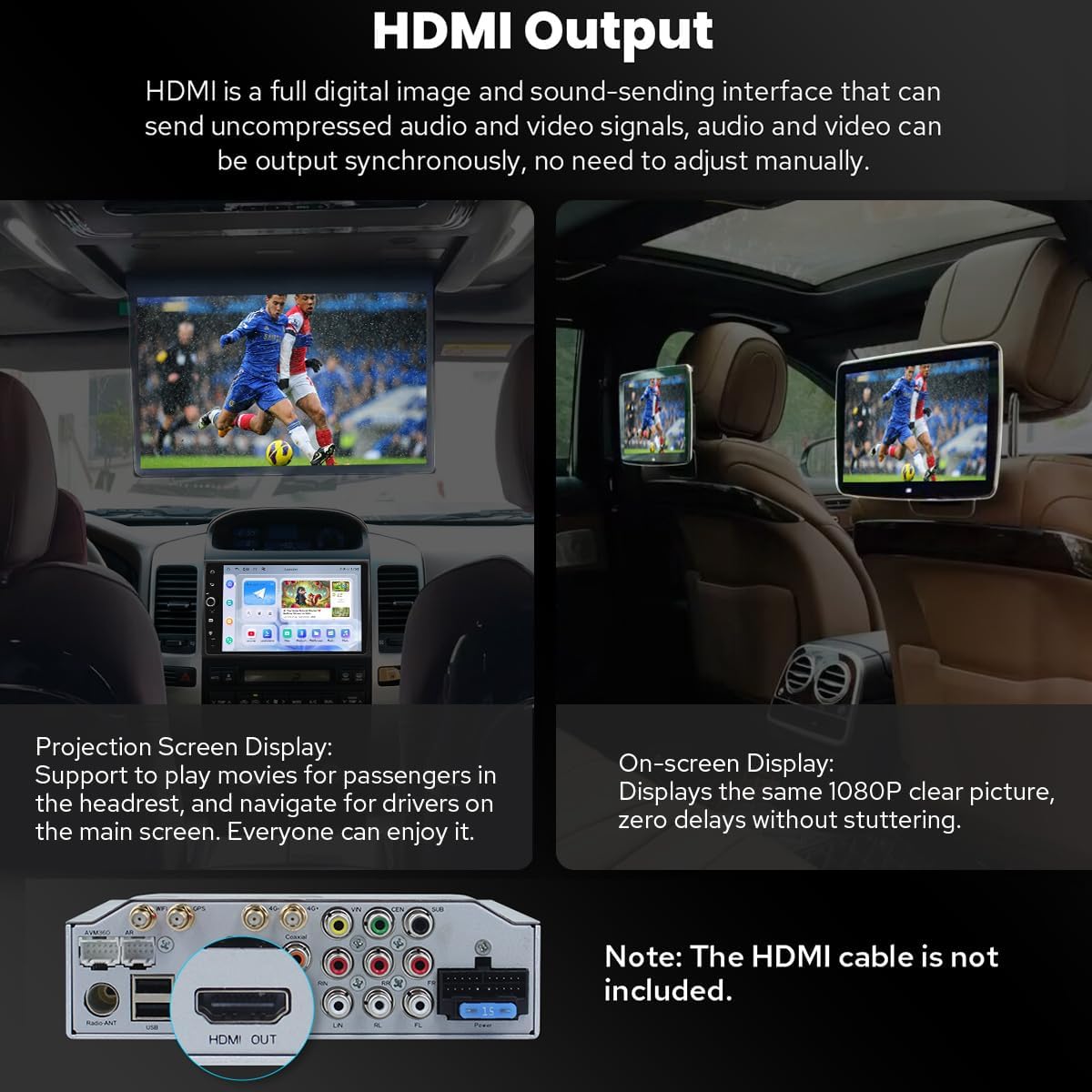
Figure 6.3: Diagram illustrating HDMI output connection to external screens.
7. Características adicionales
7.1. Configuraciones personalizadas
Customize your car stereo experience with changeable button colors, car boot logos, and a variety of wallpapers.
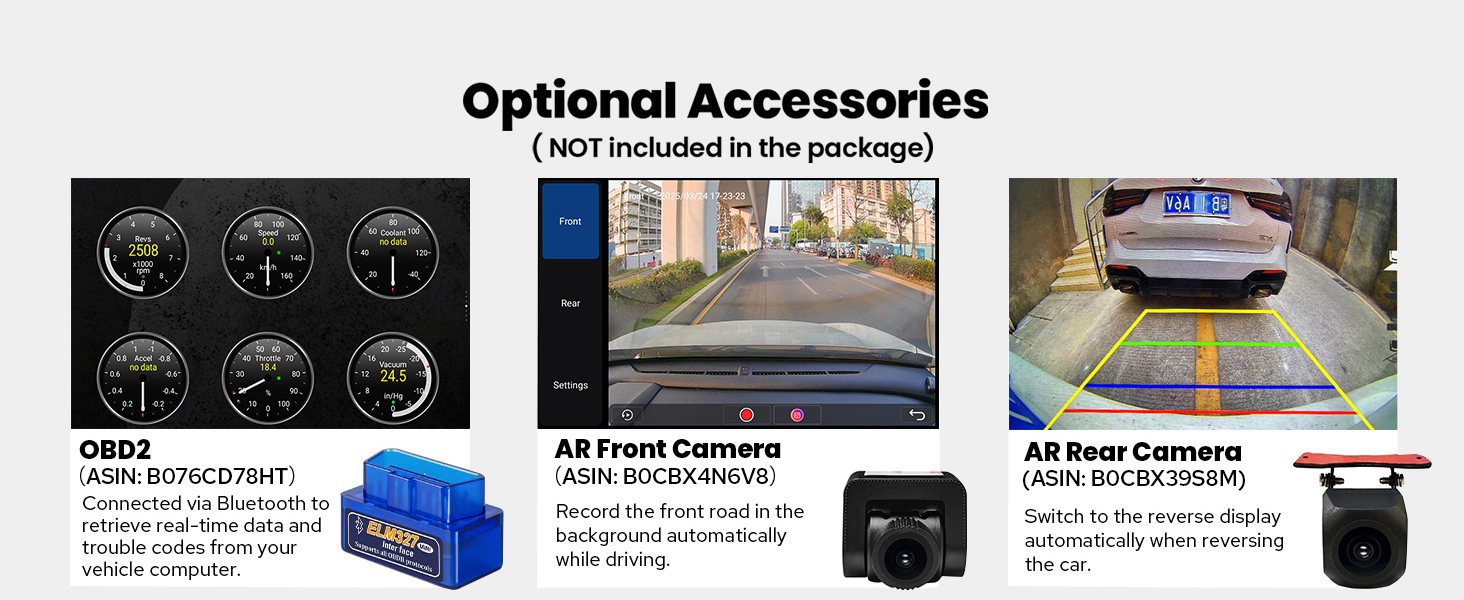
Figure 7.1: Options for customizing UI elements like button colors and wallpapers.
7.2. Conectividad
The unit offers enhanced connectivity with upgraded WiFi signal via an independent antenna for stable and fast internet access, and a built-in 4G module for SIM card data.

Figure 7.2: Illustration of the independent WiFi antenna for improved signal.
7.3. Sistema de refrigeración
A dual heat sink design ensures superior heat dissipation and improved temperature control, enhancing performance stability. The fan automatically activates if the CPU temperature or radio volume exceeds a set warning value.

Figure 7.3: Diagram showing the dual heat sink design and fan control interface.
7.4. Accesorios opcionales
Enhance your experience with optional accessories such as OBD2 scanners, AR front cameras, and AR rear cameras (sold separately).

Figura 7.4: Sobreview of optional accessories for the car stereo.
8. Especificaciones
| Característica | Detalle |
|---|---|
| Número de modelo del artículo | JY-TT158N4 |
| Tamaño de la pantalla | 9 pulgadas |
| Sistema operativo | Androide |
| Características especiales | Bluetooth, Touchscreen, Built-in 4G Module, Optical Fiber and Coaxial Digital Output, Fast Boot, GPS Navigation, CarPlay, Android Auto |
| Tecnología de conectividad | Bluetooth, Ethernet, USB, Wi-Fi |
| Modo de salida de audio | Estéreo |
| Tipo de mapa | North America (Offline maps supported) |
| Peso del artículo | 6 libras |
| Dimensiones del paquete | 13 x 9 x 8 pulgadas |
9. Mantenimiento
- Limpieza: Utilice un paño suave y seco para limpiar la pantalla y el exterior. Evite limpiadores abrasivos o disolventes.
- Actualizaciones de software: Compruebe periódicamente si hay actualizaciones de software para garantizar un rendimiento óptimo y acceso a nuevas funciones.
- Temperatura: No exponga la unidad a temperaturas extremas.
10. Solución de problemas
- Sin energía: Revise todas las conexiones eléctricas y asegúrese de que el encendido del vehículo esté activado. Verifique los fusibles.
- Sin sonido: Check speaker connections, volume levels, and audio settings (e.g., equalizer, balance). Ensure external ampLos ificadores se encienden si se utilizan.
- Problemas de conexión Bluetooth: Asegúrate de que el Bluetooth esté activado tanto en el estéreo como en tu teléfono. Intenta desvincular y volver a vincular los dispositivos.
- CarPlay/Android Auto no se conecta: Ensure your phone's operating system is up to date. Try a different USB cable. Verify USB debugging settings for Android Auto if connecting via USB.
- Pérdida de señal GPS: Asegúrese de que la antena GPS esté correctamente instalada y tenga una vista clara. view del cielo.
11. Garantía y soporte
Este producto viene con un Garantía de 2 años. For technical support, troubleshooting assistance, or warranty claims, please contact JOYING customer service through your purchase platform or the official JOYING websitio.