
1. Introducción
This manual provides detailed instructions for the installation, operation, and maintenance of your JOYING Android 13 Car Stereo Head Unit (Model JY-HT145N8). This unit is designed to integrate seamlessly with Honda Civic models from 2016 to 2021, offering advanced features such as CarPlay, Android Auto, GPS navigation, and enhanced audio capabilities.
Lea este manual detenidamente antes de la instalación y el uso para garantizar el correcto funcionamiento y evitar daños a la unidad o a su vehículo.

Imagen: Más alláview of the JOYING Android 13 Car Stereo Head Unit highlighting key features.
2. Información de seguridad
- Always ensure the vehicle's ignition is off before performing any installation or wiring.
- Desconecte la batería del vehículo para evitar cortocircuitos o daños eléctricos.
- Consulte con un instalador profesional si no está seguro de algún paso.
- No opere la unidad de una manera que lo distraiga de la conducción.
- Ensure all connections are secure to prevent intermittent issues or hazards.
3. Contenido del paquete
Verifique que todos los artículos enumerados a continuación estén incluidos en su paquete:
- Radio de 9" x1
- Single Din Cage x1
- Left & Right Bracket x1
- Antena WiFi x1
- Antena GPS x1
- Antena 4G x2
- Micrófono externo x1
- USB cable x2
- Cable de realidad aumentada x1
- Cable plano de pantalla x1
- Cable de alimentación x1
- Manual de usuario x1

Image: All components included in the JOYING Android 13 Car Stereo package.
4. Configuración e instalación
The JOYING head unit is designed for a plug-and-play installation, supporting factory reverse camera, steering wheel controls, USB, and lanewatch camera. Follow these general steps for installation:
- Remove Original Dashboard Components: Carefully remove the side panel trims and the original radio unit from your vehicle's dashboard.
- Conectar los arneses de cableado: Connect the provided wiring harnesses to the new head unit and your vehicle's existing connectors. Ensure all compatible plugs are securely connected. Some plugs may not be used depending on your vehicle's configuration.
- Conectar antenas: Attach the WiFi, GPS, and 4G antennas to their respective ports on the head unit.
- Conectar cables USB: Plug in the USB cables for data transfer and charging.
- Connect Camera Inputs: Connect your reverse camera to the "CAM IN" port.
- CAN Bus Setting: If your vehicle is equipped with a CAN bus, ensure the communication protocol (white button) on the head unit is set to the right side (CAN).
- Adaptador de antena de radio: For sedan 4-door Honda Civic models, you may need to remove the rear passenger seat panel trim to access and bypass the HD radio box using the included green and gray cables.
- Funcionalidad de prueba: Before fully reassembling the dashboard, loosely fit the head unit and test all functions (power, audio, navigation, camera, steering wheel controls) to ensure everything is working correctly.
- Reensamblar el tablero: Una vez verificadas todas las funciones, vuelva a ensamblar con cuidado los componentes del tablero.

Image: JOYING head unit seamlessly integrated into a Honda Civic dashboard.

Image: Purchase guide illustrating different wiring harnesses (A, B, C) based on OEM radio type.

Image: Important note on setting the CAN bus communication protocol.
Videos de instalación:
Video: Detailed installation guide for an Android 13 car stereo in a Honda Civic (from Dasaita Offical Store). This video provides comprehensive steps for removing the old unit and connecting the new one.
Video: Installation steps for a new radio in a Honda Civic (from Dasaita Offical Store). This video focuses on the initial removal and wiring process.
Video: Wiring installation guide (from Jingelsye-US). This video demonstrates the connection of various cables to the head unit.
5. Instrucciones de funcionamiento
5.1 Funciones básicas
- Encendido/apagado: The unit will typically power on with the vehicle's ignition. A fast boot feature allows it to start in 2 seconds after the initial 30-40 second boot.
- Control de volumen: Utilice la perilla de volumen físico o los controles en pantalla para ajustar los niveles de audio.
- Android OS Navigation: Navigate through the Android 13 interface using the touchscreen.
5.2 Características de conectividad
- CarPlay y Android Auto: Connect your mobile phone via USB cable or Bluetooth to mirror apps, access navigation, make calls, and listen to music on the larger screen.
- Bluetooth 5.0: Para llamadas manos libres y transmisión de audio.
- Módulo 4G incorporado: Inserte una tarjeta SIM para acceder a internet (no admite llamadas ni SMS). Compatible con FDD-LTE: B2/B4/B5/B7/B12/B13/B14/B17/B25/B26/B38/B66/B71 y TDD-LTE: B41.
- Señal WiFi: Independent WiFi antenna ensures stable 2.4GHz/5GHz internet access.
- Puertos USB: Three USB ports are available for various connections.
- Ranura para tarjeta micro SD: Para almacenamiento adicional.

Image: Demonstration of Built-in CarPlay and Android Auto connectivity.

Image: Illustration of the upgraded WiFi signal with an independent antenna.
5.3 Navegación y multimedia
- Navegacion GPS: Precise GPS engines with included GPS antennas for accurate positioning and faster real-time navigation. Supports offline maps.
- Radio FM/AM: Built-in FM RDS tuner radio for selecting your favorite radio stations.
- DSP Sound: TDA7851 chip, 48-band graphic equalizer, and 4x50W max output power for high-quality sound. Supports aftermarket amplifiers via optical fiber and coaxial digital output.
- Multitarea en pantalla dividida: Ejecutar dos aplicaciones simultáneamente en la pantalla.
- Salida HDMI: Full digital image and sound-sending interface for projection screen display or on-screen display (1080P clear picture, zero delays). HDMI cable not included.

Image: High-quality sound enjoyment features including DSP chip and graphic equalizer.
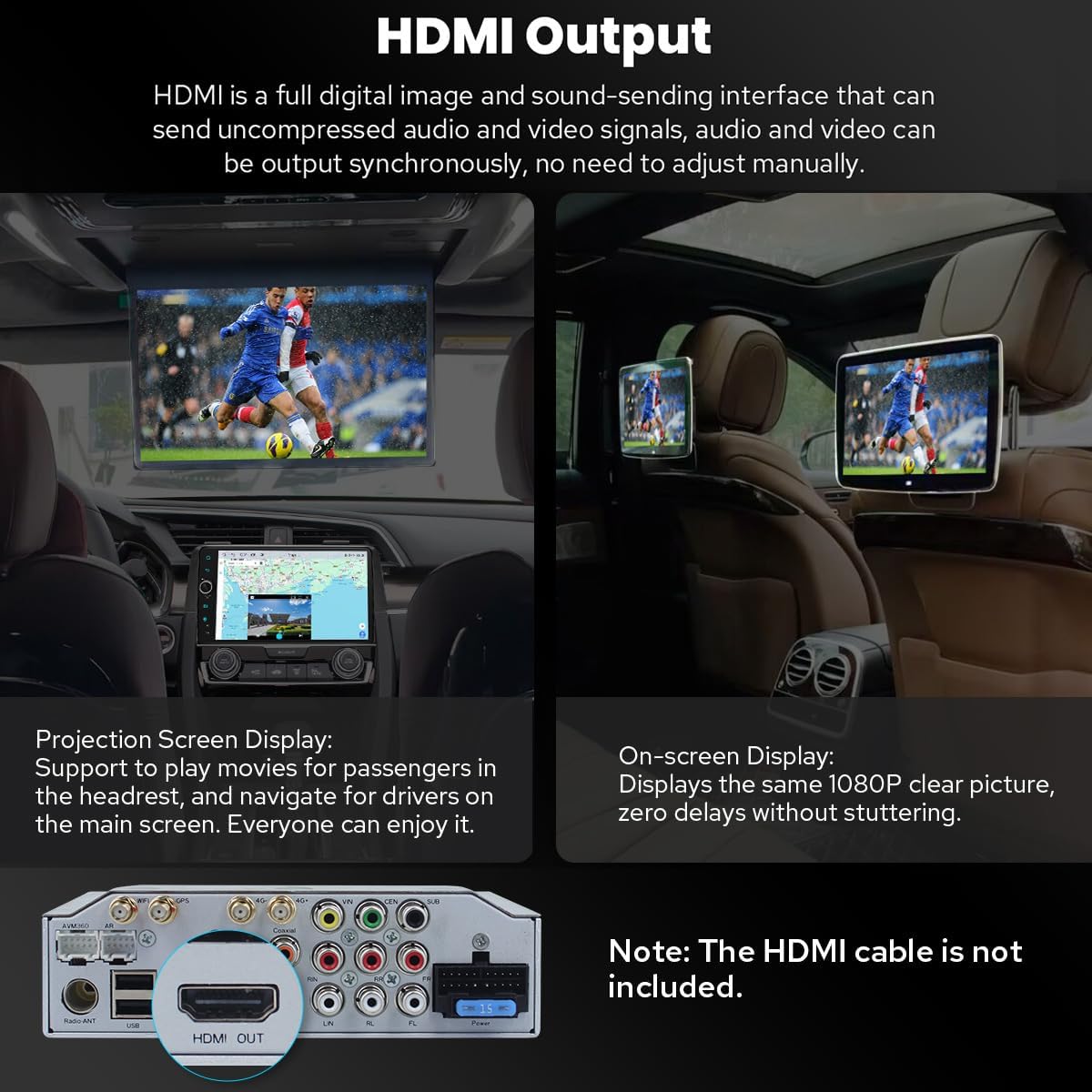
Image: HDMI output for connecting external displays.

Image: Demonstration of split-screen multitasking on the head unit.
5.4 Personalization and Other Features
- Configuraciones personalizadas: Customize car boot logo, wallpapers, and changeable button colors. Adjustable screen brightness.
- Sistema de enfriamiento: Dual heat sink design for superior heat dissipation and temperature control. Fan automatically turns on if CPU temperature or radio volume exceeds a warning value.
- Accesorios opcionales: Supports external OBD2 (for real-time data and trouble codes), AR Front Camera (records front road), and AR Rear Camera (switches automatically when reversing).

Image: Personalized settings for the head unit interface.

Image: Illustration of the upgraded dual heat sink cooling system.

Image: Optional accessories that can be integrated with the head unit.
6. Mantenimiento
- Limpieza: Utilice un paño suave y seco para limpiar la pantalla y la unidad. Evite limpiadores abrasivos o disolventes.
- Actualizaciones de software: Periodically check for software updates via the system settings. Updates can improve performance and add new features.
- Control de temperatura: The dual heat sink design helps manage temperature. Ensure proper ventilation around the unit.
7. Solución de problemas
Si encuentra problemas, consulte los siguientes consejos comunes de solución de problemas:
- Sin energía: Revise todas las conexiones de los cables de alimentación. Asegúrese de que el encendido del vehículo esté activado.
- Sin sonido: Verify audio cable connections (RR, RL for touring amp). Check volume levels and DSP settings.
- La cámara de marcha atrás no funciona: Ensure the "CAM IN" cable is properly connected. Check factory settings for reversing camera (Setting > Factory settings > Others > Prohibit reverse and set "Enable").
- Los controles del volante no funcionan: Check factory settings (Setting > Car > Factory settings > Canbus > Canbus Select and choose NO.21).
- Problemas con la señal GPS: Asegúrese de que la antena GPS esté conectada de forma segura y tenga una vista libre. view del cielo.
- Wi-Fi/4G Connectivity Problems: Check antenna connections and ensure correct SIM card insertion (for 4G). Verify network settings.
- Rendimiento lento: Ensure the unit's cooling system is functioning. Close unnecessary background applications.
8. Especificaciones
| Peso del artículo | 6 libras |
| Dimensiones del paquete | 12.6 x 9.06 x 7.68 pulgadas |
| Número de modelo del artículo | JY-HT145N8 |
| Tamaño de la pantalla | 9 pulgadas |
| Comando de voz | Pantalla táctil |
| Tipo de servicio del vehículo | Auto |
| Característica especial | Bluetooth, pantalla táctil |
| Tecnología de conectividad | Bluetooth, Ethernet, USB, Wi-Fi |
| Tipo de mapa | América del norte |
| Modo de salida de audio | Estéreo |
| Tipo de montaje | Montaje en tablero de instrumentos |
| Sistema operativo | Androide |
9. Garantía y soporte
9.1 Información de garantía
The JOYING Android 13 Car Stereo Head Unit comes with a 2 años de garantíaConserve su comprobante de compra para reclamaciones de garantía.
9.2 Soporte de productos
For technical assistance, troubleshooting, or warranty inquiries, please contact JOYING customer support through the Amazon platform or visit the official JOYING website. Refer to the included warranty card for specific contact details.
Política de devoluciones: This product is eligible for a 30-day refund/replacement policy from the date of purchase, subject to Amazon's return guidelines.


