
1. Introducción
This manual provides detailed instructions for the assembly, operation, maintenance, and troubleshooting of your FLEXISPOT EB2 electric height-adjustable desk frame. Please read this manual thoroughly before installation and use to ensure proper function and safety.
The FLEXISPOT EB2 desk frame features dual motors for smooth and quiet height adjustments, a wide height adjustment range, and a smart control panel with memory functions. It is designed to support various desktop sizes, offering flexibility for your workspace.
2. Información de seguridad
- Siempre siga cuidadosamente las instrucciones de montaje.
- Ensure the desk frame is securely mounted to the tabletop to prevent tipping.
- Do not exceed the maximum weight recommendation of 100 kg (dynamic load) or 125 kg (static load) to maintain stability and safety.
- Mantenga a los niños y a las mascotas alejados del escritorio durante su funcionamiento.
- Asegúrese de que no haya obstrucciones en el camino del escritorio durante los ajustes de altura.
- Do not open the motor housing or attempt to repair the unit yourself. Contact customer support for assistance.
- Desconecte la alimentación antes de limpiar o realizar cualquier mantenimiento.
3. Contenido del paquete
Verifique que todos los componentes estén presentes antes de comenzar el ensamblaje. El paquete generalmente incluye:
- Desk Legs (2) with integrated motors
- Crossbar/Frame (adjustable width)
- Control Panel with digital display
- Adaptador de corriente y cable
- Todos los tornillos, pernos y herramientas necesarios para el montaje.
- Cable management accessories (e.g., clips, hooks)
4. Configuración y montaje
Este producto requiere ensamblaje. Siga las instrucciones paso a paso que se incluyen en la guía de ensamblaje incluida con su compra. Asegúrese de tener suficiente espacio y de pedir ayuda si la necesita.
Consideraciones clave sobre el ensamblaje:
- Compatibilidad de escritorio: The frame is designed for tabletops with a width of 120 cm to 180 cm and a depth of 60 cm to 80 cm. The frame width is adjustable from 107 cm to 160 cm.
- Fijación segura: Ensure all screws are tightened securely, especially those connecting the desktop to the frame.
- Sistema de organización de cables: Utilize the provided cable management solutions to keep wires tidy and prevent interference with desk movement.
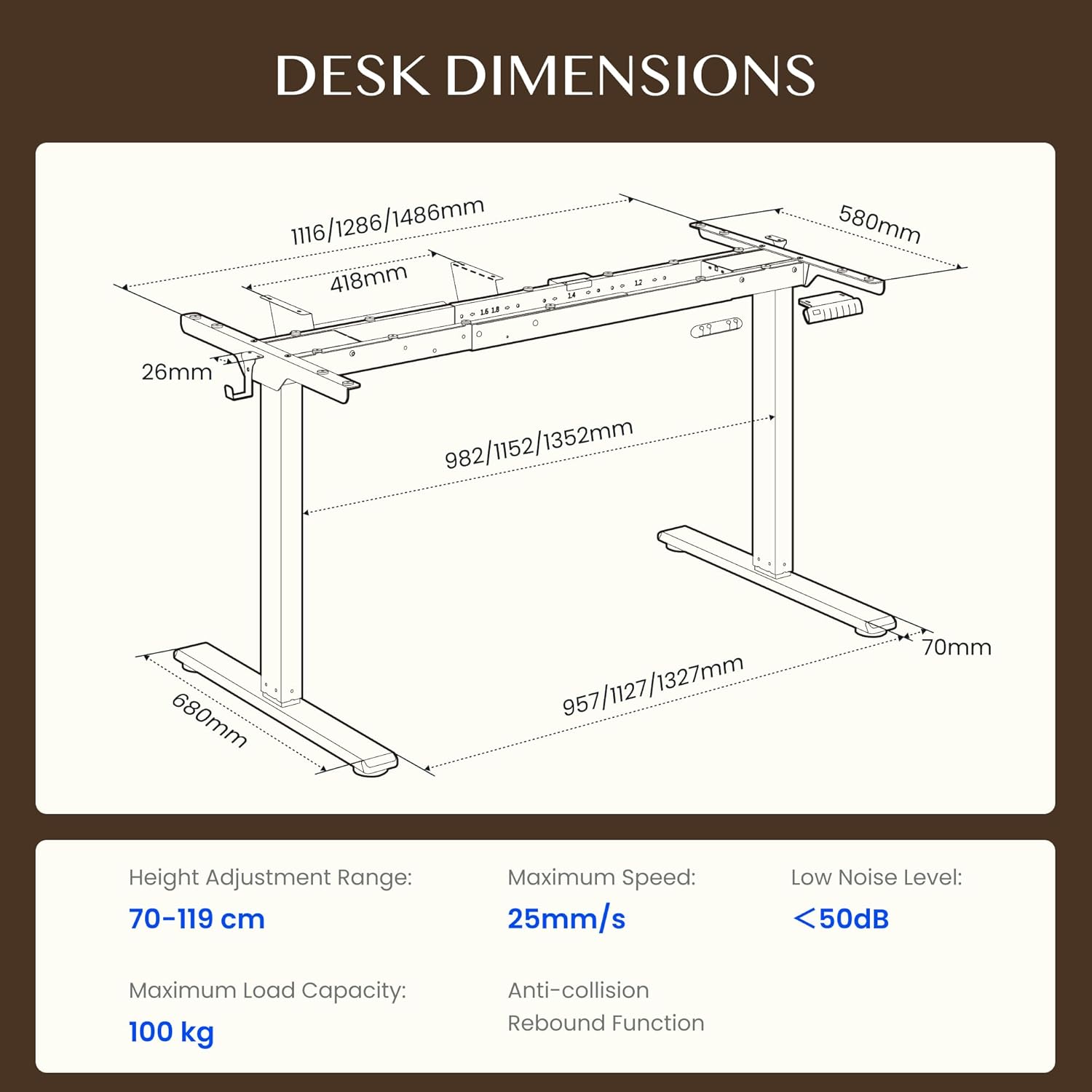
Figure 4.1: Detailed dimensions of the FLEXISPOT EB2 desk frame, showing adjustable width and height ranges, and overall structural measurements.

Figure 4.2: Illustration demonstrating the adaptable desktop size range for the FLEXISPOT EB2 frame, indicating minimum and maximum dimensions for compatible tabletops.
5. Instrucciones de funcionamiento
5.1 Encendido
Connect the power cable to the desk frame and then to a standard electrical outlet. The digital display on the control panel should illuminate.
5.2 Ajuste de altura
Utilice el Up y Abajo arrow buttons on the control panel to manually adjust the desk height. The height range is from 70 cm to 119 cm.

Figure 5.1: Visual representation of the desk's height adjustment range, illustrating the minimum and maximum heights achievable with the FLEXISPOT EB2 frame.
5.3 Ajustes preestablecidos de memoria
El panel de control cuenta con 4 botones de memoria preestablecidos (1, 2, 3, 4) para guardar y recuperar sus alturas preferidas para sentarse y pararse.
- Ajuste el escritorio a la altura deseada utilizando los botones Arriba/Abajo.
- Press and hold one of the memory buttons (1, 2, 3, or 4) until the display flashes or beeps, indicating the height has been saved.
- To recall a saved height, simply press the corresponding memory button. The desk will automatically move to that position.

Figura 5.2: Primer plano view of the smart control panel, highlighting the Up/Down buttons, 4 memory presets, and LED display for effortless height adjustment.
5.4 Sit/Stand Reminder
The control panel may include a sit/stand reminder button. Consult your specific control panel's instructions for activation and customization of reminder intervals.
5.5 Sistema anticolisión
The desk frame is equipped with an anti-collision system. If the desk encounters an obstruction during height adjustment, it will automatically stop and reverse slightly to prevent damage.

Figure 5.3: Diagram illustrating the powerful dual motor system of the FLEXISPOT EB2, emphasizing stability, quiet operation, and efficiency.

Figura 5.4: Examples of simple desk helpers, including under-desk cable management, side hooks, and adhesive cable clips, designed to keep your workspace organized.
6. Mantenimiento
- Limpieza: Limpie el marco del escritorio con un paño seco. Evite usar limpiadores abrasivos o productos químicos fuertes que puedan dañar el acabado.
- Inspección: Revise periódicamente todos los tornillos y conexiones para asegurarse de que estén bien apretados. Vuelva a apretarlos si es necesario.
- Sistema de organización de cables: Ensure cables are not pinched or tangled, which could impede desk movement or cause damage.
7. Solución de problemas
If you encounter issues with your FLEXISPOT EB2 desk frame, refer to the following common troubleshooting steps:
- El escritorio no se mueve: Check if the power cable is securely connected to both the desk and the wall outlet. Ensure the outlet is functional.
- Movimiento desigual o ruidos extraños: Ensure the desk is not overloaded. Check for any obstructions under or around the desk. Verify that all assembly screws are tight.
- Códigos de error en pantalla: Refer to the specific error code in your detailed assembly guide or contact customer support for assistance.
- Reiniciar el sistema: Some issues can be resolved by performing a system reset. Consult your assembly guide for specific reset procedures, which often involve holding down certain buttons.
If the problem persists after attempting these steps, please contact FLEXISPOT customer support.
8. Especificaciones
| Característica | Especificación |
|---|---|
| Marca | FLEXISPOT |
| Número de modelo | EB2B-EU |
| Rango de ajuste de altura | 70 cm a 119 cm (27.56" a 46.85") |
| Frame Width (Adjustable) | 107 cm a 160 cm (42.13" a 62.99") |
| Ancho de mesa recomendado | 120 cm a 180 cm (47.24" a 70.87") |
| Profundidad de mesa recomendada | 60 cm a 80 cm (23.62" a 31.50") |
| Capacidad de carga máxima | 100 kg (220 lbs) dynamic, 125 kg (275 lbs) static |
| Tipo de motor | Motores duales |
| Velocidad de ajuste | 2.5 cm/s (1 inch/s) |
| Nivel de ruido | <50dB |
| Consumo de energía en modo de espera | <0.5 W |
| Panel de control | 7-button digital display with 4 memory presets |
| Material | Acero aleado |
| Peso del artículo | 28 kilogramos (61.7 libras) |
| Características especiales | Anti-collision system, Sit/Stand reminder |
9. Garantía
The FLEXISPOT EB2 desk frame comes with a limited warranty. Please refer to the warranty card included with your product or visit the official FLEXISPOT webSitio para conocer los términos y condiciones detallados sobre la cobertura y la duración.
10. Atención al cliente
For technical assistance, warranty claims, or any questions regarding your FLEXISPOT EB2 desk frame, please contact FLEXISPOT customer support through their official websitio o la información de contacto proporcionada en el embalaje de su producto.
Please have your model number (EB2B) and purchase information ready when contacting support.