
1. Introducción
The MiBOXER ML5 5-in-1 LED Controller is designed for versatile smart lighting applications, integrating Matter over WiFi and 2.4GHz wireless control. This controller supports five output modes: RGB, RGBW, RGB+CCT, CCT, and single color, offering flexibility for various LED strip configurations. It is compatible with the Matter protocol, enabling broad interoperability with smart home ecosystems such as Apple Home, Google Home, Amazon Alexa, and Samsung SmartThings. This manual provides essential information for the safe installation, operation, and maintenance of your ML5 controller.
2. Información de seguridad
- Asegúrese de que la energía esté desconectada antes de realizar la instalación o el mantenimiento para evitar descargas eléctricas.
- Este dispositivo está diseñado solo para uso en interiores. Evite la exposición a la humedad o a temperaturas extremas.
- No exceda el volumen de entrada especificado.tage (DC12V~48V).
- Consulte a un electricista calificado si no está seguro acerca de alguno de los pasos de instalación.
- Mantenga el dispositivo fuera del alcance de los niños.
3. Producto terminadoview
3.1 Características principales
- Certified Matter Over WiFi: Supports Matter standard protocol for multi-platform collaboration.
- Wide Compatibility: Works with products from different brands that comply with the Matter ecosystem.
- Simple Configuration: Easy pairing via QR code.
- 5-in-1 Functionality: Supports RGB, RGBW, RGB+CCT, CCT, and single color LED strips.
- 2.4G RF Wireless Control: Allows control via MiBOXER 2.4GHz remotes.
- Vol de entradatage: DC12V~48V.
3.2 ¿Qué hay en la caja?
- 1 x MiBOXER ML5 5-in-1 LED Controller
3.3 Componentes del producto

Imagen 3.3.1: Arriba view of the MiBOXER ML5 controller, showing input terminals, output terminals, and control buttons (Link, Frequency, Mode).

Imagen 3.3.2: Angular view of the MiBOXER ML5 controller, highlighting its compact design and connection points.

Imagen 3.3.3: The MiBOXER ML5 controller alongside its retail packaging and a small instruction leaflet.
4. Especificaciones
| Característica | Detalle |
|---|---|
| Marca | MiBOXER |
| Número de modelo | ML5 |
| Color | Blanco |
| Uso en interiores y exteriores | Interior |
| Característica especial | 2.4G RF wireless, Matter Over WiFi |
| Tipo de fuente de luz | CONDUJO |
| Fuente de poder | DC12V~48V (LED) |
| Material | Plástico |
| Peso del artículo | 2.72 onzas |
| Longitud del artículo | 30 Meters (Control Distance) |

Imagen 4.1: Dimensional drawing of the ML5 controller (124mm x 38mm x 23mm) and its packaging (125mm x 39mm x 29mm), with a gross weight of 0.078 KGS.
5. Configuración e instalación
5.1 Diagramas de cableado
The ML5 controller supports various LED strip configurations. Ensure correct polarity and voltage matching for your LED strips. Connect the DC12V~48V power supply to the input terminals and the LED strip to the corresponding output terminals.

Imagen 5.1.1: Connection diagrams for Single Color (V+, W), Dual White (V+, CW, WW), and RGB (V+, R, G, B) LED strip configurations. An AC to DC power adapter is shown connecting to the controller's input.

Imagen 5.1.2: Connection diagrams for RGBW (V+, R, G, B, W) and RGB+CCT (V+, R, G, B, CW, WW) LED strip configurations. An AC to DC power adapter is shown connecting to the controller's input.
5.2 Pairing and Network Connection
The ML5 controller supports Matter over WiFi and 2.4GHz RF pairing.
- Emparejamiento de materia: Long press the "Link" button for 3 seconds to activate Matter pairing mode. Follow the instructions in your Matter-compatible smart home app (e.g., Apple Home, Google Home, Amazon Alexa, Samsung SmartThings) to scan the QR code on the device for easy pairing.
- 2.4GHz RF Remote Pairing: Short press the "Link" button 3 times to activate 2.4GHz remote pairing mode. Refer to your MiBOXER 2.4GHz remote's manual for specific pairing instructions.
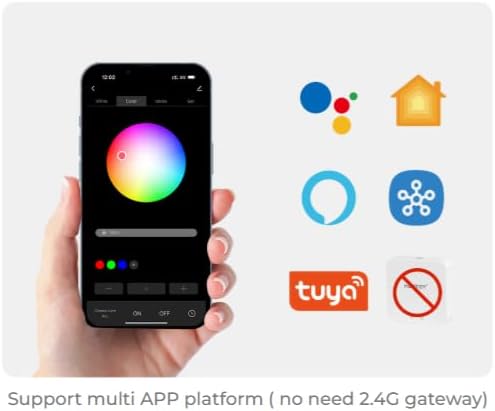
Imagen 5.2.1: Illustration of a smartphone app interface for controlling LED lighting, featuring a color wheel and compatibility logos for Google Home, Apple Home, Amazon Alexa, Samsung SmartThings, and Tuya.
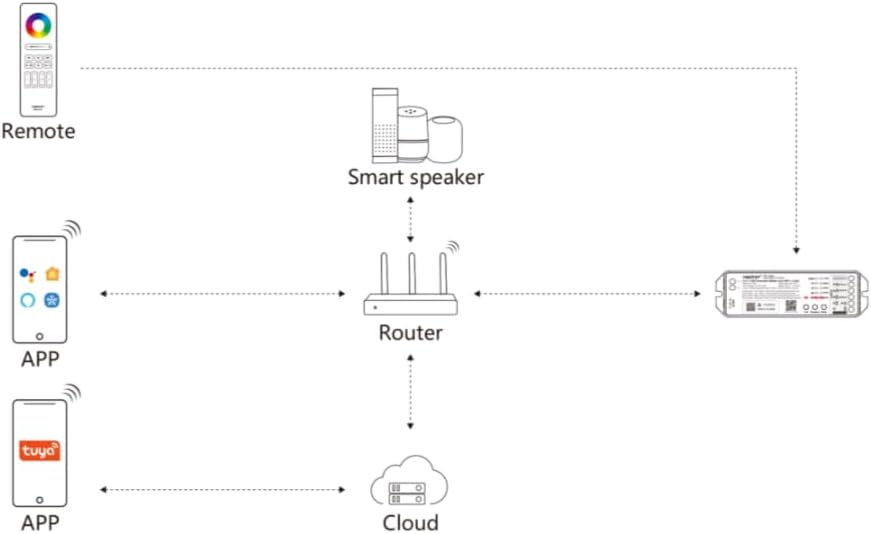
Imagen 5.2.2: Diagram illustrating the ML5 controller's connectivity: it connects to a router, which then allows control via mobile apps (Matter-compatible and Tuya) and smart speakers (e.g., Alexa, Google Assistant).
6. Instrucciones de funcionamiento
Selección de 6.1 modos
- Cambio de modos de salida: Short press the "Mode" button to cycle through the five output modes (RGB, RGBW, RGB+CCT, CCT, Single Color). Ensure the connected LED strip matches the selected mode.
6.2 Control de aplicaciones
Once paired with your smart home ecosystem via Matter, you can control the ML5 controller using your preferred smart home app. Functions typically include:
- Encender y apagar luces.
- Adjusting brightness (dimming).
- Changing colors (for RGB, RGBW, RGB+CCT modes).
- Adjusting color temperature (for CCT, RGB+CCT modes).
- Setting scenes and schedules.
Control remoto RF de 6.3 2.4 GHz
If paired with a MiBOXER 2.4GHz RF remote, you can control the controller directly. Refer to your specific remote's manual for detailed button functions, which typically include:
- Encendido/apagado.
- Ajuste de brillo.
- Color selection.
- Mode switching (e.g., dynamic effects).
7. Mantenimiento
- Limpie el dispositivo con un paño suave y seco. No utilice productos químicos agresivos ni limpiadores abrasivos.
- Asegúrese de que haya una ventilación adecuada alrededor del controlador para evitar el sobrecalentamiento.
- Regularly check all connections for security and integrity.
8. Solución de problemas
| Problema | Posible causa | Solución |
|---|---|---|
| La tira de LED no se enciende. | No power, incorrect wiring, faulty LED strip. | Check power supply connection. Verify wiring matches the selected mode. Test LED strip with another power source if possible. |
| Cannot pair with Matter app. | Controller not in pairing mode, WiFi issue, incorrect QR code scan. | Long press "Link" button for 3 seconds. Ensure your smartphone is on the same 2.4GHz WiFi network. Rescan QR code. |
| 2.4GHz remote not working. | Control remoto no emparejado, batería del control remoto baja, interferencia. | Short press "Link" button 3 times to enter pairing mode, then pair with remote. Replace remote battery. Reduce interference sources. |
| Incorrect colors or modes. | Wrong output mode selected. | Short press "Mode" button to cycle to the correct output mode for your LED strip. |
9. Garantía y soporte
Los productos MiBOXER están diseñados para brindar confiabilidad y rendimiento. Para obtener información sobre la garantía y soporte técnico, consulte el sitio web oficial de MiBOXER. webSitio web o contacte a su vendedor. Conserve el recibo de compra para reclamaciones de garantía.
Para obtener más ayuda, puede visitar el Tienda MiBOXER en Amazon.