
1. Introducción
Thank you for choosing the MOCREO LS1 Waterproof Thermometer. This device is designed for accurate and reliable temperature monitoring in various environments, including refrigerators, freezers, greenhouses, and warehouses. It provides real-time data and alerts when paired with the MOCREO H5Pro LoRa Hub and the MOCREO Smart App. This manual provides detailed instructions for setup, operation, and maintenance to ensure optimal performance.
2. Producto terminadoview
2.1 Características principales
- Upgraded Waterproofing: IP66 rated for use in humid environments like refrigerators, measuring from -0.4°F to 131°F with ±0.9°F accuracy.
- Conectividad de largo alcance: Requires MOCREO H5Pro LoRa Hub (sold separately, ASIN B0DRHQT24P) for an open-air range of up to 1,640 ft (500m). Not compatible with H5Lite, H1B, H2 hubs.
- Alertas instantáneas: Provides app notifications, email alerts, and an 80dB hub beep for critical temperature changes. Includes smart settings for low battery and anti-false alarms.
- Mayor duración de la batería: Powered by three replaceable AAA batteries, offering up to 2 years of operation.
- 2 Years Data Logging: No subscription required. View clear charts online and export up to 2 years of data in CSV format for analysis.
2.2 Contenido del paquete
- 1 MOCREO LS1 Wireless Thermometer (three AAA batteries included)
2.3 Componentes del producto

Imagen 1: The MOCREO LS1 Waterproof Thermometer sensor, a compact white device with a silver button and yellow accent.

Imagen 2: Comparison of MOCREO LS1 and ST4 models, highlighting LS1's long range (1640ft/500m), whole IP66 waterproofing, and 2-year replaceable battery life.

Imagen 3: Visual representation of the LS1 sensor's IP66 waterproof rating, showing it resistant to water splashes, ideal for humid environments.

Imagen 4: Un interno view of the MOCREO LS1, illustrating the three AAA replaceable batteries that provide up to 2 years of operation.
3. Instrucciones de configuración
3.1 Antes de comenzar
- Ensure you have the MOCREO H5Pro LoRa Hub (ASIN B0DRHQT24P) as it is required for the LS1 sensor to function.
- Download the MOCREO Smart App from your device's app store.
- Ensure your H5Pro Hub is powered on and connected to your network.
3.2 Instalación de la batería
- Gently open the LS1 sensor casing para acceder al compartimento de la batería.
- Insert the three included AAA batteries, ensuring correct polarity (+/-).
- Cierra la casing de forma segura para mantener su clasificación de resistencia al agua IP66.
3.3 Pairing with H5Pro Hub
- Open the MOCREO Smart App on your smartphone.
- Siga las instrucciones de la aplicación para agregar un nuevo dispositivo.
- Select the LS1 sensor from the list of available devices. The app will guide you through the pairing process with your H5Pro Hub.
- Once paired, you can name the sensor and assign it to a specific location (e.g., 'Kitchen Fridge', 'Greenhouse').

Imagen 5: Diagram illustrating the long-range monitoring capability of the MOCREO LS1 sensors connecting wirelessly to the LoRa H5-Pro Hub over a wide area.

Imagen 6: An apartment building with multiple MOCREO sensors connected to a single H5Pro Hub, demonstrating the ability to add up to 100 sensors for comprehensive monitoring.
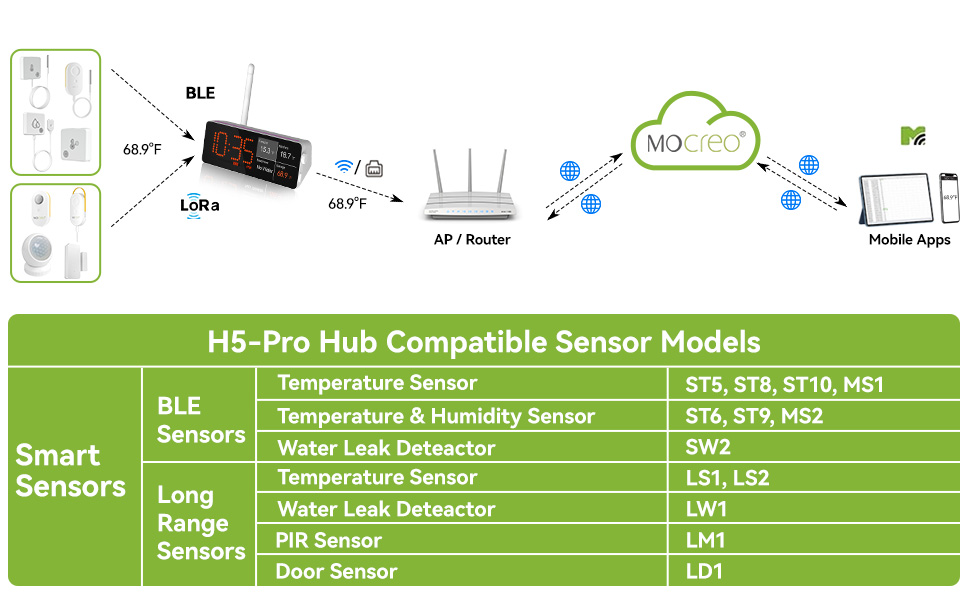
Imagen 7: A table listing various MOCREO smart sensors compatible with the H5-Pro Hub, categorized by BLE and Long Range sensors, including the LS1 and LS2 temperature sensors.
4. Instrucciones de funcionamiento
4.1 Monitoreo en tiempo real
- Once paired, the LS1 sensor will begin transmitting temperature data to your H5Pro Hub, which then sends it to the MOCREO Smart App.
- Abra la aplicación para view real-time temperature readings for all your connected sensors.
- The app displays current temperatures and historical data in clear charts.

Imagen 8: A smartphone screen displaying the MOCREO Smart App interface, showing real-time temperature monitoring for multiple locations and alert notifications.
4.2 Sistema de alerta
- Configure temperature thresholds within the MOCREO Smart App for each sensor.
- When the temperature exceeds or falls below your set limits, you will receive instant alerts via:
- Notificaciones de la aplicación: Push notifications directly to your smartphone.
- Alertas de correo electrónico: Notificaciones enviadas a su dirección de correo electrónico registrada.
- Hub Beep: An 80dB audible alarm from the H5Pro Hub.
- Utilize smart settings like "low battery alert" and "anti-false alarm" to enhance monitoring reliability.

Imagen 9: Un usuario viewing urgent temperature alerts on their smartphone via the MOCREO Smart App, indicating a temperature deviation in a monitored area.
4.3 Registro y exportación de datos
- The LS1 sensor automatically logs temperature data for up to 2 years.
- Access historical data and charts directly within the MOCREO Smart App.
- Export data in CSV format for in-depth analysis by selecting the desired date range within the app.

Imagen 10: A smartphone screen showing the MOCREO Smart App's data export function, allowing users to select a date range and export temperature data in CSV format.
5. Mantenimiento
5.1 Reemplazo de batería
- When the low battery alert is triggered, replace the three AAA batteries.
- Follow the steps in Section 3.2 for battery installation, ensuring the casing is sealed properly after replacement to maintain waterproofing.
5.2 Limpieza
- Limpie el sensor con un paño suave.amp Paño. No utilice limpiadores abrasivos ni disolventes.
- Ensure the sensor is dry before placing it back in its monitoring environment.
6. Solución de problemas
6.1 Problemas comunes
- No hay datos en la aplicación:
- Ensure the LS1 sensor has fresh batteries and is powered on.
- Verify the H5Pro Hub is online and connected to your network.
- Check the distance between the sensor and the hub; reduce obstacles if possible.
- Re-pair the sensor with the hub via the MOCREO Smart App.
- Alerts Not Triggering:
- Confirm that temperature thresholds are correctly set in the app.
- Verifique la configuración de notificaciones de la aplicación en su teléfono inteligente.
- Verify email address for alerts is correct and check spam folders.
- Lecturas inexactas:
- Ensure the sensor is placed in a location that accurately reflects the environment you wish to monitor.
- Avoid placing the sensor near heat sources or direct sunlight unless intended.
7. Especificaciones
7.1 Especificaciones técnicas
| Característica | Especificación |
|---|---|
| Número de modelo | LS1 |
| Rango de temperatura | -0.4 °F a 131 °F (-18 °C a 55 °C) |
| Precisión de temperatura | ± 0.9 ° F (± 0.5 ° C) |
| Clasificación de impermeabilidad | IP66 |
| Fuente de poder | 3 pilas AAA (incluidas) |
| Duración de la batería | Hasta 2 años |
| Conectividad | LoRa (requires MOCREO H5Pro Hub) |
| alcance inalámbrico | Hasta 1,640 pies (500 m) al aire libre |
| Registro de datos | 2 years, exportable in CSV format |
| Tipos de alerta | App Notification, Email Alert, 80dB Hub Beep |
| Dimensiones | 5.2 x 2.44 x 1.54 pulgadas |
| Peso | 4.66 onzas |
| Color | Blanco |
8. Garantía y soporte
8.1 Información de garantía
- Garantía de satisfacción de 90 días: MOCREO offers a 90-day 100% satisfaction guarantee, including money-back and free returns.
- Garantía de 1 años: The MOCREO LS1 Waterproof Thermometer is covered by a 1-year warranty from the date of purchase.
8.2 Atención al cliente
- For technical assistance, troubleshooting, or warranty claims, please contact MOCREO customer support.
- Soporte en línea: 24/7 online support is available. Refer to the MOCREO Smart App or the official MOCREO websitio para detalles de contacto.