
1. Introducción
Thank you for choosing the URPIZY Smart Thermostat. This manual provides detailed instructions for the installation, operation, and maintenance of your new smart thermostat. Please read this manual thoroughly before installation and use to ensure proper function and safety. Keep this manual for future reference.
2. Producto terminadoview
The URPIZY Smart Thermostat is a digital heating controller designed for warm water, gas heating, and boiler systems. It features a modern touchscreen interface, programmable settings, and smart home integration for enhanced comfort and energy efficiency.
Características principales:
- Compatibilidad con control por voz: Seamlessly integrates with popular voice platforms such as Alexa and HomeKit for convenient hands-free operation.
- Acceso remoto: Control your heating system from anywhere using the Tuya Smart app on your smartphone.
- Horarios programables: Supports weekly programming (5+2, 6+1, or 7 days) with up to 6 time-modes daily to optimize heating according to your schedule.
- Seguridad mejorada: Equipped with a dedicated protection clamp to ensure safe operation and protect your home's electrical installation.
- Eficiencia Energética: Designed to help reduce heating costs by optimizing energy consumption.
- Diseño elegante: Features a sleek, modern design with a responsive touchscreen and intuitive buttons.
Componentes:
The thermostat unit consists of a display panel with a touchscreen and three physical buttons (Mode, Up, Down) for navigation and settings adjustment.


3. Configuración
3.1 Instalación
This thermostat is designed for 3A systems, suitable for boilers, wall heaters, and kettles. For electrical safety and optimal performance, installation should be performed by a qualified electrician or heating engineer.
- Desconexión de energía: Ensure the main power supply to your heating system is turned off before beginning installation.
- Alambrado: Connect the thermostat according to the wiring diagram provided with your heating system and the thermostat's specific terminals. Pay close attention to live, neutral, and load connections. The integrated protection clamp enhances safety during wiring.
- Montaje: Securely mount the thermostat to a standard electrical box on the wall, ensuring it is level and stable.
- Restauración de energía: Una vez completada la instalación y todas las conexiones estén seguras, restablezca la energía al sistema de calefacción.

3.2 Conexión de la aplicación (Tuya Smart)
To utilize the smart features and remote control, connect your thermostat to the Tuya Smart app:
- Descargar el Tuya inteligente aplicación desde la tienda de aplicaciones de tu teléfono inteligente (iOS o Android).
- Regístrese o inicie sesión en su cuenta Tuya Smart.
- On the thermostat, follow the instructions to enter pairing mode (usually by pressing and holding a specific button or combination). The WiFi icon on the display will typically flash.
- In the Tuya Smart app, tap 'Add Device' and select 'Thermostat' or 'Heater'.
- Follow the on-screen prompts in the app to connect the thermostat to your home's 2.4GHz Wi-Fi network.
- Una vez conectado, el ícono de WiFi en la pantalla del termostato se volverá fijo.
4. Instrucciones de funcionamiento
4.1 Funcionamiento básico
The thermostat can be operated directly via its touchscreen and physical buttons:
- Encendido/apagado: Press the 'M' button to toggle the thermostat's power state.
- Ajuste de temperatura: Use the 'Up' (^) and 'Down' (v) buttons to manually adjust the desired set temperature.
- Selección de modo: Press the 'M' button to cycle through different operating modes (e.g., Manual, Auto/Program, Away).

4.2 Horarios de programación
The thermostat supports weekly programming to automatically adjust temperatures based on your daily routine. You can set up to 6 time periods per day.
- Access the programming menu via the 'M' button or the Tuya Smart app.
- Select your desired programming mode (e.g., 5+2 days for weekdays/weekend, 6+1 days, or 7 individual days).
- For each day and time period, set the start time and the desired temperature.
- Save your settings. The thermostat will then operate according to this schedule in 'Auto' or 'Program' mode.

4.3 Control de voz
Once connected to your smart home ecosystem (Alexa, HomeKit), you can control your thermostat using voice commands.
- Ensure your smart speaker (e.g., Amazon Echo, Google Home) is linked to your Tuya Smart account.
- Utilice comandos como:
- "Alexa, enciende el termostato."
- "Ok Google, pon el termostato a 22 grados".
- "Alexa, ¿cuál es la temperatura en la sala?"

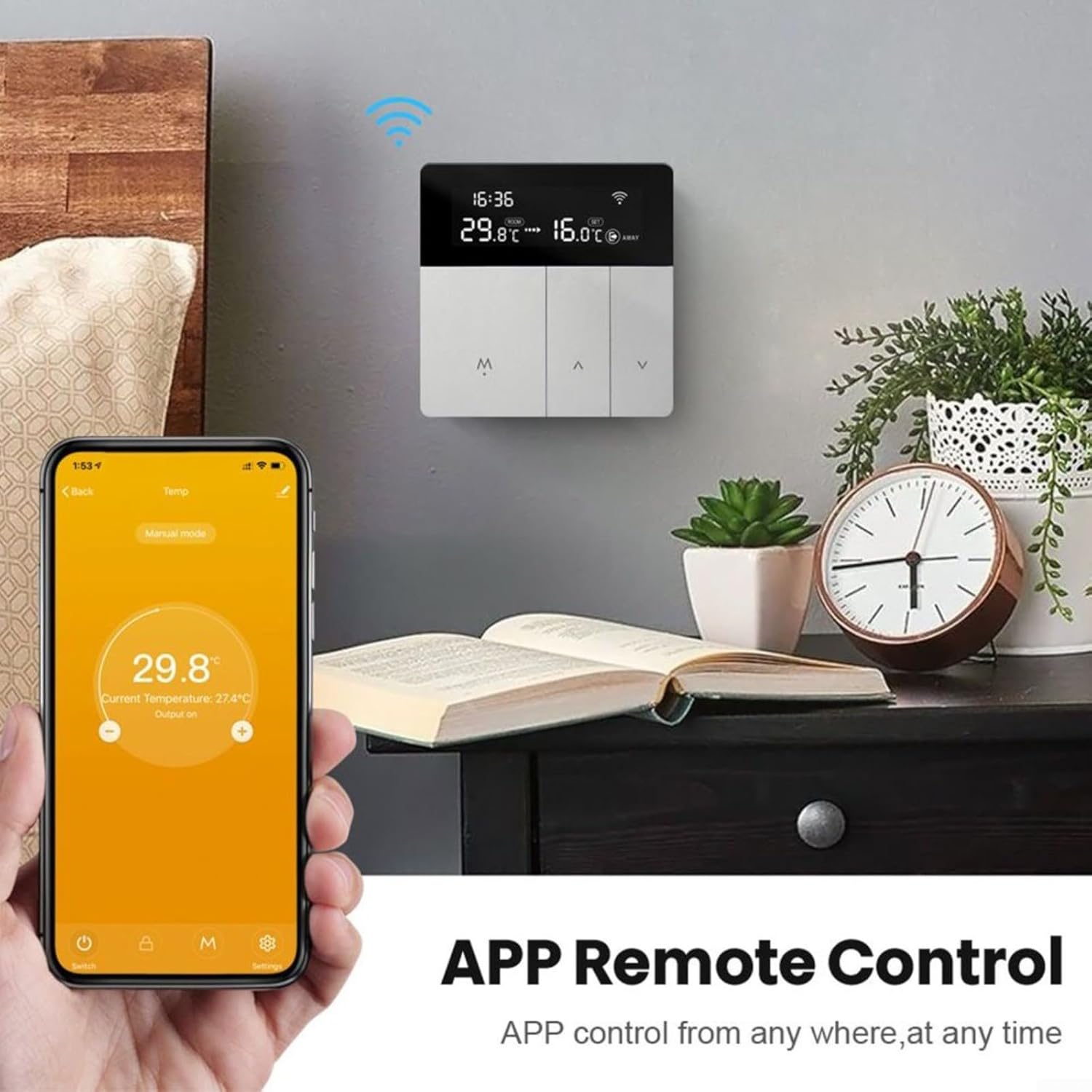
4.4 Control remoto mediante aplicación
The Tuya Smart app allows you to monitor and control your thermostat from any location with an internet connection.
- Open the Tuya Smart app on your smartphone.
- Select your URPIZY Smart Thermostat from the device list.
- Puede view the current room temperature, adjust the set temperature, change operating modes, and modify programming schedules.
5. Mantenimiento
The URPIZY Smart Thermostat requires minimal maintenance to ensure long-term performance.
- Limpieza: Limpie suavemente la pantalla yasing with a soft, dry cloth. Avoid using abrasive cleaners, solvents, or chemical sprays, as these can damage the surface and internal components.
- Actualizaciones de firmware: Periodically check the Tuya Smart app for any available firmware updates for your thermostat. Updates can improve performance, add features, and enhance security.
6. Solución de problemas
If you encounter issues with your URPIZY Smart Thermostat, refer to the following common problems and solutions:
| Problema | Posible causa | Solución |
|---|---|---|
| El termostato no se enciende | No hay suministro de energía; cableado incorrecto | Check circuit breaker. Verify wiring connections (consult an electrician if unsure). |
| Sin calefacción/refrigeración | Incorrect mode; low set temperature; heating system issue | Ensure thermostat is in heating mode. Increase set temperature above room temperature. Check your boiler/heating system. |
| WiFi desconectado | Router issue; incorrect password; out of range | Restart your router. Re-enter WiFi password in the Tuya Smart app. Ensure thermostat is within WiFi range. |
| Lectura de temperatura inexacta | Thermostat exposed to direct sunlight or drafts | Asegúrese de que el termostato no esté expuesto a la luz solar directa ni cerca de fuentes de calor o corrientes de aire. |
Si el problema persiste, póngase en contacto con el servicio de atención al cliente.
7. Especificaciones
| Especificación | Detalle |
|---|---|
| Marca | URPIZY |
| Número de modelo | X01197L664Z3377FROEKO8 |
| Dimensiones | 12 x 10 x 8 cm |
| Peso | 220 gramos |
| Material | ABS + PC |
| Color | Silver-grey |
| Compatibilidad | 3A for boilers, wall heaters, and kettles |
| Conectividad | Wi-Fi (2.4 GHz) |
| Control de voz | Alexa, HomeKit |
| Control de aplicaciones | Aplicación inteligente Tuya |
8. Información de seguridad
Your URPIZY Smart Thermostat is designed with safety in mind, including a protection clamp for secure electrical connections. However, it is crucial to follow general electrical safety guidelines:
- Desconecte siempre la energía antes de la instalación o el mantenimiento.
- Ensure all wiring is correctly connected and insulated.
- Do not attempt to repair the device yourself. Refer to qualified personnel.
- Mantenga el dispositivo alejado del agua y la humedad excesiva.
- Este dispositivo está diseñado únicamente para uso en interiores.
9. Garantía y soporte
For warranty information and technical support, please refer to the documentation provided at the time of purchase or contact your retailer. You may also visit the URPIZY official websitio para obtener más ayuda.