
SENBONO KT79
SENBONO KT79 Military Smart Watch User Manual
Modelo: KT79
1. Introducción
The SENBONO KT79 Military Smart Watch is a rugged, feature-rich device designed for outdoor enthusiasts and daily use. It combines military-grade durability with advanced smart functionalities, including a bright LED flashlight, comprehensive health tracking, and seamless communication features. This manual provides detailed instructions for setting up, operating, and maintaining your smart watch.
2. ¿Qué hay en la caja?
- SENBONO KT79 Military Smart Watch
- Cable de carga
- Manual de usuario
- Correa de reloj
3. Producto terminadoview
Familiarize yourself with the key components and features of your SENBONO KT79 Smart Watch.

Image: The KT79 Smart Watch displaying its main watch face with steps, heart rate, time, date, temperature, and calories. Insets show an incoming call screen and the flashlight/SOS control interface.

Image: Four panels illustrating the military-grade durability of the KT79 Smart Watch: submerged in ice, exposed to fire, covered in mud, and undergoing a stress test with a screwdriver. The image highlights anti-impact, anti-fluid corrosion, dust-proof, and temperature test capabilities, confirming MIL-STD Military Grade.

Image: Detailed dimensions of the KT79 Smart Watch (49mm x 40mm x 12.3mm) and its strap length (265mm). It also shows the 430mAh battery capacity, providing 25 days of standby time and 7 days of daily use, with a hiker in the background.

Image: The KT79 Smart Watch being worn by a swimmer, demonstrating its 3ATM waterproof capability, suitable for activities like swimming, surfing, and diving up to 30 meters in depth. A close-up of the watch buckle is also shown.
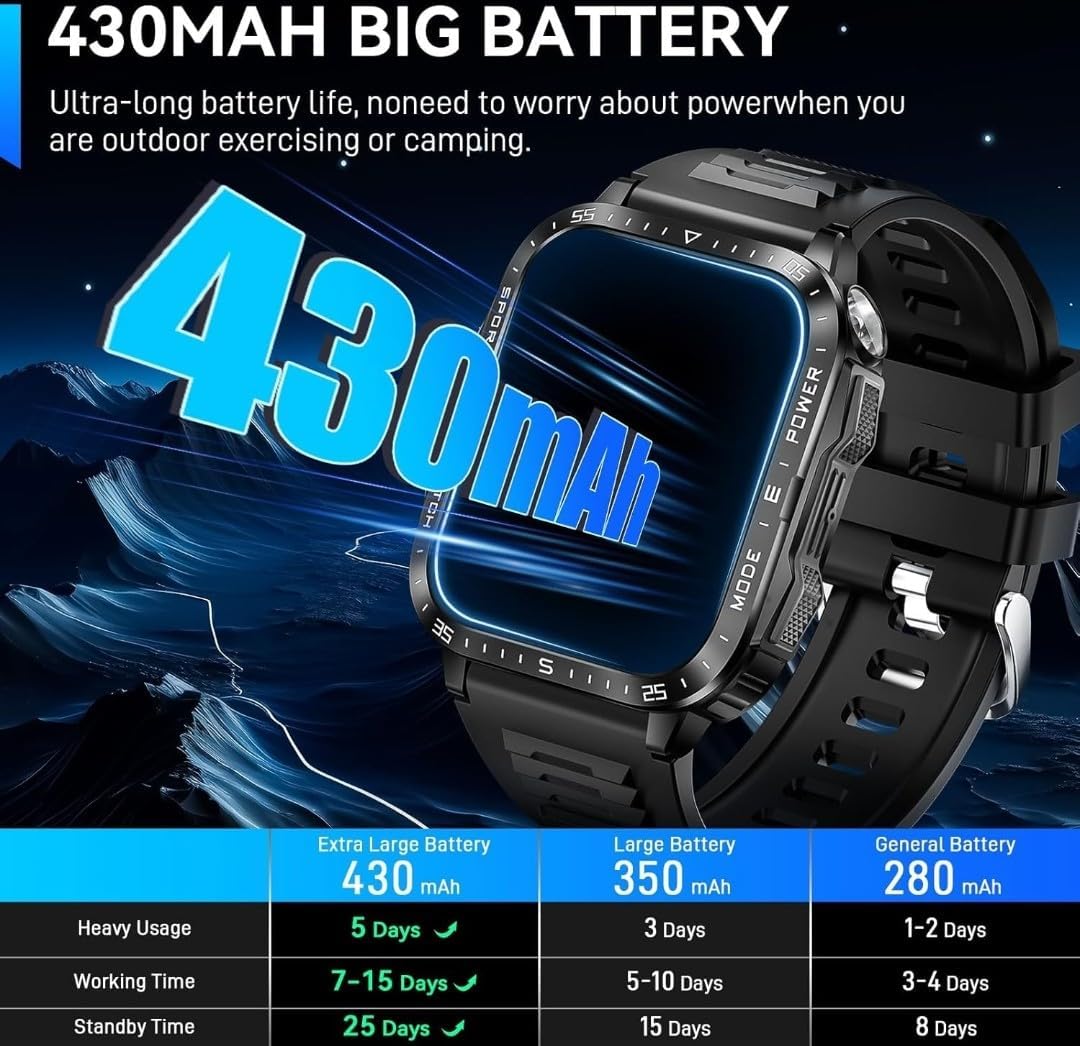
Image: A comparison table showing the battery life of the KT79 Smart Watch (430mAh) against other capacities (350mAh, 280mAh). The 430mAh battery offers 7-15 days working time and 25 days standby time, emphasizing its ultra-long battery life for outdoor activities.

Image: The physical dimensions of the KT79 Smart Watch (56mm height, 46mm width) and its adjustable strap length (Min: 6.26" / 159mm, Max: 9.69" / 246mm). The image also displays the package contents: the watch, an extra watch band, charging cable, and user manual.
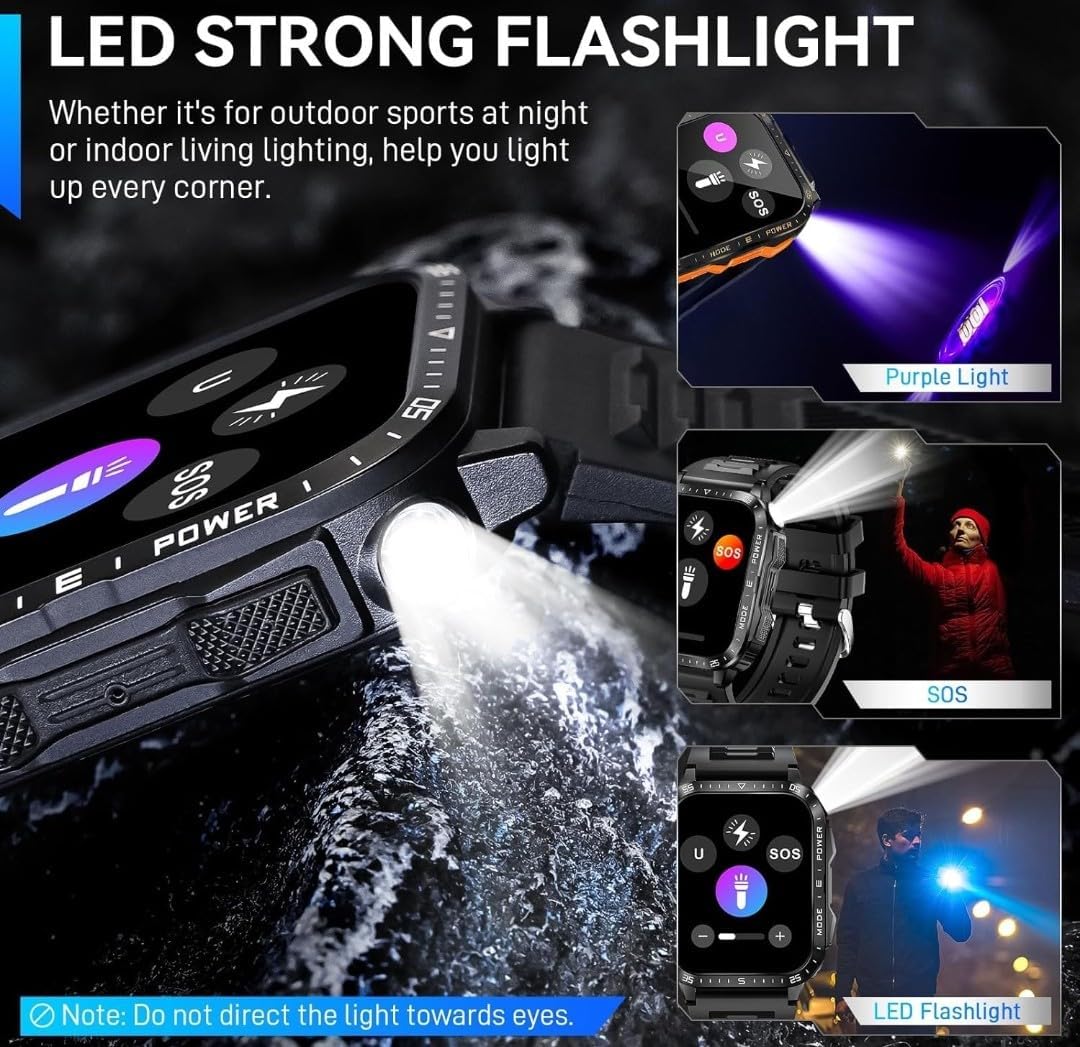
Image: Demonstrates the powerful LED flashlight feature of the KT79 Smart Watch. It shows the watch emitting a bright white light, a purple light option, and a user utilizing the SOS mode. A note advises not to direct the light towards eyes.

Image: The KT79 Smart Watch resting on a wet, rocky surface with water droplets, showcasing its water resistance and rugged design. The watch face displays time, steps, heart rate, temperature, and calories.

Image: A close-up of the KT79 Smart Watch with its powerful LED flashlight illuminated, casting a bright beam onto a dark, rocky surface, highlighting its utility in low-light conditions.
4. Configuración
4.1 Carga inicial
Before first use, fully charge your smart watch. Connect the magnetic charging cable to the charging points on the back of the watch and plug the USB end into a standard USB power adapter (not included) or a computer USB port. The watch display will indicate charging status. A full charge typically takes approximately 2 hours.
4.2 Instalación y emparejamiento de la aplicación
- Descargar la aplicación: Scan the QR code in the watch manual or search for "DaFit" in your smartphone's app store (compatible with iOS 10.0+ and Android 6.0+).
- Habilitar Bluetooth: Asegúrese de que Bluetooth esté habilitado en su teléfono inteligente.
- Abra la aplicación DaFit: Launch the DaFit application on your phone.
- Agregar dispositivo: In the app, navigate to the "Device" section and select "Add Device". The app will search for available devices.
- Select KT79: Choose "KT79" from the list of found devices to initiate pairing.
- Confirmar emparejamiento: Follow any on-screen prompts on both the watch and the phone to confirm the pairing. Once connected, the watch will synchronize time and data with your phone.
For optimal performance, ensure the app is running in the background and has necessary permissions enabled (e.g., location, notifications).
5. Instrucciones de funcionamiento
5.1 Navegación básica
- Pantalla táctil: Desliza el dedo hacia la izquierda/derecha, arriba/abajo para navegar por los menús y las funciones. Toca para seleccionar.
- Botones laterales: The watch features multiple side buttons for quick access to functions like power, mode selection, and flashlight activation. Refer to the watch's on-screen prompts for specific button functions.
5.2 Realizar y recibir llamadas
The KT79 supports Bluetooth calls. Ensure your watch is paired with your phone via Bluetooth.
- Haciendo llamadas: Access the dial pad or contact list on the watch to make calls directly.
- Recibir llamadas: When a call comes in, the watch will display the caller ID. You can answer or reject calls directly from the watch using the on-screen buttons.
- Control de volumen: Adjust call volume using the watch's interface during a call.
5.3 Notificaciones
Receive smart notifications for messages (WhatsApp, Facebook, Twitter, etc.) directly on your watch. Ensure notification permissions are enabled in the DaFit app and your phone's settings.
Linterna LED 5.4
The watch is equipped with a powerful LED flashlight.
- Activación: Access the flashlight function through the watch's menu or a dedicated side button (refer to watch interface for exact method).
- Modos: The flashlight may offer multiple modes, including bright, flash, and SOS. Some models may also feature an optional UV light.
- Precaución: No dirija la luz hacia los ojos.
5.5 Seguimiento de la salud
The KT79 monitors various health metrics:
- Frecuencia cardíaca: Monitorización de frecuencia cardíaca continua o bajo demanda.
- Oxígeno en sangre (SpO2): Mide los niveles de oxígeno en sangre.
- Calidad del sueño: Realiza un seguimiento de los patrones de sueño y proporciona información sobre la calidad del sueño.
- Pasos/Actividad: Counts steps, distance, and calories burned throughout the day.
View detailed health data in the DaFit app.
5.6 modos deportivos
The watch supports over 100 sports modes. Select your activity from the sports menu to track specific workout data, including duration, distance, calories, and heart rate.
5.7 Otras funciones inteligentes
Explora funciones adicionales como:
- Brújula
- Pronóstico del tiempo
- Control de música
- Control de cámara
- Recordatorios de sedentarismo
- Despertador
- Cronógrafo
- Minutero
- Customizable Watch Faces (via DaFit app)
6. Batería y carga
The KT79 Smart Watch is equipped with a 430mAh battery, offering extended usage times.
- Capacidad de la batería: 430 mAh
- Uso diario: Hasta 7-15 días (dependiendo del uso)
- Tiempo en espera: Hasta 25 días
- Cargando: Use the provided magnetic charging cable. Ensure the charging pins align correctly with the watch's charging contacts.
- Tiempo de carga: Aproximadamente 2 horas para una carga completa.
To prolong battery life, reduce screen brightness, limit continuous heart rate monitoring, and disable unnecessary notifications.
7. Mantenimiento
- Limpieza: Limpie el reloj y la correa regularmente con un paño suave y seco. Para la suciedad difícil, utilice un paño ligeramente seco.amp paño y secar bien.
- Resistencia al agua: The watch is 3ATM waterproof (up to 30 meters). It is suitable for swimming and light water activities but avoid hot water, steam, or prolonged submersion in deep water. Do not operate buttons underwater.
- Evite los productos químicos: Do not use harsh chemicals, cleaning solvents, or strong detergents to clean the watch, as this may damage the finish or internal components.
- Almacenamiento: Guarde el reloj en un lugar fresco y seco cuando no esté en uso.
8. Solución de problemas
| Problema | Posible solución |
|---|---|
| El reloj no enciende | Ensure the watch is fully charged. Connect to the charging cable and check if the charging indicator appears. |
| No se puede emparejar con el teléfono |
|
| Notificaciones no recibidas |
|
| Datos de salud inexactos | Ensure the watch is worn snugly on your wrist, about one finger's width from the wrist bone. Avoid excessive movement during measurements. Note that smartwatches are not medical devices. |
9. Especificaciones
- Modelo: KT79
- Tamaño de pantalla: 2.0 inches TFT (2.02'' HD Big Screen)
- Resolución: 240*282
- Capacidad de la batería: 430 mAh
- Conectividad: Bluetooth 5.3
- Compatibilidad: Android 6.0+ / iOS 10.0+
- Resistencia al agua: 3ATM (hasta 30 metros)
- Almacenamiento de memoria: 64 MB
- Peso del artículo: 1.43 libras (0.65 kilogramos)
- Dimensiones: 3.94 x 2.76 x 1.97 pulgadas (paquete)
- Características especiales: LED Flashlight, Compass, Bluetooth Calling, Heart Rate Monitor, SpO2 Monitor, Sleep Tracker, 100+ Sports Modes, Notifications, Music Control, Camera Control, Sedentary Reminders, Alarm Clock, Stopwatch, Timer, Customizable Watch Faces.
10. Garantía y soporte
SENBONO provides a Servicio de reemplazo de 1 años for the KT79 Military Smart Watch. If you encounter any issues or have questions regarding your product, please contact SENBONO customer support. Refer to the contact information provided with your purchase or visit the official SENBONO websitio para detalles de soporte.
Para obtener más ayuda, también puede consultar la SENBONO Store on Amazon.