
1. Introducción
Gracias por la compraasing the SODLK T21 40W Portable Bluetooth Speaker. This manual provides essential information for setting up, operating, and maintaining your speaker. Please read it carefully before use to ensure optimal performance and longevity of the product.
2. Características del producto
- 6D stereo surround sound for an immersive audio experience.
- Strengthened deep bass with 2pcs vibrating diaphragm.
- 4pcs built-in driver unit (2pcs bass driver unit + 2pcs Mids & Tweets) for balanced sound.
- 5Play model: Supports TF card slot, U disk, AUX input, Bluetooth, and TWS connection.
- 2pcs power amplifier for robust audio output.
- Integrated LED light for visual ambiance.
- Inbuilt 3600mAh battery for extended playtime.
- TWS (True Wireless Stereo) function to connect two speakers for ampSonido estéreo nítido.
3. Contenido del paquete
Al desembalar, asegúrese de que todos los elementos enumerados a continuación estén presentes y en buenas condiciones:
- Altavoz Bluetooth portátil SODLK T21
- Cable de carga USB-C
- Manual de usuario

Image: The SODLK T21 Portable Bluetooth Speaker, highlighting its ultra-portable design and key features like IPX7 waterproof rating, BT 5.3, punchy bass, voice assistant, Type-C port, 18 hours playtime, stereo pairing, and hands-free calls.
4. Controles e indicadores
Familiarize yourself with the speaker's control panel for easy operation:
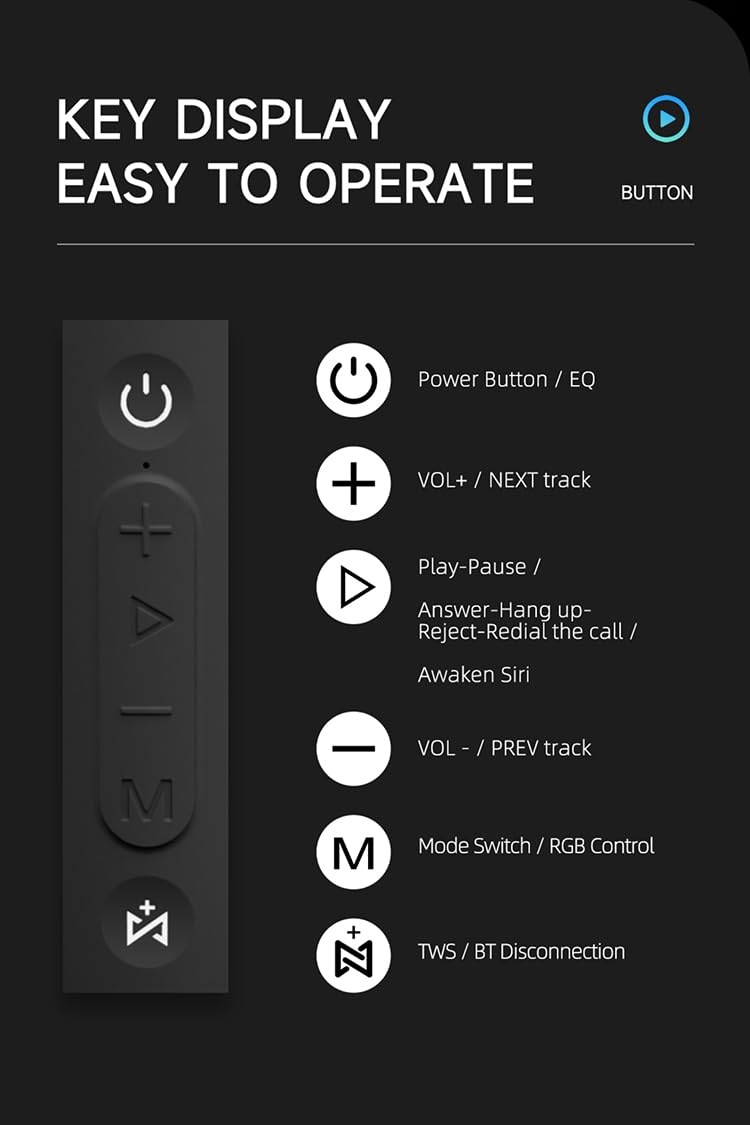
Imagen: Un detalle view of the SODLK T21 speaker's control panel, showing buttons for Power/EQ, Volume Up/Next Track, Play/Pause/Answer/Hang Up/Reject/Redial/Awaken Siri, Volume Down/Previous Track, Mode Switch/RGB Control, and TWS/BT Disconnection.
- Power Button / EQ: Press and hold to power on/off. Short press to cycle through EQ modes.
- VOL+ / NEXT track: Pulsación corta para subir el volumen. Pulsación larga para pasar a la siguiente pista.
- Play-Pause / Answer-Hang up-Reject-Redial the call / Awaken Siri: Short press for play/pause. Short press to answer/hang up calls. Long press to reject calls. Double press to redial. Triple press to awaken Siri (or other voice assistant).
- VOL- / PREV track: Pulsación corta para bajar el volumen. Pulsación larga para ir a la pista anterior.
- Mode Switch / RGB Control: Short press to switch between input modes (Bluetooth, TF card, U disk, AUX). Long press to control RGB lighting effects.
- TWS / BT Disconnection: Short press to initiate TWS pairing. Long press to disconnect Bluetooth.
5. Configuración y operación
5.1 Carga del altavoz
Before first use, fully charge the speaker. Connect the provided USB Type-C cable to the speaker's charging port and the other end to a compatible USB power adapter (5V/1A recommended). The charging time is approximately 3-4 hours.
5.2 Encendido y apagado
Mantenga pulsado el Botón de encendido for 2-3 seconds to turn the speaker on or off. An audible prompt will indicate the power status.
5.3 Emparejamiento Bluetooth
- Encienda el altavoz. Entrará automáticamente en modo de emparejamiento Bluetooth, lo que se indicará mediante una luz LED parpadeante.
- Habilite Bluetooth en su dispositivo (teléfono inteligente, tableta, etc.).
- Buscar "SODLK T21" in the list of available Bluetooth devices and select it to connect.
- Once connected, the LED light will become solid, and you will hear a confirmation tone.
5.4 Emparejamiento TWS (estéreo inalámbrico verdadero)
To achieve stereo sound, you can connect two SODLK T21 speakers together:

Image: Two SODLK T21 speakers shown side-by-side with a TWS icon and dashed lines indicating a wireless connection, illustrating the stereo pairing feature.
- Ensure both SODLK T21 speakers are powered on and not connected to any other Bluetooth device.
- En un altavoz (este será el altavoz principal), presione brevemente el Botón TWSEl altavoz entrará en el modo de emparejamiento TWS.
- Los dos altavoces se conectarán automáticamente. Sonará un tono de confirmación una vez que el emparejamiento TWS se haya realizado correctamente.
- Ahora, conecta tu dispositivo al altavoz principal mediante Bluetooth, como se describe en la sección 5.3. Ambos altavoces reproducirán audio en estéreo.
5.5 Cambio de modo
Presione brevemente el Botón de cambio de modo (M) to cycle through available input modes: Bluetooth, TF Card, U Disk, and AUX. The speaker will announce the current mode.
5.6 Control de luz RGB
Mantenga pulsado el Botón de cambio de modo (M) to change or turn off the RGB lighting effects.

Image: The SODLK T21 speaker displaying a vibrant rainbow light show, illustrating its 16.8 million color RGB light effect feature.
6. Mantenimiento
- Limpie el altavoz con un paño suave y seco. No utilice limpiadores abrasivos ni disolventes.
- Mantenga el altavoz alejado de temperaturas extremas, luz solar directa y humedad.
- No intente desmontar ni reparar el altavoz usted mismo. Esto anulará la garantía.
- Guarde el altavoz en un lugar fresco y seco cuando no lo utilice durante períodos prolongados.
7. Solución de problemas
| Problema | Posible causa | Solución |
|---|---|---|
| El altavoz no se enciende. | Batería baja. | Cargue el altavoz completamente. |
| No se puede emparejar a través de Bluetooth. | El altavoz no está en modo de emparejamiento o ya está conectado a otro dispositivo. | Ensure the speaker is in pairing mode (flashing LED). Disconnect from other devices. Restart both speaker and device. |
| No hay sonido. | Volumen demasiado bajo, modo de entrada incorrecto o dispositivo no reproduce. | Increase volume on both speaker and device. Check input mode. Ensure audio is playing on the connected device. |
| El emparejamiento de TWS falla. | Los altavoces están demasiado separados o ya están conectados a otros dispositivos. | Ensure speakers are within close proximity. Disconnect both speakers from any other Bluetooth devices before initiating TWS pairing. |
8. Especificaciones

Image: The SODLK T21 speaker with its dimensions (232mm height, 100mm width) and a table of specifications including model number, color, BT version, output, waterproof rating, play time, charging time, working distance, input, speaker size, and speaker weight.
| Característica | Detalle |
|---|---|
| Modelo Nro. | T21 |
| Color | Negro |
| Versión BT | BT5.3 |
| Producción | 40 W |
| Impermeable | IPX7 |
| Tiempo de juego | Hasta 18 horas |
| Tiempo de carga | 3-4 horas |
| Distancia de trabajo | Hasta 18M |
| Aporte | 5 V/1 A |
| Tamaño del altavoz | 232 mm x 100 mm |
| Peso del altavoz | 1.12 kg |
9. Garantía y soporte
The SODLK T21 Portable Bluetooth Speaker comes with a standard manufacturer's warranty. Please refer to the warranty card included in your package for specific terms and conditions. For technical support or service inquiries, please contact your retailer or the SODLK customer service team.