
Introducción
The XIXIMENG SF3000 is a versatile retro handheld game console designed for entertainment on the go. It features a 4.5-inch IPS screen, a dual-core processor, and comes pre-loaded with over 20,000 classic games across more than 14 mainstream emulators. Beyond gaming, this device supports video playback, e-book reading, music playback, and can even function as an emergency power bank for mobile phones. This manual provides detailed instructions for setting up, operating, and maintaining your SF3000 console.
Contenido del paquete
Asegúrese de que todos los artículos estén presentes en el paquete:
- SF3000 emulator handheld
- Cable USB
- Adaptador tipo C
- Instrucciones (este manual)

Image: The SF3000 console, USB cable, Type-C adapter, and instruction manual are included in the package.
Producto terminadoview
Disposición y controles de la consola
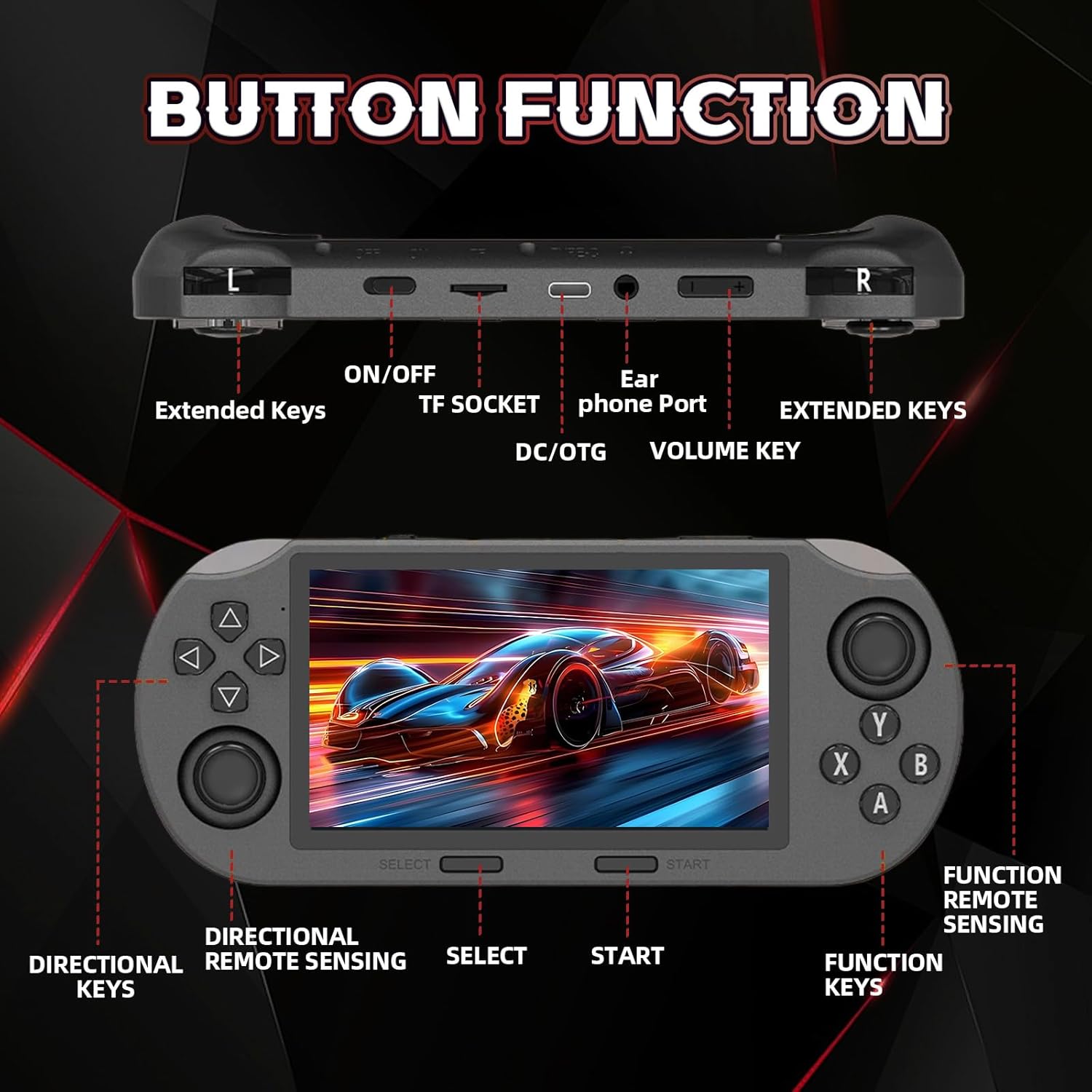
Imagen: Superior y frontal view of the SF3000 console, highlighting directional keys, function keys (A, B, X, Y), SELECT, START, joysticks, extended keys (L, R), ON/OFF switch, TF socket, DC/OTG port, earphone port, and volume key.
- Teclas direccionales: Para movimiento y navegación por el menú.
- Teclas de función (A, B, X, Y): Para acciones dentro del juego.
- Botón SELECCIONAR: Se utiliza para selecciones de menú y funciones del juego.
- Botón de inicio: Used to begin games and confirm selections.
- Joysticks analógicos: For precise movement control in supported games.
- Extended Keys (L, R): Botones de hombro para controles adicionales en el juego.
- Interruptor encendido / apagado: Power button for the console.
- Toma TF: Slot for a TF (MicroSD) card to expand storage.
- Puerto DC/OTG: USB Type-C port for charging and OTG functionality.
- Puerto de auriculares: Jack de 3.5 mm para salida de audio.
- Tecla de volumen: Ajusta el nivel de salida de audio.
Pantalla de visualización

Imagen: La consola SF3000 mostradaasing its 4.5-inch IPS high-definition screen with 854*480 resolution.
The console features a 4.5-inch IPS full-viewing angle HD screen with an 854*480 resolution. This display delivers rich colors and clear details. It is protected by ultra-strong fully laminated tempered glass, which is wear-resistant and scratch-resistant, and effectively reduces reflections. Screen brightness can be adjusted to suit different environments.
Soporte integrado

Image: The SF3000 console with its integrated foldable stand extended, providing stable support.
The back of the console includes a foldable stand. This stand can be unfolded to provide stable support, ideal for hands-free viewing of videos or for desktop gaming. It folds back flush with the console for convenient handheld use and storage.
Configuración
- Carga inicial: Before first use, it is recommended to fully charge the console using the provided USB Type-C cable and adapter. Connect the Type-C cable to the DC/OTG port on the console and the other end to the adapter, then plug into a power outlet.
- Encendido: Mantenga pulsado el ENCENDIDO/APAGADO button located on the top of the console to power it on. The console will boot up and display the main menu.
- Language Selection (if applicable): If prompted, select your preferred language using the directional keys and A button.
- Explorar juegos: Once powered on, you can navigate the vast game library using the directional keys and analog joysticks.
Instrucciones de funcionamiento
Encendido/apagado
- Para encender: Mantenga presionado el ENCENDIDO/APAGADO botón.
- Para apagar: Mantenga presionado el ENCENDIDO/APAGADO botón hasta que aparezca el mensaje de apagado y luego confirme.
Juego de azar
- Seleccionar un juego: From the main menu, use the directional keys or joysticks to browse through the game categories and titles. Press the A button to select a game.
- Comenzar un juego: After selecting a game, press the COMENZAR button to launch it.
- Saving and Loading Game Progress: To save or load your game progress, press and hold SELECCIONAR + INICIAR simultaneously during gameplay. This will bring up a menu where you can choose to save your current state or load a previously saved state.
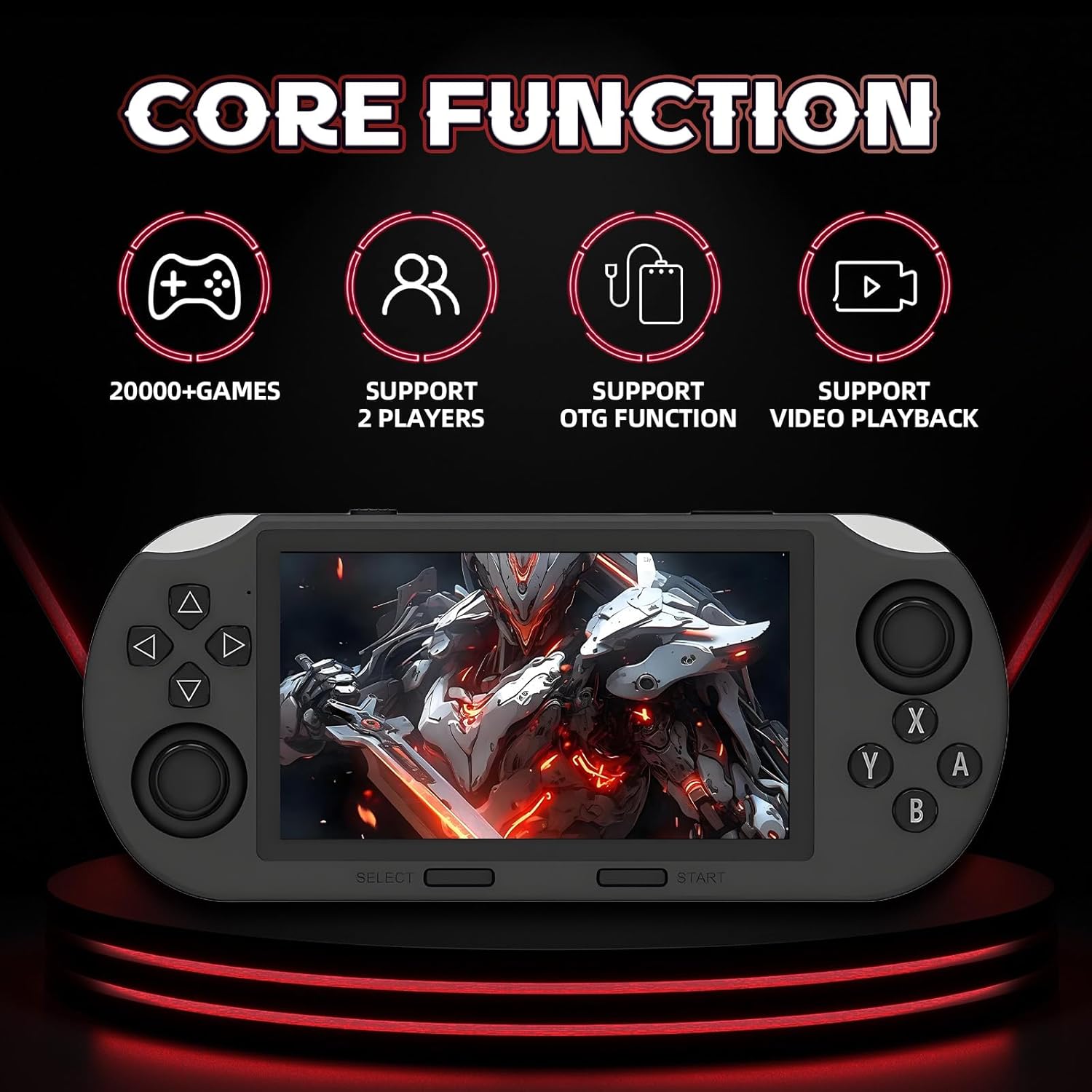
Image: The SF3000 console highlighting its core functions: access to over 20,000 games, support for two players, OTG functionality, and video playback.
Media Playback (E-Book, Music, Video)
El SF3000 admite varias funciones multimedia:
- Navigate to the respective E-Book, Music, or Video sections from the main menu.
- Seleccione su deseado file from the storage. The console is compatible with a variety of mainstream formats.
- Use the console's controls for playback (play, pause, skip, volume adjustment).
Modo de dos jugadores
The console supports a two-player game mode. Connect compatible external controllers (not included) via the OTG function to enjoy multiplayer gaming with friends or family.

Image: The SF3000 console illustrating its dual functionality: game mode for two players and emergency charging mode for a mobile phone.
Funcionalidad OTG
The SF3000 supports On-The-Go (OTG) functionality, allowing you to connect external devices such as USB flash drives for expanded storage or joysticks for alternative control methods. Connect these devices to the DC/OTG port using an appropriate OTG adapter (if required).
Carga de emergencia del teléfono
The console can act as an emergency power bank. Connect your mobile phone to the console's DC/OTG port using a compatible USB cable to charge your phone when its battery is low.

Image: The SF3000 console demonstrating its emergency charging capability for a mobile phone, powered by its 3000mAh battery.
Mantenimiento
- Limpieza: Keep the console clean by using a soft, dry cloth. Avoid using harsh chemicals, abrasive cleaners, or solvents, as these may damage the screen or the body of the console.
- Almacenamiento: Cuando no esté en uso, guarde la consola en un lugar fresco y seco, lejos de la luz solar directa y de temperaturas extremas.
- Cargando: Always use the original USB Type-C cable and adapter or a high-quality compatible cable for charging to ensure safe and efficient power delivery.
Solución de problemas
- Console Not Turning On:
- Ensure the battery is charged. Connect the console to a power source and allow it to charge for at least 30 minutes before attempting to power on again.
- Mantenga presionado el botón ON/OFF durante unos segundos para asegurarse de que se registre.
- Games Not Loading or Lagging:
- Ensure the TF card is properly inserted into the TF socket.
- The console's built-in games do not support user-initiated system changes or updates. Attempting to modify the system may cause issues.
- Si los problemas persisten, comuníquese con atención al cliente para obtener ayuda.
- Screen Issues (No Display, Flickering):
- Compruebe si la consola está encendida.
- Adjust the screen brightness using the dedicated controls.
- If the screen remains unresponsive or displays abnormalities, contact customer support.
- Audio Problems (No Sound, Distorted Sound):
- Adjust the volume using the volume key.
- Ensure headphones are properly connected if using the earphone port.
- Test with different headphones or without headphones to isolate the issue.
Nota importante: The gaming consoles with built-in games do not support users to change or update the system by themselves, nor to refresh the system. If you encounter any problems during use, please contact customer support for assistance.
Presupuesto
| Número de modelo | SF3000 |
| Tamaño de pantalla | 4.5 pulgadas |
| Tipo de pantalla | Pantalla LCD IPS |
| Resolución de pantalla | 854*480 alta definición |
| Procesador | Dual-core (1.2G main frequency) |
| Memoria | 2 GB DDR3 |
| Capacidad de almacenamiento | 64 GB (a través de tarjeta TF) |
| Capacidad de la batería | 3000mAh Iones de litio |
| Duración de la batería | 5-7 hours (continuous gameplay) |
| Puerto de carga | USB Type-C (DC/OTG) |
| Emuladores | 14+ mainstream emulators |
| Número de jugadores | 1-2 (with external controllers) |
| Dimensiones (L x An x Al) | 3.43" x 1.5" x 7.87" |
| Material | Plástico |

Image: Visual representation of the SF3000's dual-core high-performance processor, indicating its 1.2G main frequency for smooth operation.
Información de seguridad
- Exposición a la temperatura: Avoid exposing the console to extreme temperatures, direct sunlight, or high humidity for extended periods. This can affect performance and lifespan.
- Precauciones de carga: Use only the original USB Type-C cable and adapter or high-quality, compatible alternatives for charging. Improper charging equipment can damage the device or pose safety risks.
- Limpieza: Refer to the Maintenance section for proper cleaning instructions. Do not use liquids directly on the console.
- Desmontaje: Do not attempt to disassemble or repair the console yourself. This will void the warranty and may cause damage or injury.
- Exposición al agua: Keep the console away from water and other liquids.
Garantía y soporte
Your SF3000 Retro Handheld Game Console comes with a comprehensive warranty and dedicated customer support.
- Servicio de devolución: We offer a one-month return service. You may request a refund if you are not satisfied with the product within this period.
- Garantía de por vida: Enjoy a lifetime worry-free warranty for your console.
- Atención al cliente: If you encounter any problems during use, please contact our customer support team. We aim to respond and resolve issues within 12 hours.
- Información del contacto: For support, please refer to the contact details provided on the product packaging or the official XIXIMENG websitio.