
1. Producto terminadoview
The Bonacell RGB Wireless Controller is designed to enhance your gaming experience on PS5 Pro, PS5 Slim, and PC. It features advanced functionalities such as dual vibration, 6-axis motion sensing, customizable RGB lighting, programmable back paddles, and a turbo function. This manual provides detailed instructions for setup, operation, and troubleshooting.

Image 1: The Bonacell RGB Wireless Controller is compatible with multiple devices, including PS5 consoles and Windows PCs.
2. Controller Layout and Components
Familiarize yourself with the various buttons and components of your Bonacell RGB Wireless Controller.

Image 2: Detailed diagram showing the layout of the multifunctional controller, including all buttons, sticks, and ports.
- Panel táctil: Interactive surface for in-game navigation.
- Botón de compartir: Para compartir contenido de juego.
- Botón MENÚ: Accesses in-game menus.
- Tecla cruzada (D-pad): Entrada direccional.
- Vocero: Salida de audio integrada.
- Palo izquierdo: Control de movimiento primario.
- Botón turbo: Activates turbo mode for rapid input.
- Toma de auriculares de 3.5 mm: Para conectar auriculares.
- Botón de luz: Controla los modos de iluminación RGB.
- Botón de inicio: Powers on/off and accesses system menus.
- Palo derecho: Camera and secondary movement control.
- Botones R1/L1: Botones de hombro.
- Puerto de carga USB: Puerto tipo C para carga y conexión por cable.
- R2/L2 Triggers: Disparadores analógicos.
- SET (Marco) Button: For macro programming.
- PR/PL Paddles: Programmable rear paddles.
3. Configuración y conexión
3.1 Initial Pairing with PS5 Console
- Ensure the PS5 console is powered on.
- Connect the Bonacell RGB Wireless Controller to the PS5 console using a Type-C data cable (included or original).
- Mantenga pulsado el Botón para compartir + Botón de inicio on the wireless controller simultaneously for 3 seconds to initiate pairing.
- Once paired, the controller can be used wirelessly. The Home button can then activate the controller with a single click without restarting the console.
3.2 Conexión a PC
The controller offers two methods for PC connection:
3.2.1 conexiones cableadas
- Connect the controller to your PC using the Type-C data cable.
- La PC debería detectar e instalar automáticamente los controladores necesarios.
3.2.2 Conexión inalámbrica Bluetooth
- Asegúrese de que su PC tenga Bluetooth habilitado.
- En el controlador, mantenga presionado el botón Botón para compartir + Botón de inicio simultaneously for 3 seconds to enter pairing mode. The indicator light will flash.
- On your PC, go to Bluetooth settings and search for new devices. Select the Bonacell controller when it appears.
- Siga las instrucciones en pantalla para completar el proceso de emparejamiento.
4. Instrucciones de funcionamiento
4.1 modos de iluminación RGB
The controller features 9 vibrant RGB lighting effects.

Image 3: The controller offers seven light colors and three light modes, including breathing, strobe, and static effects, with a color memory function.
- Presione el Botón de LUZ to cycle through the 9 available lighting effects (e.g., breath, strobe, static).
- The controller includes a color memory function, ensuring your preferred lighting color is displayed upon subsequent use.
4.2 Retroalimentación de vibración dual
Experience immersive feedback with the controller's dual vibration motors.

Image 4: The dual motor vibration feedback provides a delicate and immersive sensation during gameplay.
- The dual motors provide tactile feedback for in-game actions, such as explosions and impacts.
4.3 6-Axis Gyroscope and Sensitive Joysticks
Achieve precise control with the integrated 6-axis gyroscope and sensitive 3D joysticks.

Image 5: The sensitive 6-axis somatosensory and 3D joysticks contribute to an ultimate gaming experience with enhanced precision.
- The 6-axis gyroscope allows for motion-based controls, enhancing aiming and in-game interactions.
- Sensitive 3D joysticks provide accurate and responsive input.
4.4 Programmable Back Paddles and Macro Function
- The rear paddles (PR/PL) can be programmed to execute complex button combinations (macros).
- Utilice el SET (Marco) button to program sequences like R2 + Triangle + L3 onto a single paddle for quick execution.
4.5 Modo Turbo
- Activar Modo Turbo to transform single button presses into rapid, automatic fire. This is useful for games requiring fast, repetitive inputs.
4.6 Funciones de audio
The controller supports both wired and Bluetooth audio functions.
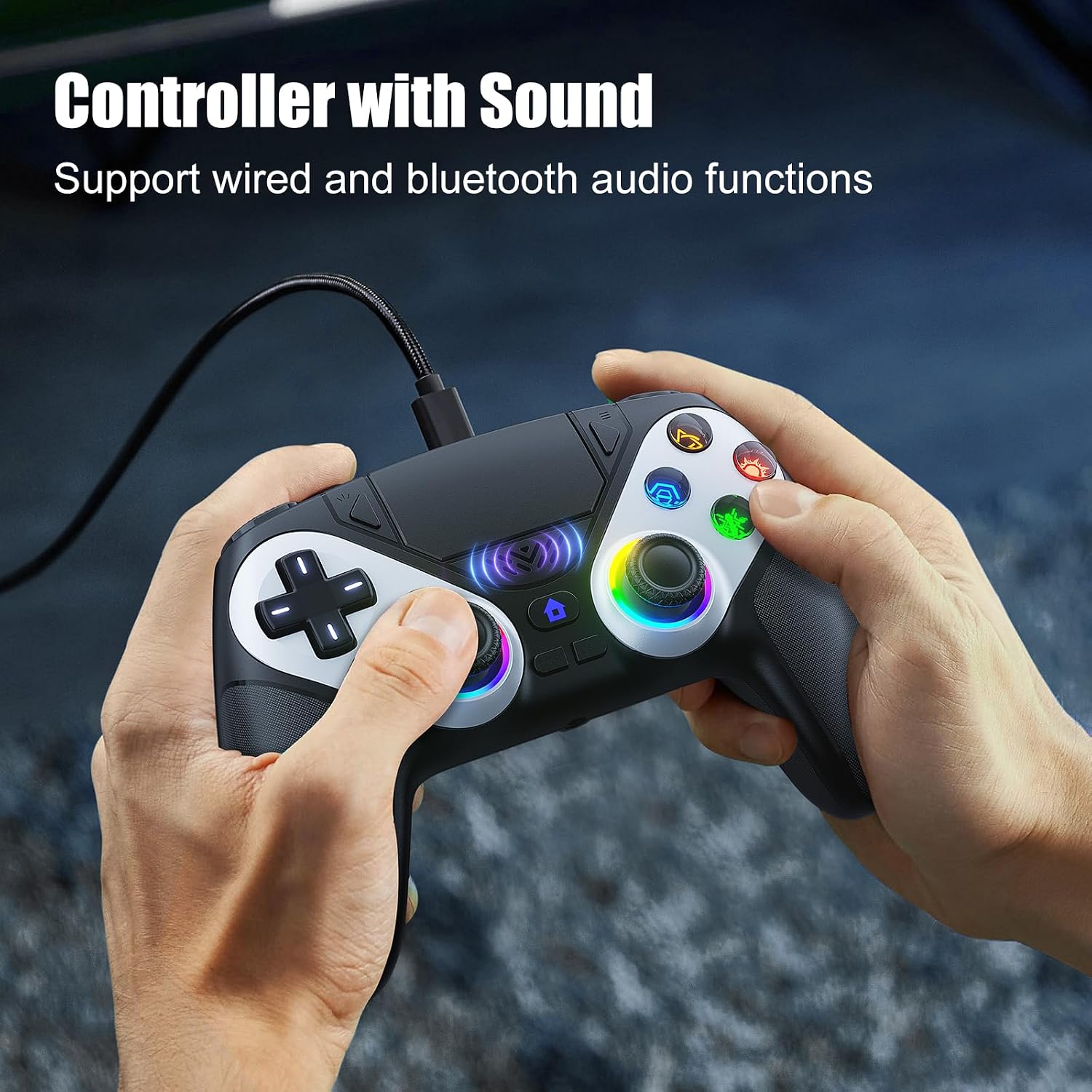
Image 6: The controller supports wired and Bluetooth audio functions, allowing for headset connection via the 3.5mm jack.
- Conecte sus auriculares al Toma de auriculares de 3.5 mm for private audio.
- The built-in speaker provides in-game audio cues.
- Nota: To use the controller's microphone, headphones must be connected.
5. Carga del controlador
- The controller has a 1000 mAh battery capacity.
- Charging can be done via the Type-C port using a cable or a compatible charging base.
- Una carga completa suele tardar aproximadamente 2.5 horas.
- Once fully charged, the controller provides up to 16 hours of usage time.
6. Solución de problemas
- Controller not charging or turning on: Ensure the Type-C cable is securely connected to both the controller and a power source. Try a different cable or charging port.
- Headphones not working correctly: Verify that the headphones are fully plugged into the 3.5mm jack. Check headphone volume settings on the console/PC and the controller. Remember that a microphone requires headphones to be connected.
- Problemas de conexión: For PS5, ensure initial wired pairing was successful. For PC Bluetooth, ensure PC Bluetooth is active and the controller is in pairing mode. Try re-pairing the controller.
- If issues persist, please refer to the support information provided with your purchase or contact Bonacell customer support.
7. Especificaciones
| Característica | Especificación |
|---|---|
| Nombre del producto | Wireless Controller for P-5 |
| Peso del producto | 0.26 kg (340 grams with packaging) |
| Dimensiones del producto | 165 x 105 x 45 mm (Controller) / 17 x 7 x 12 cm (Package) |
| Capacidad de la batería | 1000 mAh |
| Tiempo de uso | Hasta 16 horas |
| Tiempo de carga | Aproximadamente 2.5 horas |
| Método de carga | Type-C cable or charging base |
| Funciones | Dual Shock Motor, 6-Axis Gyroscope, RGB Lighting, Back Paddles, Turbo Mode, Touchpad, 3.5mm Audio Jack, Speaker |
| Material | abdominales |
| Compatibilidad | PS5 Pro, PS5 Slim, Windows PC |
8. Garantía y soporte
For warranty information, returns, or specific support inquiries, please refer to the documentation included with your purchase or contact the seller directly. If you encounter any issues not covered in this manual, such as charging problems or audio malfunctions, please reach out to customer support for assistance.