
Introducción
This manual provides detailed instructions for the setup, operation, and maintenance of your SPYPOINT FORCE-PRO 30 Megapixel 4K Trail Camera. Designed for outdoor monitoring, this camera captures high-resolution photos and videos, making it ideal for wildlife observation and security. Please read this manual thoroughly to ensure proper use and optimal performance of your device.
Contenido del paquete
Verify that all items listed below are present in your package. If any items are missing or damaged, please contact SPYPOINT customer support.
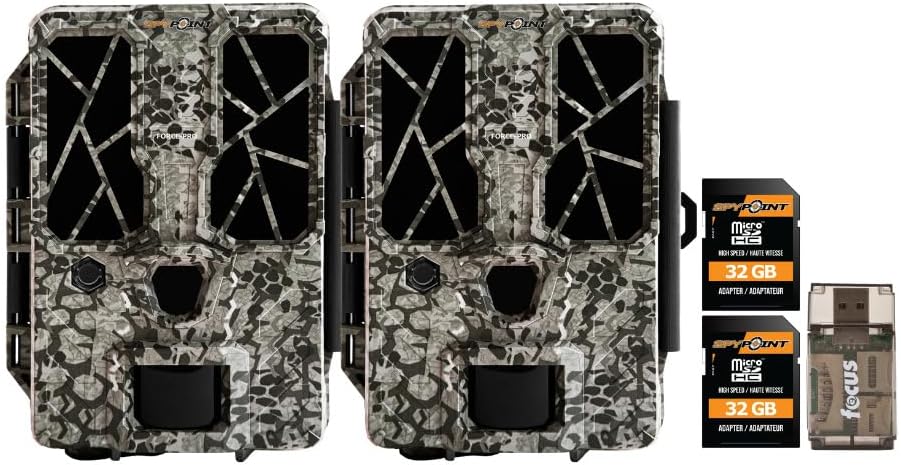
- 2 x SPYPOINT FORCE-PRO 30 Megapixel Trail Camera
- 2 x SPYPOINT MicroSD 32GB Ultra High Speed Class 10 Memory Card
- 1 x Focus All-In-One High Speed Card Reader

Producto terminadoview
The SPYPOINT FORCE-PRO is a robust trail camera designed for reliable performance in outdoor environments. It features advanced imaging capabilities and user-friendly controls.
Características principales
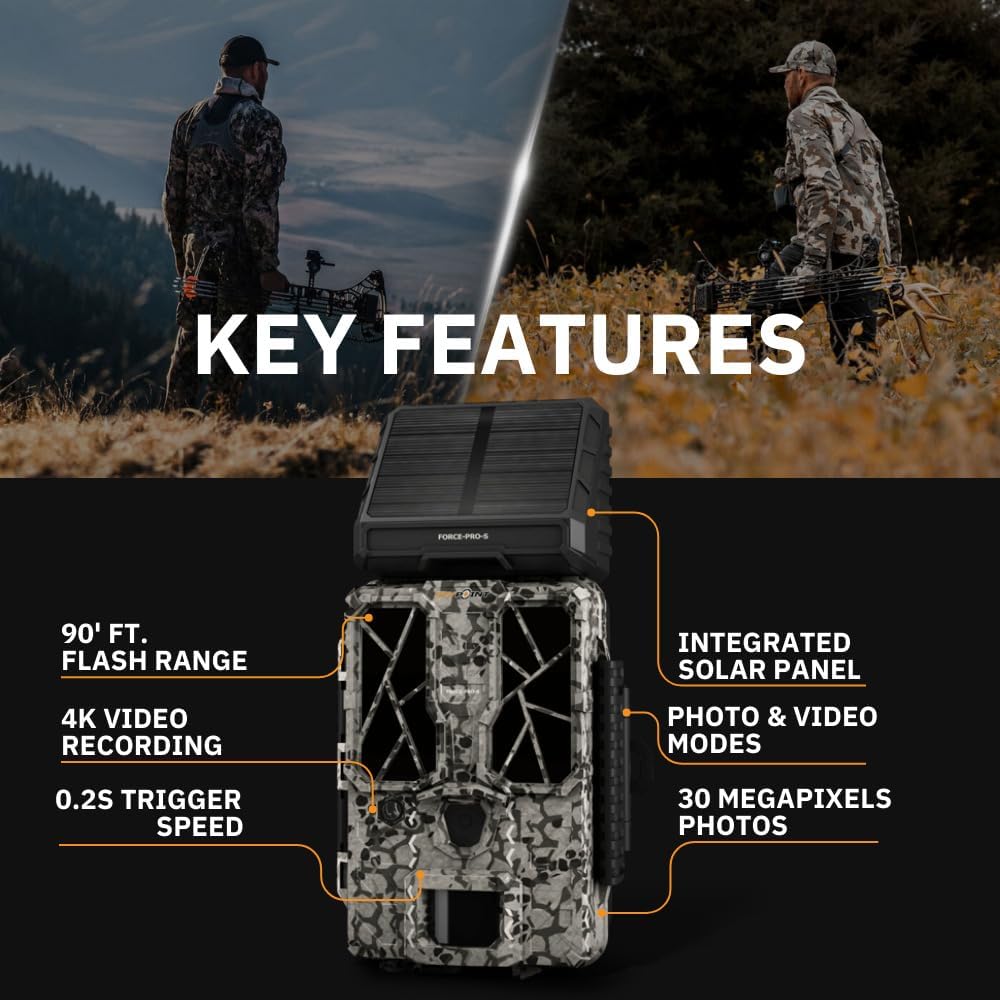
- Resolución alta: 30 Megapixel photos and 4K video recording with sound.
- Velocidad de disparo rápida: Velocidad de disparo ultrarrápida de 0.2 segundos para capturar movimientos rápidos.
- Amplio rango de detección: 110-foot detection range.
- Powerful Flash: 90-foot flash range with 54 LEDs for clear night images.
- Panel solar integrado: For extended battery life and reduced maintenance.
- Dual-SIM Cellular: Automatically connects to the best available network for reliable transmission (if cellular model).



Configuración
1. Instalación de la fuente de alimentación
The FORCE-PRO camera is equipped with an integrated solar panel for charging its internal battery. For initial setup or extended use without sufficient sunlight, an external power source can be used.
- Batería interna: Ensure the camera's internal battery is charged. The integrated solar panel will charge it during daylight hours.
- Alimentación externa (opcional): If using an external 12V power source (not included), connect it to the camera's 12V jack.
2. Inserción de la tarjeta MicroSD
A MicroSD card is required to store photos and videos. Two 32GB MicroSD cards are included in this bundle.
- Localice la ranura para tarjeta MicroSD en la cámara.
- Inserte la tarjeta MicroSD con los contactos dorados hacia la parte posterior de la cámara hasta que encaje en su lugar.
- Para retirarla, presione la tarjeta suavemente hasta que salga.
3. Encendido inicial y configuración básica
- Turn the camera ON using the power switch.
- Follow the on-screen prompts (if available) or refer to the camera's menu for initial settings such as date, time, and language.
- Format the MicroSD card through the camera's menu for optimal performance.
4. Montaje de la cámara
The camera can be mounted using a strap, tripod, or other compatible mounting accessories. While specifications mention 'Tabletop Mount', for outdoor use, secure mounting is crucial.
- Elija una ubicación que proporcione una vista clara view del área de monitoreo deseada.
- Ensure the camera is securely fastened to prevent movement from wind or animals.
- Position the camera to avoid direct sunlight into the lens, which can cause overexposure.
Instrucciones de funcionamiento
Modos de cámara
- Modo foto: Captura imágenes fijas cuando se activa.
- Modo de vídeo: Graba videoclips cuando se activa.
- Modo Foto + Vídeo: Captura una fotografía seguida de un videoclip.
Ajuste de la configuración
Access the camera's menu using the built-in screen and navigation buttons to customize settings:
- Resolución: Select desired photo (up to 30MP) and video (up to 4K) resolution. Higher resolutions consume more storage.
- Retraso del disparador: Establezca el retraso entre activaciones consecutivas.
- Sensibilidad: Adjust the motion sensor sensitivity to suit the environment and avoid false triggers.
- Horario de atención: Define specific times the camera should be active.
- Fecha/Hora Stamp: Enable or disable the date and time overlay on images/videos.
Recuperación de datos
- Tarjeta MicroSD: Remove the MicroSD card from the camera and insert it into the included Focus All-In-One High Speed Card Reader. Connect the card reader to a computer to access files.
- SPYPOINT App: For cellular models, use the SPYPOINT mobile application to view and manage captured media remotely. The app also allows for camera settings adjustments and firmware updates.
Mantenimiento
- Limpieza: Regularly clean the camera lens and housing with a soft, dry cloth. Avoid abrasive materials or harsh chemicals.
- Comprobación de la batería: Monitor battery levels, especially during periods of low sunlight. The integrated solar panel helps maintain charge, but supplemental charging may be needed.
- Actualizaciones de firmware: Periodically check for and install firmware updates via the SPYPOINT app or websitio para garantizar un rendimiento óptimo y acceso a nuevas funciones.
- Almacenamiento: Cuando no esté en uso, guarde la cámara en un lugar fresco y seco, lejos de la luz solar directa.
Solución de problemas
- Camera Not Triggering: Check motion sensor sensitivity, ensure no obstructions, and verify battery level.
- Mala calidad de imagen/vídeo: Clean the lens, check resolution settings, and ensure proper lighting conditions.
- Problemas de energía: Ensure the internal battery is charged or an external power source is properly connected. Check for any damage to power cables.
- Errores de la tarjeta MicroSD: Reformat the MicroSD card (backing up data first) or try a different card. Ensure the card is properly inserted.
- Connectivity Problems (Cellular Models): Verify cellular signal strength in the camera's location. Check your SPYPOINT app for data plan status.
Presupuesto
| Característica | Especificación |
|---|---|
| Modelo | FUERZA-PRO |
| Resolución de la fotografía | 30 megapíxeles |
| Resolución de vídeo | 4K |
| Velocidad de disparo | 0.2 segundos |
| Rango de detección | 110 pies |
| Alcance del flash | 90 pies |
| LED | 54 |
| Fuente de poder | Integrated Solar Panel, Corded Electric (external 12V option) |
| Conectividad | USB, Wired (for data transfer), Cellular (for remote management) |
| Material | Plástico |
| Resistencia al agua | Resistente al agua |
| Tipo de enfoque | Enfoque automático |
| Código Postal | 196271434986 |
Garantía y soporte
For warranty information, technical support, or service inquiries, please refer to the official SPYPOINT webSitio web o contacte directamente con el departamento de atención al cliente. Conserve su comprobante de compra para reclamaciones de garantía.
PUNTO ESPÍA Websitio: www.spypoint.com