
1. Introducción
This manual provides detailed instructions for setting up, operating, maintaining, and troubleshooting your Beelink SER5 MAX Mini PC. Please read this manual thoroughly before using the device to ensure proper functionality and to prevent damage.
2. Contenido del paquete
Verifique que todos los artículos enumerados a continuación estén incluidos en su paquete:
- Beelink SER5 Mini PC ×1
- Adaptador de corriente × 1
- Wall-Mounted bracket ×1
- Manual de usuario ×1
- HDMI Cable (100CM) ×1
3. Producto terminadoview
3.1 Puertos delanteros y traseros
The Beelink SER5 MAX Mini PC features a variety of ports for connectivity. The front panel provides easily accessible ports for common peripherals, while the rear panel offers ports for display outputs, network, and power.

El panel frontal incluye:
- 2x USB 3.2 Gen2 ports (10Gbps)
- 1 puerto USB 2.0
- 1x Type-C port (Data & Video output)
- 1x conector para auriculares
- 1x botón de encendido
El panel trasero incluye:
- 1 conector de CC
- 1x HDMI port (max 4K 60Hz)
- 1x DisplayPort (DP 1.4, max 4K 144Hz)
- 2x USB 3.2 Gen2 ports (10Gbps)
- 1 puerto USB 2.0
- 1x RJ45 LAN port (1000Mbps)
4. Guía de configuración
4.1 Conexión inicial
- Connect your monitor(s) to the HDMI, DisplayPort, or Type-C video outputs on the Mini PC.
- Conecte su teclado y mouse a los puertos USB disponibles.
- Conecte el adaptador de corriente al conector CC de la mini PC y luego conéctelo a una toma de corriente.
- Presione el botón de encendido en el panel frontal para encender la Mini PC.
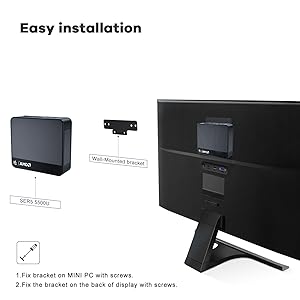
4.2 Instalación del soporte VESA
The Beelink SER5 MAX Mini PC can be mounted to the back of a compatible monitor using the included VESA mount bracket. This saves desk space and provides a cleaner setup.
- Secure the VESA bracket to the Mini PC using the provided screws.
- Attach the Mini PC with the bracket to the VESA mounting holes on the back of your display using the appropriate screws.

5. Instrucciones de funcionamiento
5.1 Encendido y apagado
- Para encender: Presione el botón de encendido en la parte frontal de la Mini PC.
- Para apagar: Use the operating system's shutdown function. Alternatively, press and hold the power button for 5-7 seconds for a forced shutdown (use only when necessary).
5.2 Acceso a la BIOS
To access the BIOS settings or boot options:
- Ingresar a la configuración del BIOS: Press the "Delete" key repeatedly at the Beelink logo during boot-up.
- Enter Boot Options Menu: Press the "F7" key repeatedly at the Beelink logo during boot-up.
5.3 Configuración de pantalla triple
The Beelink SER5 MAX supports connecting up to three displays simultaneously, enhancing productivity for various tasks. Utilize the HDMI, DisplayPort, and Type-C video outputs for this configuration.
5.4 Conectividad de red
The Mini PC offers robust network connectivity options:
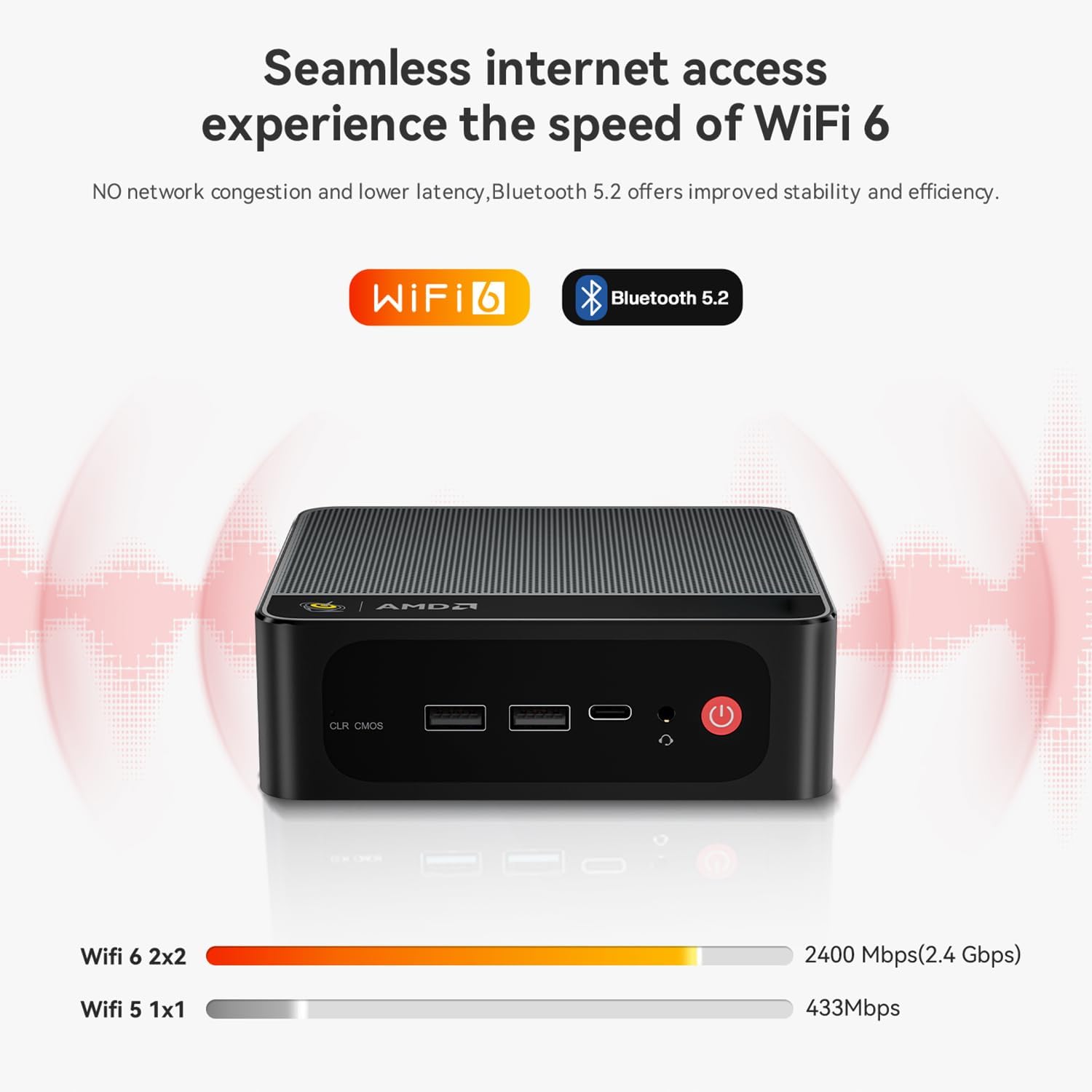
- Wifi 6: Provides faster wireless speeds and lower latency compared to previous Wi-Fi standards.
- Bluetooth 5.2: For stable and efficient connection to various wireless devices such as keyboards, mice, and audio peripherals.
- Red LAN RJ45: A Gigabit Ethernet port for a stable wired network connection.

6. Almacenamiento y expansión de memoria
6.1 Expansión del almacenamiento
The Beelink SER5 MAX Mini PC comes with a 500GB M.2 NVMe 2280 SSD. It supports dual M.2 2280 PCIe 4.0 SSD slots, each supporting up to 4TB of storage. Additionally, there is space for a 2.5-inch SSD/HDD inside the bottom lid for further storage expansion.

7. Sistema de refrigeración
The SER5 MAX Mini PC is equipped with an efficient MSC2.0 cooling system, featuring a cooling fan, dual heat conduction tubes, and a heat sink to maintain optimal operating temperatures and ensure stable performance.

7.1 CPU Temperature & Noise Test Data
The following table presents typical CPU temperature and noise levels under various workloads. Note that actual performance may vary due to environmental conditions and specific configurations.
| Juego | Temperatura | FPS on AVG | Ruido |
|---|---|---|---|
| Supervisión | 81°C | 47 FPS | 34.6–35.2 dB |
| Forza Horizon 5 | 65°C | 53 FPS | 35–37.1 dB |
| CS:GO | 73°C | 44 FPS | 35.3–37 dB |
| DOTA 2 | 73°C | 65 FPS | 34.6–37.2 dB |
| League of Legends | 72°C | 64 FPS | 34–36.5 dB |
| PUBG | 79°C | 41 FPS | 33.7–37.8 dB |
Test Configurations: AMD Ryzen™ 7 6800H Processor, Radeon™ 680M Graphics, 32GB(16GB*2) LPDDR5 RAM, PCIe 1TB SSD, 1080p low quality, 27°C ambient temperature. Test data from Beelink lab, and the actual performance may fluctuate due to environmental and configuration changes.
8. Solución de problemas
This section addresses common issues you might encounter with your Beelink SER5 MAX Mini PC.
- Q: What should I do if I find the Mini PC defective?
A: Please contact customer support immediately. They will provide assistance and a satisfactory solution. - Q: What should I do if I need to update the Mini PC?
A: Please contact customer support, and they will provide the necessary tutorial files and guidance for updates. - Q: How do I set up Auto Power On?
A: To enable the Auto Power On feature, please send the barcode located at the bottom of your machine to customer support. They will provide the corresponding tutorial file.
9. Especificaciones
Especificaciones técnicas detalladas de la mini PC Beelink SER5 MAX:
| Característica | Descripción |
|---|---|
| Marca | Enlace de abeja |
| Nombre del modelo | SER5 |
| Sistema operativo | Sistema operativo (preinstalado) |
| Modelo de CPU | AMD Ryzen 7 6800U (8 núcleos, 16 subprocesos) |
| Velocidad de la CPU | Up to 4.7 GHz (Max Boost Clock) |
| Coprocesador gráfico | AMD Radeon Graphics 12core 2200 MHz |
| Memoria RAM instalada | 32 GB LPDDR5 |
| Velocidad de la memoria | 5200 MHz |
| Ranuras de memoria disponibles | 2 (LPDDR5 is typically soldered, this might refer to M.2 slots for storage) |
| Capacidad de almacenamiento de memoria | 500 GB M.2 NVMe SSD |
| Descripción del disco duro | SSD (M.2 NVMe 2280, expandable up to 8TB; supports 2.5-inch SSD/HDD) |
| Salida de vídeo | HDMI, DisplayPort, Type-C (Supports 4K Triple Display) |
| Resolución máxima de pantalla | 3840x2160 (4K) |
| Tecnología de conectividad | Bluetooth 5.2, Ethernet (RJ45), HDMI, USB, Wi-Fi 6 |
| Puertos USB totales | 4 (2x USB 3.2 Gen2, 2x USB 2.0) + 1x Type-C |
| Peso del artículo | 0.89 kilogramos |
| Fabricante | Shenzhen AZW Technology Co., Ltd. |
10. Garantía y soporte
10.1 Información de garantía
The Beelink SER5 MAX Mini PC comes with a 1 año de garantía from the date of purchase. This warranty covers manufacturing defects and hardware malfunctions under normal use. Please retain your proof of purchase for warranty claims.
10.2 Soporte técnico
For technical assistance, troubleshooting, or any questions regarding your Beelink SER5 MAX Mini PC, please contact Beelink customer support. You can typically find contact information on the official Beelink websitio o a través de su plataforma de compra.
Beelink provides professional after-sales service and lifetime technical support. If a replacement is needed during the warranty period, it will be provided.


