
Introducción
This manual provides essential information for setting up, operating, maintaining, and troubleshooting your Razer BlackWidow V4 Low Profile TKL HyperSpeed Wireless Gaming Keyboard. Please read thoroughly to ensure optimal performance and longevity of your device.
¿Qué hay en la caja?
- Razer BlackWidow V4 Low-profile Tenkeyless HyperSpeed Keyboard
- HyperSpeed Wireless Dongle + USB Dongle Adapter
- Cable USB tipo A a USB tipo C
- Guía del usuario (este documento)
Configuración
1. Carga inicial
Before first use, it is recommended to fully charge your keyboard using the provided USB Type A to USB Type C cable. Connect the USB-C end to the keyboard and the USB-A end to a powered USB port on your computer or a wall adapter.
2. Opciones de conectividad
Your Razer BlackWidow V4 Low Profile TKL keyboard offers three connectivity modes:
- HyperSpeed Wireless (2.4GHz): For a lag-free gaming experience with a 1000Hz polling rate. Use the included HyperSpeed Wireless Dongle.
- Bluetooth: Connect up to three Bluetooth-enabled devices simultaneously for multi-tasking efficiency.
- Con cable (USB-C): Connect directly to your PC using the USB Type A to USB Type C cable for a stable, wired connection and simultaneous charging.

Imagen: Trasera view of the keyboard, highlighting the USB-C port and the wired/wireless switch.
3. Software Installation (Razer Synapse 4 & Chroma App)
For full customization of lighting, macros, and other features, download and install Razer Synapse 4 and the Chroma App from the official Razer website. These applications allow you to:
- Remap keys and create macro layers.
- Customize RGB lighting effects (Chroma effects).
- Enlace profesionalfiles to specific applications or games.
- Manage onboard memory for settings.
Operación del teclado
Características y controles clave

Image: Close-up of three keyboards displaying the different low-profile mechanical switch types.
- Baja Profile Orange Mechanical Switches: Experience quick, quiet actuation with a tactile bump. These switches have a 1.6 mm actuation point and require 45g of force.
- Ultra-Low 18.5mm Front Height: Designed for ergonomic comfort, reducing wrist strain during extended use. The keyboard features a solid 5052 aluminum alloy top case for durability.

Imagen: Side profile of the keyboard demonstrating its ultra-low 18.5mm front height.
- Textured Doubleshot PBT Keycaps: Durable and fade-resistant keycaps with optimized legends for enhanced backlight illumination.
- Optimized Typing Experience: Features lubricated stabilizers and dual sound-dampening foams for clean keystrokes and improved acoustics.
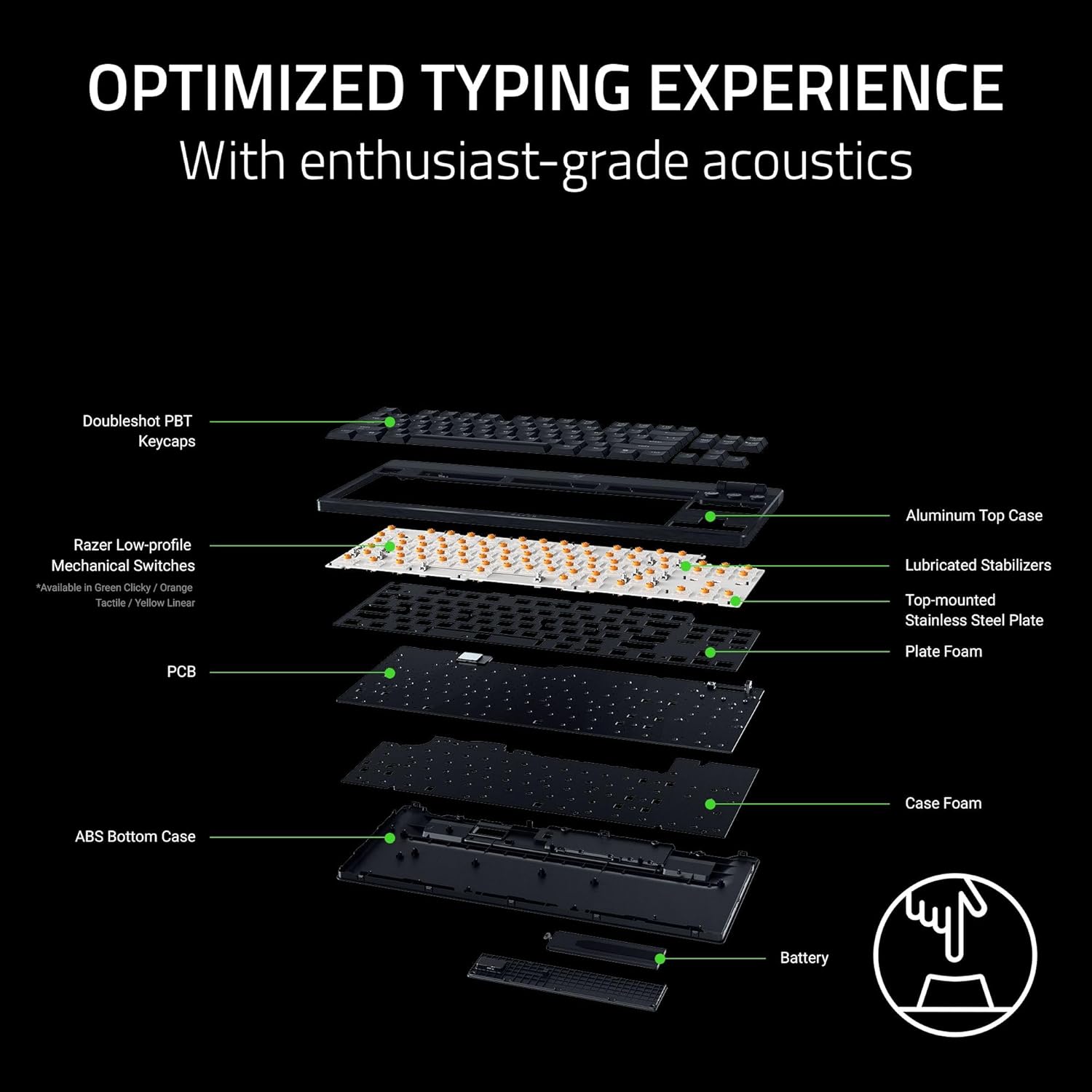
Imagen: Explotada view of the keyboard's internal construction, showing layers for optimized typing.
Dedicated Controls

Image: Detail of the multi-function roller and dedicated control buttons.
- Rodillo multifunción: Adjust volume or remap to other functions via Razer Synapse.
- Botones de control de medios: Botones dedicados para reproducir/pausa, pista siguiente y pista anterior.
- Connectivity Buttons: Toggle between 2.4GHz HyperSpeed Wireless and Bluetooth modes.
- AI Prompt Button: Launch the AI Prompt Master via Synapse for quick AI interactions.
- Botón de estado de la batería: Press to display the current battery level on the number row.
Modo de ahorro de energía
To conserve battery life, press and hold the Battery Status button for 3 seconds to activate Power Saving Mode. In this mode, the keyboard:
- Pauses communication with Synapse.
- Shuts down RGB lighting.
- Reduces the polling rate to 250Hz.
This mode extends battery life significantly, up to 980 hours in idle state when fully charged.

Image: Keyboard highlighting its ultra-long battery life capability.
Mantenimiento
Limpieza
La limpieza regular ayuda a mantener la apariencia y la funcionalidad del teclado:
- Utilice un paño suave y sin pelusa ligeramente seco.ampened with water to wipe down the keycaps and chassis.
- For stubborn dirt, a small amount of isopropyl alcohol can be used on the cloth.
- Evite rociar limpiadores directamente sobre el teclado.
- Use compressed air to remove debris from between keycaps.
Cuidado de las teclas
The Doubleshot PBT keycaps are designed for durability. If removal is necessary for deep cleaning or replacement, use a keycap puller to avoid damage. Apply gentle, even pressure when removing and reattaching keycaps.
Solución de problemas
Problemas de conectividad
- Wireless (2.4GHz/Bluetooth): Ensure the keyboard is charged and within range of the receiver/device. Check that the correct connectivity mode is selected on the keyboard. Re-pair the device if necessary.
- Wired: Verify the USB-C cable is securely connected to both the keyboard and the PC. Try a different USB port or cable.
Fallos de iluminación
- Ensure Razer Synapse and Chroma App are running and updated.
- Check lighting settings within the Chroma App for any disabled effects or low brightness.
- If specific keys are not lighting up, check for physical damage or software conflicts.
Preocupaciones sobre la duración de la batería
- Activate Power Saving Mode when not actively gaming or requiring full RGB lighting.
- Ensure the keyboard is fully charged. Battery life can vary based on usage, lighting intensity, and polling rate.
Problemas de software
- Ensure Razer Synapse and Chroma App are updated to the latest version.
- Restart the applications or your computer.
- If issues persist, consider reinstalling the Razer software.
Presupuesto
| Característica | Detalle |
|---|---|
| Marca | Razer |
| Nombre del modelo | BlackWidow V4 Low Profile TKL HyperSpeed Wireless Gaming Keyboard |
| Número de modelo | RZ03-05450800-R3U1 |
| Tecnología de conectividad | 2.4 GHz inalámbrico, Bluetooth, cable USB-C |
| Descripción del teclado | Baja Profile Teclado de juegos mecánicos |
| Tipo de interruptor | Razer Low Profile Orange Mechanical Switches (Tactile & Quiet) |
| Fuerza de actuación | 45 gramos |
| Punto de actuación | 1.2 mm |
| Viajes totales | 2.8 mm |
| Material de las teclas | Textured Doubleshot PBT |
| Altura delantera | 18.5 mm |
| Material del baúl superior | Aleación de aluminio 5052 |
| Duración de la batería | Up to 980 hours (in Power Saving Mode) |
| Tasa de sondeo | 1000Hz (Wireless), 250Hz (Power Saving Mode) |
| Número de llaves | 87 (sin teclado numérico) |
| Disposición del teclado | QWERTY |
| Retroiluminación del teclado | RGB |
| Dimensiones del producto (L x An x Al) | 5.48" x 14.07" x 1.12" |
| Peso del artículo | 3.1 libras |
| Dispositivos compatibles | PC |
Información de garantía
The Razer BlackWidow V4 Low Profile TKL HyperSpeed Wireless Gaming Keyboard comes with a Garantía del fabricante de 2 años. Please retain your proof of purchase for warranty claims. For detailed terms and conditions, refer to the official Razer warranty policy on their websitio.
Apoyo
For further assistance, technical support, or to access additional resources, please visit the official Razer Support websitio:
You can also find FAQs, driver downloads, and community forums on the support portal.