
Karuisrc K610
Manual de usuario del dron GPS karuisrc K610
Modelo: K610
1. Introducción
This manual provides essential information for the safe operation and maintenance of your karuisrc K610 GPS Drone. Please read this manual thoroughly before operating the drone to ensure proper usage and to prevent damage or injury. The K610 is a foldable GPS quadcopter equipped with a 4K camera, designed for both beginners and experienced users, featuring intelligent flight modes and stable performance.

Image 1.1: The karuisrc K610 GPS Drone in flight.
2. Normas de seguridad
Operating a drone requires responsibility. Adhere to the following safety guidelines to ensure a safe flight experience for yourself and others:
- Comprobación previa al vuelo: Inspeccione siempre el dron, las hélices y la batería antes de cada vuelo. Asegúrese de que todos los componentes estén bien fijados y sin daños.
- Condiciones ambientales: Vuele en áreas abiertas, lejos de personas, animales, edificios y obstáculos. Evite volar con vientos fuertes, lluvia, nieve o niebla.
- Seguridad de la batería: Use only approved batteries and chargers. Do not overcharge or puncture batteries. Discontinue use if batteries are damaged or swollen.
- Línea de visión: Mantenga la línea de visión con el dron en todo momento.
- Respetar la privacidad: Do not use the drone to invade privacy.
- Regulaciones locales: Tenga en cuenta y cumpla todas las leyes y regulaciones locales relacionadas con la operación de drones.
3. Contenido del paquete
Verifique que todos los artículos estén presentes en su paquete:
- Dron K610 x 1
- Control remoto x 1
- Batteries x 1 (Nonstandard Battery)
- Hélices de repuesto x 4
- Destornillador x 1
- Cable USB x1
- Estuche de transporte x 1
- Manual de instrucciones x 1

Image 3.1: Included items in the karuisrc K610 drone package.
4. Componentes sobreview
4.1 dron
The K610 drone features a foldable design for portability, brushless motors for stable flight, and an integrated 4K camera.

Image 4.1: The karuisrc K610 drone and remote control.
4.2 control remoto
The remote control provides intuitive flight control and a mount for your smartphone to view La alimentación FPV.
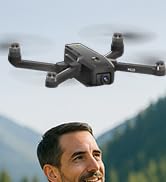
Image 4.2: Remote control with smartphone for FPV viewEn.
5. Configuración
5.1 Instalación y carga de la batería
- Insert the modular battery into the drone's battery compartment until it clicks into place.
- Para cargar, retira la batería del dron. Conecta el cable de carga USB a la batería y a un adaptador de corriente USB compatible (no incluido).
- The charging indicator on the battery will show its status. Ensure the battery is fully charged before flight.

Image 5.1: Modular battery for the K610 drone.
5.2 Instalación de la hélice
Attach the propellers according to the markings (A and B) on the propellers and motor arms. Ensure they are securely fastened with the provided screwdriver.
5.3 Configuración del control remoto
- Install 3x AA batteries (not included) into the remote control.
- Extend the phone holder and securely mount your smartphone.
5.4 Instalación y conexión de la aplicación
- Download the official karuisrc drone app from your smartphone's app store.
- Encienda el dron y luego el control remoto.
- On your smartphone, connect to the drone's Wi-Fi network (usually named 'K610-XXXXXX').
- Abra la aplicación para establecer una conexión y view La transmisión FPV en vivo.

Image 5.2: 5GHz WiFi transmission for real-time viewEn.
5.5 Calibración
Before the first flight and after any significant change in location, perform compass and gyroscope calibration as instructed in the app or quick start guide. This ensures stable flight and accurate GPS positioning.
6. Operando
6.1 Controles básicos de vuelo
Refer to the remote control diagram in the quick start guide for specific joystick and button functions. Generally:
- Left Joystick: Controls altitude (up/down) and rotation (yaw left/right).
- Right Joystick: Controls forward/backward and left/right movement (pitch/roll).
6.2 Despegue y aterrizaje
- Despegue con una sola tecla: Press the designated take-off button on the remote or in the app. The drone will automatically ascend to a safe height and hover.
- Despegue manual: Empuja ambos joysticks hacia las esquinas inferiores exteriores para desbloquear los motores, luego empuja lentamente el joystick izquierdo hacia arriba para ascender.
- Aterrizaje con una sola tecla: Press the designated landing button. The drone will descend and land automatically.
- Aterrizaje manual: Slowly pull the left joystick down to descend. Once landed, push both joysticks to the bottom-outer corners to stop motors.
6.3 Funciones del GPS
The K610 drone utilizes GPS for enhanced stability and intelligent flight functions.
- Retorno automático a casa (RTH): The drone can automatically return to its take-off point if the signal is lost, battery is low, or the RTH button is pressed.

Image 6.1: GPS Auto Return Home functionality.
6.4 Modos de vuelo avanzados
Access these modes via the drone's app:
- Sígueme: The drone will automatically follow the remote control or smartphone, capturing footagy mientras te mueves.
- Waypoint Flight (Tap Fly): Tap points on the map in the app, and the drone will fly along the specified path.
- Point-of-Interest (Circle Fly): Select a point on the map, and the drone will circle around it at a set radius and altitude.

Image 6.2: Advanced flight modes: Follow Me, Circle Fly, and Tap Fly.
6.5 Funcionamiento de la cámara 4K
The K610 is equipped with a 4K UHD camera with 90° adjustable tilt for capturing high-quality aerial footage y fotos.
- Captura de foto/video: Utilice los botones dedicados en el control remoto o la interfaz de la aplicación para tomar fotografías o iniciar/detener la grabación de videos.
- Ángulo de cámara ajustable: The camera's tilt can be adjusted remotely via the app or remote control.
- Soporte de tarjeta SD: Insert an SD card (not included) into the drone for direct storage of high-resolution media.

Image 6.3: The K610's 4K HD Camera.
6.6 producto másview Video
Watch this video for a visual guide on the karuisrc K610 GPS Drone's features and operation.
Vídeo 6.4: Terminadoview of the karuisrc K610 GPS Drone's features and capabilities.
7. Mantenimiento
El mantenimiento regular garantiza la longevidad y el rendimiento óptimo de su dron.
- Limpieza: Limpie suavemente el dron y el control remoto con un paño suave y seco después de cada uso. Evite el uso de productos químicos agresivos.
- Inspección de la hélice: Revise regularmente las hélices para detectar grietas, deformaciones o daños. Reemplace las hélices dañadas inmediatamente con las de repuesto proporcionadas.
- Cuidado de la batería: Guarde las baterías en un lugar fresco y seco. No las guarde completamente cargadas o agotadas durante periodos prolongados. Cárguelas al 50-60 % para un almacenamiento prolongado.
- Almacenamiento: Cuando no esté en uso, pliegue el dron y guárdelo en su estuche de transporte para protegerlo del polvo y daños físicos.
8. Solución de problemas
Si encuentra problemas, consulte los siguientes problemas y soluciones comunes:
| Problema | Posible causa | Solución |
|---|---|---|
| El dron no despega ni responde a los controles. | Low battery, improper calibration, motors locked. | Charge drone/remote batteries. Perform calibration. Unlock motors (refer to section 6.2). |
| Vuelo inestable o a la deriva. | Poor calibration, strong winds, damaged propellers. | Recalibrate the drone. Fly in calm conditions. Inspect and replace damaged propellers. |
| No hay transmisión FPV en el teléfono inteligente. | Wi-Fi not connected, app not open, drone/phone too far apart. | Ensure phone is connected to drone's Wi-Fi. Open the app. Move closer to the drone. |
| GPS features (RTH, Follow Me) not working. | Insufficient GPS signal, drone not calibrated. | Fly in an open area with clear sky. Wait for sufficient GPS satellites to connect (indicated by app). Perform GPS calibration. |
9. Especificaciones
Key technical specifications for the karuisrc K610 GPS Drone:
| Característica | Detalle |
|---|---|
| Nombre del modelo | K610 |
| Peso del artículo | 204 gramos (7.2 onzas) |
| Cámara | 4K UHD (4096×3072P images), 12 MP Effective Still Resolution, 90° Adjustable, CMOS Sensor |
| Resolución de captura de video | 1080p (formato MP4) |
| Tecnología de conectividad | Wi-Fi, RF (5GHz FPV Transmission) |
| Tipo de control | Mando a distancia |
| Características especiales | Adjustable, Auto-Landing, Portable, GPS Auto Return, Follow Me, Waypoint Flight, Point-of-Interest Circle |
| Tipo de motor | Motor sin escobillas |
| Batería | 1 Nonstandard Lithium Ion Battery (included) |
| Tiempo de vuelo | Up to 20 minutes (typical 18 minutes) |
| Material | Plástico |
| Dimensiones del producto | 7" de largo x 2" de ancho x 8" de alto |

Image 9.1: Brushless motor technology for the K610 drone.
10. Garantía y soporte
For warranty information or technical support, please contact karuisrc customer service. Keep your purchase receipt as proof of purchase.
- Teléfono: +44 7419 298225
- Correo electrónico: Karuisrc@gmail.com

Image 10.1: karuisrc customer support.
Ask a question about this manual
Ask about setup, troubleshooting, compatibility, parts, safety, or missing instructions. Manuals+ will review the question and use this page’s manual context to help answer it.