
1. Introducción
Thank you for choosing the Schneider 43A1 4K UHD LED TV. This television combines advanced display technology with smart features to provide an immersive viewing experience. Featuring a 4K Ultra High Definition display, QLED-LCD technology with Direct LED backlighting, and the VIDAA Smart TV platform, your new TV offers vibrant colors, deep blacks, and access to a wide range of entertainment.
This manual provides essential information for the safe and efficient use of your television. Please read it thoroughly before operating the device and retain it for future reference.
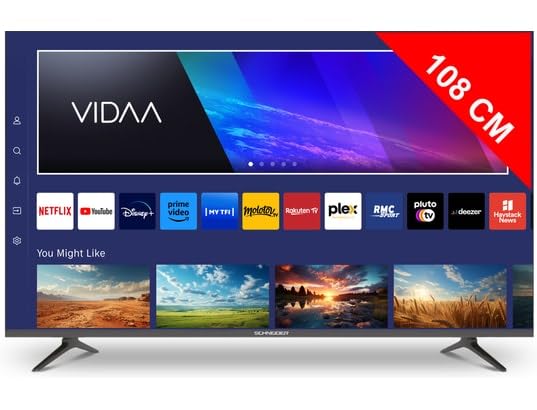
Imagen 1.1: Frente view of the Schneider 43A1 TV with VIDAA interface.
2. Información de seguridad
Para garantizar un funcionamiento seguro y evitar daños, tenga en cuenta las siguientes precauciones de seguridad:
- Colocación: Position the TV on a stable, level surface. Avoid placing it in direct sunlight, near heat sources, or in environments with high humidity or dust.
- Ventilación: Ensure adequate ventilation around the TV. Do not block ventilation openings. Maintain a minimum distance of 10 cm from walls or other objects.
- Fuente de alimentación: Use solo el volumen de alimentación especificadotage. Ensure the power cord is not pinched or walked on. Disconnect the power plug during lightning storms or when unused for extended periods.
- Limpieza: Desenchufe el televisor antes de limpiarlo. Utilice un paño suave y seco. No utilice limpiadores líquidos ni en aerosol.
- Líquidos: No exponga el televisor a goteos ni salpicaduras de líquidos. No coloque objetos con líquido, como jarrones, sobre el televisor.
- Niños: Supervise children to ensure they do not climb on the TV or furniture.
- Montaje en pared: If wall-mounting, use a VESA compatible bracket (200 x 200 mm) and ensure proper installation by qualified personnel to prevent injury.
3. Contenido del paquete
Por favor, compruebe que todos los artículos estén presentes y en buen estado:
- Schneider 43A1 4K UHD LED TV
- Mando a distancia
- Cable de alimentación
- Soporte para TV (2 piezas)
- Tornillos para soporte de TV
- Manual de usuario (este documento)
4. Configuración
4.1 Desembalaje
Carefully remove the TV from its packaging. It is recommended to keep the original packaging for potential future transport or service needs.
4.2 Instalación del soporte
If you are not wall-mounting the TV, attach the included stand pieces to the bottom of the TV using the provided screws. Ensure the stand is securely fastened before placing the TV upright.
4.3 Montaje en pared (opcional)
The Schneider 43A1 is compatible with VESA 200 x 200 mm wall mounts. For safe installation, it is highly recommended to use a professional installer. Refer to your wall mount's instructions for specific details.
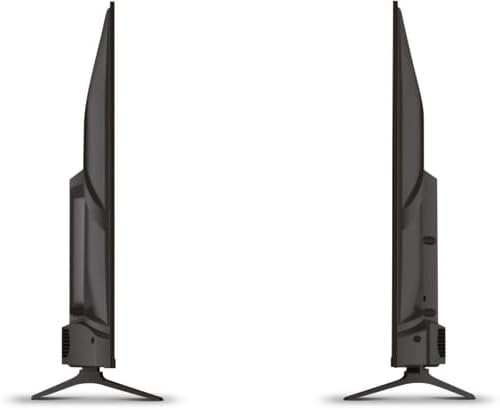
Imagen 4.1: Lateral view of the Schneider 43A1 TV, illustrating its profile for placement or wall mounting.
4.4 Conexión de dispositivos externos
Su televisor ofrece varias opciones de conectividad:
- HDMI: Conecte hasta tres dispositivos HDMI 2.0 (por ejemplo, reproductor de Blu-ray, consola de juegos, decodificador) a los puertos HDMI.
- USB: Hay dos puertos USB disponibles para conectar dispositivos de almacenamiento USB para reproducir medios.
- AV/Audio Input: For older devices requiring composite video and stereo audio.
- Salida coaxial: Para conectar a un sistema de audio externo.
- Entrada de antena/cable: Connect your antenna or cable TV signal for DVB-T/T2/C/S2 reception.
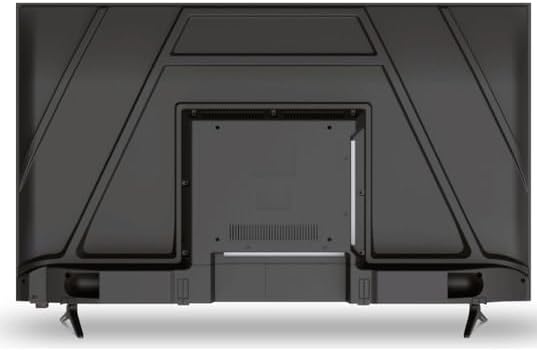
Imagen 4.2: Trasera view of the Schneider 43A1 TV, highlighting connection ports.
4.5 Conexión de la alimentación
Plug the power cable into the TV's power input, then into a suitable wall outlet.
4.6 Asistente de configuración inicial
Upon first power-on, the TV will guide you through an initial setup process. This includes selecting your language, connecting to a Wi-Fi network, and scanning for available channels (DVB-T/T2/C/S2).
5. Operando
5.1 Funciones de control remoto
The remote control allows you to navigate the TV's features:
- Botón de encendido: Enciende o apaga el televisor.
- Subir/Bajar volumen: Ajusta el nivel de sonido.
- Canal arriba/abajo: Cambia los canales de televisión.
- Fuente de entrada: Selects the input source (HDMI, USB, TV Tuner).
- Botones de navegacion: Para navegar por el menú.
- Botones de Smart TV: Direct access to popular apps like Netflix, Prime Video, YouTube.
5.2 Smart TV (VIDAA)
The integrated VIDAA Smart TV platform provides access to a variety of applications and streaming services. Connect your TV to the internet via Wi-Fi to enjoy features like Netflix, Prime Video, and YouTube. Bluetooth connectivity allows for wireless connection to compatible audio devices.

Imagen 5.1: Frente en ángulo view of the Schneider 43A1 TV, displaying the VIDAA Smart TV interface.
5.3 Selección de entrada
Press the 'Input' or 'Source' button on your remote control to switch between connected devices (HDMI 1, HDMI 2, HDMI 3, USB, AV, TV Tuner).
5.4 Configuración de imagen y sonido
Access the TV's menu to adjust picture and sound settings. The 4K UHD resolution, QLED-LCD technology, and Direct LED backlighting ensure a high-quality visual experience. The TV also features upscaling to enhance lower-resolution content. Audio is delivered via 2 x 8 W RMS stereo speakers with Dolby Audio support.
5.5 PC Monitor Mode
The TV can be used as a PC monitor by connecting your computer via an HDMI cable. This mode optimizes the display for computer use.
6. Mantenimiento
6.1 Limpieza del televisor
Antes de limpiarlo, asegúrese de que el televisor esté desenchufado de la toma de corriente.
- Pantalla: Limpie suavemente la pantalla con un paño suave que no deje pelusa. Para manchas difíciles, limpie ligeramenteampEnjuague el paño con agua o un limpiador de pantallas especializado (no rocíe directamente sobre la pantalla).
- Exterior: Utilice un paño suave y seco para limpiar el televisor.asing. Evite el uso de limpiadores abrasivos o disolventes.
6.2 Actualizaciones de software
Your TV may receive software updates to improve performance and add new features. Ensure your TV is connected to the internet to receive these updates automatically or check for them manually through the settings menu.
7. Solución de problemas
Si tiene problemas con su televisor, consulte los siguientes problemas y soluciones comunes:
- Sin energía:
- Compruebe si el cable de alimentación está bien conectado al televisor y al tomacorriente de pared.
- Asegúrese de que el tomacorriente de pared funcione (pruebe con otro dispositivo).
- Presione el botón de encendido en el control remoto o en el televisor.
- Sin imagen/sonido:
- Verifique que esté seleccionada la fuente de entrada correcta (por ejemplo, HDMI 1, TV).
- Verifique todas las conexiones de cables entre el televisor y los dispositivos externos.
- Asegúrese de que el volumen no esté silenciado o configurado al mínimo.
- Si utiliza una antena, verifique la conexión de la antena y realice un escaneo de canales.
- El control remoto no funciona:
- Reemplace las pilas del control remoto.
- Asegúrese de que no haya obstrucciones entre el control remoto y el sensor IR del televisor.
- Problemas con Smart TV/red:
- Verifique su enrutador Wi-Fi y su conexión a Internet.
- Go to the TV's network settings to re-connect to your Wi-Fi network.
- Reinicie el televisor y el enrutador.
Si el problema persiste después de probar estas soluciones, comuníquese con el servicio de atención al cliente.
8. Especificaciones
| Característica | Especificación |
|---|---|
| Modelo | Schneider 43A1 |
| Tamaño de la pantalla | 109 cm (43 pulgadas) |
| Resolución | 4K Ultra HD (3840 x 2160 píxeles) |
| Tecnología de visualización | QLED-LCD with Direct LED Backlight |
| Relación de contraste | 1100:1 |
| Brillo | 200 cd/m² |
| Salida de audio | 2 x 8 W RMS Stereo |
| Tecnología de audio | Audio Dolby |
| Puertos HDMI | 3 (HDMI2.0) |
| Puertos USB | 2 |
| Otras entradas | AV/Audio Input |
| Salidas | Salida coaxial |
| Sintonizador | DVB-T/T2/C/S2 |
| Plataforma de televisión inteligente | VIDAA (Netflix, Prime Video, YouTube) |
| Conectividad inalámbrica | Wi-Fi, Bluetooth |
| Compatibilidad VESA | 200 x 200 mm |
| Peso | 7.5 kilogramos |