
Hikity A7878A4294H6MI2-63EU
Hikity 4+128GB Android 15 Car Radio Instruction Manual
Model: A7878A4294H6MI2-63EU
1. Producto terminadoview
This manual provides detailed instructions for the installation, operation, and maintenance of your Hikity 4+128GB Android 15 Car Radio. Designed for Citroen Berlingo B9 (2008-2017) and Peugeot Partner (2008-2019) vehicles, this car radio features a 9-inch In-Cell touchscreen, wireless CarPlay and Android Auto, Bluetooth 5.0, integrated GPS, Wi-Fi, FM/RDS tuner, and steering wheel control compatibility.
The unit offers 4GB RAM and 128GB internal storage for smooth performance and ample space for applications. It is equipped with a high-definition display for clear visuals and an intuitive user interface.
2. Contenido del paquete
Verifique que todos los artículos enumerados a continuación estén incluidos en su paquete:
- 1 x carcasa de radio
- 1 cable USB original
- 1 x Antena de radio
- 1 decodificador Canbus
- 1 x herramienta de instalación
- 1 unidad de radio para coche
- 2 x cables de alimentación
- 1 x Antena GPS
- Cámara trasera 1 x
- 1 x cable de entrada de cámara trasera
- Cable 1 x RCA
- 2 x Cables USB
- 2 x soportes de montaje
- 1 x micrófono
- 1 x Manual de usuario
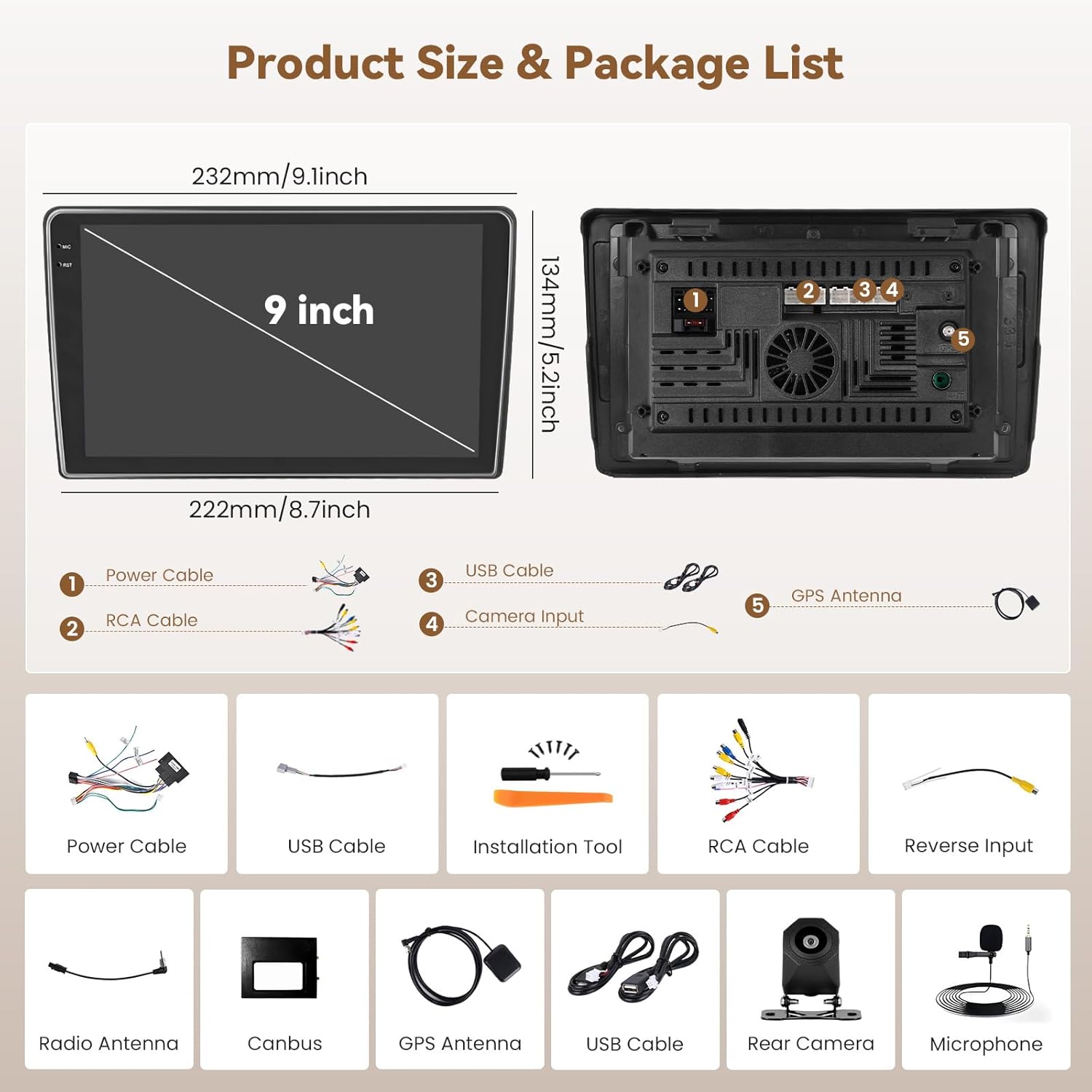
Figura 2.1: Dimensiones del producto y accesorios incluidos.
3. Guía de instalación
3.1 Compatibilidad del vehículo
This car radio is specifically designed for Citroen Berlingo B9 (2008-2017) and Peugeot Partner (2008-2019) models. Please confirm that your vehicle's center console matches the compatible models shown in the image below before proceeding with installation. If your console differs, contact customer service for guidance.

Figure 3.1: Compatible vehicle center console types.
3.2 Pasos previos a la instalación
- Desconecte la batería del vehículo para evitar cortocircuitos eléctricos.
- Carefully remove the original car radio and trim panels using the provided installation tool.
- Identify the wiring harnesses from your vehicle.
3.3 conexiones de cableado
Connect the provided cables to the corresponding ports on the Hikity car radio and your vehicle's wiring harness. Refer to the wiring diagram in the included user manual for specific connections. Key connections include:
- Cables de alimentación: Conectarse a la fuente de alimentación del vehículo.
- Cable RCA: Para entrada/salida de audio/video.
- Cables USB: For external USB devices and data transfer.
- Cable de entrada de cámara: Para conectar la cámara trasera.
- Antena GPS: Móntelo en un lugar despejado. view del cielo.
- Antena de radio: Conectar para recepción FM/RDS.
- Decodificador Canbus: Conexión para el control del volante y la integración de datos del vehículo.
- Micrófono: Conecte el micrófono externo para realizar llamadas manos libres.

Figure 3.2: Visual comparison of the dashboard before and after installing the Hikity car radio.
3.4 Montaje de la unidad
- Secure the car radio into the dashboard opening using the provided mounting brackets.
- Vuelva a instalar los paneles de moldura.
- Vuelva a conectar la batería del vehículo.
4. Instrucciones de funcionamiento
4.1 Encendido/apagado y navegación básica
- Encendido: Turn the vehicle ignition to ACC or ON. The unit will power on automatically.
- Apagado: Turn the vehicle ignition to OFF. The unit will power off.
- Pantalla táctil: Navigate the interface by tapping, swiping, and pinching on the 9-inch In-Cell touchscreen.
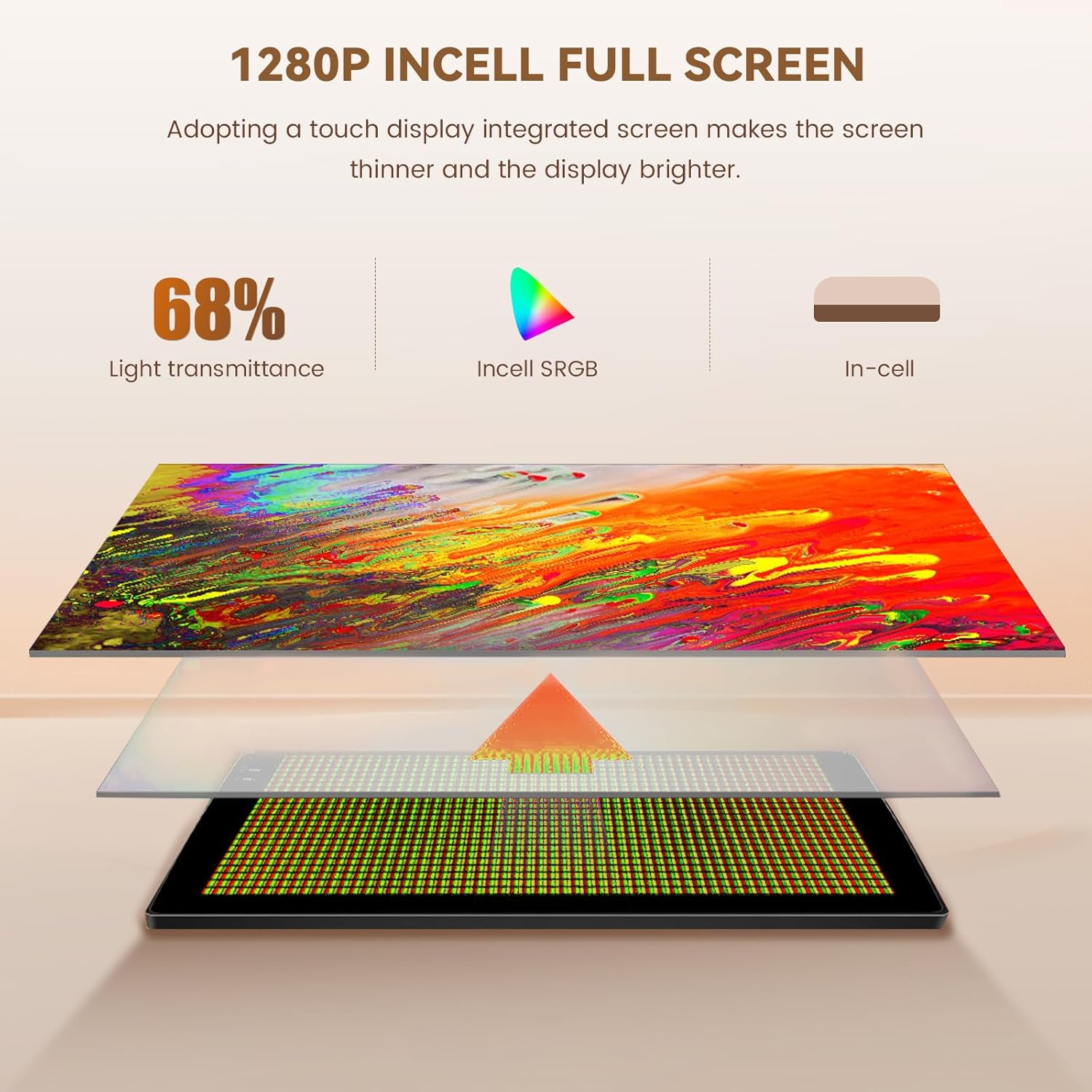
Figure 4.1: In-Cell touchscreen technology benefits.
4.2 CarPlay inalámbrico y Android Auto
The unit supports wireless CarPlay for iOS devices and wireless Android Auto for Android devices, allowing seamless integration of your smartphone's features onto the car radio display.
- Asegúrese de que Bluetooth y Wi-Fi estén habilitados en su teléfono inteligente.
- En la radio del coche, abra la aplicación “CarPlay” o “Android Auto”.
- Sigue las instrucciones en pantalla para emparejar tu teléfono por Bluetooth. Una vez emparejado, el sistema establecerá automáticamente una conexión Wi-Fi para CarPlay/Android Auto inalámbrico.
- You can now access navigation, music, calls, and messages directly from the car radio screen.

Figure 4.2: Wireless CarPlay, Android Auto, and Mirror Link interfaces.
4.3 Llamadas manos libres y música con Bluetooth
Connect your smartphone via Bluetooth 5.0 for hands-free calls and audio streaming.
- Vaya a la configuración de Bluetooth en la radio del automóvil.
- Habilite Bluetooth en su teléfono inteligente y busque dispositivos disponibles.
- Seleccione “Hikity Car Radio” (o un nombre similar) de la lista de su teléfono y vincúlelo.
- Una vez conectado, podrás realizar/recibir llamadas y reproducir música a través de los altavoces del coche.

Figure 4.3: Bluetooth, Wi-Fi, GPS, and Equalizer features.
4.4 Navegación GPS
The integrated GPS module provides reliable navigation. You can use pre-installed maps or download online maps via Wi-Fi.
- Open the Navigation application from the main menu.
- Enter your destination. The system will calculate the route and provide turn-by-turn directions.
- Online maps support real-time traffic updates when connected to Wi-Fi.
Radio FM/RDS 4.5
Acceda a estaciones de radio FM con RDS (sistema de datos de radio) para obtener información de la estación.
- Seleccione la aplicación "Radio".
- Utilice la función de escaneo para encontrar estaciones disponibles o sintonizar manualmente una frecuencia.
- RDS provides information such as station name and program type.
4.6 Control del volante (SWC)
La unidad admite los controles del volante originales de su vehículo para una operación conveniente.
- Acceda a la configuración de “Control del volante” en el menú del sistema.
- Follow the on-screen instructions to program each button on your steering wheel to its corresponding function (e.g., volume up/down, next/previous track, answer/end call).
- Save the settings once configuration is complete.

Figura 4.4: Interfaz de configuración del control del volante.
4.7 Cámara de respaldo
Cuando el vehículo se pone en marcha atrás, la pantalla cambiará automáticamente a la cámara trasera. view, ayudando con el estacionamiento y las maniobras.

Figure 4.5: Backup camera, radio, and other advanced features.
4.8 Funcionalidad de pantalla dividida
La función de pantalla dividida le permite ejecutar dos aplicaciones simultáneamente en la pantalla, como navegación y reproducción de música.
- While an application is open, long-press the recent apps button or drag from the side (depending on the Android version) to activate split-screen mode.
- Seleccione una segunda aplicación para mostrar junto a la primera.
5. Mantenimiento
Para garantizar la longevidad y el rendimiento óptimo de su radio para automóvil Hikity, siga estas pautas de mantenimiento:
- Limpieza de la pantalla: Utilice un paño suave y sin pelusa para limpiar suavemente la pantalla táctil. Evite limpiadores abrasivos o disolventes que puedan dañarla.
- Actualizaciones de software: Periodically check for available software updates through the system settings to ensure you have the latest features and performance improvements.
- Condiciones ambientales: Evite exponer la unidad a temperaturas extremas, luz solar directa durante períodos prolongados o humedad excesiva.
6. Solución de problemas
Si tiene problemas con la radio de su automóvil, consulte los siguientes pasos de solución de problemas comunes:
| Problema | Posible causa | Solución |
|---|---|---|
| La unidad no se enciende. | Conexión de alimentación suelta, fusible quemado, problema con la batería del vehículo. | Revise las conexiones del cable de alimentación. Inspeccione los fusibles del vehículo. Asegúrese de que la batería del vehículo esté cargada. |
| No hay sonido. | Volumen demasiado bajo, fuente de audio incorrecta, problema de cableado del altavoz. | Sube el volumen. Selecciona la fuente de audio correcta. Revisa las conexiones de los altavoces. |
| CarPlay/Android Auto inalámbrico no se conecta. | Bluetooth/Wi-Fi desactivado en el teléfono, emparejamiento incorrecto, falla del software. | Asegúrate de que el Bluetooth y el Wi-Fi del teléfono estén activados. Vuelve a emparejar el dispositivo. Reinicia el teléfono y la radio del coche. |
| La cámara de respaldo no se muestra. | Loose camera connection, faulty camera, incorrect wiring. | Check the camera input cable connection. Verify camera functionality. Ensure reverse trigger wire is correctly connected. |
| Los controles del volante no funcionan. | Canbus not connected, incorrect programming. | Ensure Canbus decoder is correctly installed. Re-program the steering wheel controls in settings. |
Si el problema persiste después de intentar estas soluciones, comuníquese con el servicio de atención al cliente de Hikity para obtener más ayuda.
7. Especificaciones
| Característica | Detalle |
|---|---|
| Número de modelo | A7878A4294H6MI2-63EU |
| Sistema operativo | Androide 15 |
| RAM | 4 GB |
| Almacenamiento interno (ROM) | 128 GB |
| Tipo de pantalla | 9-inch In-Cell Touchscreen |
| Conectividad | Bluetooth 5.0, USB, Wi-Fi (5G compatible) |
| Funciones especiales | GPS Navigation, RDS, FM Tuner, Wireless CarPlay, Wireless Android Auto |
| Modo de salida de audio | Estéreo |
| Canales de sonido envolvente | 4.0 |
| Potencia de salida | 45 vatios (por canal, total 180 vatios) |
| Codificación de vídeo | H.264, H.265/HEVC, MPEG-4, etc. |
| Dispositivos compatibles | Teléfono inteligente |
| Dimensiones del producto (Pr x An x Al) | 23.5 x 13.5 x 4.5 cm |
| Peso | 1.29 kilogramos |
| Origen | Porcelana |
8. Garantía y soporte
Your Hikity car radio comes with a Garantía de 24 meses. For any technical assistance, product inquiries, or warranty claims, please contact Hikity customer support. Online assistance is available, with responses typically provided within 24 hours.
For the most up-to-date support information, please visit the official Hikity store on Amazon or refer to the contact details provided in your warranty card.
Online Store: Tienda Hikity de Amazon
Ask a question about this manual
Ask about setup, troubleshooting, compatibility, parts, safety, or missing instructions. Manuals+ will review the question and use this page’s manual context to help answer it.