
1. Introducción
The NZXT H2 Flow (CI-H21FB-01) is a compact vertical Mini-ITX PC case designed to maximize airflow and save space while accommodating high-performance components. It features smart cable management, tool-less access, and includes dual top fans and a premium PCIe 5.0 riser cable for a streamlined building experience.
Características principales:
- Hybrid Glass-and-Mesh Side Panel: Showcases your build while supporting up to a 280 mm radiator for efficient cooling.
- Diseño compacto: A 20.7 L volume fits most GPUs up to 331 mm, offering high-end power in a small footprint.
- High Airflow Panels: Ultra-fine mesh panels on multiple sides maximize fresh air intake and filter dust, keeping components cooler and cleaner.
- Effortless Building: Tool-less panels, integrated cable routing Velcro straps, and intuitive wire management channels simplify installation.
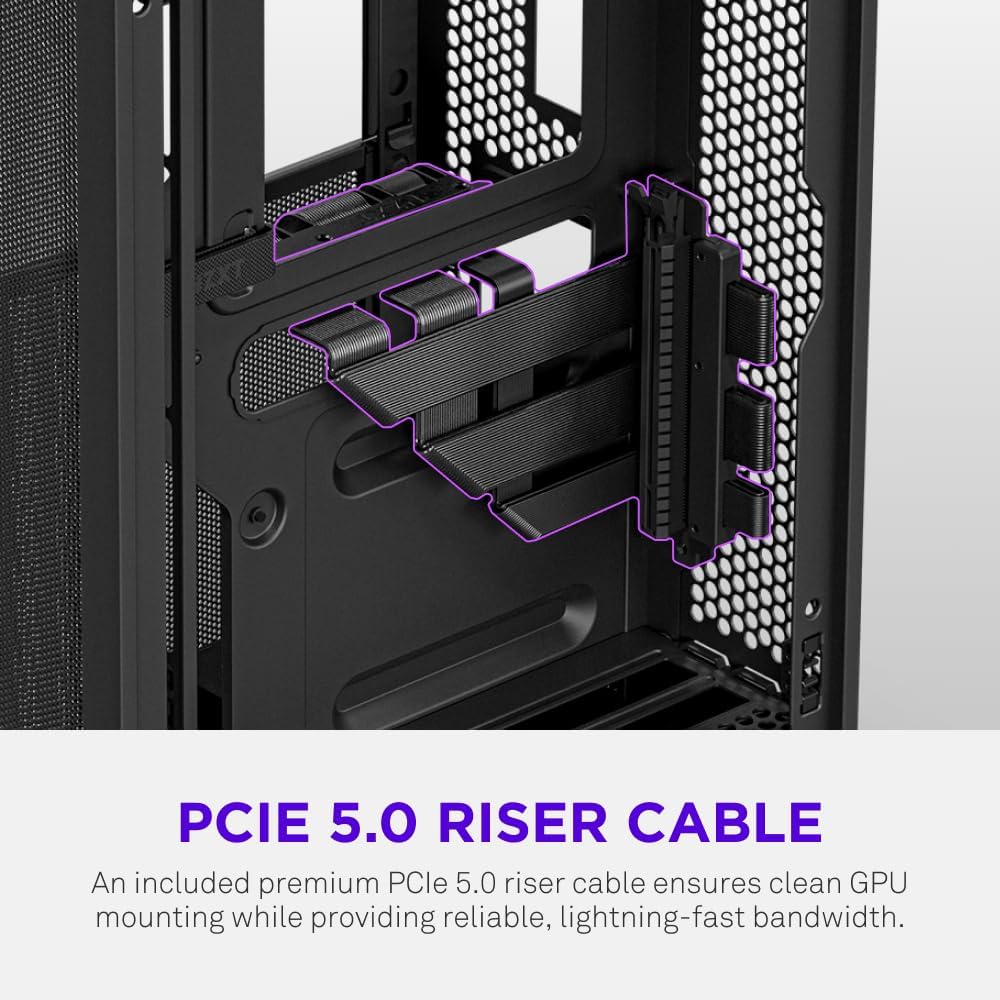
- Pre-Installed Performance: Includes a premium PCIe 5.0 riser cable for vertical GPU mounting and dual F120Q CV fans for immediate exhaust cooling.
2. Información de seguridad
WARNING: Always disconnect power from your PC before performing any installation, maintenance, or troubleshooting. Failure to do so may result in personal injury or damage to components.
- Lea todas las instrucciones cuidadosamente antes de la instalación.
- Use una pulsera antiestática o toque con frecuencia un objeto metálico conectado a tierra para evitar daños por descarga electrostática (ESD) a los componentes.
- Handle components with care. Avoid touching pins or exposed circuitry.
- Mantenga las piezas pequeñas y los materiales de embalaje fuera del alcance de los niños.
- Asegúrese de que haya una ventilación adecuada alrededor de la carcasa de la PC para evitar el sobrecalentamiento.
3. Contenido del paquete
Verify that all items are present in your NZXT H2 Flow package:
- NZXT H2 Flow Mini-ITX PC Case
- 2 x 120mm F120Q CV Top Fans (pre-installed)
- Premium PCIe 5.0 Riser Cable (pre-installed)
- Caja de accesorios (que contiene tornillos, bridas y otras piezas pequeñas)
4. Compatibilidad de componentes
The NZXT H2 Flow case is designed to accommodate specific component sizes for optimal performance and fit:
- Placa madre: Mini-ITX
- Tarjeta gráfica (GPU): Up to 331 mm in length
- Radiador: Up to 280 mm (for liquid cooling solutions)
- Fuente de alimentación (PSU): SFX/SFXL form factor is recommended for best compatibility and cable management.
- Aficionados: Includes 2 x 120mm top fans. Additional fan mounting options may be available depending on other component choices.
5. Configuración e instalación
Follow these steps to assemble your PC within the NZXT H2 Flow case. Refer to your individual component manuals for specific installation details.
5.1. Caso cerradoview y dimensiones
The NZXT H2 Flow is a compact vertical Mini-ITX case. Understanding its dimensions is crucial for planning your build.

5.2. Accessing the Case Interior
The H2 Flow features tool-less panels for easy access to the interior.

5.3. Motherboard and CPU Installation
Install your Mini-ITX motherboard and CPU (with cooler) before placing it into the chassis.
5.4. Instalación de la fuente de alimentación (PSU)
The case supports SFX/SFXL power supplies. Mount the PSU in its designated area, typically at the bottom of the case.

5.5. Gestión de cables
Utilize the integrated cable routing channels and Velcro straps for a clean and organized interior.
5.6. Instalación de la tarjeta gráfica (GPU)
The H2 Flow supports GPUs up to 331 mm in length and includes a premium PCIe 5.0 riser cable for vertical mounting.

5.7. Sistema de refrigeración
The case comes with two pre-installed 120mm F120Q CV fans at the top for exhaust. It also supports up to a 280mm radiator for liquid cooling.


5.8. Producto terminadoview Video
Mira este video oficial para tener una idea visual.view of the NZXT H2 Flow Mini-ITX PC Gaming Case.
6. Instrucciones de funcionamiento
6.1. Encendido y apagado
Press the power button located on the front I/O panel to turn your PC on or off.
6.2. Puertos de E/S frontales
The front I/O panel provides convenient access to:
- Puertos USB 3.0
- Puerto USB-C
- Audio Jack (if applicable)
Connect your peripherals such as keyboards, mice, and headsets to these ports.
7. Mantenimiento
7.1. Limpieza de los filtros de polvo
The NZXT H2 Flow features ultra-fine mesh panels that act as dust filters. Regularly clean these panels to maintain optimal airflow and prevent dust buildup inside your PC.
- Gently remove the mesh panels from the case.
- Utilice aire comprimido o un cepillo suave para eliminar el polvo acumulado.
- Reattach the panels securely.
7.2. Limpieza General
Utilice un paño suave y seco.amp cloth to wipe down the exterior of the case. Avoid abrasive cleaners or solvents.
8. Solución de problemas
Si encuentra problemas con la compilación de su PC, tenga en cuenta los siguientes pasos comunes de solución de problemas:
- Sin energía: Asegúrese de que todos los cables de alimentación (de la fuente de alimentación a la pared, de la fuente de alimentación a la placa base, de la CPU y de la GPU) estén bien conectados. Compruebe el interruptor de encendido de la fuente de alimentación.
- Sin pantalla: Verify that your monitor is connected to the graphics card (not the motherboard I/O unless using integrated graphics) and that the GPU has proper power connections. Reseat the GPU and RAM.
- Calentamiento excesivo: Check fan connections and orientation. Ensure mesh panels are clean and not obstructed. Verify CPU cooler installation and thermal paste application.
- Componente no detectado: Reseat the component (GPU, RAM, storage drives). Check power and data connections.
For more complex issues, consult your individual component manuals or NZXT customer support.
9. Especificaciones
| Característica | Detalle |
|---|---|
| Marca | NZXT |
| Nombre del modelo | NZXT H2 Flow |
| Tipo de caso | Mini-Torre |
| Compatibilidad de la placa base | Mini-ITX |
| Compatibilidad con longitud de GPU | Hasta 331 mm |
| Soporte del radiador | Hasta 280 mm |
| Ventiladores incluidos | 2 x 120mm F120Q CV Top Fans |
| Included Riser Cable | Premium PCIe 5.0 |
| Tipo de montaje de la fuente de alimentación | Bottom Mount (SFX/SFXL recommended) |
| Método de enfriamiento | Aire, líquido |
| Color | Negro |
| Material | Vidrio, metal |
| Peso del artículo | 4.55 kilogramos |
| Total USB 3.0 Ports | 1 |
| Other Special Features | Tool-less Installation, Integrated Cable Management |
10. Garantía y soporte
10.1. Información de garantía
The NZXT H2 Flow Mini-ITX PC Case comes with a Garantía del fabricante de 2 añoConserve su comprobante de compra para reclamaciones de garantía.
10.2. Atención al cliente
For technical assistance, troubleshooting, or warranty inquiries, please visit the official NZXT support websitio o comuníquese con su equipo de servicio al cliente.
NZXT Store: Visita la tienda NZXT en Amazon