
1. Introducción
This manual provides detailed instructions for the COLORROOM A30L1 Android 16 Tablet. Please read this manual carefully before using your device to ensure proper operation and to maximize its performance and lifespan. Keep this manual for future reference.

Image: The COLORROOM A30L1 Android 16 Tablet, showcasing su elegante diseño.
2. ¿Qué hay en la caja?
Upon unboxing your COLORROOM A30L1 tablet, verify that all the following items are included:
- COLORROOM A30L1 Android 16 Tablet
- Cable de carga USB-C
- Adaptador de corriente
- Manual de usuario
- Estuche protector
- Protector de pantalla (preaplicado o incluido por separado)

Image: The COLORROOM A30L1 Tablet shown with its included accessories, including a protective case.
Vídeo: Unboxing y presentaciónview of the Android 16 Tablet, demonstrating its components and capabilities.
3. Producto terminadoview
The COLORROOM A30L1 is a high-performance Android 16 tablet designed for both productivity and entertainment. It combines advanced features with a user-friendly interface.
3.1. Características principales
- Mostrar: 10-inch Full HD IPS display with 1280x800 resolution, 300 nits brightness, and 178-degree ultra-wide viewing angle. Widevine L1 certified for 1080P streaming.
- Actuación: Android 16 OS, Unisoc T7200 Octa-core processor (1.6 GHz), 12nm process for improved power efficiency.
- Almacenamiento de memoria: 24GB de RAM (4GB físicos + 20GB virtuales) y 64GB de almacenamiento interno, ampliable hasta 2TB mediante tarjeta microSD.
- Batería: High-capacity 6,000mAh battery with 18W PD fast charging support.
- Conectividad: Dual-band 2.4GHz/5GHz Wi-Fi 5 (802.11ac) for high-speed internet, Bluetooth 5.0, and GPS.
- Cámaras: Cámara frontal de 5MP y cámara trasera de 8MP.
- Seguridad: Facial recognition unlock and enhanced data privacy protection.
- Audio: Dual speakers and a 3.5mm headphone jack.

Image: The tablet displaying the Android 16 interface with various application icons.

Image: A visual summary of the COLORROOM A30L1's key features, including battery, OS, CPU, cameras, and connectivity.
3.2. Pantalla y elementos visuales
Experience vibrant colors and sharp details on the 10.1-inch IPS display. Widevine L1 certification ensures you can enjoy your favorite streaming content in full 1080P HD quality.

Image: A comparison demonstrating the superior 1080P quality with Widevine L1 versus 720P with Widevine L2.
3.3. Performance and Processing
The Unisoc T7200 octa-core processor, built on a 12nm process, delivers efficient and powerful performance for smooth app usage and multitasking. Android 16 enhances security and user experience.

Image: Diagram illustrating the Unisoc T7200 Octa-core processor, highlighting its architecture and capabilities.
3.4. Memoria y Almacenamiento
With 24GB of combined RAM (4GB physical + 20GB virtual) and 64GB of internal storage, the tablet handles multiple applications with ease. Expand storage up to 2TB using a microSD card for all your files y medios.

Image: The tablet with a microSD card, illustrating its expandable storage capability.

Image: Visual representation of the tablet's 24GB RAM and 64GB internal storage, with up to 2TB microSD expansion.

Image: Illustrates the vast storage potential for videos and music on the tablet.
3.5. Batería y carga
The 6,000mAh battery provides extended usage times. With 18W PD fast charging via the Type-C port, you can quickly recharge and get back to your activities.

Image: The tablet connected to a Type-C charger, indicating fast charging.

Image: Details on the 6000mAh battery capacity and 18W PD fast charging, showing extended usage time.
3.6. Conectividad
Enjoy stable and fast internet with dual-band 2.4GHz/5GHz Wi-Fi 5. Bluetooth 5.0 allows seamless connection to wireless accessories, and built-in GPS provides accurate location services.

Image: The tablet displaying Wi-Fi and Bluetooth connection indicators.
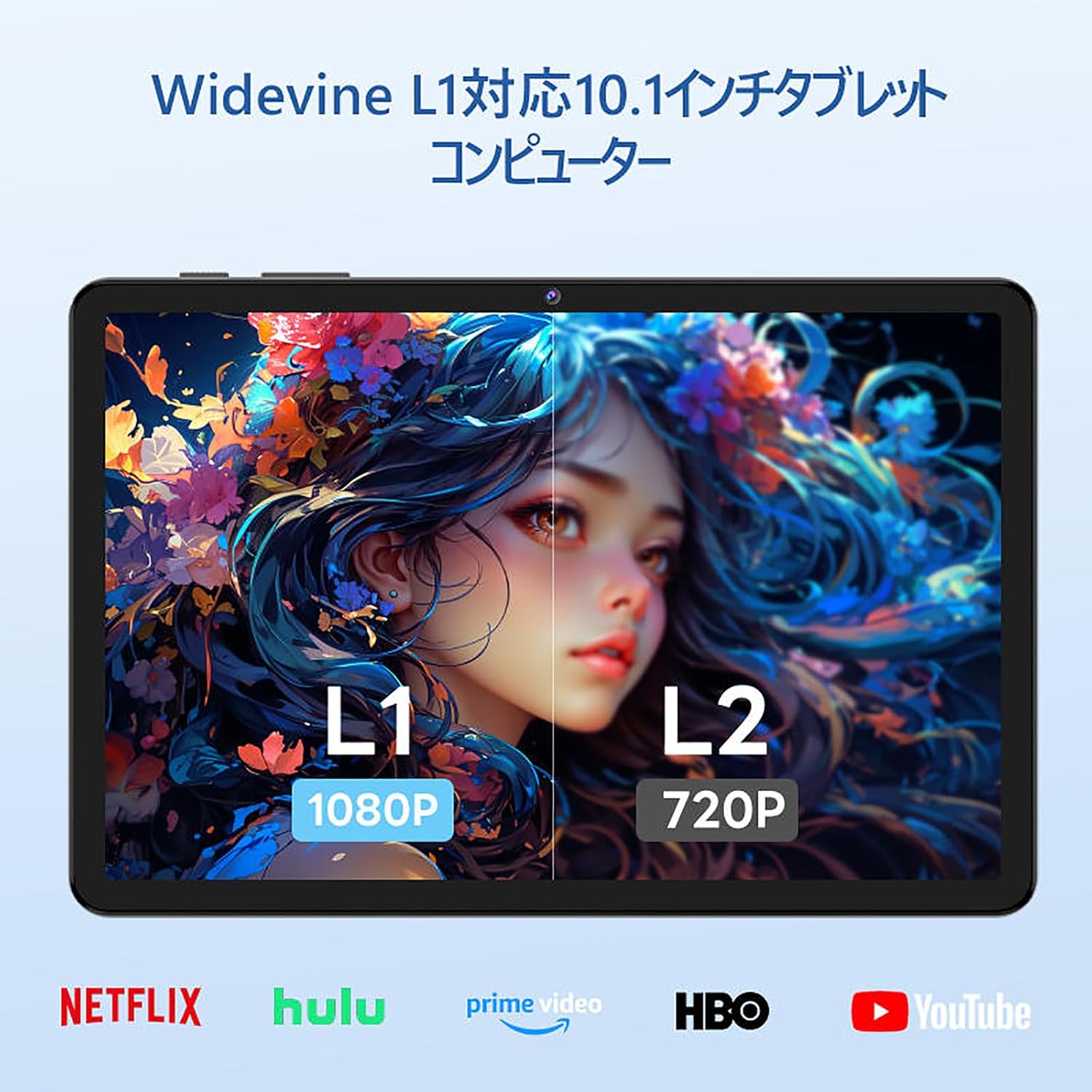
Image: The tablet showing a GPS map, indicating its navigation capabilities.
4. Configuración
Follow these steps for the initial setup of your COLORROOM A30L1 tablet:
4.1. Encendido inicial y selección de idioma
- Mantén presionado el botón de encendido hasta que se encienda la pantalla.
- On the welcome screen, select your preferred language. For English, choose "English (United States)".
- Click "Start" to proceed.
4.2. Wi-Fi and Data Transfer
It is recommended to skip Wi-Fi connection during initial setup to avoid interruptions, especially if your Wi-Fi environment is unstable. You can connect to Wi-Fi later.
- When prompted to set up your device, click "Skip".
- If asked to connect to Wi-Fi, click "Set up offline" or "Skip". Confirm by clicking "Continue" if prompted.
4.3. Configuración de fecha y hora
- Select your time zone (e.g., "Japan Standard Time").
- Adjust the date and time if necessary, then click "Next".
4.4. Screen Lock (PIN)
Setting a PIN or screen lock is recommended for security. You can skip this step and set it up later if desired.
- To set a PIN, enter your desired PIN (4 digits or more) and confirm.
- To skip, click "Skip" and confirm the skip action.
4.5. Servicios de Google
- Review the Google Services information.
- Click "See more" multiple times until the "Agree" button appears.
- Click "Agree" to accept the terms and complete the setup.
Your tablet is now set up and ready for use.
Video: A step-by-step guide on the initial setup process for the tablet, including language selection and basic configurations.
5. Instrucciones de funcionamiento
5.1. Navegación básica y gestos
- Tocar: Toque un ícono para abrir una aplicación o seleccionar un elemento.
- Golpe fuerte: Slide your finger across the screen to scroll through pages or content.
- Pellizcar para hacer zoom: Utilice dos dedos para acercar o alejar las imágenes y web páginas.
- Pantalla dividida: Android 16 supports split-screen multitasking. Drag an app to one side of the screen to use two apps simultaneously.
- Captura de pantalla: Use a three-finger swipe down gesture to capture a screenshot.

Image: The tablet screen showing various applications, demonstrating its multitasking capabilities.

Image: Various scenarios of using the tablet for entertainment, such as watching videos, reading, and video calls.

Imagen: Más examples of the tablet being used in daily life, including during holidays and for cooking.
5.2. Reproducción y transmisión de medios
With Widevine L1 support, you can stream high-definition content from popular services like Amazon Prime Video, Netflix, YouTube, and Hulu.

Image: The tablet displaying a high-definition video from a streaming service.
5.3. Proyección inalámbrica
The tablet supports wireless projection, allowing you to mirror your screen to a larger display for an enhanced viewExperiencia de aprendizaje.
5.4. Funcionalidad GPS
Utilize the built-in GPS for navigation, location-based services, and finding points of interest. The tablet supports multiple satellite systems for accurate positioning.
6. Mantenimiento
To ensure the longevity and optimal performance of your COLORROOM A30L1 tablet, follow these maintenance guidelines:
- Limpieza de pantalla: Utilice un paño suave y sin pelusa para limpiar suavemente la pantalla. Para manchas difíciles, limpie ligeramenteampEnjuague el paño con agua o un limpiador de pantallas. Evite productos químicos agresivos.
- Actualizaciones de software: Revise e instale periódicamente las actualizaciones del sistema para asegurarse de tener las últimas funciones, parches de seguridad y mejoras de rendimiento.
- Cuidado de la batería: Evite temperaturas extremas. No permita que la batería se descargue por completo con frecuencia. Para un almacenamiento prolongado, cargue la batería al 50-60 % aproximadamente.
- Administración de almacenamiento: Limpiar periódicamente lo innecesario files, apps, and cache to free up storage space and maintain performance.
- Protección física: Use the provided protective case and screen protector to guard against scratches, drops, and impacts.
Video: Instructions on how to apply a screen protector to the tablet, ensuring a bubble-free installation.
7. Solución de problemas
Si tiene problemas con su tableta, consulte las siguientes soluciones comunes:
- La tableta no se enciende: Asegúrese de que la batería esté cargada. Conecte la tableta al cargador y espere unos minutos antes de volver a encenderla.
- La pantalla no responde: Try restarting the tablet by holding down the power button for about 10-15 seconds until it powers off, then turn it back on.
- Las aplicaciones se bloquean o se congelan: Cierra la aplicación problemática y vuelve a abrirla. Si el problema persiste, borra la caché de la aplicación o reinstálala. Asegúrate de que el software de tu tableta esté actualizado.
- Problemas de conectividad Wi-Fi: Reinicia el router Wi-Fi y la tableta. Olvídate de la red Wi-Fi en tu tableta y vuelve a conectarla. Asegúrate de estar dentro del alcance de la señal Wi-Fi.
- Rendimiento lento: Cierre las aplicaciones que no utilice en segundo plano. Borre la caché y los archivos temporales. files. Considere realizar un restablecimiento de fábrica si los problemas de rendimiento persisten después de otros pasos de solución de problemas (primero haga una copia de seguridad de sus datos).
- Problemas de carga: Ensure the charging cable and adapter are securely connected and undamaged. Try using a different compatible charger and cable.
If the problem cannot be resolved using these steps, please contact customer support.
8. Especificaciones
| Característica | Detalle |
|---|---|
| Marca | SALA DE COLORES |
| Nombre del modelo | A30L1 |
| Sistema operativo | Androide 16 |
| Tamaño de la pantalla | 10.1 pulgadas |
| Resolución de pantalla | 1280x800 Pixels (IPS) |
| Marca de CPU | Unisoc |
| Velocidad de la CPU | 1.6 GHz (Octa-core T7200) |
| RAM | 24 GB (4 GB físicos + 20 GB virtuales) |
| Almacenamiento interno | 64 GB |
| Almacenamiento expandible | Hasta 2 TB mediante tarjeta microSD |
| Capacidad de la batería | 6,000 mAh |
| Cargando | 18W PD Fast Charging (Type-C) |
| Tipo inalámbrico | 802.11ac (2.4GHz/5GHz Dual-band) |
| Bluetooth | Bluetooth 5.0 |
| GPS | Sí |
| Cámara frontal | 5 MP |
| Cámara trasera | 8 MP |
| Peso del artículo | 1.07 kilogramos |
| Dimensiones del paquete | 32.4 x 19.8 x 3.7 cm |
9. Garantía y soporte
COLORROOM offers a Servicio de garantía de 1 año for all tablets purchased from official COLORROOM brand direct stores. This warranty covers manufacturing defects and ensures your product is free from material and workmanship flaws under normal use.
For warranty claims, technical support, or any inquiries regarding your COLORROOM A30L1 tablet, please contact COLORROOM customer service through the retailer where you purchased the product or visit the official COLORROOM websitio para obtener información de contacto de soporte.
Conserve su comprobante de compra para validar la garantía.