
1. Introducción
Thank you for choosing the THOMSON WS902DUO Cosy Bookshelf Speakers. These active stereo speakers deliver a powerful 150W audio experience with deep bass from two 10 cm woofers. They offer versatile connectivity options including Bluetooth 5.3, Optical, HDMI (ARC), RCA, and USB playback. The included remote control and side panel adjustments provide precise control over your audio. Please read this manual carefully before use to ensure proper operation and to maximize your listening experience.

Image 1.1: THOMSON WS902DUO Bookshelf Speakers in a living space, showcasing their elegant wood finish.
2. Instrucciones de seguridad importantes
- Lea estas instrucciones detenidamente antes de utilizar el producto.
- Conserve estas instrucciones para futuras consultas.
- Preste atención a todas las advertencias en el producto y en las instrucciones de funcionamiento.
- Siga todas las instrucciones.
- No utilice este aparato cerca del agua.
- Limpiar únicamente con un paño seco.
- No obstruya las aberturas de ventilación. Instale el producto según las instrucciones del fabricante.
- No lo instale cerca de fuentes de calor como radiadores, rejillas de calefacción, estufas u otros aparatos (incluidos ampificadores) que producen calor.
- No anule la función de seguridad del enchufe polarizado o con conexión a tierra. Un enchufe polarizado tiene dos clavijas, una más ancha que la otra. Un enchufe con conexión a tierra tiene dos clavijas y una tercera clavija de conexión a tierra. La clavija ancha o la tercera clavija se proporcionan para su seguridad. Si el enchufe proporcionado no encaja en su tomacorriente, consulte a un electricista para que reemplace el tomacorriente obsoleto.
- Proteja el cable de alimentación para que no sea pisado ni aplastado, especialmente en los enchufes, receptáculos y en el punto donde sale del aparato.
- Utilice únicamente accesorios especificados por el fabricante.
- Utilice únicamente el carrito, el soporte, el trípode, el soporte o la mesa especificados por el fabricante o vendidos con el aparato. Cuando utilice un carrito, tenga cuidado al mover la combinación carrito/aparato para evitar lesiones por vuelco.
- Desenchufe este aparato durante tormentas eléctricas o cuando no lo utilice durante períodos prolongados.
- Encargue todas las tareas de mantenimiento a personal técnico cualificado. Se requiere realizar el mantenimiento cuando el aparato haya sufrido algún daño, como por ejemplo si el cable de alimentación o el enchufe están dañados, si se ha derramado líquido o han caído objetos en el interior del aparato, si el aparato ha estado expuesto a la lluvia o la humedad, si no funciona con normalidad o si se ha caído.
3. Contenido del paquete
Compruebe que todos los artículos enumerados a continuación estén incluidos en su paquete:
- THOMSON WS902DUO Bookshelf Speakers (2 units)
- Mando a distancia
- Cable de alimentación
- Cable de conexión de altavoz
- 3.5mm Jack to RCA Adapter Cable
- Manual de usuario (este documento)

Image 3.1: Packaging of the THOMSON WS902DUO Bookshelf Speakers.
4. Producto terminadoview
4.1. Side Control Panel (Active Speaker)
The active speaker features a side control panel for easy access to essential functions.

Image 4.1: Side control panel.
- Control de graves: Ajusta la salida de baja frecuencia.
- Control de agudos: Ajusta la salida de alta frecuencia.
- Control de volumen: Ajusta el volumen general del sonido.
- Interruptor de alimentación: Enciende o apaga los altavoces.
- Indicador LED: Shows the current status or selected input.
4.2. Rear Panel (Active Speaker)
The rear panel of the active speaker provides all necessary input and output connections.
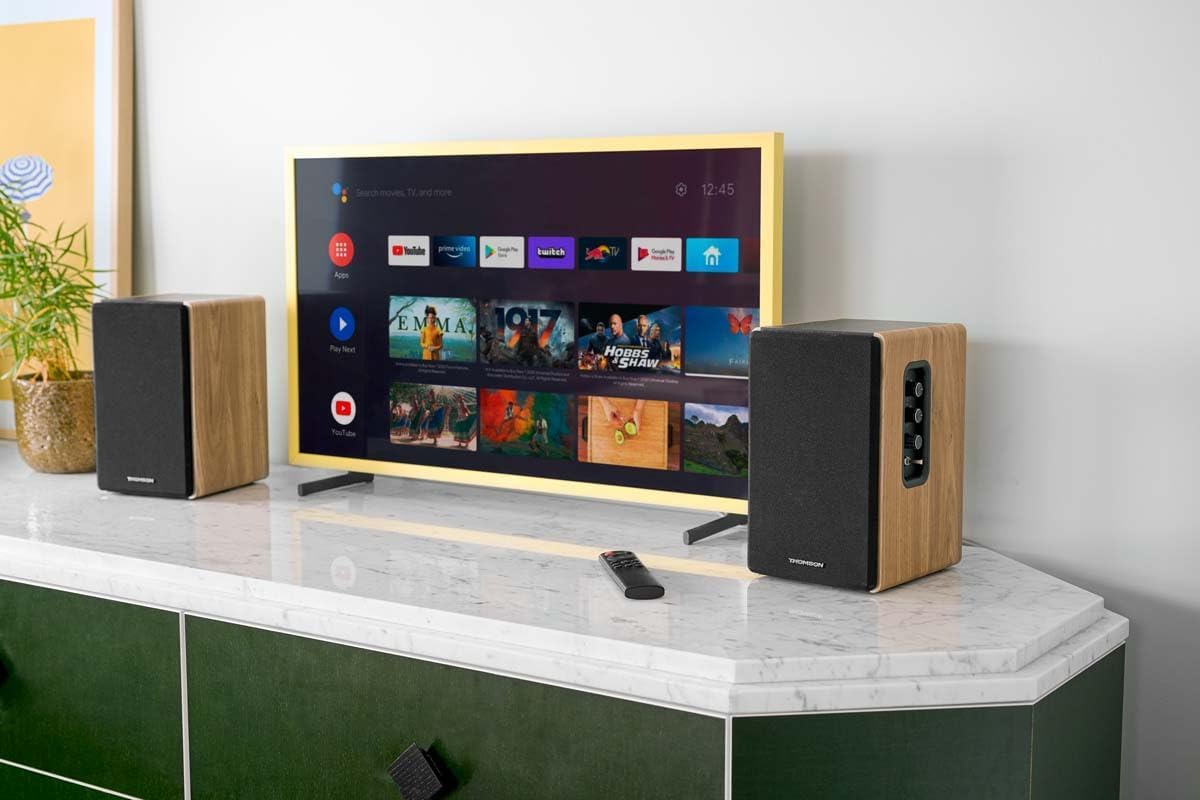
Imagen 4.2: Conexiones del panel trasero.
- Entrada óptica: For connecting digital audio sources like TVs, game consoles, or Blu-ray players.
- Entrada auxiliar (RCA): For connecting analog audio sources such as turntables, CD players, or PCs. A 3.5mm jack adapter is provided.
- TV Audio (HDMI ARC): For connecting to a TV's HDMI ARC port, allowing TV remote control of the speaker volume.
- Juego USB: Para reproducir MP3 files directamente desde una unidad flash USB.
- Sin subtitulos: For connecting an external active subwoofer for enhanced bass.
- Salida del altavoz: Se conecta al altavoz pasivo.
- Entrada de energía: Se conecta a la fuente de alimentación principal.
4.3. Control remoto
The remote control provides convenient access to all speaker functions from a distance.

Image 4.3: Remote control.
- Botón de encendido: Enciende/apaga los altavoces.
- Botón de silencio: Silencia o activa el sonido.
- Volumen +/-: Ajusta el nivel de volumen.
- Controles de reproducción (Reproducir/Pausa, Saltar): Para reproducción USB.
- Source Selection Buttons (OPT, BT, ARC, USB, LINE): Selecciona la fuente de entrada de audio.
- EQ Mode Buttons (MOVIE, MUSIC, DIALOG): Selects preset equalization modes.
5. Configuración
5.1. Ubicación de los altavoces
Place the speakers on a stable, flat surface such as a bookshelf, desk, or speaker stands. For optimal stereo imaging, position the speakers equidistant from your listening position and at ear level. Ensure there is adequate space around the speakers for ventilation.
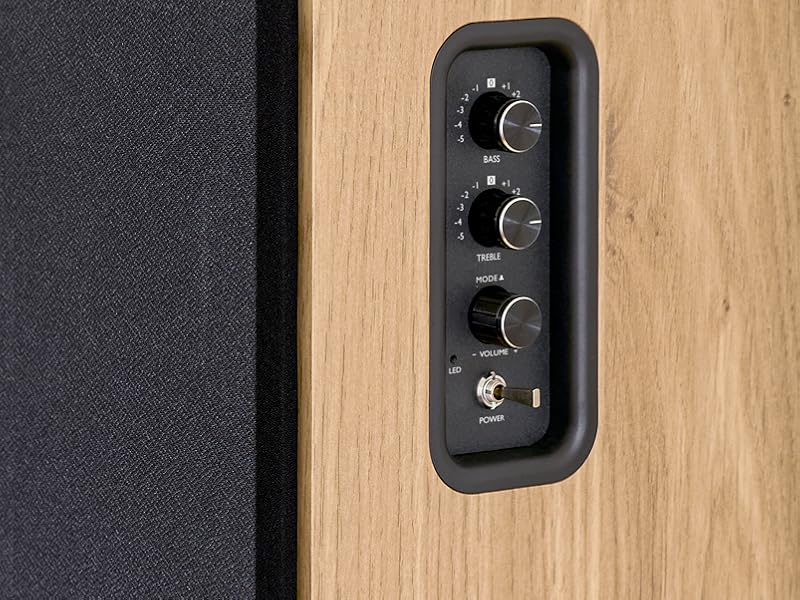
Image 5.1: Recommended speaker placement on a desk.
5.2. Conexión de los altavoces
- Identifique el altavoz activo (con controles y entradas) y el altavoz pasivo.
- Connect the included speaker cable from the speaker output terminals on the active speaker to the input terminals on the passive speaker. Ensure correct polarity (+ to + and - to -).
5.3. Conexión de fuentes de audio
Connect your desired audio sources to the active speaker using the appropriate cables.
- Entrada óptica: Use an optical cable to connect your TV, game console, or Blu-ray player to the OPTICAL IN port.
- Entrada HDMI (ARC): Use an HDMI cable to connect your TV's HDMI ARC port to the TV AUDIO (HDMI) port on the speaker. This allows your TV remote to control the speaker volume.
- Entrada RCA (AUX): Use an RCA cable (or the provided 3.5mm jack to RCA adapter) to connect devices like a turntable, CD player, or PC to the AUX IN (RCA) ports.
- Entrada USB: Inserte una unidad flash USB que contenga MP3 files into the USB PLAY port.

Image 5.2: Speakers connected to a television via HDMI ARC.
5.4. Emparejamiento Bluetooth
- Asegúrese de que los altavoces estén encendidos.
- Press the 'BT' button on the remote control or the side panel to select Bluetooth input. The LED indicator will flash, indicating pairing mode.
- En su teléfono inteligente, tableta o computadora, habilite Bluetooth y busque los dispositivos disponibles.
- Select "THOMSON WS902DUO" from the list of devices.
- Una vez emparejados, el indicador LED dejará de parpadear y permanecerá fijo. Ahora puedes transmitir audio de forma inalámbrica.
5.5. Conexión del subwoofer (opcional)
If you wish to enhance bass further, connect an active subwoofer to the 'Sub Out' port on the rear panel of the active speaker using an RCA cable.
6. Instrucciones de funcionamiento
6.1. Encendido y apagado
Use the power switch on the side control panel or the power button on the remote control to turn the speakers on or off.
6.2. Selección de fuente
Press the corresponding source button on the remote control (OPT, BT, ARC, USB, LINE) to switch between connected audio inputs. The LED indicator will change to reflect the selected source.
6.3. Control de volumen
Adjust the volume using the 'Volume' knob on the side control panel or the 'VOL+/-' buttons on the remote control.
6.4. Ajustes de audio
Fine-tune the sound to your preference:
- Graves agudos: Use the 'Bass' and 'Treble' knobs on the side control panel to adjust the low and high frequencies.
- Modos de ecualización: Press the 'MOVIE', 'MUSIC', or 'DIALOG' buttons on the remote control to select preset equalization settings optimized for different content types.
6.5. Reproducción USB
When a USB flash drive with MP3 files is inserted and USB source is selected, the speakers will automatically begin playing. Use the playback control buttons on the remote control (Play/Pause, Skip) to manage your music.
6.6. Operación Bluetooth
After successful pairing (see Section 5.4), you can stream audio from your Bluetooth device. Use your device's controls or the speaker's remote control for playback and volume adjustments.
7. Mantenimiento
Un mantenimiento adecuado garantiza la longevidad y el rendimiento de sus altavoces.
- Limpieza: Wipe the speaker surfaces with a soft, dry cloth. Do not use liquid cleaners or abrasive materials.
- Ventilación: Asegúrese de que las aberturas de ventilación no estén bloqueadas para evitar el sobrecalentamiento.
- Almacenamiento: Si va a almacenar los altavoces durante un período prolongado, desconéctelos de la toma de corriente y guárdelos en un lugar fresco y seco.
- Evite la humedad: Keep the speakers away from water and high humidity.
8. Solución de problemas
Si encuentra algún problema, consulte la siguiente guía de solución de problemas:
| Problema | Posible causa | Solución |
|---|---|---|
| Sin poder | Power cable not connected; Power switch off; Wall outlet not working. | Ensure power cable is securely connected. Turn on the power switch. Test the wall outlet with another device. |
| Sin sonido | Incorrect input source selected; Volume too low; Mute function active; Audio cable not connected properly. | Select the correct input source. Increase volume. Press Mute button on remote. Check all audio cable connections. |
| El emparejamiento de Bluetooth falla | Speakers not in pairing mode; Device too far; Bluetooth disabled on source device. | Ensure speakers are in Bluetooth pairing mode (flashing LED). Move device closer to speakers. Enable Bluetooth on your source device. |
| La reproducción USB no funciona | USB drive not formatted correctly; Files not MP3; USB drive not inserted properly. | Ensure USB drive is FAT32 formatted. Verify files are in MP3 format. Re-insert USB drive firmly. |
| Distorsión del sonido | Volume too high; Source audio quality poor; Bass/Treble settings too extreme. | Lower the volume. Test with a different audio source. Adjust Bass and Treble controls. |
9. Especificaciones
| Característica | Especificación |
|---|---|
| Marca | Thomson |
| Número de modelo | WS902DUO |
| Potencia máxima de salida del altavoz | 150 vatios |
| Respuesta de frecuencia | 60 Hz |
| Tecnología de conectividad | Bluetooth, HDMI (ARC), Optical, RCA, USB |
| Versión de Bluetooth | 5.3 |
| Modo de salida de audio | Estéreo (2.0 canales) |
| Vol de entradatage | 230 voltios (CA) |
| Tipo de montaje | Montaje en estante |
| Tipo de altavoz | Multimedia Bookshelf |
| Características especiales | Stereo Pairing, USB Port, Sub-Out, Remote Control, EQ Modes |
| Usos recomendados | Smartphone, Tablet, PC, TV, Game Console, DVD Player, Turntable |
| Color | Acabado de madera natural |
| Método de control | Control remoto, perillas del panel lateral |
| Tamaño del woofer | 10 centímetros |
| Dimensiones (alto x ancho x profundidad) | 28 cm x 24 cm x 47 cm (aproximado, por altavoz) |
| Peso | 5048 Grams (total for pair) |
| Número de artículos | 2 |
| País natal | Porcelana |
10. Información de garantía
This THOMSON WS902DUO product comes with a Garantía limitada de 1 años A partir de la fecha de compra. Esta garantía cubre defectos de fabricación y mano de obra en condiciones normales de uso. No cubre daños causados por mal uso, accidentes, modificaciones no autorizadas ni desgaste normal. Conserve su comprobante de compra para reclamaciones de garantía.
11. Atención al cliente
For technical assistance, warranty claims, or any questions regarding your THOMSON WS902DUO speakers, please contact your retailer or visit the official THOMSON support website. Please have your model number (WS902DUO) and proof of purchase ready when contacting support.
Soporte en línea: www.thomsonconsumer.com (Consulte los contactos de soporte regional)