
Introducción
This manual provides detailed instructions for the installation, operation, and maintenance of your Alpine ILX-W670-S 7-inch Double-DIN Digital Multimedia Receiver with Backup Bullet Camera. Please read this manual thoroughly before using the product to ensure proper operation and to prevent damage.
Información de seguridad
Always observe the following safety precautions to prevent injury or damage to the unit and vehicle:
- No opere la unidad de forma que le distraiga de la conducción. Priorice siempre la seguridad vial.
- Ensure all wiring is correctly connected to prevent short circuits or electrical hazards. Incorrect wiring can cause fire or damage.
- Si no está seguro de alguno de los pasos, consulte a un profesional para la instalación.
- Mantenga el volumen a un nivel que le permita escuchar sonidos externos, como los de los vehículos de emergencia.
- No desmonte ni modifique la unidad. Esto podría causar daños y anular la garantía.
Contenido del paquete
Verifique que todos los artículos estén presentes en el paquete:
- Alpine ILX-W670-S Digital Multimedia Receiver
- BULCAMC-1 Backup Bullet Camera
- Arneses de cableado y conectores
- Herrajes de montaje
- Manual de usuario (este documento)

Figura 1: Alpine ILX-W670-S Digital Multimedia Receiver with included Backup Bullet Camera. The image displays the 7-inch touchscreen receiver unit, the compact bullet-style backup camera, and a small key fob accessory.
Configuración
Instalación del receptor
The ILX-W670-S is designed for standard double-DIN vehicle openings. Its shallow-mount chassis is beneficial for vehicles with limited dash space. Professional installation is recommended for optimal performance and safety.
- Preparación: Desconecte el terminal negativo de la batería del vehículo antes de comenzar cualquier trabajo eléctrico.
- Montaje: Secure the receiver into the double-DIN opening using the provided mounting hardware. Ensure it is firmly seated.
- Conexiones de cableado:
- Connect the main power harness (constant 12V, accessory 12V, ground).
- Conecte los cables de los altavoces al sistema de altavoces del vehículo.
- Connect the backup camera input cable.
- Connect the USB and AUX input cables as needed.
- For steering wheel control integration, connect the SWC adapter via the 3.5mm mini jack.
- Si usa externo amplifiers, connect the 4V pre-outs (front, rear, subwoofer).
- Pruebas: Reconnect the battery and perform a basic function test before fully reassembling the dashboard.
Instalación de la cámara de respaldo
The BULCAMC-1 bullet camera provides a wide-angle view for enhanced safety when reversing.

Figura 2: De cerca view of the BULCAMC-1 Backup Bullet Camera. This image highlights the compact design and mounting bracket of the camera, which is designed for discreet installation.
- Ubicación de montaje: Choose a central location at the rear of the vehicle, typically near the license plate, that offers a clear, unobstructed view.
- Montaje seguro: Drill necessary holes (if required) and securely mount the camera using the provided hardware. Ensure the camera is aimed correctly.
- Alambrado:
- Connect the camera's power wire to the vehicle's reverse light circuit (12V) so it activates when the vehicle is in reverse.
- Run the video signal cable from the camera to the camera input on the ILX-W670-S receiver.
- Impermeabilización: Ensure all connections are properly sealed, as the camera is IP67-68 waterproof rated.
Instrucciones de funcionamiento
Encendido/apagado
The unit will power on automatically when the vehicle's ignition is turned to the accessory or on position. To turn off the unit, turn off the vehicle's ignition.
Interfaz de pantalla táctil
The ILX-W670-S features a responsive 6.75-inch touchscreen display with 800 x 480 resolution. The home screen is customizable, allowing you to arrange icons and even upload your own background image. The key illumination can be set to one of five colors (red, green, blue, amber, white).
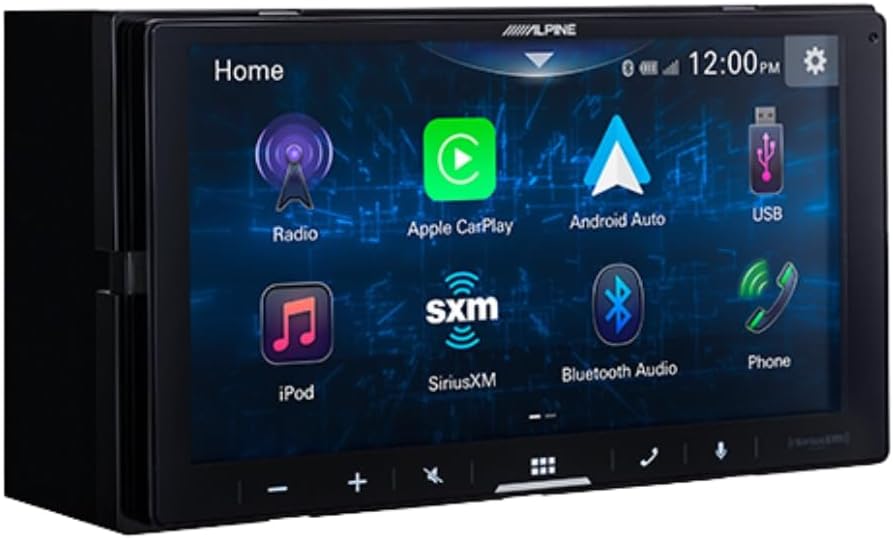
Figura 3: Alpine ILX-W670-S home screen displaying various application icons. This image shows the customizable interface with options for Radio, Apple CarPlay, Android Auto, USB, iPod, SiriusXM, Bluetooth Audio, and Phone.
Funciones de audio
- Ecualizador: Utilize the 13-band graphic EQ to fine-tune audio frequencies to your preference.
- Corrección de tiempo: The 6-channel time correction feature allows for precise adjustment of sound delivery to each speaker, optimizing the sound stage.
- Cruces: Adjust front, rear, and subwoofer crossovers to manage frequency distribution to your speakers.
- Menú de refuerzo de sonido: Access dedicated controls for bass, mid-bass, and subwoofer output.
- Formatos de audio compatibles: The unit supports AAC, FLAC, MP3, and WMA audio playback.
Conectividad
- Apple CarPlay y Android Auto: Connect your compatible smartphone via USB for wired access to navigation, music, messaging, and other apps directly on the receiver's screen.

Figura 4: Alpine ILX-W670-S display showing the Apple CarPlay interface. This image illustrates the integration of smartphone applications like Phone, Music, Maps, Messages, and Podcasts onto the receiver's screen.
- Bluetooth: Empareje su teléfono inteligente para realizar llamadas manos libres y transmisión de audio inalámbrica.
- Compatible con SiriusXM: The unit is compatible with SiriusXM satellite radio (requires a separate SiriusXM Connect Vehicle Tuner and subscription).
- Entrada auxiliar: Conecte dispositivos de audio externos mediante la entrada auxiliar de 3.5 mm.
- Entrada USB: Use the USB port for media playback or smartphone connectivity.
- Control del volante (SWC): Integrate with your vehicle's factory steering wheel controls using a compatible adapter connected to the 3.5mm mini jack.
Reproducción de vídeo
The receiver supports various video formats including MP4, MKV, MOV, H.264, FLV, MPEG-4, and AVC. Video playback is typically restricted while the vehicle is in motion for safety reasons.
Operación de la cámara de respaldo
Cuando el vehículo se pone en reversa, la pantalla cambiará automáticamente a la cámara. view, providing a 155-degree wide-angle perspective. The camera has a low light sensitivity of 0.5 lux, ensuring visibility in various lighting conditions.
Mantenimiento
- Limpieza de pantalla: Utilice un paño suave y sin pelusa para limpiar suavemente la pantalla táctil. Para manchas difíciles, limpie ligeramenteampEnjuague el paño con agua o un limpiador de pantallas. Evite materiales abrasivos o productos químicos agresivos.
- Cuidado general: Mantenga la unidad libre de polvo y residuos. Asegúrese de que todas las conexiones estén bien sujetas.
- Limpieza de la cámara: Limpie periódicamente la lente de la cámara con un paño suave para garantizar una imagen nítida. view.
Solución de problemas
| Problema | Posible causa | Solución |
|---|---|---|
| No hay energía en la unidad | Fusible quemado; cableado incorrecto; conexión de alimentación suelta. | Revise los fusibles del vehículo y el fusible de la unidad. Verifique las conexiones de alimentación y tierra. Asegúrese de que el encendido esté activado. |
| No hay salida de sonido | Volume too low; mute activated; speaker wires disconnected; incorrect audio source selected. | Increase volume. Check if mute is active. Verify speaker wiring. Select the correct audio source. |
| Apple CarPlay/Android Auto no se conecta | Faulty USB cable; phone not compatible; software issue; phone settings. | Use a high-quality, certified USB cable. Ensure your phone's OS is updated. Check phone settings for CarPlay/Android Auto permissions. Restart phone and receiver. |
| La cámara de respaldo no se muestra | Camera power issue; video cable disconnected; vehicle not in reverse. | Ensure vehicle is in reverse. Check camera power connection (to reverse lights). Verify video cable connection to the receiver. |
| La pantalla táctil no responde | Fallo temporal del software; daño en la pantalla. | Reinicie la unidad (apague y encienda el vehículo). Si el problema persiste, contacte con el servicio de asistencia. |
Presupuesto
Alpine ILX-W670-S Digital Multimedia Receiver
- Mostrar: 6.75-inch capacitive touchscreen (800 x 480 resolution)
- Iluminación clave: 5-color customizable (red, green, blue, amber, white)
- Ampmás duradero: Built-in 16W RMS / 45W peak x 4 channels
- Procesamiento de audio: 13-band graphic EQ, 6-channel time correction, Sound Boost menu, Front/Rear/Subwoofer crossovers
- Salidas previas: 3 pairs (Front, Rear, Subwoofer) at 4V
- Entradas: 1x AUX (3.5mm), 1x USB, 1x Camera, SWC adapter via 3.5mm mini jack
- Conectividad: Wired Apple CarPlay, Wired Android Auto, Bluetooth (hands-free calling & audio streaming), SiriusXM-ready
- Formatos de audio compatibles: AAC, FLAC, MP3, WMA
- Formatos de vídeo compatibles: MP4, MKV, MOV, H.264, FLV, MPEG-4, AVC
- Dimensiones: 8.75 x 6 x 7 pulgadas (Producto)
- Peso: 3.4 libras
BULCAMC-1 Backup Bullet Camera
- Sensor: CMOS
- Resolución: 420 líneas
- Iluminación mínima: 0.5 lux
- View Ángulo: 155 grados
- Clasificación de impermeabilidad: IP67-68
- Temperatura de funcionamiento: -30 a 70 ℃ (-22 a 158 ℉)
Información de garantía
Alpine products are manufactured to high-quality standards. For specific warranty terms and conditions, please refer to the warranty card included with your product or visit the official Alpine webSitio. Conserve su comprobante de compra para reclamaciones de garantía.
Apoyo
For further assistance, technical support, or to download the latest firmware updates, please visit the official Alpine websitio en www.alpine-usa.com. You may also contact Alpine customer service directly for personalized support.