
Introducción
This manual provides detailed instructions for the operation and maintenance of your NUISK SPSJ-4k Dual Screen Sports Camera. Designed for capturing dynamic moments, this compact camera features 4K video recording, electronic image stabilization, and versatile mounting options. Please read this manual thoroughly to ensure proper use and to maximize your camera's performance.
¿Qué hay en la caja?
The NUISK SPSJ-4k package includes the following items:
- NUISK SPSJ-4k Dual Screen Sports Camera
- Estuche impermeable
- Colgante Magnético
- Various Mounting Accessories (e.g., clip, quick release base, neck bracket, small hole adapter, bandage)
- Cable de carga USB-C
- 128GB Micro SDXC Memory Card
- Manual de instrucciones
- Paño de limpieza

This image displays the complete set of items included with your NUISK SPSJ-4k camera, such as the camera unit, waterproof housing, magnetic necklace mount, various clips and adapters for different surfaces, a USB charging cable, and the user manual.
Producto terminadoview
The NUISK SPSJ-4k is a compact and versatile action camera designed for various activities. It features dual screens for easy framing and control, along with robust video capabilities.
Características principales:
- Magnetic Hands-Free Mounting: Securely attaches to clothing or accessories for POV recording.
- Diseño de bolsillo: Ligero y portátil para fácil transporte.
- Smooth 4K Footage with EIS Stabilization: Reduces shake for clear and professional-looking videos.
- Capacidad impermeable: Submersible up to 98ft (30m) with the included waterproof case.
- Accesorios versátiles: Includes mounts for hats, chest, bikes, and more.
- Pantallas duales: Front and rear screens for flexible viewing y control.
- Conectividad Wi-Fi: Connects to a smartphone app for remote control and file transferir.
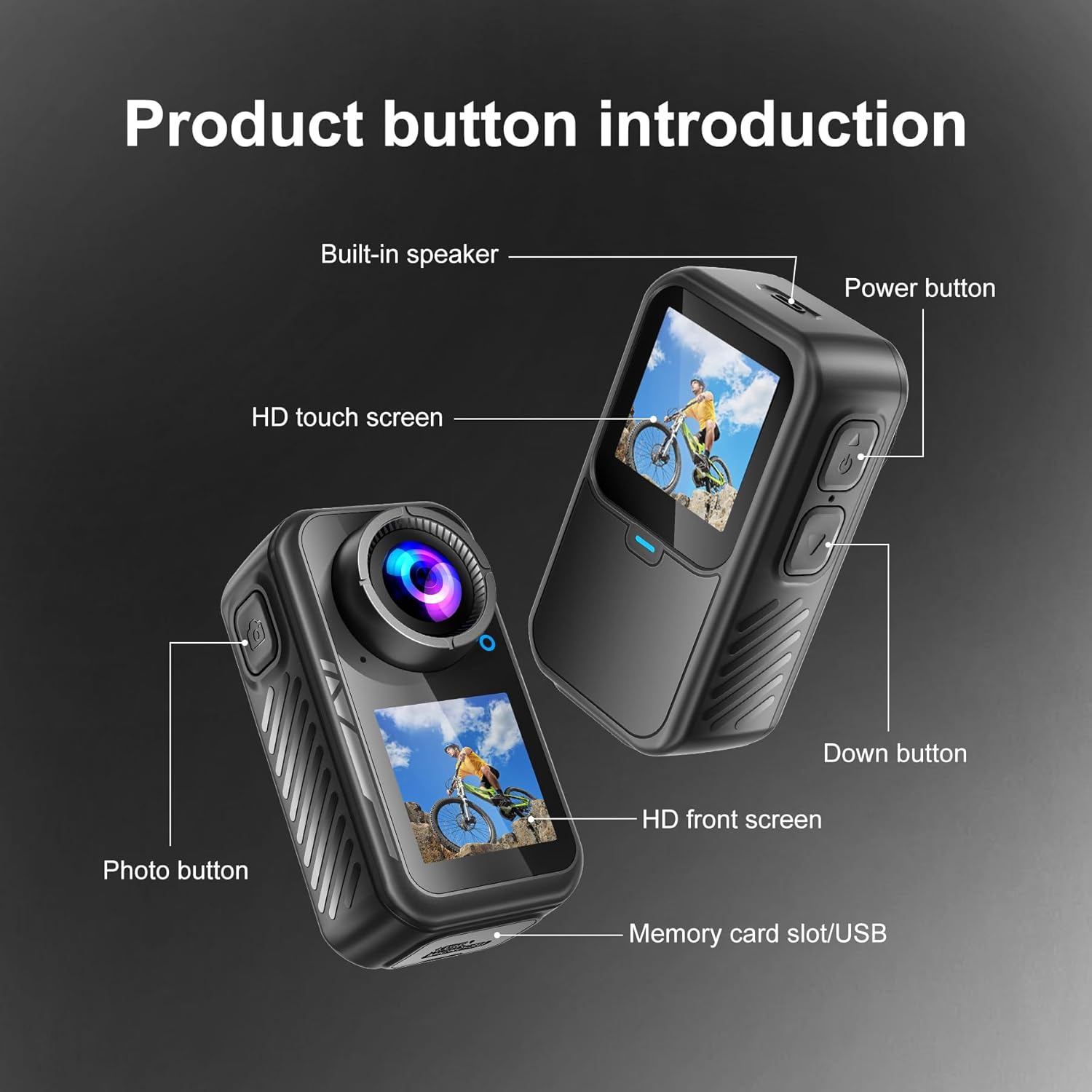
This diagram highlights the key physical features of the camera, including the power button, photo button, HD touch screen, HD front screen, built-in speaker, and the memory card slot/USB port.
Configuración
- Carga inicial: Connect the camera to a power source using the provided USB-C charging cable. The camera will indicate charging status on its screen.
- Inserte la tarjeta Micro SD: Locate the memory card slot (often near the USB port, as shown in Figure 2). Insert the 128GB Micro SDXC card (included) into the slot until it clicks. Ensure the card is inserted correctly to avoid damage.
- Encendido: Press and hold the Power button (refer to Figure 2) to turn on the camera.
- Configuración de idioma, fecha y hora: Upon first use, the camera may prompt you to set the language, date, and time. Use the touchscreen or navigation buttons to select your preferences. It is recommended to set the correct date and time for accurate video timestamps.
- Formatear tarjeta SD: For optimal performance and to ensure compatibility, it is recommended to format the SD card directly on the camera. Navigate to the settings menu and select the "Format SD Card" option. Confirm your selection. Nota: El formateo borrará todos los datos de la tarjeta.
- Connect to Mobile App (Optional):
- Download the official NUISK app from your smartphone's app store.
- On the camera, navigate to the Wi-Fi settings and enable Wi-Fi. The camera screen may display a QR code or network name (SSID) and password.
- En su teléfono inteligente, conéctese a la red Wi-Fi de la cámara.
- Open the NUISK app. You should now be able to control the camera remotely and view/descargar medios.
- Coloque los accesorios de montaje: Depending on your activity, select the appropriate mounting accessory.
- For underwater use, place the camera inside the waterproof case and secure it.
- For hands-free POV recording, attach the magnetic pendant or chest strap.
- Utilize other clips and adapters for helmets, bicycles, or other surfaces as needed.
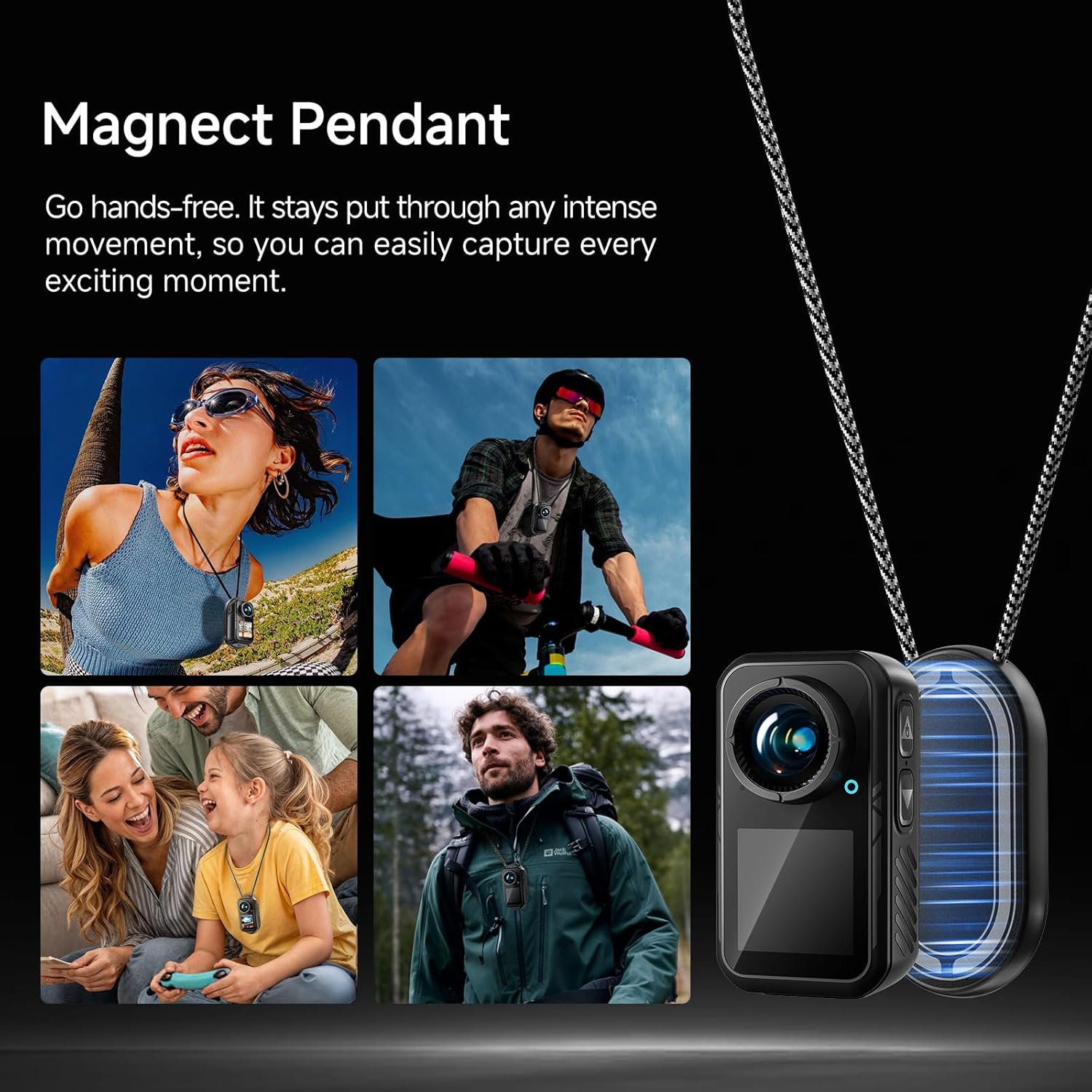
The magnetic pendant allows for secure, hands-free attachment of the camera to your clothing, ensuring stable capture during various activities.

The included waterproof case protects the camera, allowing it to be submerged up to 98 feet (30 meters) for capturing aquatic adventures.
Instrucciones de funcionamiento
1. Funcionamiento básico
- Encendido/apagado: Press and hold the Power button (top right button) to turn the camera on or off.
- Navegación en pantalla: The camera features an HD touchscreen for intuitive navigation. Swipe up, down, left, or right to access different menus and settings.
- Cambiar de pantalla: Long-press the 'Down' button (bottom right button) to switch between the rear HD touchscreen and the front HD screen.
- Iniciar/Detener grabación: Press the Photo button (top left button) to start or stop video recording, or to capture a photo.
2. Modos de grabación
The camera offers various recording modes to suit different needs:
- Vídeo normal: Grabación de vídeo estándar.
- Cámara lenta: Captura vídeo a una velocidad de cuadros más alta para reproducción en cámara lenta.
- Grabación de bucle: Graba vídeo continuamente, sobrescribiendo los archivos más antiguos.tage cuando la tarjeta de memoria está llena.
- Video Time-lapse (V-Timelapse): Records a sequence of video frames at set intervals to create a time-lapse video.
- Foto única: Captures a single still image.
- Foto ráfaga: Toma múltiples fotografías en rápida sucesión.
- Self-Timer Photo: Retrasa la captura de fotografías por un período de tiempo determinado.
- Photo Time-lapse (P-Timelapse): Captura una serie de imágenes fijas a intervalos establecidos.
3. Configuración de vídeo e imagen
Access the settings menu via the touchscreen to adjust:
- Resolución de vídeo: Select from options like 4K/60fps, 4K/30fps, 2.7K/60fps, 2.7K/30fps, 1080P/60fps, 1080P/30fps, 720P/120fps, 720P/60fps, etc.
- Calidad del vídeo: Adjust the compression level for video files.
- Image Stabilization (EIS): Enable or disable Electronic Image Stabilization for smoother footage.
- Balance de blancos: Adjust color temperature for accurate color reproduction in different lighting conditions.
- Filtrar: Apply various visual filters to your footage.
- Rotación de imagen: Ajustar la orientación de la imagen.
- Nivel de retroiluminación: Controlar el brillo de la pantalla.
- Frecuencia: Set the power line frequency (50Hz/60Hz) to avoid flickering in recorded video.

The dedicated smartphone app allows for remote control of the camera, live preview de comidatage, and convenient downloading of videos and photos directly to your phone.
Mantenimiento
- Limpieza: Use the provided cleaning cloth or a soft, lint-free cloth to gently wipe the camera lens and screens. Avoid abrasive materials or harsh chemicals.
- Cuidado de la funda impermeable: After using the waterproof case in water, rinse it with fresh water and allow it to air dry. Inspect the seals for any debris or damage before each use to ensure water tightness.
- Cuidado de la batería: Charge the camera regularly, even when not in use, to maintain battery health. Avoid extreme temperatures.
- Almacenamiento: Store the camera and accessories in a cool, dry place away from direct sunlight and dust.
Solución de problemas
- La cámara no se enciende: Asegúrese de que la batería esté cargada. Conecte la cámara a la corriente y vuelva a intentarlo.
- Error de tarjeta SD: Reformat the SD card via the camera's settings menu. If the issue persists, try a different compatible Micro SDXC card.
- Foo temblorosotage: Ensure Electronic Image Stabilization (EIS) is enabled in the settings. For best results, hold the camera as steady as possible or use appropriate mounts.
- Poor Low-Light Performance: Action cameras generally perform best in well-lit conditions. Ensure adequate lighting for optimal video quality.
- La pantalla táctil no responde: Gently clean the screen. If unresponsive, try restarting the camera.
- Problemas de conexión Wi-Fi: Ensure the camera's Wi-Fi is enabled and your smartphone is connected to the correct network. Restart both the camera and the app if necessary.
Presupuesto
| Característica | Detalle |
|---|---|
| Marca | NUISK |
| Número de modelo | SPSJ-4k |
| Peso del artículo | 13.7 onzas |
| Dimensiones del producto | 1.26 x 1.46 x 2.7 pulgadas |
| Baterías | 1 batería no estándar (incluida) |
| Color | Negro |
| Características especiales | Anti-Shake (EIS), Internal Memory |
| Tecnología de fotosensor | Otro |
| Resolución de captura de video | 4K |
| Distancia focal máxima | 30 milímetros |
| Apertura máxima | 2.8 f |
| Tipo de memoria flash | Micro SDXC |
| Formato de captura de video | MP4 |
| Formato de audio compatible | MP4 |
| Tamaño de pantalla | 1.3 pulgadas |

This image illustrates the compact size of the camera, with a length of 2.7 inches (68.5mm), width of 1.46 inches (37.1mm), and depth of 1.26 inches (32mm), weighing only 2.33 ounces.
Garantía y soporte
Specific warranty details are not provided in the product information. For warranty claims, technical support, or further assistance, please refer to the contact information provided with your purchase or visit the official NUISK websitio.