
1. Introducción
This user manual provides detailed instructions for the T&G Portable Bluetooth Speaker, model TG116C. Designed for exceptional audio performance, this compact speaker delivers crystal-clear sound and powerful bass, making it ideal for various indoor and outdoor environments. Please read this manual thoroughly before using the product to ensure proper operation and longevity.
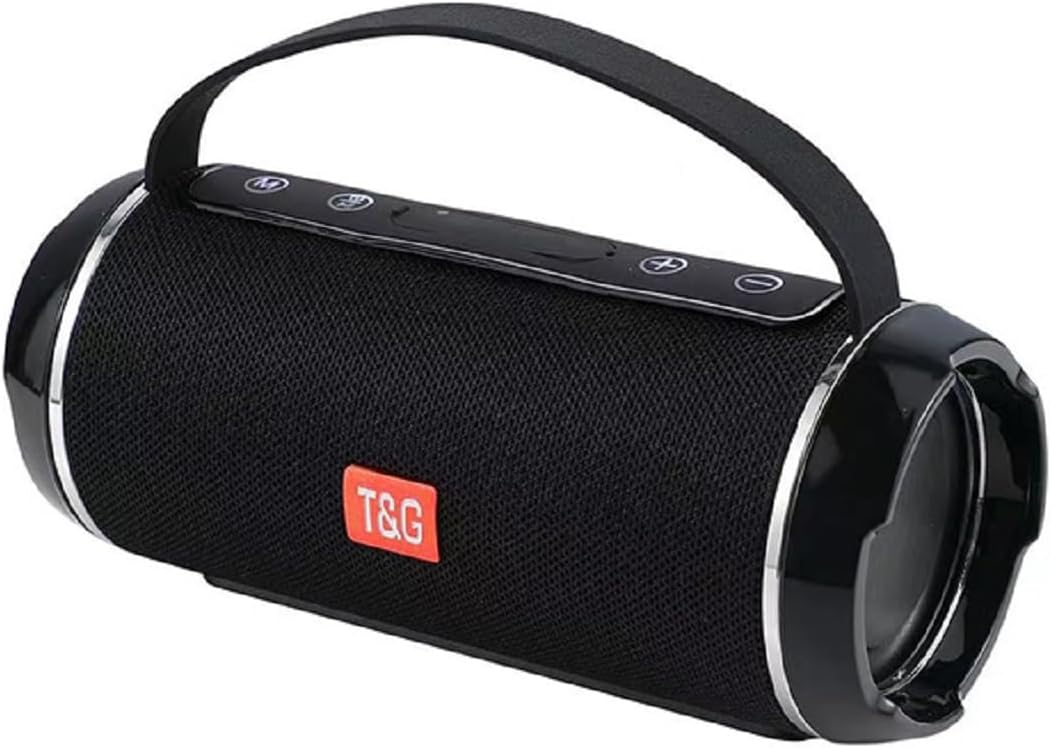
Figure 1: T&G Portable Bluetooth Speaker TG116C
2. Características principales
- Immersive HD Sound with Deep Bass: Experience crystal-clear audio and powerful, distortion-free bass from this compact Bluetooth speaker. Advanced dual-driver technology and passive radiators deliver rich, balanced sound across all frequencies.
- Sonido envolvente de 360°: Designed to fill any room with sound, providing an immersive listening experience.
- Diseño portátil y compacto: Measuring just 3.2" tall and 7.08" wide, this lightweight speaker fits easily in bags or backpacks. Features a convenient carry lanyard for on-the-go convenience.
- Batería de larga duración: Enjoy up to 50 hours of nonstop music with a high-capacity lithium battery. Smart power-saving technology auto-adjusts consumption and enables deep sleep when idle.
- Carga rápida: USB-C fast charging delivers 5 hours of playtime in just 10 minutes.
- Grado de impermeabilidad IPX4: This speaker is splash-proof, making it suitable for outdoor adventures, beach trips, and poolside use. Note: IPX4 protects against splashes from any direction; it is not designed for full immersion.
- Conectividad versátil: Supports Bluetooth for wireless freedom, as well as AUX input, USB, and MicroSD card playback.
- Emparejamiento True Wireless Stereo (TWS): Connect two TG116C speakers wirelessly for an enhanced stereo sound experience.

Figure 2: IPX4 Waterproof Grade - Splash Resistant

Figure 3: Compact Product Dimensions (7.08" x 3.14" x 3.14")
3. Contenido del paquete
Por favor revise el paquete para ver los siguientes artículos:
- T&G Portable Bluetooth Speaker (TG116C)
- Cable de carga USB-C
- Cable de audio de 3.5 mm (AUX)
- Manual de usuario
4. Controles y puertos
Familiarícese con los controles y puertos del altavoz:
- Botón de encendido (⑂): Pulsación larga para encender/apagar. Pulsación corta para reproducir/pausar.
- Botón de modo (M): Presione brevemente para cambiar entre los modos Bluetooth, AUX, USB y MicroSD.
- Bajar volumen / Pista anterior (-): Pulsación corta para bajar el volumen. Pulsación larga para ir a la pista anterior.
- Subir volumen / Pista siguiente (+): Pulsación corta para subir el volumen. Pulsación larga para pasar a la siguiente pista.
- Puerto de carga USB-C: Para cargar el altavoz.
- Puerto USB-A: Para reproducción de unidad USB.
- Ranura para tarjeta microSD: Para reproducción de tarjeta MicroSD.
- Entrada AUX (3.5 mm): Para conexión de audio por cable.
Figura 4: Sobreview of Speaker Controls and Ports (refer to product for exact layout)
5. Configuración
5.1 Carga del altavoz
- Conecte el cable de carga USB-C provisto al puerto USB-C del altavoz.
- Conecte el otro extremo del cable a un adaptador de corriente USB (no incluido) o al puerto USB de una computadora.
- The charging indicator light will illuminate. Once fully charged, the light will change or turn off (refer to specific product behavior).
- A full charge provides up to 50 hours of playtime. For quick power, 10 minutes of charging can provide 5 hours of playtime.
5.2 Encendido / Apagado
- Para encender: Mantenga presionado el botón de encendido (⑂) until you hear a power-on prompt or see the indicator lights illuminate.
- Para apagar: Mantenga presionado el botón de encendido (⑂) again until you hear a power-off prompt or the indicator lights turn off.
5.3 Emparejamiento Bluetooth
- Ensure the speaker is powered on and in Bluetooth mode (indicated by a flashing blue light or voice prompt "Bluetooth Mode"). If not, short press the Mode (M) button to switch.
- En su dispositivo móvil (teléfono inteligente, tableta, computadora), habilite Bluetooth.
- Buscar available Bluetooth devices. The speaker will appear as "TG116C" or similar.
- Select "TG116C" to connect. Once paired, you will hear a confirmation sound or voice prompt, and the Bluetooth indicator light will become solid.
- El altavoz intentará automáticamente reconectarse al último dispositivo emparejado cuando se encienda.
5.4 Emparejamiento estéreo inalámbrico verdadero (TWS)
To achieve a true stereo sound experience, you can pair two TG116C speakers together:
- Ensure both TG116C speakers are powered on and in Bluetooth mode, but not connected to any device.
- On one of the speakers (this will be your primary speaker), long press the Mode (M) button until you hear a pairing sound, indicating TWS pairing mode.
- Los dos altavoces se buscarán y se conectarán automáticamente. Una vez conectados, oirá un sonido de confirmación.
- Ahora, conecta tu dispositivo móvil al altavoz principal mediante Bluetooth, como se describe en la Sección 5.3. Ambos altavoces reproducirán audio en estéreo.

Figure 5: TWS Pairing for 3D Stereo Sound

Figure 6: TWS Pairing for Enhanced Bass
6. Instrucciones de funcionamiento
6.1 Reproducción de música
- Modo Bluetooth: After successful pairing, open your music app and start playback. Use the speaker's Power button for play/pause.
- Modo AUX: Connect one end of the 3.5mm audio cable to the speaker's AUX input and the other end to your audio device's headphone jack. Short press the Mode (M) button to switch to AUX mode.
- USB/MicroSD Mode: Insert a USB drive into the USB-A port or a MicroSD card into its slot. The speaker will automatically switch to the respective mode and begin playing supported audio files. If not, short press the Mode (M) button.
6.2 Control de volumen y navegación de pistas
- Sube el volumen: Presione brevemente el botón '+'.
- Bajar volumen: Presione brevemente el botón '-'.
- Pista siguiente: Mantenga presionado el botón '+'.
- Pista anterior: Mantenga presionado el botón '-'.
6.3 Call Functionality (Bluetooth Mode)
- Responder llamada: Presione brevemente el botón de encendido (⑂) cuando suena una llamada entrante.
- Finalizar llamada: Presione brevemente el botón de encendido (⑂) durante una llamada.
- Rechazar llamada: Mantenga presionado el botón de encendido (⑂) cuando suena una llamada entrante.
7. Mantenimiento y cuidado
- Limpieza: Use a soft, dry cloth to clean the speaker. Do not use abrasive cleaners, alcohol, or chemical solvents.
- Resistencia al agua: The speaker is IPX4 rated, meaning it is protected against splashing water from any direction. Do not submerge the speaker in water or expose it to strong jets of water. Ensure the port cover is securely closed before exposing to water.
- Almacenamiento: Store the speaker in a cool, dry place away from direct sunlight and extreme temperatures. If storing for a long period, charge the battery periodically to maintain its lifespan.
- Evitar impactos: Do not drop the speaker or subject it to strong impacts, as this may damage internal components.
8. Solución de problemas
| Problema | Posible causa | Solución |
|---|---|---|
| El altavoz no se enciende. | Batería baja; el botón de encendido no se presionó el tiempo suficiente. | Charge the speaker for at least 30 minutes. Long press the Power button for 3-5 seconds. |
| No se puede emparejar con un dispositivo Bluetooth. | Speaker not in pairing mode; Device Bluetooth off; Too far from speaker; Already connected to another device. | Ensure speaker is in Bluetooth mode (flashing light). Turn device Bluetooth off/on. Move device closer (within 10m). Disconnect from other devices. |
| No hay sonido o volumen bajo. | Volume too low on speaker/device; Incorrect mode selected; Cable not fully inserted (AUX). | Increase volume on both speaker and device. Press Mode (M) button to select correct input. Ensure AUX cable is fully inserted. |
| Distorsión de sonido. | Volumen demasiado alto; Dispositivo demasiado lejos del altavoz; Interferencia. | Lower volume. Move device closer. Move away from other electronic devices. |
| El emparejamiento de TWS falló. | Speakers already paired to a device; Not in TWS pairing mode. | Ensure both speakers are disconnected from any Bluetooth devices. Long press the Mode (M) button on one speaker to initiate TWS pairing. |
9. Especificaciones
| Característica | Detalle |
|---|---|
| Marca | T&G |
| Nombre del modelo | TG116C |
| Tecnología de conectividad | Inalámbrico (Bluetooth) |
| Tecnología de comunicación inalámbrica | Bluetooth |
| Tipo de altavoz | Exterior |
| Característica especial | Bass Boost, Hi Res Audio, Waterproof, auto speaker setup, dolby trueHD |
| Usos recomendados del producto | Interior/exterior |
| Fuente de poder | Funciona con pilas |
| Dimensiones del producto | 7.09" de profundidad x 3.15" de ancho x 3.15" de alto |
| Peso del artículo | 1.22 libras |
| Color | Negro |
| Recuento de unidades | 1.0 Conteo |
| Fabricante | T&G |
10. Garantía y soporte
The T&G Portable Bluetooth Speaker TG116C comes with a standard manufacturer's warranty. Please refer to the product packaging or the official T&G webSitio para conocer los términos y condiciones específicos de la garantía.
For technical support, troubleshooting assistance, or warranty claims, please contact T&G customer service through their official channels. Contact information can typically be found on the product packaging or the brand's official websitio.
Nota: Conserve el recibo de compra como comprobante de compra para fines de garantía.