
1. Introducción
The CUBOT Kingkong 11 is a rugged 5G smartphone designed for durability and high performance. It features a powerful processor, extensive memory, a large battery, and an advanced camera system, all housed in a robust, water-resistant, and dustproof body.
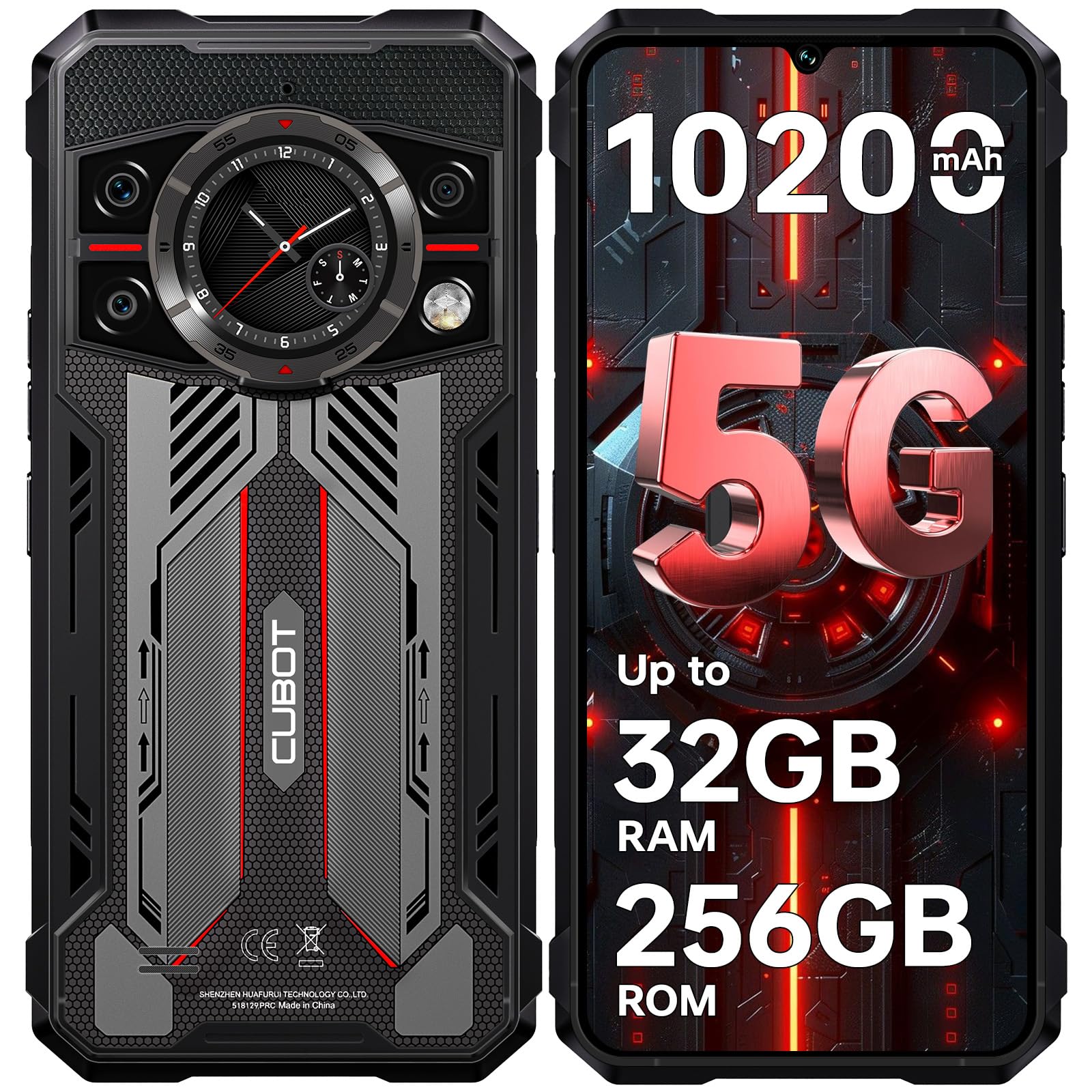
Imagen: Anverso y reverso view of the CUBOT Kingkong 11 5G smartphone, highlighting its rugged design.
2. Configuración inicial
2.1. Inserción de tarjetas SIM y tarjetas MicroSD
The CUBOT Kingkong 11 supports dual SIM cards and a MicroSD card for expanded storage.
- Localice la bandeja de la tarjeta SIM en el costado del dispositivo.
- Utilice la herramienta de expulsión de SIM proporcionada para abrir la bandeja.
- Coloque con cuidado las tarjetas Nano-SIM y/o MicroSD en las ranuras designadas. Asegúrese de que estén correctamente orientadas.
- Empuje suavemente la bandeja dentro del dispositivo hasta que quede al ras con el costado.

Image: Close-up of the CUBOT Kingkong 11 showing the SIM card tray with waterproof seals.
2.2. Encendido y carga inicial
- Press and hold the power button located on the side of the device until the CUBOT logo appears.
- For first-time use, it is recommended to fully charge the device. Connect the USB-C cable to the phone and the 33W fast charger to a power outlet.
- El indicador de batería en la pantalla mostrará el estado de carga.

Image: Illustration of the 10200mAh battery capacity and 33W fast charging capability of the CUBOT Kingkong 11.
2.3. Configuración de software
Follow the on-screen prompts to complete the initial setup, including language selection, Wi-Fi connection, Google account login, and security settings (Face ID/Fingerprint).
3. Operación
3.1. Sistema operativo Android 15
The CUBOT Kingkong 11 runs on Android 15, offering an intuitive user interface and enhanced features. Navigate through apps, customize settings, and utilize smart functions for an optimized experience.

Image: Screenshot of the Android 15 operating system interface on the CUBOT Kingkong 11.
3.2. Pantalla principal (6.72" FHD+ 120 Hz)
The 6.72-inch FHD+ display provides vibrant visuals with a 120Hz refresh rate for smooth scrolling and gaming. The 1080x2400 resolution ensures clear and detailed content viewEn.

Image: Visual representation of the 6.72-inch FHD+ display with 120Hz refresh rate on the CUBOT Kingkong 11.
3.3. Rear Smart Display (1.46")
The 1.46-inch rear smart display provides quick access to essential information such as time, notifications, battery status, and compass without activating the main screen. This feature is useful for quick glances during activities.

Image: The 1.46-inch rear smart display of the CUBOT Kingkong 11, showing widgets for clock, camera, music, battery, calls, compass, and alarm.
3.4. Sistema de cámara
The device features a versatile quad-camera system:
- Cámara principal de 108 MP: Captures high-resolution photos with impressive detail.
- Cámara frontal de 32 MP: For high-definition selfies and video calls.
- Cámara de visión nocturna de 24 MP: Equipped with infrared LEDs for clear imaging in complete darkness.
- Lente macro de 8MP: Allows for close-up photography, capturing intricate details of small subjects.

Imagen: Más alláview of the CUBOT Kingkong 11's quad-camera system, including the 108MP main, 32MP front, 24MP night vision, and 8MP macro lenses, with examplas fotos.
3.5. Conectividad y navegación
The Kingkong 11 supports 5G full-band connectivity for fast data speeds. It includes NFC for contactless payments and data transfer, and a quadruple positioning system (GPS+GLONASS+BeiDou+Galileo) for accurate navigation.

Image: Graphic illustrating the CUBOT Kingkong 11's 5G ultra-fast global coverage and connectivity features.
4. Mantenimiento
4.1. Durabilidad y protección
The CUBOT Kingkong 11 is certified with IP68/IP69K for dust and water resistance, and MIL-STD-810H for shock resistance. It can withstand submersion in water up to 5 meters for 30 minutes.
- Resistencia al agua: Ensure all ports (USB-C, SIM tray) are properly sealed before exposing the device to water. After exposure to water, dry the device thoroughly before charging.
- Resistencia al polvo: The device is designed to prevent dust ingress. Clean any accumulated dust from ports and crevices using a soft, dry brush.
- Resistencia a los golpes: While rugged, avoid intentional drops or impacts from extreme heights to preserve the device's integrity.

Image: Visual representation of the CUBOT Kingkong 11's IP68, IP69K, and MIL-STD-810H certifications for water, dust, and shock resistance.
4.2. Limpieza
Use a soft, lint-free cloth to clean the screen and body of the phone. For stubborn smudges, a slightly damp Se puede utilizar un paño y secarlo inmediatamente.
5. Solución de problemas
5.1. El dispositivo no se enciende
- Asegúrese de que la batería esté cargada. Conecte el cargador y espere unos minutos antes de intentar encenderla de nuevo.
- Mantenga presionado el botón de encendido durante al menos 10 a 15 segundos para realizar un reinicio forzado.
5.2. Poor Performance/Lag
- Cierre las aplicaciones en segundo plano innecesarias.
- Borre los datos de caché de las aplicaciones utilizadas con frecuencia.
- Asegúrese de que haya suficiente espacio de almacenamiento disponible. Considere trasladar objetos grandes files a la tarjeta MicroSD o al almacenamiento en la nube.
- Reinicie el dispositivo periódicamente.
5.3. Problemas de carga
- Verifique que el cable de carga y el adaptador estén conectados de forma segura y sin daños.
- Intente utilizar un cargador y un cable compatibles diferentes.
- Check the USB-C port for any debris or obstruction.
5.4. Problemas de conectividad de red
- Asegúrese de que las tarjetas SIM estén correctamente insertadas y activadas.
- Check network settings (e.g., APN settings) with your service provider.
- Activa y desactiva el modo avión.
- Reinicie el dispositivo.
6. Especificaciones
| Característica | Detalle |
|---|---|
| Marca | Cubot |
| Modelo | Cubot Kingkong 11 |
| Sistema operativo | Androide 15 |
| Procesador | 5G Dimensity 7025 Octa-Core |
| RAM | Up to 32 GB (16 GB physical + 16 GB extended) |
| Almacenamiento interno | 256 GB |
| Almacenamiento expandible | Hasta 1 TB mediante tarjeta MicroSD |
| Pantalla principal | 6.72 inches FHD+ (1080x2400), 120Hz refresh rate, 450 nits brightness |
| Pantalla trasera | 1.46 inches Smart Display |
| Cámara principal | 108 MP |
| Cámara frontal | 32 MP |
| Cámara de visión nocturna | 24 MP with IR LED |
| Lente macro | 8 MP |
| Capacidad de la batería | 10200 mAh |
| Cargando | Carga rápida de 33 W, carga inversa OTG |
| Conectividad | 5G, NFC, Doble SIM |
| Navegación | GPS + GLONASS + BeiDou + Galileo |
| Durabilidad | IP68/IP69K, MIL-STD-810H (Water resistant up to 5m for 30 min) |
| Seguridad | Face ID, sensor de huellas dactilares |
| Dimensiones | 22.4 x 17.3 x 4.2 cm (Paquete) |
| Peso | 700 g (Paquete) |

Image: Energy label for the CUBOT Kingkong 11, showing battery life and durability ratings. View Hoja de información del producto EPREL
7. Garantía y soporte
CUBOT offers a comprehensive support package for the Kingkong 11:
- Devoluciones: Devoluciones sin complicaciones dentro de los 30 días posteriores a la compra.
- Garantía: A two-year warranty covers manufacturing defects.
- Apoyo técnico: Long-term technical assistance is available.
- Servicio al cliente: 24/7 online customer service is provided for any inquiries during your ownership.
For assistance, please contact CUBOT customer service through their official channels.