
1. Información importante de seguridad
Lea todas las instrucciones de seguridad antes de usar este producto. Si no las sigue, podría sufrir una descarga eléctrica, un incendio o lesiones.
- Do not expose the power bank to extreme temperatures (above 45°C or below 0°C) or direct sunlight.
- Do not disassemble, modify, or repair any part of the power bank.
- Mantenga el banco de energía alejado del agua u otros líquidos.
- No deje caer, perfore ni aplique fuerza excesiva sobre el banco de energía.
- Asegúrese de que haya una ventilación adecuada durante el uso y la carga.
- This power bank is CCC Certified and includes 9 safety mechanisms: overcharge, overcurrent, short circuit, overvoltage, over-discharge, overheat, recovery, overpower, and flame-retardant casinprotección g.

Image: Advanced safety protection features of the VENTION Power Bank.
2. Producto terminadoview
The VENTION 45W 20000mAh Power Bank is a portable charging solution designed for various electronic devices. It features a high-capacity battery, fast charging capabilities, and a compact design for travel convenience.
- Carga de alta velocidad de 45 W: Supports Power Delivery (PD) and PPS protocols for rapid charging of compatible devices.
- Capacidad de 20000 mAh: Provides multiple charges for smartphones and tablets, and can partially charge laptops.
- Cable USB-C incorporado: Integrated USB-C cable for convenient charging without needing an extra cable. This cable also functions as a lanyard.
- Pantalla digital LED: Muestra el porcentaje de batería restantetage.
- Múltiples puertos de salida: Includes an additional USB-C port (45W output) and a USB-A port (22.5W output) for charging up to three devices simultaneously.
- Diseño compacto y portátil: Smaller than many smartphones, making it easy to carry in pockets or bags.

Image: The VENTION 45W 20000mAh Power Bank.

Image: The compact size of the VENTION Power Bank compared to a smartphone.

Image: The built-in USB-C cable also serves as a convenient lanyard.
3. Contenido del paquete
El paquete incluye los siguientes artículos:
- 1 x VENTION 45W 20000mAh Power Bank
- 1 x bolsa con cordón
- 1 x Manual de usuario
4. Especificaciones
| Característica | Especificación |
|---|---|
| Marca | VENCIÓN |
| Nombre del modelo | FHGH0 |
| Número de modelo | FHG |
| Capacidad de la batería | 20000 miliamp Horas (77Wh) |
| Tipo de celda de la batería | Polímero de litio |
| Peso de la batería | 254 gramos |
| Entrada (cable USB-C integrado) | 5 V = 3 A, 9 V = 3 A, 12 V = 2.5 A, 15 V = 2 A, 20 V = 1.5 A (30 W máx.) |
| Entrada (puerto USB-C) | 5 V = 3 A, 9 V = 3 A, 12 V = 2.5 A, 15 V = 2 A, 20 V = 1.5 A (30 W máx.) |
| Salida (cable USB-C integrado) | 5 V = 3 A, 9 V = 3 A, 12 V = 3 A, 15 V = 3 A, 20 V = 2.25 A (45 W máx.) |
| Salida (puerto USB-C) | 5 V = 3 A, 9 V = 3 A, 12 V = 3 A, 15 V = 3 A, 20 V = 2.25 A (45 W máx.) |
| Salida (puerto USB-A) | 5 V = 3 A, 9 V = 2.5 A, 12 V = 1.87 A (22.5 W máx.) |
| Producción total | 5 V = 3 A |
| Dimensiones (largo x ancho x grosor) | 6.1"L x 4.3"W x 1.4"Th (10.35 x 7.14 cm) |
| Característica especial | Slim, LED Digital Display, Built-in USB-C Cable |
| Color | Gris |
5. Configuración
5.1 Carga inicial del banco de energía
Before first use, fully charge the power bank to ensure optimal performance. The LED digital display will show the battery percentage. A full charge is indicated by 100% on the display.
- Conecte el cable USB-C incorporado o un cable USB-C separado al puerto de entrada del banco de energía.
- Conecta el otro extremo del cable a un cargador de pared USB compatible (no incluido). Para una carga más rápida, usa un cargador compatible con PD de 30 W o superior.
- La pantalla LED mostrará el progreso de la carga.
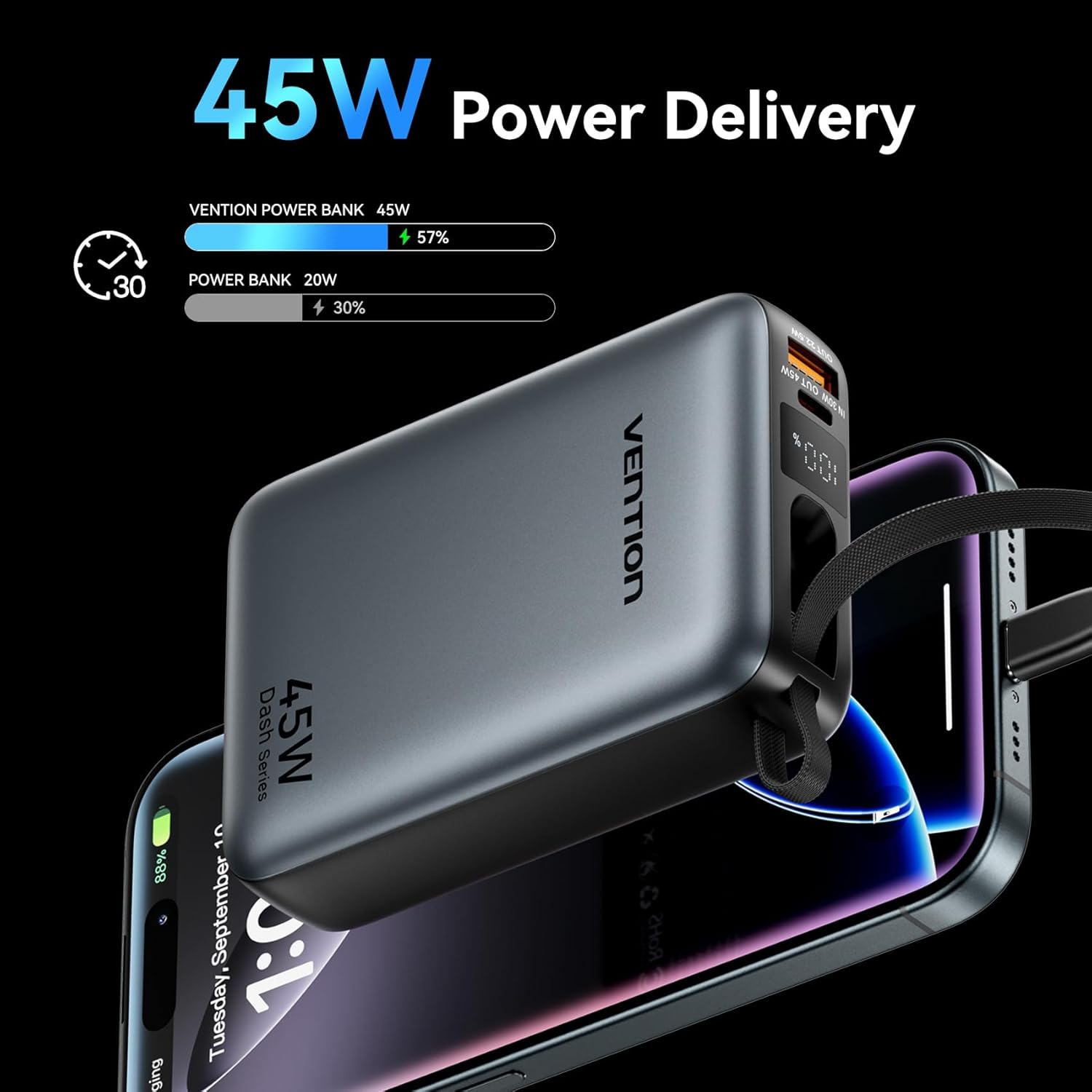
Image: The power bank's LED display showing charging status.
6. Instrucciones de funcionamiento
6.1 Dispositivos de carga
The power bank can charge various devices using its built-in USB-C cable, dedicated USB-C port, or USB-A port.
- Uso del cable USB-C incorporado: Pull out the integrated USB-C cable from its storage slot and connect it directly to your device's USB-C charging port.
- Usando el puerto USB-C: Connect a compatible USB-C to USB-C cable (not included) to the power bank's USB-C output port and then to your device.
- Usando el puerto USB-A: Connect a compatible USB-A to your device's charging cable (not included) to the power bank's USB-A output port and then to your device.
El banco de energía comenzará a cargar automáticamente su dispositivo. La pantalla LED mostrará el porcentaje de batería restante.tage.
6.2 Carga simultánea
The VENTION Power Bank supports charging up to three devices concurrently using its built-in USB-C cable, USB-C port, and USB-A port. Note that the total output will be shared among the devices, and charging speed may vary depending on the number of devices and their power requirements.

Image: Charging three devices simultaneously with the power bank.

Image: The built-in USB-C cable ready for use.
7. Mantenimiento y cuidado
Proper maintenance ensures the longevity and performance of your power bank.
- Limpieza: Limpie la batería externa con un paño suave y seco. No utilice productos químicos agresivos ni materiales abrasivos.
- Almacenamiento: Guarde el banco de energía en un lugar fresco y seco, alejado de la luz solar directa y de temperaturas extremas.
- Estado de la batería: To maintain optimal battery health, fully charge the power bank at least once every 3-6 months, even if not in use. Avoid completely discharging the battery frequently.
- Control de temperatura: The power bank features smart temperature control to prevent overheating during operation and charging.

Image: Smart temperature control system for safe operation.
8. Solución de problemas
If you encounter issues with your VENTION Power Bank, refer to the following common problems and solutions:
- El banco de energía no carga:
- Asegúrese de que el cable de carga esté conectado de forma segura tanto al banco de energía como al cargador de pared.
- Verifique que el cargador de pared esté funcionando correctamente y proporcione suficiente energía (por ejemplo, cargador PD de 30 W).
- Pruebe con un cable de carga o un adaptador de pared diferente.
- El dispositivo no se carga desde el banco de energía:
- Compruebe si el banco de energía tiene suficiente carga.
- Ensure the cable connecting the power bank to your device is securely connected and compatible.
- Pruebe con un puerto diferente en el banco de energía o con un cable de carga diferente.
- Some devices may require specific charging protocols; ensure your device is compatible with the power bank's output.
- Carga lenta:
- Ensure your device supports fast charging protocols (PD/PPS) and that you are using a compatible cable.
- Charging speed may decrease as the power bank's battery level increases to protect the device.
- Charging multiple devices simultaneously can reduce the charging speed for each individual device.
9. Garantía y soporte
VENTION products are designed and manufactured to the highest quality standards. For warranty service or support, please contact VENTION directly.
- Websitio: www.ventiontech.com
- Correo electrónico: vention@ventiontech.com