
1. Introducción
The M-Vave SMK-37 Pro is a versatile musical instrument that combines the functionality of a modern MIDI controller with the sound capabilities of a classic FM synthesizer. Designed for both studio and mobile musicians, this device features 37 velocity-sensitive keys and a comprehensive set of controls, offering flexibility through wireless or USB connectivity.
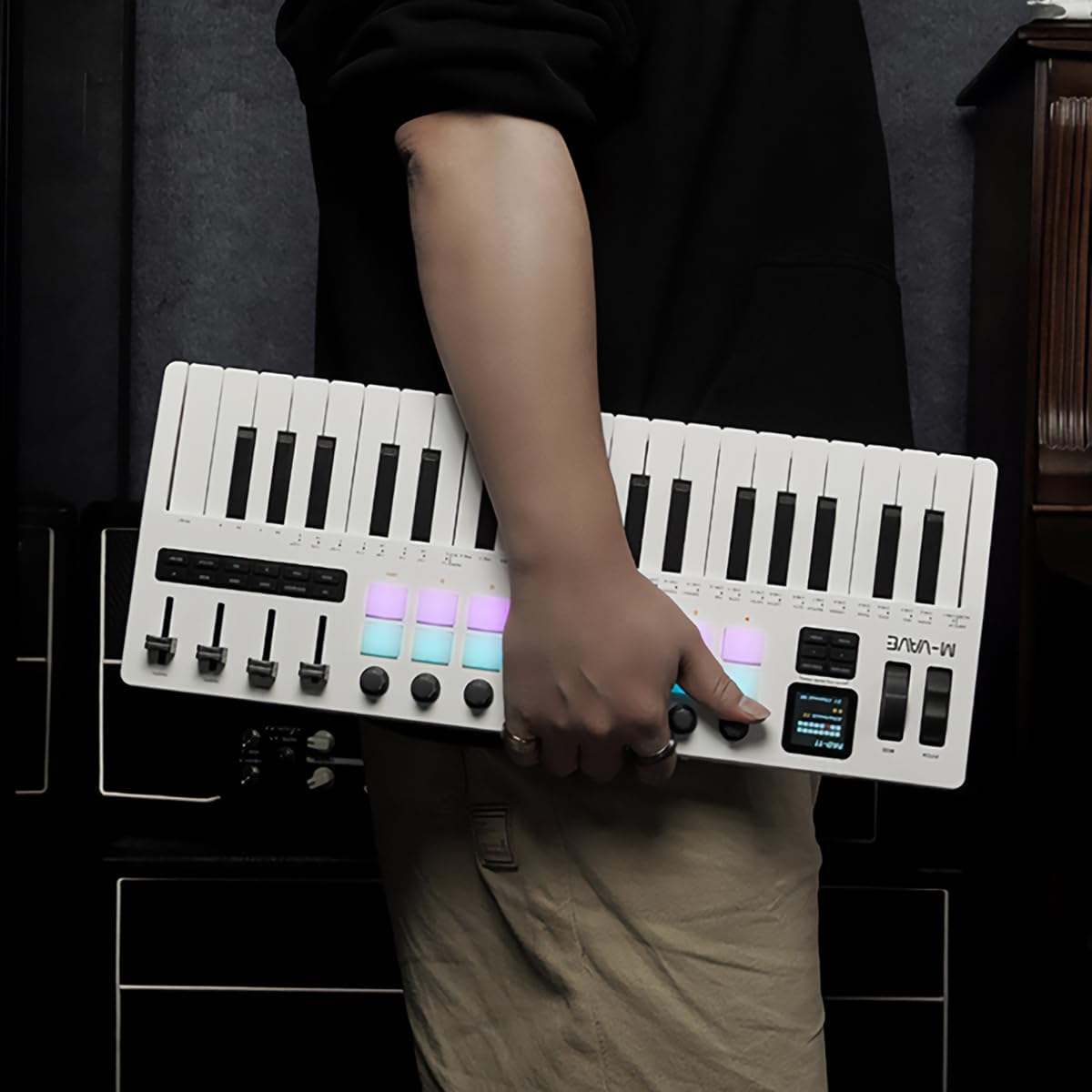
Figure 1.1: The M-Vave SMK-37 Pro is designed for portability, allowing musicians to create on the go.
2. Producto terminadoview
The SMK-37 Pro is engineered to provide extensive control and sound generation capabilities. Below is an overview de sus características y componentes clave.
2.1 Características principales
- 37 velocity-sensitive keys (3 octaves) for expressive play.
- Built-in FM synthesizer engine, inspired by the Yamaha DX7.
- 16 RGB illuminated drum pads for beat making and sampel desencadenamiento.
- 8 assignable rotary knobs and 4 assignable faders for real-time control.
- USB-C connectivity for power and data, alongside Bluetooth 5.0 and 2.4G wireless MIDI.
- Integrated 2000mAh rechargeable battery for up to 8 hours of portable use.
- 1.54-inch color display for clear parameter feedback.
- Pitch bend and modulation wheels for dynamic performance.
- Octave transform and Smart Chord functions.
2.2 Identificación de componentes

Figura 2.1: Frente view of the SMK-37 Pro, highlighting the keyboard, pads, and control surface.
- Teclado: 37 velocity-sensitive keys.
- almohadillas: 16 RGB illuminated drum pads.
- Perillas: 8 assignable rotary encoders.
- Faders: 4 assignable faders.
- Mostrar: 1.54-inch color screen for parameter visualization.
- Pitch/Mod Wheels: For expressive control.

Figure 2.2: Rear panel of the SMK-37 Pro, showing connectivity options.
- Puerto USB-C: For charging and USB MIDI connection.
- Botón de encendido: Para encender/apagar el dispositivo.
- Salida de audio: For monitoring the built-in FM synthesizer.
3. Configuración
Follow these steps to set up your M-Vave SMK-37 Pro.
3.1 Carga del dispositivo
- Connect the included USB-C cable to the USB-C port on the rear of the SMK-37 Pro.
- Conecte el otro extremo del cable USB-C a un adaptador de corriente USB compatible (no incluido) o al puerto USB de una computadora.
- The device will begin charging. A full charge provides up to 8 hours of operation.
3.2 Encendido / Apagado
- To power on, press and hold the Power button on the rear panel until the display illuminates.
- Para apagar, mantenga presionado el botón de encendido hasta que la pantalla se apague.
3.3 Opciones de conectividad
The SMK-37 Pro offers multiple ways to connect to your devices.
3.3.1 Conexión MIDI USB
- Connect the SMK-37 Pro to your computer using the USB-C cable.
- The device will be recognized as a standard MIDI input/output device by your operating system (Windows, macOS, iOS, Android).
- For Windows users, ensure you have Bluetooth 5.0 and an appropriate BLE MIDI driver installed for wireless functionality.
3.3.2 Wireless MIDI Connection (Bluetooth 5.0 / 2.4G)

Figure 3.1: Wireless connection guide for the SMK-37 Pro.
- Ensure the SMK-37 Pro is powered on.
- Activate Bluetooth on your Windows, macOS, iOS, or Android device.
- Buscar available Bluetooth devices and select "SMK-37 Pro" from the list.
- For 2.4G wireless MIDI, a compatible 2.4G receiver (sold separately) may be required. Refer to the receiver's instructions for pairing.
4. Instrucciones de funcionamiento
This section details how to use the M-Vave SMK-37 Pro as both a MIDI controller and a standalone FM synthesizer.

Figure 4.1: The SMK-37 Pro in use, showcasing its interactive controls.
4.1 MIDI Controller Mode
The SMK-37 Pro functions as a universal MIDI controller, compatible with various Digital Audio Workstations (DAWs) and software instruments.
- Connecting to DAWs: Once connected via USB or wirelessly, select "SMK-37 Pro" as a MIDI input device in your DAW's preferences (e.g., Ableton Live, FL Studio, Logic Pro, GarageBand).
- Assigning Controls: The 16 RGB pads, 8 knobs, and 4 faders can be assigned to control parameters within your DAW or VST instruments. Refer to your DAW's manual for MIDI mapping instructions.
- Keys and Wheels: The 37 velocity-sensitive keys, pitch bend, and modulation wheels transmit standard MIDI messages for expressive performance.
4.2 Built-in FM Synthesizer Mode
The SMK-37 Pro features an integrated FM synthesizer engine, allowing you to create and play sounds directly from the device without external software.

Figure 4.2: The SMK-37 Pro's internal sound source can be monitored via headphones or external speakers.
- Sound Generation: The FM synth engine is inspired by the legendary Yamaha DX7, supporting DX7 patches.
- Control de parámetros: Use the onboard knobs and faders to edit synthesizer parameters such as algorithms, filters, envelopes, and effects. The 1.54-inch color display provides visual feedback on parameter values.
- Gestión de parches: Sounds can be played, edited, and stored directly on the device. Consult the on-screen menu for patch selection and saving procedures.
- Salida de audio: Connect headphones or external speakers to the audio output jack on the rear panel to monitor the synthesizer's sound.
4.3 Pantalla y navegación

Figure 4.3: The 1.54-inch display provides clear feedback on settings and parameters.
The 1.54-inch color display is your primary interface for navigating menus, adjusting parameters, and viewing patch information. Use the dedicated navigation buttons and rotary encoders near the display to browse options and confirm selections.
4.4 Funciones especiales
- Octave Transform: Use the dedicated octave buttons to shift the keyboard's range up or down.
- Función de acorde inteligente: This feature assists in playing chords with single key presses. Refer to the on-screen menu for activation and configuration.
- Arpegiador: The built-in arpeggiator can generate rhythmic patterns from held notes. Settings for mode, octave, swing, tempo, and latch can be adjusted via the display.
5. Mantenimiento
Proper care will ensure the longevity and optimal performance of your SMK-37 Pro.
- Limpieza: Utilice un paño suave y seco para limpiar la superficie del dispositivo. Para la suciedad difícil, utilice un paño ligeramente seco.amp Se puede usar un paño y luego uno seco. Evite limpiadores abrasivos o disolventes.
- Almacenamiento: Guarde el dispositivo en un lugar fresco y seco, alejado de la luz solar directa, temperaturas extremas y alta humedad.
- Manejo: Evite dejar caer el dispositivo o someterlo a impactos fuertes. No coloque objetos pesados sobre él.
- Cuidado de la batería: Para una vida útil óptima de la batería, evite descargarla completamente con frecuencia. Si la va a guardar durante períodos prolongados, cárguela aproximadamente al 50 % cada pocos meses.
6. Solución de problemas
If you encounter issues with your M-Vave SMK-37 Pro, refer to the following common solutions.
| Problema | Posible causa | Solución |
|---|---|---|
| El dispositivo no se enciende. | Batería baja o cable de alimentación no conectado. | Charge the device using the USB-C cable. Ensure the power button is pressed and held correctly. |
| No sound from the built-in synth. | Volume too low, headphones/speakers not connected, or incorrect patch selected. | Check the volume level on the device and connected audio equipment. Ensure headphones or speakers are properly connected to the audio output. Select a different patch. |
| MIDI not recognized by computer/DAW. | Incorrect connection, driver issues (Windows), or DAW settings. | Ensure USB-C cable is securely connected or Bluetooth is paired. For Windows, verify Bluetooth 5.0 and BLE MIDI driver installation. Check your DAW's MIDI input settings to ensure SMK-37 Pro is enabled. |
| Conexión inalámbrica inestable. | Interferencia, distancia o batería baja. | Move the device closer to your host device. Ensure no other wireless devices are causing interference. Charge the SMK-37 Pro. |
| Pads or keys are unresponsive. | Software issue or device malfunction. | Restart the device. If the issue persists, perform a factory reset (refer to advanced settings in the display menu). Contact support if the problem continues. |
7. Especificaciones
Detailed technical specifications for the M-Vave SMK-37 Pro.
- Nombre del modelo: M-Vave SMK-37 Midikeyboard w/built-in Synth
- Número de modelo: MVA-SMK37 Pro
- Llaves: 37 velocity-sensitive keys (3 octaves)
- almohadillas: 16 RGB illuminated drum pads
- Controles: 8 rotary knobs, 4 faders, Pitch bend, Modulation wheel
- Mostrar: Pantalla a color de 1.54 pulgadas
- Conectividad: USB-C, Bluetooth 5.0, 2.4G wireless MIDI
- Batería: Batería recargable incorporada de 2000 mAh
- Duración de la batería: Hasta 8 horas (aproximadamente)
- Sintetizador: Built-in FM synthesizer (DX7-based)
- Compatibilidad: Windows, macOS, iOS, Android
- Software compatible: Ableton Live, FL Studio, Logic Pro, GarageBand, Carl Martin Studio (and other DAWs)
- Componentes incluidos: Cable USB
- Peso del artículo: 1 kilogramos
8. Garantía y soporte
For warranty information and technical support, please contact M-VAVE customer service through their official webSitio web o su distribuidor. Conserve el recibo de compra como comprobante.
- Soporte en línea: Visita la página oficial de M-VAVE webSitio para preguntas frecuentes, descargas de controladores e información de contacto.
- Registración del producto: Registre su producto en línea para recibir actualizaciones y soporte.