
MFVLP LC210
MFVLP LC210 Smart Watch User Manual
Su guía completa de configuración, funcionamiento y funciones.
1. Introducción
Welcome to the MFVLP LC210 Smart Watch user manual. This guide provides detailed instructions to help you set up, operate, and maintain your new smartwatch. The MFVLP LC210 is designed to enhance your daily life with its advanced features, including a vibrant AMOLED display, Bluetooth calling, comprehensive health monitoring, and a wide range of sports modes. Please read this manual thoroughly to ensure optimal performance and longevity of your device.
2. ¿Qué hay en la caja?
Upon unboxing your MFVLP LC210 Smart Watch, please verify that all the following items are included:
- Smart Watch * 1
- Magnetic charger * 1
- Manual de usuario * 1 (Este documento)
- Black Watch Band * 1
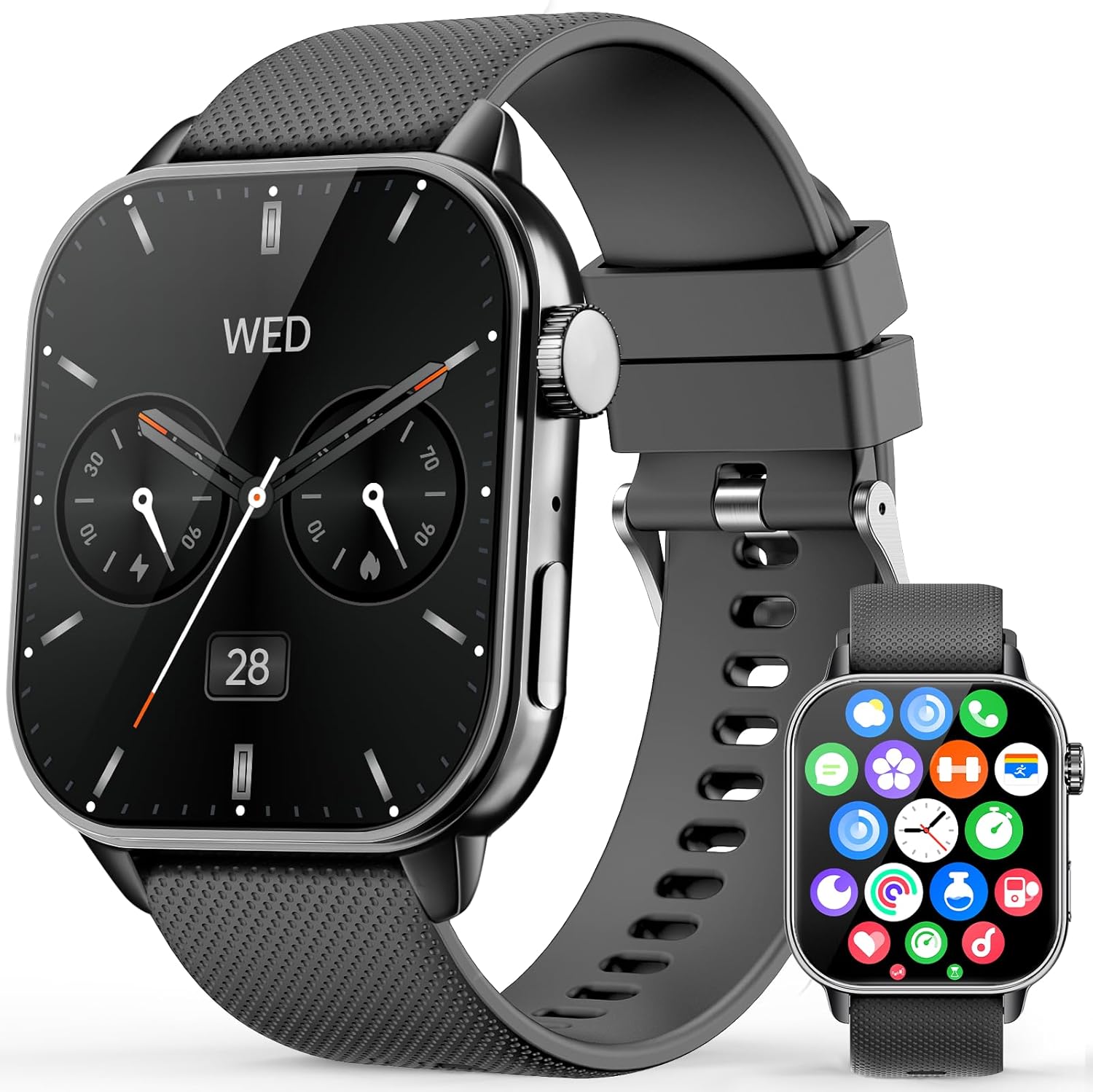
Image: The MFVLP LC210 Smart Watch, magnetic charger, and user manual as typically found in the box.
3. Guía de configuración
3.1 Carga inicial
Before first use, fully charge your MFVLP LC210 Smart Watch. Connect the magnetic charger to the charging points on the back of the watch and plug the USB end into a power adapter (not included) or a computer's USB port. A full charge typically takes approximately 2 hours.

Image: The smartwatch connected to its magnetic charging cable, illustrating the charging process.
3.2 Descarga y emparejamiento de la aplicación
To unlock the full potential of your MFVLP LC210 Smart Watch, download and install the "Da Fit" application on your smartphone. The app is compatible with both Android (5.0 or above) and iOS (9.0 or above) devices.
- Habilitar Bluetooth: Ensure Bluetooth is turned on in your phone's settings.
- Descargar "Da Fit": Scan the QR code provided in the watch's packaging or search for "Da Fit" in the Google Play Store (for Android) or Apple App Store (for iOS). You can also visit http://plus.crrepa.com/app-download/dafit.
- Abrir la aplicación y agregar el dispositivo: Launch the "Da Fit" app, navigate to the "Add Device" section, and select "LC210" from the list of available devices.
- Confirmar emparejamiento: Follow the on-screen prompts on both your phone and watch to confirm the Bluetooth pairing. Grant necessary permissions for notifications and health data synchronization.

Image: Visual guide demonstrating the steps to connect the smartwatch to your phone using the Da Fit app.
Video: A demonstration on how to operate a smartwatch, including app pairing and basic navigation, applicable to the MFVLP LC210.
3.3 Configuración inicial
Once paired, you can customize settings such as language, time format (12-hour or 24-hour), and unit system (metric or imperial) directly through the "Da Fit" app or on the watch itself.
4. Funcionamiento del reloj inteligente
4.1 Navegación básica
- Pantalla táctil: Swipe left, right, up, or down to navigate through menus and access different functions. Tap to select.
- Botón lateral/corona: Press the side button to return to the home screen or wake the display. Rotate the crown to scroll through menus and lists.

Image: Close-up of the smartwatch highlighting the rotating encoder crown for easy navigation.
4.2 Esferas de reloj
The MFVLP LC210 offers over 190 watch faces through the "Da Fit" app. You can also customize your watch face using your own photos. Long-press the home screen to quickly change watch faces directly on the device.

Image: A selection of available watch faces for the MFVLP LC210, including options for custom photo backgrounds.
4.3 Pantalla siempre activa (AOD)
The watch features an Always-On Display (AOD) for instant time checks without needing to raise your wrist. Note that enabling this function may slightly reduce battery life.

Image: The smartwatch displaying the time with its Always-On Display feature active.
5. Características principales
5.1 Notificaciones de llamadas y mensajes por Bluetooth
Equipped with a Bluetooth 5.3 chip, built-in microphone, and HD waterproof speaker, the LC210 allows you to make and receive calls directly from your wrist. You can also receive notifications from various apps (SMS, WhatsApp, Facebook, Twitter, etc.) to stay connected without constantly checking your phone.

Image: The smartwatch showing incoming call and message notifications, demonstrating its communication features.
5.2 Asistente de voz
Utilize the integrated voice assistant for hands-free control. Simply activate the feature and issue commands for tasks like setting alarms, checking the weather, or initiating calls.

Image: The smartwatch screen displaying the voice assistant interface, ready for commands.
5.3 Control de música
Control your smartphone's music playback directly from your watch. Play, pause, skip tracks, and adjust volume, ideal for workouts or when your phone is out of reach.
5.4 Control de cámara
Use your smartwatch as a remote shutter for your phone's camera, making it easier to capture group photos or selfies.
5.5 Other Daily Tools
The LC210 includes over 15 practical tools such as Weather Forecast, Calculator, Stopwatch, Timer, Alarm, World Clock, Flashlight, Phone Finder, Women's menstrual cycle reminder, and Sedentary & Hydration Reminders.

Image: A collage of smartwatch screens showing various useful functions including weather, music control, and remote camera shutter.
6. Monitoreo de la salud
The MFVLP LC210 is equipped with advanced optical sensors for comprehensive 24/7 health monitoring.
6.1 Monitoreo de la frecuencia cardíaca
Continuously monitors your heart rate in real-time, providing insights into your cardiovascular health throughout the day and during exercise.

Image: The smartwatch displaying a heart rate graph and current BPM, indicating active heart rate monitoring.
6.2 Seguimiento del sueño
Automatically tracks your sleep duration and analyzes sleep quality, differentiating between light sleep, deep sleep, and awake periods to help you improve your sleeping habits.

Image: The smartwatch displaying sleep data, including duration of deep sleep, light sleep, and awake time.
6.3 Monitoreo de oxígeno en sangre (SpO2)
Measures your blood oxygen levels, allowing you to monitor this important health indicator anytime and anywhere.

Image: The smartwatch displaying blood oxygen levels with maximum and minimum readings.
6.4 Stress Level Measurement
Monitors your stress levels throughout the day. If high stress is detected, the watch can guide you through stress relief exercises.

Image: The smartwatch displaying a stress level graph, indicating daily stress fluctuations.
6.5 Seguimiento de la salud de la mujer
Provides accurate tracking and reminders for women's menstrual cycles, offering personalized care and insights.

Image: The smartwatch displaying a calendar interface for tracking menstrual cycles.
7. Modos deportivos y seguimiento de actividad
The MFVLP LC210 is your ideal fitness companion, offering extensive tracking capabilities for various physical activities.
7.1 Más de 120 modos deportivos
Choose from over 120 built-in sports modes, including running, walking, cycling, yoga, dance, and more. The watch adapts to various activity scenarios to accurately record your performance.

Image: The smartwatch interface showing different sports modes and activity metrics like calories, distance, and steps.
7.2 Seguimiento de actividad durante todo el día
Continuously records your daily activity data, including steps taken, distance covered, and calories burned. This data helps you monitor your progress and achieve your fitness goals.

Image: The smartwatch displaying a summary of daily activity, including steps, calories, and distance.
8. Resistencia al agua (IP68)
The MFVLP LC210 Smart Watch boasts an IP68 waterproof rating, making it resistant to sweat, rain, hand washing, and suitable for swimming in a pool. Avoid hot water, saunas, or diving to prevent damage.

Image: The smartwatch shown in water, illustrating its IP68 waterproof capability for activities like swimming.
9. Duración de la batería
The LC210 features a long-lasting battery. Expect 3-6 days of active use on a single charge and up to 30 days of standby time. Charging is quick, reaching full capacity in approximately 2 hours using the magnetic charger.

Image: Infographic detailing the battery life (3-6 days active, 30 days standby) and charging time (2 hours) of the smartwatch.
10. Especificaciones
| Característica | Detalle |
|---|---|
| Número de modelo | LC210 |
| Mostrar | Pantalla AMOLED HD de 1.85 pulgadas |
| Dimensiones | 42.6 mm x 37.5 mm x 8.8 mm (1.68 pulgadas x 1.48 pulgadas x 0.35 pulgadas) |
| Peso del artículo | 40 gramos (1.41 onzas) |
| Conectividad | Bluetooth 5.3 |
| Resistencia al agua | IP68 |
| Capacidad de la batería | 290 miliamp Horas |
| Compatibilidad del sistema operativo | Android 5.0 o superior, iOS 9.0 o superior |
| Capacidad de almacenamiento de memoria | 128 MB |
| Ancho de la correa | 20mm (0.79in) |
| Circunferencia de la muñeca | 150 mm - 195 mm (5.9 pulgadas - 7.67 pulgadas) |

Image: Detailed diagram showing the dimensions of the MFVLP LC210 Smart Watch and its strap.
11. Mantenimiento
- Limpieza: Limpie regularmente la pantalla y la correa del reloj con un paño suave y seco. Para manchas difíciles, use un paño ligeramente seco.amp paño y jabón suave, luego enjuague y seque completamente.
- Evite los productos químicos: No utilice productos químicos agresivos, disolventes de limpieza ni detergentes fuertes, ya que pueden dañar el acabado y los sellos del reloj.
- Almacenamiento: When not in use for extended periods, store the watch in a cool, dry place. Ensure it has some charge to prevent deep discharge.
- Exposición al agua: While IP68 rated, avoid prolonged submersion in water, especially hot water, and do not press buttons underwater.
12. Solución de problemas
- El reloj no enciende: Asegúrese de que el reloj esté completamente cargado. Conéctelo al cargador magnético durante al menos 10 minutos.
- No se puede emparejar con el teléfono:
- Asegúrese de que Bluetooth esté habilitado en su teléfono.
- Asegúrese de que el reloj esté dentro del alcance de Bluetooth (normalmente 10 metros).
- Reinicie tanto el teléfono como el reloj.
- Compruebe si la aplicación "Da Fit" tiene todos los permisos necesarios.
- Olvide el dispositivo en la configuración de Bluetooth de su teléfono e intente emparejarlo nuevamente.
- Notificaciones no recibidas:
- Verify that app notifications are enabled in the "Da Fit" app settings.
- Ensure your phone's notification settings allow notifications for the "Da Fit" app.
- Comprueba si el modo "No molestar" está activo en tu teléfono o reloj.
- Datos de salud inexactos: Asegúrese de que el reloj esté bien ajustado a su muñeca, ni demasiado apretado ni demasiado suelto. Limpie el sensor de la parte trasera del reloj.
- Duración de la batería corta: Reduce screen brightness, disable unnecessary features like Always-On Display, and limit frequent heart rate monitoring if not needed.
13. Garantía y soporte
MFVLP is committed to providing high-quality products and excellent customer service. Your MFVLP LC210 Smart Watch comes with a Servicio de reemplazo gratuito durante 1 años for manufacturing defects.
For any inquiries, technical assistance, or warranty claims, please contact our customer support. We aim for rapid response within 24 hours and long-term support with satisfactory solutions.
- Servicio al cliente: Refer to the contact information provided in your product packaging or visit the official MFVLP websitio.
- Recursos en línea: Check the MFVLP brand store on Amazon for FAQs and additional support.

Image: Details on MFVLP's quality service support, including rapid response and 1-year free replacement service.
Ask a question about this manual
Ask about setup, troubleshooting, compatibility, parts, safety, or missing instructions. Manuals+ will review the question and use this page’s manual context to help answer it.