
1. Introducción
This manual provides detailed instructions for the installation, operation, and maintenance of your plplaaoo 100A MPPT Solar Charge Controller. This advanced controller is designed to optimize energy harvest from your solar panels and manage battery charging efficiently for 12V, 24V, 36V, and 48V solar power systems. Please read this manual thoroughly before installation and use to ensure proper function and safety.
2. Instrucciones de seguridad
Tenga en cuenta las siguientes precauciones de seguridad durante la instalación y el funcionamiento:
- Asegúrese de que todo el cableado esté conectado correctamente y bien sujeto para evitar conexiones sueltas y sobrecalentamiento.
- Desconecte siempre el panel solar y la energía de la batería antes de instalar o ajustar el controlador.
- Use appropriate tools and wear protective gear, including eye protection, during installation.
- Instale el controlador en un área bien ventilada, lejos de gases y líquidos inflamables.
- No desmonte ni intente reparar el controlador usted mismo. Contacte con personal cualificado para obtener servicio técnico.
- Ensure the battery bank is properly sized and compatible with the controller's voltage y calificaciones actuales.
- Evite provocar cortocircuitos en el panel solar, la batería o los terminales de carga.
3. Características del producto
- Seguimiento del punto de máxima potencia (MPPT): Achieves up to 98% conversion efficiency by intelligently tracking the maximum power point of solar panels under varying conditions.
- Vol automáticotage Adaptation: Automatically detects and adapts to 12V, 24V, 36V, or 48V battery systems.
- Control multifuncional: Supports various operating modes including PWM charging, constant current output, and voltage reglamento.
- Integrated USB and DC Outputs: Features dual 5V 1A USB ports and a 2A DC output for charging external devices.
- Protección integral: Includes safeguards against overvoltage, overcurrent, overtemperature, overload, short circuits, and reverse polarity.
- Interfaz fácil de usar: Equipped with a backlit LCD display for real-time monitoring and intuitive buttons for configuration.
- Construcción duradera: Features an aluminum heatsink for efficient cooling and robust design for harsh environments (0°C to 60°C).
- Compatibilidad de la batería: Compatible with gel, sealed lead-acid, and lithium batteries.
4. Contenido del paquete
- 1 x plplaaoo 100A MPPT Solar Charge Controller
- 1 x Manual de usuario
5. Producto terminadoview y componentes
Familiarize yourself with the main components and interface of the solar charge controller.

Figura 5.1: Frente view of the solar charge controller, highlighting the LCD screen and various connection terminals.
The controller features an intuitive LCD display and clearly labeled ports for easy connection. The display provides real-time information about the system's status.
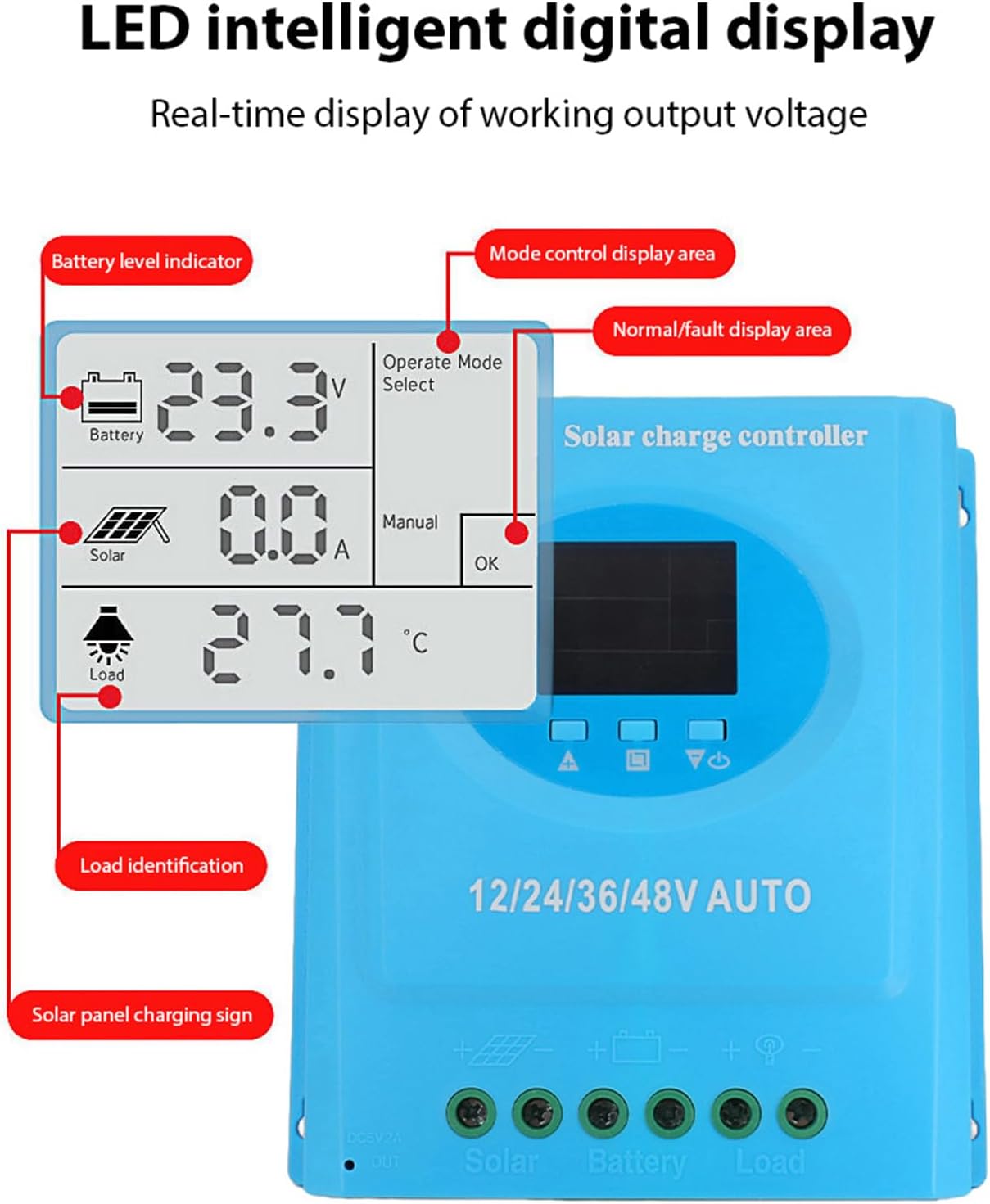
Figura 5.2: Detallado view of the controller's connection ports.

Figura 5.3: Detallado view of the LCD display, indicating battery level, solar panel charging sign, load identification, operating mode, and real-time voltage.
5.1. Puertos de conexión
- Interfaz USB dual: Two 5V 1A USB ports for charging mobile devices.
- Solar Panel Port: Connects to your solar panels (positive and negative).
- Puerto de batería: Connects to your battery bank (positive and negative).
- DC Load Port: Connects to your DC loads (positive and negative).
- Puerto de salida de CC: Additional DC output.
6. Configuración e instalación
Follow these steps for proper installation of the solar charge controller. Ensure all power sources are disconnected before beginning.
6.1. Método de cableado
Conecte los componentes en el siguiente orden para evitar daños:
- Conecte la batería: Connect the battery to the controller's battery terminals (positive to positive, negative to negative). The controller will automatically detect the battery voltage.
- Conecte el panel solar: Connect the solar panel to the controller's solar panel terminals (positive to positive, negative to negative).
- Conecte la carga de CC: Connect the DC load to the controller's load terminals (positive to positive, negative to negative).
Importante: Conecte siempre primero la batería, luego el panel solar y, por último, la carga. Desconecte en orden inverso.

Figura 6.1: Solar energy system wiring diagram. Note the correct polarity for all connections.
6.2. Montaje
Mount the controller vertically on a flat surface in a well-ventilated area, ensuring adequate clearance for air circulation around the heatsink. Avoid direct sunlight, high temperatures, and humid environments.
7. Instrucciones de funcionamiento
Once installed, the controller will automatically begin operating. The LCD display provides real-time system status.
7.1. Información de la pantalla LCD
La pantalla LCD muestra varios parámetros:
- Indicador de nivel de batería: Shows the current charge status of the battery.
- Solar Panel Charging Sign: Indicates when the solar panels are actively charging the battery.
- Identificación de carga: Shows the status of the connected DC load.
- Operating Mode Display Area: Displays the current operating mode (e.g., manual, automatic).
- Área de visualización normal/falla: Indica un funcionamiento normal o muestra códigos de error si se produce una falla.
- Real-time Working Output Voltage: Muestra el volumen actualtage del sistema.
7.2. Funciones de los botones
The controller typically features multiple buttons for navigation and setting adjustments:
- Botón de menú: Used to enter and exit the menu settings.
- Botones arriba / abajo: Used to navigate through menu options and adjust parameter values.
- Botón OK: Used to confirm selections and save settings.
Refer to the on-screen menu for specific parameter adjustments such as battery type, load control mode, and charging thresholds.
8. Mantenimiento
El mantenimiento regular garantiza un rendimiento óptimo y la longevidad de su controlador de carga solar.
- Limpieza: Limpie periódicamente el exterior del controlador con un paño seco para eliminar el polvo y la suciedad. Asegúrese de que las aberturas de ventilación estén despejadas.
- Verificación de conexión: Inspeccione anualmente todas las conexiones del cableado para comprobar su estanqueidad y evitar la corrosión. Vuelva a apretarlas si es necesario.
- Comprobación ambiental: Ensure the installation environment remains within the specified operating temperature range and is free from excessive moisture or dust.
- Inspección de la batería: Revise periódicamente los terminales de la batería para detectar corrosión y asegúrese de que la batería esté en buenas condiciones.
9. Solución de problemas
Si tiene problemas con su controlador de carga solar, consulte los siguientes problemas y soluciones comunes:
| Problema | Posible causa | Solución |
|---|---|---|
| El controlador no se enciende / La pantalla LCD está en blanco |
|
|
| La batería no se carga |
|
|
| La carga no funciona |
|
|
| Código de error mostrado | Fallo específico del sistema. | Refer to the controller's display for the specific error code and consult the full product documentation or contact support for detailed interpretation and resolution. |
10. Especificaciones
| Parámetro | Valor |
|---|---|
| Modelo | plplaaoozi6egog4wm-0A |
| Marca | plplaaoo |
| Corriente nominal | 100A |
| Vol del sistematage | 12V / 24V / 36V / 48V Automatic Adaptation |
| Tipo de carga | MPPT (Maximum Power Point Tracking) |
| Eficiencia de conversión | Hasta el 98% |
| Salida USB | Dual 5V 1A ports |
| Salida DC | 2A |
| Temperatura de funcionamiento | De 0 °C a 60 °C |
| Dimensiones (aprox.) | 19.5 cm x 18.3 cm x 6.8 cm (7.7 pulgadas x 7.2 pulgadas x 2.7 pulgadas) |

Figura 10.1: Approximate dimensions of the solar charge controller.
11. Garantía y soporte
Para obtener información sobre la garantía, asistencia técnica o consultas de servicio, contacte directamente con su distribuidor o el fabricante. Conserve su recibo de compra como comprobante.