
Introducción
This manual provides essential information for the safe and efficient use of your Google Pixel 9 Pro 5G smartphone. Please read these instructions carefully before operating your device.

Figura 1: Frente view of the Google Pixel 9 Pro 5G.
¿Qué hay en la caja?
Verifique que todos los artículos estén presentes en el embalaje:
- Teléfono inteligente Google Pixel 9 Pro
- USB-C to USB-C Cable (1m, USB 2.0)
- Herramienta de expulsión de bandeja SIM
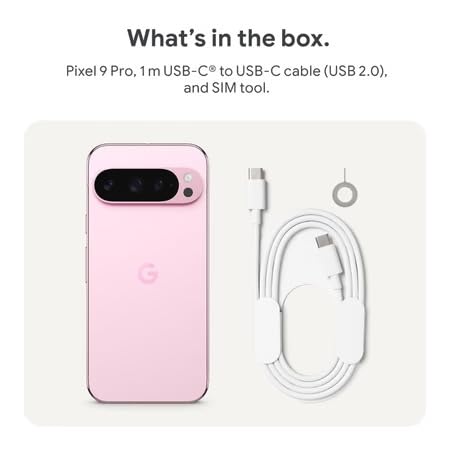
Figure 2: Included items in the Pixel 9 Pro packaging.
Configuración
1. Inserción de la tarjeta SIM
- Locate the SIM tray on the side of your Pixel 9 Pro.
- Inserte la herramienta de expulsión de SIM provista en el pequeño orificio de la bandeja SIM y presione suavemente hasta que la bandeja salga.
- Coloque la tarjeta Nano-SIM en la bandeja con los contactos dorados hacia abajo. Asegúrese de que esté correctamente colocada.
- Empuje con cuidado la bandeja SIM nuevamente dentro del dispositivo hasta que quede al ras.
2. Carga inicial
Antes del primer uso, se recomienda cargar completamente el dispositivo.
- Conecte el cable USB-C al puerto de carga en la parte inferior de su teléfono.
- Connect the other end of the cable to a compatible USB power adapter (sold separately) and plug it into a power outlet.
- El icono de la batería en la pantalla indicará el estado de carga.
3. Encendido / apagado
- Para encender: Press and hold the Power button (located on the right side) until the Google logo appears on the screen.
- Para apagar: Mantenga presionado el botón de Encendido, luego toque “Apagar” en la pantalla.
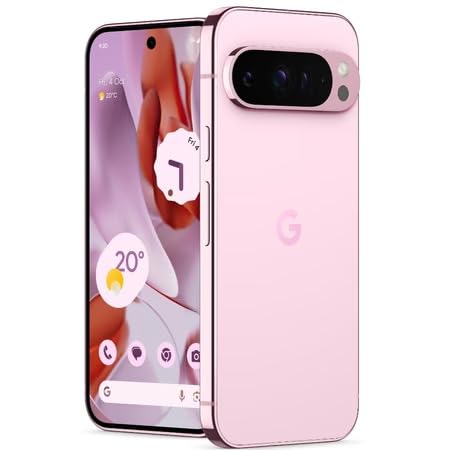
Figure 3: Power and volume buttons on the side of the device.
4. Asistente de configuración inicial
Upon powering on for the first time, follow the on-screen instructions to:
- Seleccione su idioma y región.
- Conectarse a una red Wi-Fi.
- Inicia sesión con tu cuenta de Google o crea una nueva.
- Set up security features such as fingerprint unlock, face unlock, PIN, pattern, or password.
- Transferir datos desde un dispositivo antiguo (opcional).
Instrucciones de funcionamiento
Navegación básica
- Gestos de la pantalla táctil: Interact with the device using taps, swipes, pinches (for zoom), and long presses.
- Pantalla de inicio: Access your applications, widgets, and customize your layout.
- Notificaciones: Deslice hacia abajo desde la parte superior de la pantalla para view notificaciones.
- Ajustes rápidos: Swipe down twice from the top of the screen to access quick settings toggles (Wi-Fi, Bluetooth, etc.).
Operación de la cámara
The Pixel 9 Pro features a powerful triple rear camera system.

Figure 4: Rear camera system of the Pixel 9 Pro.
- Abriendo la cámara: Toque el ícono de la aplicación Cámara en su pantalla de inicio o en la pantalla de bloqueo.
- Cambio de lentes: Tap the icons on the viewfinder to switch between wide, ultrawide, and 5x telephoto lenses.
- Modos de disparo: Select from various modes such as Night Sight for low-light conditions, Astrofotografía for capturing stars, Macro for close-up shots, La exposición a largo for creative effects, and Retrato for depth-of-field effects.
- Super Res Zoom: Pinch the screen to digitally zoom up to 30x. For video, Super Res Zoom supports up to 20x.
- Pro Controls: Access advanced camera settings like shutter speed and manual focus for greater creative control.
Gestión de la batería
- Comprobación del nivel de la batería: View el porcentaje de la bateríatage in the status bar or in Settings > Battery.
- Ahorro de batería extremo: Enable this mode in Settings > Battery > Extreme Battery Saver to significantly extend battery life.
- Cargando: Use the provided USB-C cable and a compatible power adapter for optimal charging speed.
Características de seguridad
Your Pixel 9 Pro incorporates multiple hardware security layers to protect your data.
- Desbloqueo de huella digital: Register your fingerprints in Settings > Security & privacy > Device unlock.
- Desbloqueo facial: Configure el reconocimiento facial para un desbloqueo conveniente.
- PIN/Patrón/Contraseña: Always set a strong screen lock method.
- Actualizaciones de software: Regularly install system updates to ensure your device has the latest security patches.
Sensor de temperatura
The Pixel 9 Pro includes a thermometer for measuring temperature.
- Open the dedicated Thermometer app.
- Follow the on-screen instructions to measure body temperature or the temperature of objects.
- Temperature data can be saved and tracked within the Fitbit application.
Mantenimiento
Limpieza de su dispositivo
- Utilice un paño suave y sin pelusa para limpiar la pantalla y el cuerpo de su teléfono.
- Evite utilizar materiales abrasivos, productos químicos agresivos o aerosoles.
- Do not submerge the device in water, despite its water-resistant rating.
Actualizaciones de software
Google regularly releases software updates to improve performance, add features, and enhance security.
- To check for updates, go to Settings > System > System update.
- Ensure your device is connected to Wi-Fi and has sufficient battery charge before installing updates.
Cuidado físico
The Pixel 9 Pro is built with Corning Gorilla Glass Victus 2 and is water-resistant, offering durability against everyday drops and spills.
- While durable, avoid excessive impacts or drops to prevent damage.
- Consider using a screen protector and a protective case for additional safeguarding.
Solución de problemas
El dispositivo no responde
If your phone becomes unresponsive, perform a force restart:
- Mantenga presionado el botón de encendido durante aproximadamente 10 a 15 segundos hasta que el dispositivo se reinicie.
Las aplicaciones se bloquean o se congelan
- Cierre la aplicación problemática y vuelva a abrirla.
- Clear the app's cache: Go to Settings > Apps > See all apps > [App Name] > Storage & cache > Clear cache.
- Asegúrese de que la aplicación esté actualizada a su última versión desde Google Play Store.
- Reinicia tu teléfono.
Network Connectivity Issues (Wi-Fi/Cellular)
- Toggle Wi-Fi or cellular data off and then back on.
- Reinicia tu teléfono.
- Verifique que su tarjeta SIM esté insertada correctamente.
- Reset network settings: Go to Settings > System > Reset options > Reset Wi-Fi, mobile & Bluetooth.
La batería se agota rápidamente
- Check battery usage in Settings > Battery to identify power-consuming apps.
- Reduce el brillo de la pantalla y la duración del tiempo de espera de la pantalla.
- Disable unnecessary features like GPS, Bluetooth, and Wi-Fi when not in use.
- Enable Extreme Battery Saver mode.
Restablecimiento de fábrica (último recurso)
Warning: A factory reset will erase all data from your phone. Back up all important data before proceeding.
- Vaya a Configuración > Sistema > Opciones de restablecimiento > Borrar todos los datos (restablecimiento de fábrica).
- Confirme su decisión cuando se le solicite.
Presupuesto
| Característica | Detalle |
|---|---|
| Marca | |
| Modelo | Pixel 9 Pro |
| Sistema operativo | Androide 15 |
| Procesador | Google Tensor G4 (3.1 GHz) |
| RAM | 16 GB |
| Almacenamiento interno | 256 GB |
| Mostrar | 6.3 Inches LTPO OLED (Actua), 1280 x 2856 Pixels, 120 Hz Refresh Rate |
| Cámara trasera | 50 MP wide + 48 MP ultrawide (Macro) + 48 MP 5x telephoto |
| Cámara frontal | 42 MP |
| Capacidad de la batería | 4700 miliamp Hours (up to 24 hours average life) |
| Conectividad | 5G, Wi-Fi 7, Bluetooth 5.3, NFC, UWB, USB-C |
| Tarjeta SIM | Nano SIM única |
| Resistencia al agua | Resistente al agua |
| Dimensiones | 8 x 72 x 153 milímetros |
| Peso | 198 gramos |
Garantía y soporte
Información de garantía
Your Google Pixel 9 Pro 5G comes with a 1 año de garantía del fabricante A partir de la fecha de compra. Esta garantía cubre defectos de fabricación en condiciones normales de uso. Conserve su comprobante de compra para reclamaciones de garantía.
Atención al cliente
For technical assistance, warranty claims, or other support inquiries, please contact Google customer service:
- Fabricante: Google LLC, 1600 Amphitheatre Parkway, Montaña View, CA 94043, EE. UU.
- Phone Support (India): +91 7718892303
- Contacto del importador (India): Nexora Axis Private Limited (+91 7718892303)
For the most up-to-date support information, please visit the official Google Pixel support websitio.