
Introducción
This user manual provides detailed instructions for the installation, operation, maintenance, and troubleshooting of your LongPlus 8MP 4K UHD PoE Wired Security Camera Outdoor, Model LP8MEF8. This camera is designed to deliver high-quality surveillance with advanced features for enhanced security. Please read this manual thoroughly before using the product to ensure proper setup and functionality.
¿Qué hay en la caja?
Carefully unpack the box and ensure all items are present and in good condition. If any items are missing or damaged, please contact LongPlus customer support.
- 1 x LongPlus Dome Camera
- 1 x caja de color
- 1 pegatinas de advertencia
- 1 x Adhesivo de posicionamiento
- 1 x Foam Bag/1 x Protective Film
Producto terminadoview
Características principales
- Resolución 4K UHD: Captures video at 3840x2160 pixels with a 132° wide viewing angle and HDR for clear, detailed footage.
- Detección de movimiento por IA: Advanced object detection for humans and vehicles, with customizable activity zones and privacy masks to reduce false alerts.
- Modos de visión nocturna triple: Offers IR Night Vision, Color Night Vision, and Smart Night Vision for clear visibility up to 100ft (30m) in various lighting conditions.
- Two-Way Audio & Strobe Light Alarm: Communicate with visitors or deter intruders using the built-in speaker and microphone, complemented by an automatic strobe light and siren alarm.
- Diseño duradero: IP67 weatherproof metal housing ensures reliable operation in extreme weather conditions (-30°C to 60°C / -22°F to 140°F).
- Acceso remoto: Monitorear foo en vivotage and recordings via the Longvision app, compatible with iOS, Mac, Windows, and Android devices. Supports up to 32 users.
- Almacenamiento eficiente: Utilizes H.265 High Efficiency Video Coding to optimize storage space. Supports local storage (via NVR, up to 10TB expandable) and cloud storage options.
- Conectividad PoE: Power over Ethernet (PoE) simplifies installation by delivering power, audio, and video through a single Ethernet cable.
Componentes de la cámara
The LongPlus LP8MEF8 camera features a robust dome design with integrated LED spotlights for color night vision, an infrared sensor for IR night vision, a lens, and a microphone/speaker for two-way audio. The durable metal housing provides protection against environmental elements.

Image: The LongPlus LP8MEF8 camera highlighting its IP67 weatherproof rating for all-season security and durable metal housing for efficient heat dissipation.

Image: Illustration of the camera's 132-degree wide field of view, capturing a broad area in 4K UHD resolution.
Configuración
1. Planning Installation Location
Choose a suitable location for your camera, considering the desired viewing area, proximity to an NVR or PoE switch, and protection from direct impact. The camera is IP67 weatherproof, making it suitable for outdoor use in various conditions.
2. Montaje de la cámara
- Use the provided positioning sticker to mark the drill holes on the mounting surface.
- Drill holes according to the marks. Insert wall anchors if mounting on masonry.
- Fije la base de la cámara a la superficie de montaje utilizando los tornillos.
- Ajuste el ángulo de la cámara para cubrir el área deseada.
3. Conexión de la cámara
The LP8MEF8 camera uses Power over Ethernet (PoE) for simplified connectivity.
- Conecte un extremo de un cable Ethernet al puerto PoE de la cámara.
- Connect the other end of the Ethernet cable to a PoE-enabled NVR (Network Video Recorder) or a PoE switch.
- Ensure the NVR/PoE switch is powered on. The camera will receive power and transmit data through this single cable.

Image: Diagram showing the easy plug-and-play PoE connection between the LongPlus camera and an NVR, supporting distances up to 660ft.
4. Initial Configuration (via NVR or App)
Refer to your NVR's manual for specific camera addition procedures. Generally, the NVR will automatically detect PoE cameras. For app-based setup:
- Descargar el Longvision aplicación de la App Store (iOS) o Google Play Store (Android).
- Registre una cuenta e inicie sesión.
- Sigue las instrucciones de la aplicación para agregar tu cámara. Normalmente, esto implica escanear un código QR en la cámara o ingresar manualmente el ID del dispositivo.
- Una vez añadido, puedes view vivir footage y configurar los ajustes.
Instrucciones de funcionamiento
1. Vivir View y reproducción
- Open the Longvision app or access your NVR interface.
- Seleccione la cámara deseada para view vivir footage.
- Utilice la función de reproducción para volver aview video grabado.
2. Modos de visión nocturna
La cámara admite tres modos de visión nocturna:
- Visión nocturna IR: Provides black and white video using infrared LEDs in low-light conditions.
- Visión nocturna en color: Utiliza focos incorporados para proporcionar video a todo color en condiciones de poca luz.
- Visión nocturna inteligente: Automatically switches between IR and color modes based on detected motion or light conditions.
You can switch between these modes via the Longvision app or NVR settings.

Image: Visual representation of the three night vision modes (Full-Color, AI, IR) available on the LongPlus camera, adapting to various lighting scenarios.
3. Detección de movimiento y alertas de IA
- Habilitar detección: In the app/NVR settings, enable AI motion detection for humans and/or vehicles.
- Zonas de actividad: Define áreas específicas dentro de la cámara. view where motion detection should be active. This helps filter out irrelevant alerts.
- Máscara de privacidad: Configure privacy zones to block out sensitive areas from being recorded.
- Notificaciones: Set up push notifications to receive real-time alerts on your mobile device when motion is detected.

Image: The camera's smart AI motion detection feature, capable of distinguishing between persons and vehicles to provide more accurate alerts.
4. Funciones de audio bidireccional y alarma
- Audio bidireccional: Use the microphone and speaker in the Longvision app to communicate with individuals near the camera.
- Strobe Light & Siren Alarm: When motion is detected, the camera can automatically trigger a strobe light and siren to deter intruders. This can also be manually activated via the app.

Image: A scenario depicting the camera's two-way audio and strobe light alarm features, allowing interaction and deterrence.
5. Modos de grabación
The camera supports various recording options when connected to a compatible NVR:
- Grabación activada por movimiento: Records only when motion is detected (default).
- Scheduled recording: Registros durante momentos específicos del día.
- 24/7 continuous recording: Records continuously.
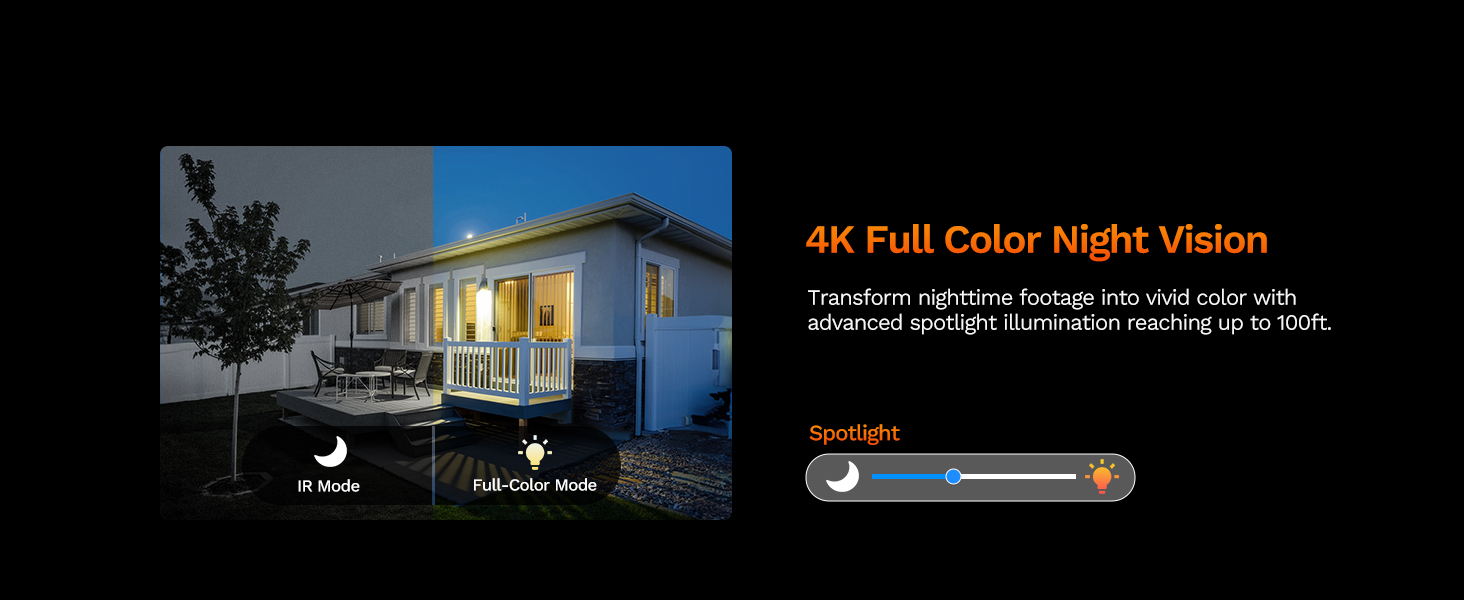
Image: The LongPlus NVR illustrating the benefits of H.265 (HEVC) video compression for saving storage space while maintaining video quality.
Mantenimiento
- Limpieza: Limpie periódicamente la lente y la carcasa de la cámara con un paño suave y húmedo.amp Paño. Evite los limpiadores abrasivos que podrían rayar la lente.
- Actualizaciones de firmware: Check the Longvision app or LongPlus website periodically for firmware updates. Keeping your camera's firmware updated ensures optimal performance and security.
- Inspección de cables: Periodically inspect the Ethernet cable for any signs of wear or damage, especially in outdoor installations. Ensure connections are secure.
- Controles ambientales: Asegúrese de que no haya obstrucciones que bloqueen la cámara. view or interfering with its sensors.
Solución de problemas
If you encounter issues with your LongPlus camera, refer to the following common problems and solutions:
| Problema | Posible causa | Solución |
|---|---|---|
| Sin transmisión de vídeo | No power; Loose cable connection; Network issue. | Check PoE connection to NVR/switch. Ensure NVR/switch is powered on. Verify Ethernet cable integrity. |
| Mala calidad de imagen | Lente sucia; Iluminación insuficiente; Problemas de ancho de banda de red. | Clean the camera lens. Ensure adequate lighting for color night vision or switch to IR mode. Check network speed. |
| La detección de movimiento no funciona | Detection disabled; Incorrect sensitivity; Activity zone not set correctly. | Enable motion detection in app/NVR settings. Adjust sensitivity. Verify activity zone configuration. |
| No se puede conectar a la aplicación | Incorrect network settings; App issues; Camera not online. | Ensure camera is connected to the network. Restart camera and router. Re-add camera to the app. Check app permissions. |
| El audio bidireccional no funciona | Micrófono/altavoz desactivados; Volumen demasiado bajo; Latencia de red. | Check audio settings in the app. Adjust volume levels. Ensure stable network connection. |
If the problem persists after trying these solutions, please contact LongPlus customer support for further assistance.
Presupuesto
| Característica | Descripción |
|---|---|
| Marca | LargoPlus |
| Número de modelo | LP8MEF8 |
| Tecnología de conectividad | Cableado (Alimentación a través de Ethernet - PoE) |
| Resolución de captura de video | 4K UHD (3840x2160) |
| Tecnología de sensores ópticos | CMOS |
| Tipo de lente | Fijado |
| Viewángulo de ing | 132 grados |
| Visión nocturna | Yes, up to 100 Feet (30m) range (IR, Color, Smart modes) |
| Velocidad de cuadros | 30 fps |
| Modos de grabación | Motion-triggered, Scheduled, 24/7 (via NVR) |
| Características especiales | H.265 Video Coding, Siren Alarm, Strobe Light Alarm, Two-Way Audio, Vehicle/Person Detection, Activity Zones, Privacy Mask, IP67 Waterproof |
| Fuente de poder | Alimentación eléctrica con cable (PoE) |
| Temperatura de funcionamiento | -30 °C a 60 °C (-22 °F a 140 °F) |
| Dispositivos compatibles | Cameras, Laptops, Personal Computers, Smartphones |
| Compatibilidad con sistemas operativos | Android, Mac OS, Windows, iOS |
| Dimensiones del artículo | 3.3 x 3.3 x 3.5 pulgadas |
| Color | Blanco |
Garantía y soporte
Información de garantía
LongPlus ofrece una 2 año de garantía for this product from the date of purchase. This warranty covers manufacturing defects and ensures the product meets its specified performance standards under normal use.
Apoyo técnico
LongPlus offers Soporte técnico de por vida for its customers. If you have any questions, require assistance with setup, operation, or troubleshooting, or encounter any issues not covered in this manual, please do not hesitate to contact our professional technical team. We are committed to responding to your inquiries within 24 hours.
For support, please visit the official LongPlus websitio o consulte la información de contacto proporcionada con el embalaje de su producto.