
Introducción
This manual provides detailed instructions for the installation, operation, and maintenance of your Reobiux 2K Outdoor WiFi Surveillance Camera, Model K6Q-1P. Please read this manual thoroughly before using the product to ensure proper functionality and safety.
Contenido del paquete
Verifique que todos los artículos enumerados a continuación estén incluidos en su paquete. Si falta algún artículo o está dañado, comuníquese con atención al cliente.
- 1 x Surveillance Camera
- 1 x adaptador de corriente
- 1 x Juego de tornillos de montaje
- 1 x Waterproof Cover Kit
- 1 x Manual de usuario
Producto terminadoview
The Reobiux 2K Outdoor WiFi Surveillance Camera (Model K6Q-1P) is an advanced security solution featuring a dual-lens design for comprehensive monitoring. It offers 2K resolution, color night vision, motion detection, two-way audio, and compatibility with Amazon Alexa.
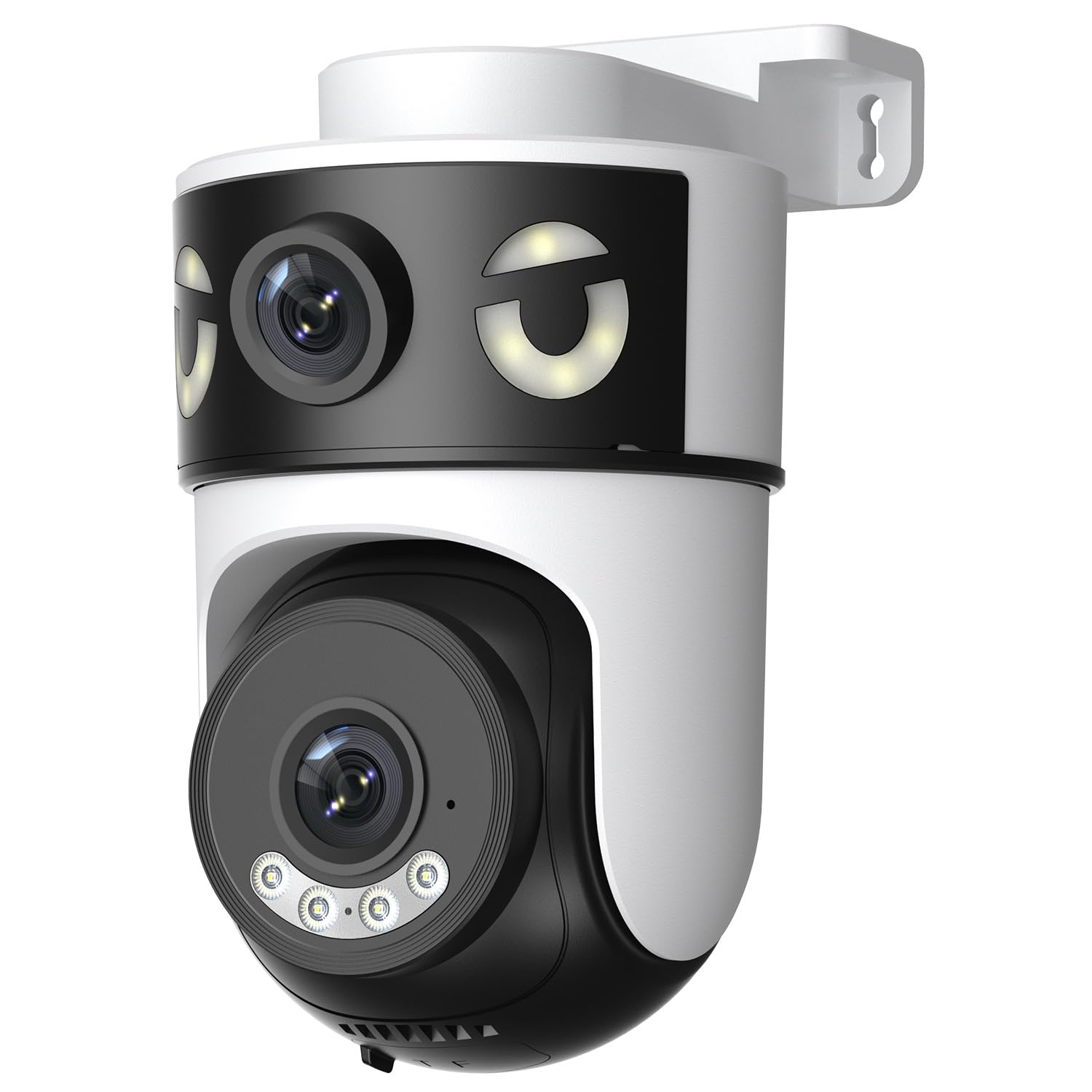
Image: Reobiux 2K Outdoor WiFi Surveillance Camera, Model K6Q-1P. This image shows the camera unit with its dual lenses, two external antennas, and a wall-mount bracket.
Características principales
- Dual Lens & 355° View: Unique 2-in-1 design supporting fixed area surveillance and mobile full-view monitoring. Features two high-resolution lenses; one fixed and one rotatable for wide panoramic views.
- Resolución 2K y visión nocturna en color: Delivers clear and detailed images and videos. Offers three night vision modes: Infrared, Color, and Smart Night Vision for reliable 24-hour surveillance.
- Motion Detection & Alarm Siren: Advanced motion detection sends real-time alarm notifications to your mobile device upon detecting movement.
- Two-Way Audio & Multi-User Access: Built-in microphone and speaker allow for remote communication. Supports sharing camera access with multiple users.
- SD Card/Cloud Storage & Alexa Compatibility: Supports 24-hour continuous recording to a Micro SD card (max 128GB) or cloud server. Compatible with Amazon Alexa for voice control.
Guía de configuración
1. Montaje de la cámara
The camera is designed for wall mounting. Choose a suitable location that provides the desired surveillance coverage and is within range of your Wi-Fi network and a power outlet.
- Marque los puntos de perforación en la pared utilizando la base de la cámara como plantilla.
- Perfore agujeros e inserte los tacos de pared si es necesario.
- Fije la cámara a la pared utilizando los tornillos de montaje proporcionados.
- Ensure the camera is firmly attached and the waterproof cover kit is properly installed to protect connections.
2. Encendido
Conecte el adaptador de corriente incluido a la entrada de alimentación de la cámara y luego a una toma de corriente estándar. La cámara se encenderá e iniciará su secuencia de inicio.
3. Conexión de red (Wi-Fi)
The camera connects via 2.4GHz Wi-Fi. Follow these steps to connect your camera to your home network:
- Descargar el O-kam Pro application from the App Store (iOS) or Google Play Store (Android) on your smartphone or tablet.
- Regístrese para una nueva cuenta o inicie sesión si ya tiene una.
- Sigue las instrucciones de la aplicación para añadir tu nueva cámara. Normalmente, esto implica escanear un código QR en la cámara o introducir manualmente su ID.
- Seleccione su red Wi-Fi de 2.4 GHz e ingrese la contraseña cuando se le solicite.
- Wait for the camera to connect to the network. A voice prompt or indicator light will confirm a successful connection.

Image: Reobiux camera with a smartphone displaying the O-kam Pro app interface, demonstrating remote control and live view Capacidades.
Instrucciones de funcionamiento
Vivir View y control de panorámica/inclinación
Once connected, open the O-kam Pro app to access the live feed from your camera. The dual-lens system provides both a fixed wide view and a movable PTZ (Pan-Tilt-Zoom) view.
- Toque la cámara en la aplicación para view la transmisión en vivo.
- Use the on-screen controls to pan (horizontal rotation up to 355°) and tilt (vertical movement) the movable lens to adjust the viewángulo de ing.
- Switch between the fixed and movable lens views within the app interface.
Modos de visión nocturna
La cámara ofrece tres modos de visión nocturna:
- Visión nocturna infrarroja: Provides black and white images in low-light conditions using infrared LEDs.
- Visión nocturna en color: Utiliza focos incorporados para proporcionar imágenes a todo color por la noche.
- Visión nocturna inteligente: Cambia automáticamente entre visión nocturna infrarroja y en color según el movimiento detectado o las condiciones de luz.
- You can select your preferred night vision mode in the O-kam Pro app settings.
Detección de movimiento y alertas
Configure motion detection settings and receive alerts on your mobile device:
- Navigate to the camera settings in the O-kam Pro app.
- Habilite la detección de movimiento y ajuste los niveles de sensibilidad según sea necesario.
- Set up alert notifications to be sent to your smartphone.
- You can also enable the alarm siren to deter intruders.
Audio bidireccional
Utilice la función de audio bidireccional para comunicarse a través de la cámara:
- En vivo view interface of the O-kam Pro app, tap the microphone icon to speak. Your voice will be transmitted through the camera's speaker.
- Toque el icono del altavoz para escuchar el audio del entorno de la cámara.
Grabación y almacenamiento de vídeo
The camera supports continuous 24-hour recording. You have two storage options:
- Tarjeta micro SD: Insert a Micro SD card (up to 128GB, not included) into the designated slot on the camera. The camera will automatically begin recording to the card.
- Almacenamiento en la nube: Subscribe to a cloud storage plan through the O-kam Pro app for secure off-site video storage.
- Acceder a foo grabadotage via the O-kam Pro app.
Integración de Amazon Alexa
Integrate your Reobiux camera with Amazon Alexa for voice control:
- Abra la aplicación Amazon Alexa en su dispositivo móvil.
- Go to "Skills & Games" and search for the "O-kam Pro" skill.
- Enable the skill and link your O-kam Pro account.
- Discover devices. You can now use voice commands like "Alexa, show me the front door camera" to view La transmisión en vivo en dispositivos Alexa compatibles.
Mantenimiento
- Limpieza: Limpie periódicamente la lente y el cuerpo de la cámara con un paño suave.amp Paño para eliminar el polvo y la suciedad. No utilice productos químicos agresivos ni limpiadores abrasivos.
- Protección contra la intemperie: The camera is waterproof, but ensure all connections are sealed properly, especially the power cable and any SD card slots, to maintain its weather resistance.
- Actualizaciones de firmware: Check the O-kam Pro app periodically for firmware updates to ensure optimal performance and security.
Solución de problemas
- La cámara no se enciende:
- Ensure the power adapter is securely connected to both the camera and a working electrical outlet. Verify the outlet has power.
- No se puede conectar al Wi-Fi:
- Ensure your Wi-Fi network is 2.4GHz. Check your Wi-Fi password for accuracy. Move the camera closer to your Wi-Fi router to improve signal strength. Restart your router and the camera.
- Sin vida view or recording:
- Check your internet connection. Ensure the camera is connected to Wi-Fi. Verify that the Micro SD card is inserted correctly and not full, or that your cloud storage subscription is active.
- Alertas de detección de movimiento no recibidas:
- Check app notification settings on your phone and within the O-kam Pro app. Ensure motion detection is enabled and sensitivity is set appropriately. Verify your phone has an active internet connection.
- El audio bidireccional no funciona:
- Ensure your phone's microphone and speaker are enabled for the O-kam Pro app. Check the volume settings on your phone and within the app. Ensure there are no obstructions blocking the camera's microphone or speaker.
Presupuesto
| Característica | Especificación |
|---|---|
| Marca | Reobiux |
| Nombre del modelo | K6Q-1P |
| Número de modelo | REO-K6Q-1P |
| Tipo de montaje | Montaje en pared |
| Resolución de grabación de vídeo | 2K |
| Número de artículos | 1 |
| Tecnología de comunicación inalámbrica | Wi-Fi (2.4 GHz) |
| Viewángulo de ing | 355 grados (pan) |
| Tipo de instalación | Atornillado |
| Material | Plástico |
| Volumentage | 5 voltios (CC) |
| Fuerza | 5 vatios |
| Nivel de resistencia al agua | Impermeable |
| Características especiales | Two-Way Audio, Local Recording, HD Resolution, PTZ Technology |
| Uso recomendado | Seguridad al aire libre |
| Dispositivos compatibles | Portátil, teléfono inteligente, tableta, televisión |
| Fuente de poder | Cable eléctrico |
| Protocolo de conectividad | RTP |
| Tipo de controlador | O-kam Pro App |
Garantía y soporte
Para obtener información sobre la garantía y soporte técnico, consulte el sitio web oficial de Reobiux. website or contact Reobiux customer service directly. Keep your purchase receipt as proof of purchase for warranty claims.
Manufacturer: Reobiux