
1. Producto terminadoview
The USX MOUNT XTL908 is a heavy-duty tilting TV wall mount designed for large televisions ranging from 60 to 120 inches. It supports TVs weighing up to 220 lbs and features a low-profile design, positioning the TV just 2.6 inches from the wall. The mount is compatible with VESA patterns up to 900x600mm and can be installed on wood studs (16-32 inches apart), concrete, or brick walls.

Image 1.1: The USX MOUNT XTL908 TV Wall Mount installed in a modern living room setting.

Imagen 1.2: El ultradelgado profile of the mount, showing the TV positioned close to the wall.
2. Información de seguridad
Read all instructions carefully before installation. If you have any questions, consult a qualified installer. Improper installation can result in serious injury or damage.
- Capacidad de peso: No exceda la capacidad máxima de peso de 100 kg (220 lb). Este soporte está diseñado para usarse únicamente con los pesos máximos indicados.
- Tamaño de TV: Este soporte está diseñado para televisores de entre 60 y 120 pulgadas.
- Tipo de pared: Install only on wood studs, solid concrete, or brick walls. NO install on drywall alone.
- Espaciado entre montantes: Ensure wood studs are spaced between 16 and 32 inches apart.
- Hardware de montaje: Use only the provided mounting hardware. If you require concrete anchors, please contact customer support.
- Integrity Test: After installation, perform an integrity test by gently pulling on the mount to ensure it is securely fastened to the wall.

Image 2.1: The robust construction of the mount, designed to securely hold TVs up to 220 lbs.
3. Contenido del paquete
Please verify that all components are present and undamaged before installation. If any parts are missing or defective, contact customer support.
- Conjunto de placa de pared
- Soportes de TV (2)
- Mounting Hardware Kit (screws, washers, spacers, anchors for concrete/brick)
- Plantilla de montaje
- Manual de instrucciones
4. Especificaciones
| Característica | Especificación |
|---|---|
| Tipo de montaje | Montaje en pared |
| Tipo de movimiento | Inclinación |
| Marca | MONTURA USX |
| Material | Metal |
| Color | Negro |
| Dispositivos compatibles | Televisión |
| Ángulo de inclinación máximo | 12 Degrees Down, 5 Degrees Up |
| Minimum Supported Screen Size | 60 pulgadas |
| Maximum Supported Screen Size | 120 pulgadas |
| Capacidad de carga máxima | 220 libras (100 kg) |
| Compatibilidad VESA | Hasta 900x600mm |
| Distancia a la pared (Low Profile) | 2.6 pulgadas |
| Compatibilidad de espaciado de montantes | 16-32 pulgadas |

Image 4.1: Visual representation of VESA patterns supported and the maximum load capacity of 220 lbs.

Image 4.2: Technical drawing showing the dimensions of the TV interface and wall plate.

Imagen 4.3: Otra view of the product dimensions, highlighting key measurements.
5. Configuración e instalación
Before you begin, ensure you have all necessary tools and that your wall type is suitable for this mount. The installation video below provides a visual guide.
Video 5.1: Official USX MOUNT XTL908 installation video, demonstrating the step-by-step mounting process.
5.1 Comprobaciones previas a la instalación
- Verificar la compatibilidad del televisor: Check your TV's weight and VESA mounting pattern to ensure it falls within the mount's specifications (60-120 inches, up to 220 lbs, VESA up to 900x600mm).
- Identificar el tipo de pared: Determine si su pared es de madera, de hormigón macizo o de ladrillo.
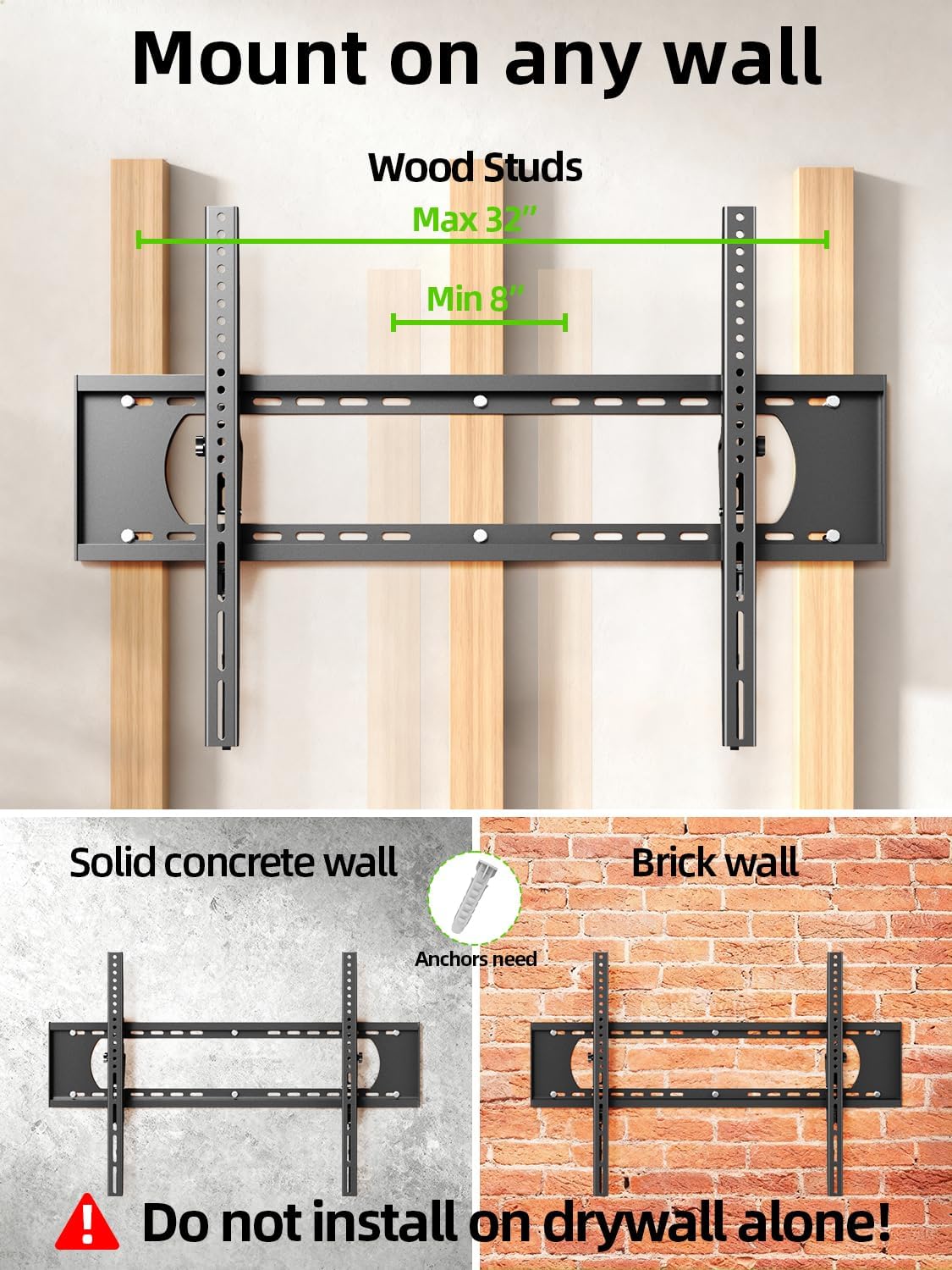
Image 5.2: The mount is suitable for wood studs (16-32" spacing), solid concrete, and brick walls. Not for drywall alone.
5.2 Fijación de los soportes del televisor
Depending on your TV's back, choose the appropriate option:
- For Flat TV Back: Align the TV brackets with the VESA holes on the back of your TV. Secure them using the appropriate screws and washers from the hardware kit. Do not overtighten.
- For Irregular TV Back: If your TV has an irregular or curved back, use the provided spacers to create a flat mounting surface before attaching the brackets.
5.3 Montaje de la placa de pared
Use the provided mounting template to mark the drill holes on your wall. Ensure the template is level before marking.
- Para montantes de madera: Locate the center of your wood studs. Drill pilot holes (7/32 in. / 5.5mm diameter, 2.5 in. / 64mm depth). Secure the wall plate using lag bolts and washers. Do not use plastic anchors for wood studs.
- Para paredes de hormigón/ladrillo: Drill pilot holes (3/8 in. / 10mm diameter, 2.5 in. / 64mm depth). Insert concrete anchors into the drilled holes. Secure the wall plate using lag bolts and washers.
After securing the wall plate, perform an integrity test by pulling on the mount to ensure it is firmly attached to the wall.

Image 5.3: Simplified 3-step installation process: 1. Attach TV brackets, 2. Mount wall plate, 3. Hang up TV.
5.4 Hanging and Securing the TV
- Carefully lift the TV with the attached brackets and hook them onto the top edge of the wall plate.
- Baje suavemente el televisor hasta que los soportes encajen completamente en la placa de pared.
- Use the quick lock and release pull tabs to secure the TV to the wall plate, preventing accidental dislodgement.
6. Instrucciones de funcionamiento
6.1 Ajuste del ángulo de inclinación
The USX MOUNT XTL908 allows for easy tilt adjustment to optimize your viewing angle and reduce glare. The mount can tilt 5 degrees upwards and 12 degrees downwards.
- To adjust the tilt, loosen the tilting adjustment knobs located on the TV brackets.
- Incline el televisor al ángulo deseado.
- Tighten the tilting adjustment knobs to secure the TV in place.
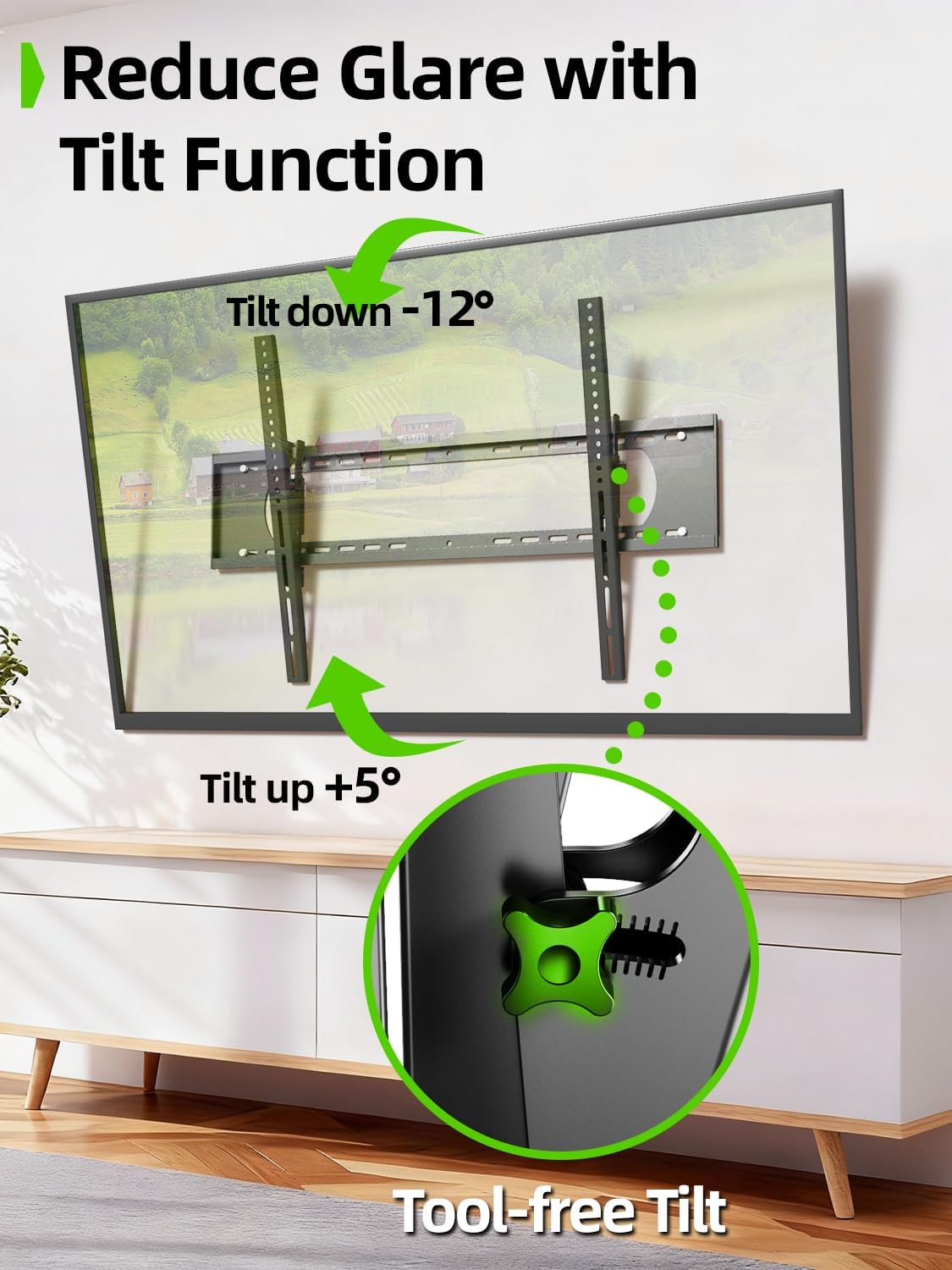
Image 6.1: The tilt function allows for easy adjustment up to +5° and down to -12° to reduce glare.

Image 6.2: The mount's tilt range for optimal viewing desde varias posiciones.
6.2 Quick Lock and Release
The mount features pull tabs for easy locking and releasing of the TV from the wall plate.
- A cerrar the TV, ensure the pull tabs are pushed upwards into the locked position after hanging the TV.
- A liberar the TV, gently pull down on the cords attached to the tabs. This will unlock the TV from the wall plate, allowing you to lift it off.

Image 6.3: The adjustable pull tabs for easy locking and releasing of the TV.

Image 6.4: Illustration of pulling the cords to release the TV from the mount.
7. Mantenimiento
El mantenimiento regular garantiza la longevidad y el funcionamiento seguro de su soporte de pared para TV.
- Limpieza: Limpie el soporte con un paño suave y seco para eliminar el polvo. Evite usar limpiadores abrasivos o disolventes.
- Controles periódicos: Revise periódicamente todos los tornillos y pernos para asegurarse de que estén bien apretados y seguros. Vuelva a apretarlos si es necesario.
- Inspeccionar si hay daños: Inspect the mount for any signs of wear, corrosion, or damage. If any issues are found, contact customer support and do not use the mount until it is repaired or replaced.
8. Solución de problemas
Si encuentra algún problema durante o después de la instalación, consulte los siguientes problemas y soluciones comunes.
| Problema | Posible causa | Solución |
|---|---|---|
| El televisor no está nivelado | La placa de pared no está nivelada durante la instalación. | Remove TV, loosen wall plate screws, adjust level, re-tighten. Ensure to use a level during installation. |
| El soporte se siente suelto en la pared. | Screws not fully tightened; incorrect wall anchors used; wall material not suitable. | Ensure all lag bolts are fully tightened. Verify correct anchors for concrete/brick. Do not install on drywall alone. If issues persist, consult a professional. |
| TV cannot be tilted | Tilting adjustment knobs are too tight. | Loosen the tilting adjustment knobs on the TV brackets to allow movement. Re-tighten once desired angle is achieved. |
| TV cannot be removed from mount | Quick release pull tabs are in the locked position. | Pull down on the cords attached to the quick release tabs to unlock the TV. |
9. Garantía y soporte
For warranty information or technical support, please refer to the contact details provided with your purchase or visit the official USX MOUNT webSitio. Conserve su recibo de compra como comprobante de compra para cualquier reclamación de garantía.
If you have any questions or require additional assistance, please do not hesitate to contact USX MOUNT customer service.