
1. Introducción
This manual provides detailed instructions for the safe and effective use of your Moukey MPS5 Portable Karaoke Machine. Please read this manual thoroughly before operating the device and retain it for future reference. The MPS5 is a versatile portable speaker system designed for various audio playback needs, including karaoke, music streaming, and public address, featuring wireless microphones and multiple connectivity options.
2. ¿Qué hay en la caja?
Desempaque con cuidado todos los artículos de la caja. Asegúrese de que todos los componentes enumerados a continuación estén presentes y en buen estado.
- Moukey MPS5 Portable Karaoke Machine (1 unit)
- Micrófonos inalámbricos (2 unidades)
- Cable de carga USB (1 unidad)
- 3.5mm AUX Cable (1 unit)
- Shoulder Strap (1 unit)
- Manual de usuario (1 unidad)
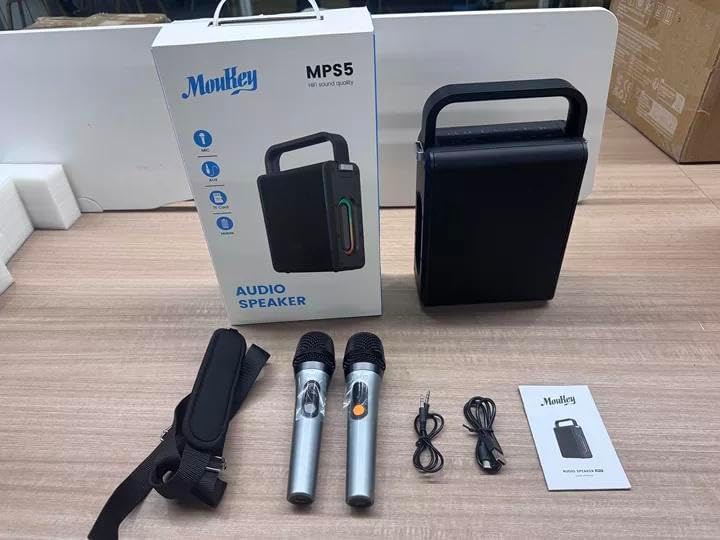
Image: All components included in the Moukey MPS5 package.
3. Producto terminadoview
The Moukey MPS5 is a compact yet powerful portable karaoke machine. It features a robust design with integrated LED lighting on the sides, enhancing the user experience. A sturdy handle and an included shoulder strap provide convenient portability.
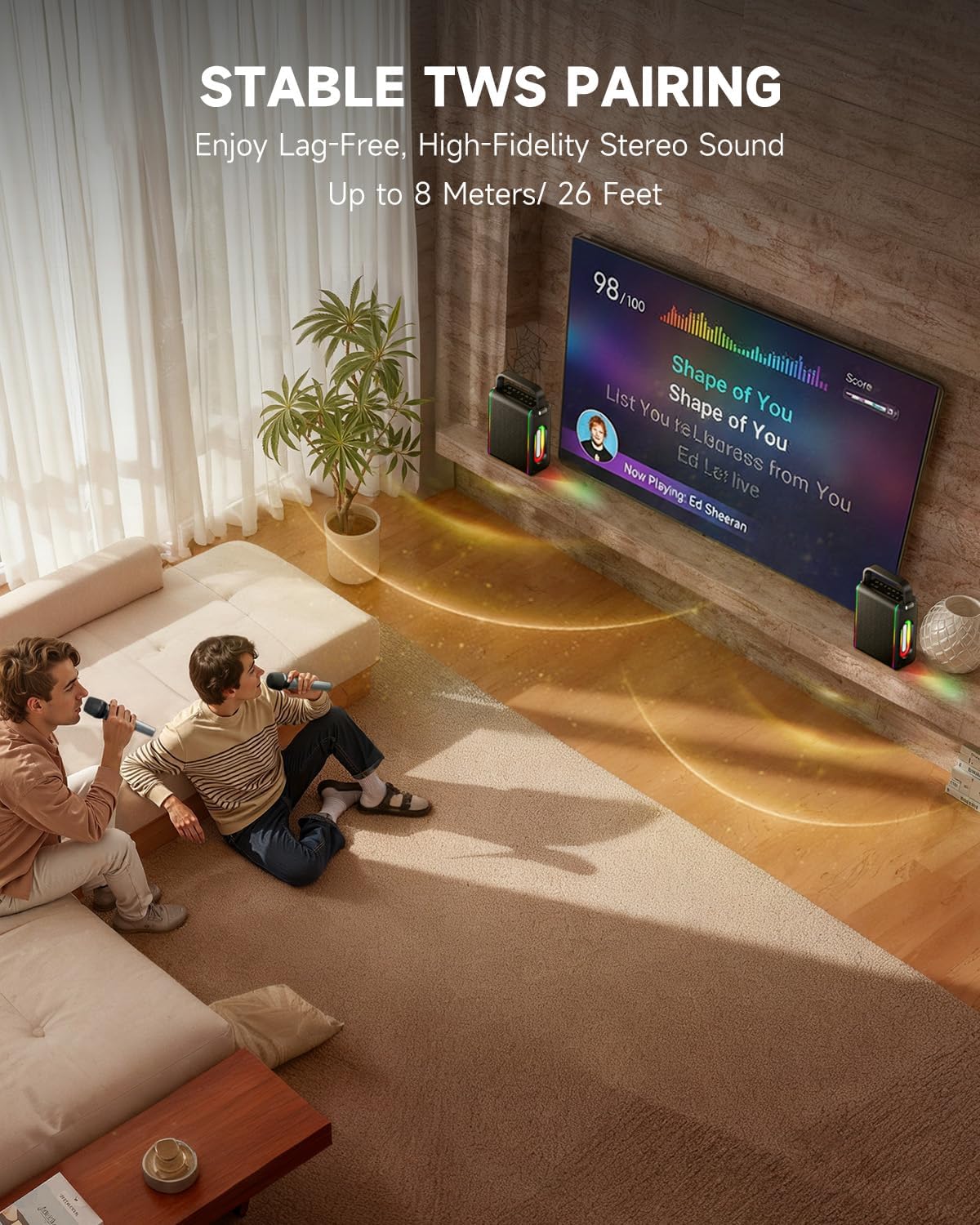
Imagen: Frente view of the Moukey MPS5 speaker.

Imagen: Lateral view of the Moukey MPS5, showing the LED lighting.
4. Características principales
- Excellent Sound Output: The MPS5 delivers 200W peak power (RMS 60W) through a 4-inch woofer and two 2-inch tweeters, providing full-range stereo sound with enhanced bass.
- Funcionalidad potente: Supports Bluetooth 5.3 for wireless connection to various devices. Also includes Micro TF card, Flash USB, MP3, and AUX IN playback options. Features stable TWS (True Wireless Stereo) pairing for connecting two MPS5 units for a wider stereo soundstage.
- Batería de ultra larga duración: The rechargeable battery provides up to 8 hours of continuous music playback on a 2-hour charge, suitable for extended use indoors or outdoors.
- Diseño liviano y portátil: Weighing only 2kg, the MPS5 is designed for easy transport. It can be carried by hand using the integrated handle or with the included shoulder strap.
- Micrófonos inalámbricos duales: Includes two 2.4Ghz rechargeable microphones with a connection range of up to 60 feet and up to 8 hours of use time per charge (2-3 hours charging time). Features one-tap connectivity for effortless pairing.

Image: Internal speaker components of the MPS5.

Image: MPS5 connected to multiple devices via Bluetooth.

Image: Battery life and charging details for the MPS5.

Image: Demonstrating the portability of the MPS5 with hand and shoulder strap options.

Image: The two wireless microphones for the MPS5.
5. Configuración
5.1 Carga del altavoz y los micrófonos
Before first use, fully charge the MPS5 speaker and both wireless microphones.
- Vocero: Connect the provided USB Type-C cable to the charging port on the speaker and to a compatible USB power adapter (not included). The charging indicator light will show charging status. A full charge takes approximately 2 hours.
- Micrófonos: Each microphone has a charging port. Connect them to a USB power source using the provided USB cable. Charging time for microphones is 2-3 hours.
5.2 Encendido y apagado
- Para encender el altavoz, mantenga presionado el botón de encendido (U) on the top panel for 2 seconds.
- Para apagar, mantenga presionado el botón de encendido (U) de nuevo durante 2 segundos.
5.3 Emparejamiento Bluetooth
- Ensure the MPS5 speaker is powered on and in Bluetooth mode (indicated by a blue LED). If not, press the 'M' (Mode) button to switch to Bluetooth mode.
- En su dispositivo móvil (teléfono inteligente, tableta, etc.), habilite Bluetooth y busque los dispositivos disponibles.
- Select 'Moukey MPS5' from the list of devices to pair. A voice prompt will confirm successful connection.
5.4 Emparejamiento TWS (estéreo inalámbrico verdadero)
To achieve stereo sound, you can pair two Moukey MPS5 speakers together.
- Ensure both MPS5 speakers are powered on and in Bluetooth mode, but not connected to any other device.
- On one of the speakers, double-press the 'M' (Mode) button. The speaker will enter TWS pairing mode.
- Los dos altavoces se conectarán automáticamente. Un mensaje de voz confirmará el emparejamiento TWS.
- Once TWS is established, connect your mobile device to one of the MPS5 speakers via Bluetooth as described in section 5.3. Both speakers will then play audio in stereo.
Vídeo: Un repaso rápidoview of the MPS5 Karaoke Machine, demonstrating TWS pairing and other features.
6. Instrucciones de funcionamiento
6.1 controles sobreview
The top panel of the MPS5 speaker features several buttons for controlling playback, volume, and microphone settings.
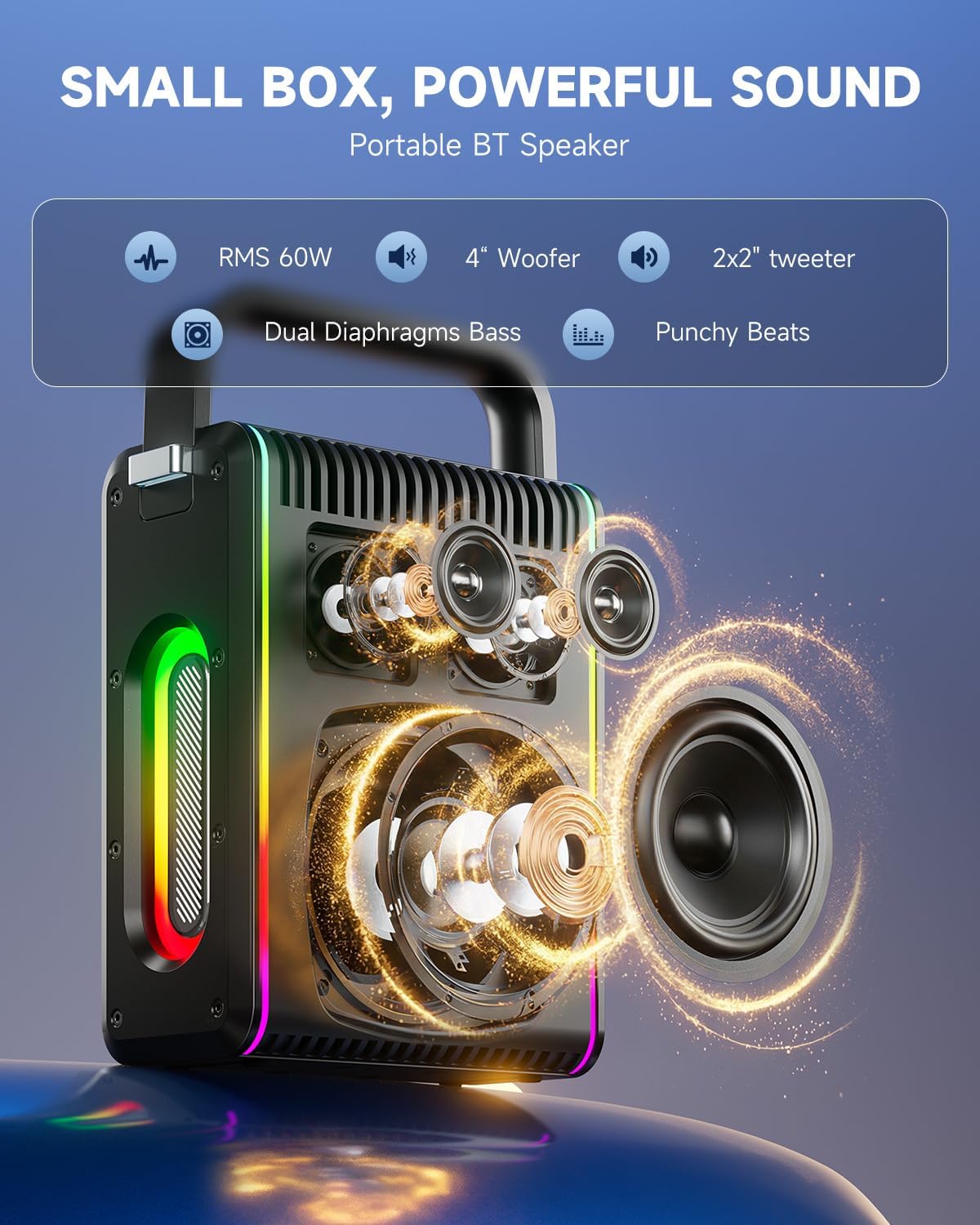
Image: Top control panel of the MPS5.
- Botón de encendido (U): Mantenga presionado durante 2 segundos para encender/apagar.
- Botón de modo (M): Short press to cycle through input modes (Bluetooth, AUX, USB, TF Card). Double-press to initiate TWS pairing.
- Microphone Volume (Mic - / Mic +): Ajusta el volumen de los micrófonos conectados.
- Echo Adjustment (R-/R+): Ajusta el efecto de eco para los micrófonos.
- Reproducir pausar (▶): Reproduce o pausa la pista actual.
- Bajar volumen (-): Decreases the main speaker volume.
- Subir volumen (+): Increases the main speaker volume.
- EQ A/E: Short press to switch between EQ modes. Long press to toggle between original sound and accompaniment elimination.
6.2 Uso del micrófono
The MPS5 comes with two wireless microphones for karaoke and vocal performances.
- Encendido/apagado: Mantenga presionado el botón de encendido del micrófono para encenderlo o apagarlo.
- Emparejamiento: The microphones are pre-paired with the speaker. If re-pairing is needed, ensure the speaker is on, then power on the microphone. They should connect automatically.
- Microphone Disconnect/Reconnect: Press the dedicated microphone button on the speaker's control panel to quickly disconnect or reconnect the microphones.
6.3 Modos de entrada de audio
In addition to Bluetooth, the MPS5 supports several wired and local storage input options.

Image: Input ports on the MPS5 speaker.
- Entrada auxiliar: Connect an external audio device using the 3.5mm AUX cable. Select AUX mode using the 'M' button.
- Reproducción USB: Inserte una unidad flash USB que contenga audio MP3 fileConecte el cable al puerto USB. El altavoz cambiará automáticamente al modo USB y comenzará la reproducción.
- Reproducción de tarjeta TF: Insert a Micro TF card containing MP3 audio fileInserte el cable en la ranura para tarjeta TF. El altavoz cambiará automáticamente al modo tarjeta TF y comenzará la reproducción.
6.4 iluminación LED
The MPS5 features dynamic LED lighting on its sides. Use the dedicated LED button (if available, or refer to the 'M' button for light control if combined) to cycle through different light modes or turn them off.
7. Mantenimiento
- Limpieza: Utilice un paño suave y seco para limpiar el exterior del altavoz. No utilice limpiadores líquidos ni productos abrasivos.
- Almacenamiento: Guarde el dispositivo en un lugar fresco y seco, alejado de la luz solar directa y de temperaturas extremas.
- Cuidado de la batería: Para prolongar la vida útil de la batería, evite descargarla por completo con frecuencia. Cargue el dispositivo regularmente, incluso si no lo usa durante períodos prolongados.
8. Solución de problemas
If you encounter issues with your Moukey MPS5, refer to the following common problems and solutions:
| Problema | Posible causa | Solución |
|---|---|---|
| Sin poder | La batería está agotada. | Cargue el altavoz utilizando el cable USB tipo C proporcionado. |
| No hay sonido del altavoz | El volumen está demasiado bajo o silenciado. Se seleccionó un modo de entrada incorrecto. | Increase volume using the '+' button. Press 'M' to cycle through input modes. |
| El emparejamiento de Bluetooth falló | El altavoz no está en modo de emparejamiento. El dispositivo está demasiado lejos. | Ensure speaker is in Bluetooth mode. Move device closer to speaker. Try restarting both devices. |
| El micrófono no funciona | Microphone is off or uncharged. Microphone is disconnected. | Ensure microphone is charged and powered on. Press the microphone button on the speaker to reconnect. |
| El emparejamiento TWS falló | Los altavoces ya están conectados a otro dispositivo. | Asegúrese de que ambos altavoces no estén conectados a ningún otro dispositivo Bluetooth antes de iniciar el emparejamiento TWS. |
9. Especificaciones
- Marca: Ratón
- Número de modelo: MPS5
- Salida Wattage: 200 vatios (pico)
- Tecnología de conectividad: Bluetooth 5.3
- Entrada de audio: Bluetooth, TF card, USB, MP3, AUX, Wired microphones
- Número de canales: 2
- Fuente de energía: Funciona con pilas
- Tipo de conector: USB tipo C
- Dimensiones del artículo (largo x ancho x alto): 2.36 x 6.3 x 12.2 pulgadas
- Peso del artículo: Aproximadamente 2 kg
- Dispositivos compatibles: Smartphone, Tablet, Laptop, MP3 Player, Microphone
- Color: Negro con detalles plateados
10. Garantía y soporte
The Moukey MPS5 Portable Karaoke Machine comes with a Garantía de 1 años A partir de la fecha de compra. Esta garantía cubre defectos de fabricación y mano de obra en condiciones normales de uso. Conserve su comprobante de compra para reclamaciones de garantía.
For technical support, troubleshooting assistance, or warranty inquiries, please contact Moukey customer service through the retailer where the product was purchased or visit the official Moukey websitio para información de contacto.


