
Introducción
The MELONARE MA-1 Mini Guitar Amplifier is a versatile and portable 10W electric guitar amplifier designed for practice and recording. It features 30 built-in rhythm patterns, switchable clean and overdrive channels, adjustable reverb, and Bluetooth 5.3 connectivity. Its compact design and long-lasting rechargeable battery make it an ideal companion for musicians on the go.
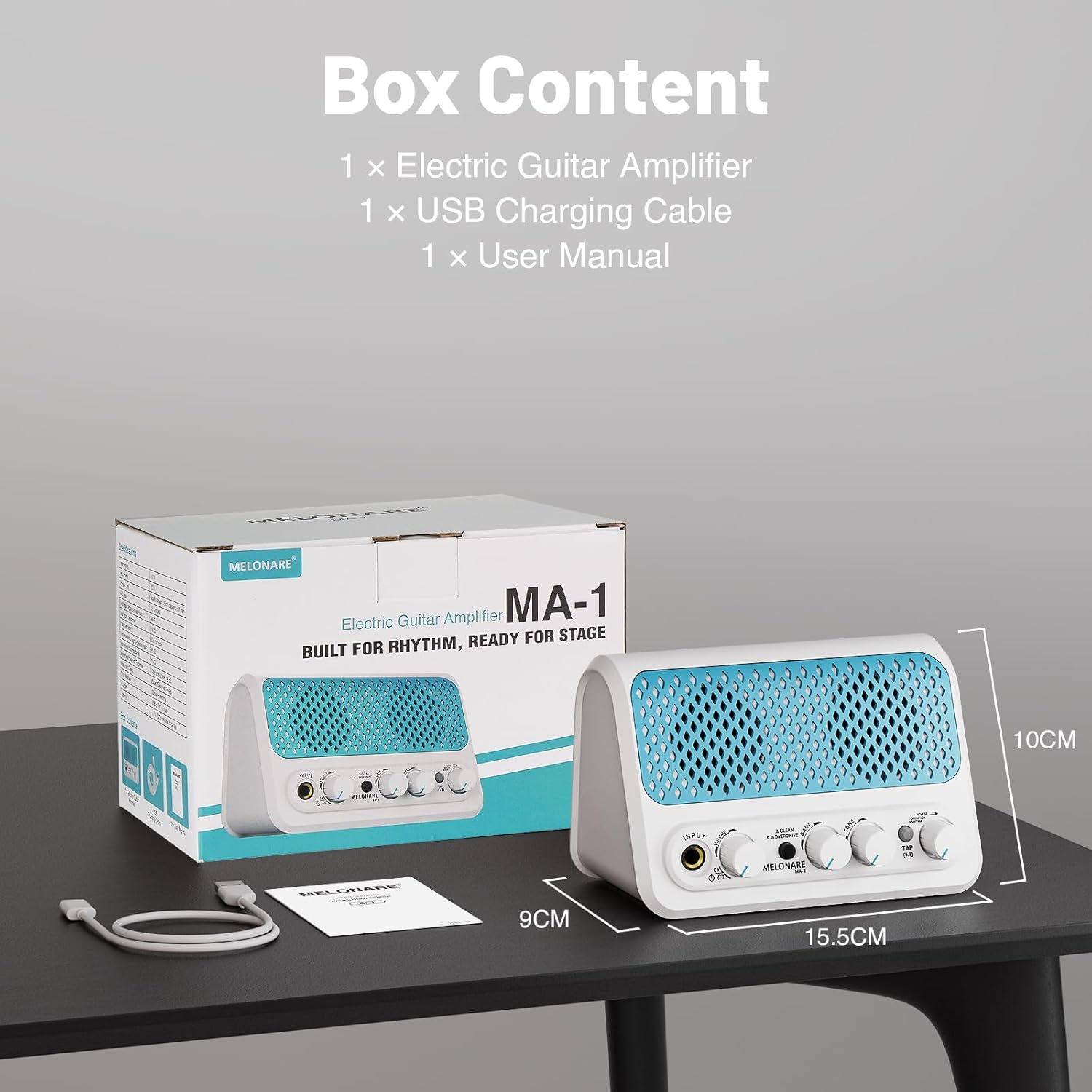
¿Qué hay en la caja?
- Guitarra Ampelevador * 1
- Manual de instrucciones * 1
- Cable de carga USB *1
- Guitarra Amplifier packaging bag *1
- Charging cable packaging bag *1
Producto terminadoview y controles
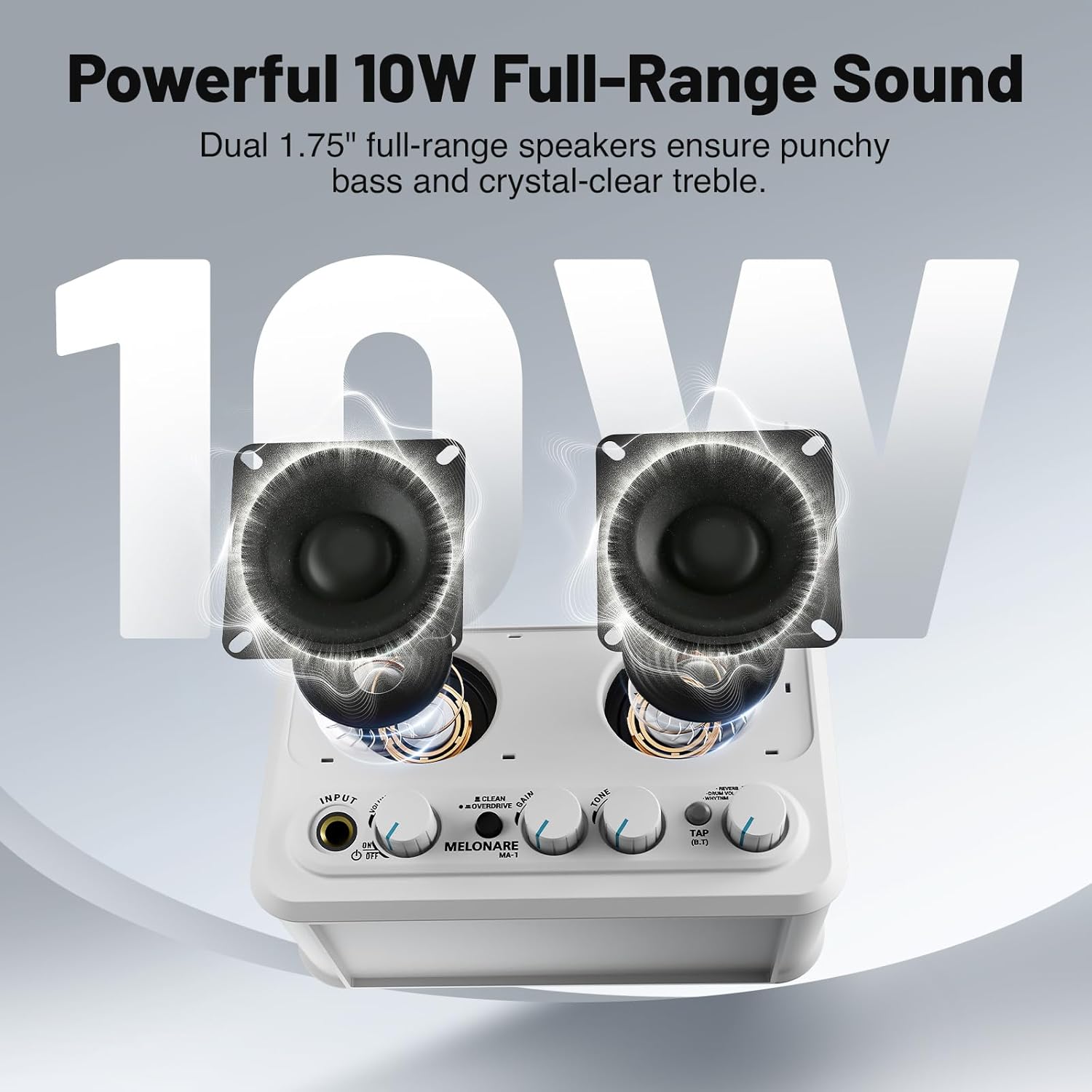
Familiarícese con el amplifier's front panel controls:
- ENTRADA: 6.35mm jack for connecting your electric guitar.
- VOLUMEN: Ajusta el volumen de salida general del ampmás duradero.
- Interruptor encendido / apagado: Enciende o apaga la unidad.
- CLEAN/OVERDRIVE Button: Toggles between clean and overdrive sound modes.
- GANAR: Controls the amount of distortion or overdrive in the signal.
- TONO: Shapes the treble and bass frequencies of your sound.
- TAP (B.T) Button: Used for tap tempo for rhythms and Bluetooth pairing.
- REVERB/DRUM VOL/RHYTHM Knob: This multi-function knob controls reverb depth, drum volume, and selects rhythm patterns.

Configuración
1. Carga de la batería
The MA-1 features a built-in 2000mAh rechargeable battery, providing approximately 6-7 hours of continuous playtime on a full charge (actual playtime may vary based on volume and mode). To charge, connect the amplifier to a USB power source (power bank, computer, or wall adapter) using the provided USB charging cable. A full charge typically takes about 3 hours.

2. Conexión de la guitarra
Plug your electric guitar into the APORTE 6.35mm jack on the front panel. Ensure the amplifier is powered on using the ON/OFF switch.
3. Conectividad Bluetooth
To stream audio wirelessly from your phone or other Bluetooth-enabled device, press and hold the TAP (B.T) button until the indicator light flashes, indicating pairing mode. On your device, search for and select 'MELONARE MA-1' to connect. Once connected, the indicator light will remain solid.

4. Entrada AUX
For wired audio input, connect your phone, MP3 player, tablet, or computer to the 3.5mm AUX IN jack located on the rear of the ampmás duradero.
5. Salida de auriculares
For personal monitoring or quiet practice, plug your 3.5mm headphones into the HEADPHONE OUT jack on the rear of the amplifier. This mutes the main speakers.
Operación del Ampmás vivaz
1. Clean and Overdrive Modes
Presione el LIMPIEZA/SOBREMARCHA button to switch between the two primary sound modes:
- Modo limpio: Delivers a clear, transparent sound suitable for daily practice or acoustic-style performances.
- Overdrive Mode: Adds a heavy, powerful tone for improvisation or solos.
Ajustar el GANAR y TONO knobs to fine-tune your sound in either mode.
2. Metronome and Rhythm Patterns
El amplifier includes 30 built-in rhythm patterns. To activate and control them:
- Seleccionar ritmo: Empuja el REVERB/DRUM VOL/RHYTHM knob to cycle through the modes. A green LED indicates rhythm selection mode. Turn the knob to choose from the 30 patterns.
- Ajustar el tempo: Toque el TAP (B.T) button three times to set the desired tempo.
- Ajustar el volumen del tambor: Empuja el REVERB/DRUM VOL/RHYTHM knob again. A red LED indicates drum volume mode. Turn the knob to adjust the volume of the rhythm pattern independently.

3. Reverb Control
When no LED is lit on the REVERB/DRUM VOL/RHYTHM knob, you are in reverb control mode. Turn the knob to fine-tune the depth of the reverb effect, adding space and atmosphere to your sound.
4. Demostración en video
Mantenimiento
To ensure the longevity and optimal performance of your MELONARE MA-1 Mini Guitar Amplifier, siga estas pautas de mantenimiento:
- Limpieza: Utilice un paño suave y seco para limpiar el exterior del ampLificador. Evite usar limpiadores abrasivos, solventes o ceras, ya que pueden dañar el acabado.
- Almacenamiento: Almacenar el ampGuarde el dispositivo en un lugar fresco y seco, alejado de la luz solar directa, temperaturas extremas y alta humedad.
- Cuidado de la batería: For best battery life, avoid fully discharging the battery frequently. Charge the amplifier regularly, even if not in use, to maintain battery health. If storing for an extended period, charge the battery to approximately 50% every few months.
- Manejo: Manejar el amplifier with care to prevent drops or impacts, which can damage internal components.
Solución de problemas
If you encounter issues with your MELONARE MA-1 Mini Guitar Amplifier, consulte los siguientes pasos comunes de solución de problemas:
- Sin sonido:
- Asegúrese de que ampEl dispositivo está encendido y completamente cargado.
- Check that your guitar cable is securely connected to both the guitar and the ampToma de entrada del amplificador.
- Verifique que la perilla de VOLUMEN esté subida.
- If using headphones, ensure they are properly plugged into the HEADPHONE OUT jack and that the main speakers are muted.
- Poor Sound Quality/Distortion (in Clean Mode):
- Reduce the guitar's volume or the amplifier's GAIN setting.
- Check for damaged cables or faulty guitar pickups.
- Problemas de conexión Bluetooth:
- Asegúrese de que amplifier is in Bluetooth pairing mode (flashing blue LED).
- Deshabilite y vuelva a habilitar Bluetooth en su dispositivo.
- Acerque su dispositivo al ampLificador para garantizar una señal fuerte.
- Olvida el dispositivo de la configuración de Bluetooth e intenta emparejarlo nuevamente.
- Rhythm Pattern Not Playing:
- Asegúrese de que amplifier is in rhythm selection mode (green LED on REVERB/DRUM VOL/RHYTHM knob).
- Check the drum volume setting.
- Tap the TAP (B.T) button to start the rhythm.
Presupuesto
| Marca | MELONARE |
| Modelo | MA-1 |
| Salida Wattage | 10 vatios |
| Peso del artículo | 1.21 libras |
| Dimensiones del producto | 5.5 x 3.5 x 1.4 pulgadas |
| Tipo de batería | Iones de litio (2000 mAh) |
| Fuente de poder | Funciona con pilas |
| Tipo de material | Plástico |
| Color | Turquesa |
| Conectividad | Bluetooth 5.3, 3.5mm Jack (AUX IN, Headphone OUT), 6.35mm Jack (Guitar INPUT), USB (Charging) |
Garantía y soporte
For warranty information and customer support, please refer to the contact details provided on the product packaging or visit the official MELONARE webSitio. Conserve su recibo de compra como comprobante de compra para cualquier reclamación de garantía.