
1. Introducción y másview
This manual provides essential information for setting up, operating, maintaining, and troubleshooting your HP 17-inch Business Laptop. This device is designed for productivity and features a 13th Generation Intel Core i5 processor, a 17.3-inch HD+ anti-glare display, a backlit keyboard with a numeric keypad, and a fingerprint reader for enhanced security. It comes pre-installed with Windows 11 Home.
Las características principales incluyen:
- Procesador: 13th Gen Intel Core i5-1334U 10-core processor for efficient multitasking.
- Sistema operativo: Windows 11 Home for a modern and secure computing experience.
- Mostrar: 17.3-inch HD+ (1366x768) anti-glare screen with micro-edge design.
- Almacenamiento de memoria: Up to 64GB DDR4 RAM and up to 2TB NVMe M.2 SSD for fast performance and ampalmacenamiento.
- Conectividad: USB 3.2 Gen 1 Type-C, USB 3.2 Gen 1 Type-A, HDMI 1.4, and a headphone/microphone combo jack.
- Seguridad: Integrated fingerprint reader.
- Conveniencia: Full-size backlit keyboard with numeric keypad and HP Fast Charge battery technology.
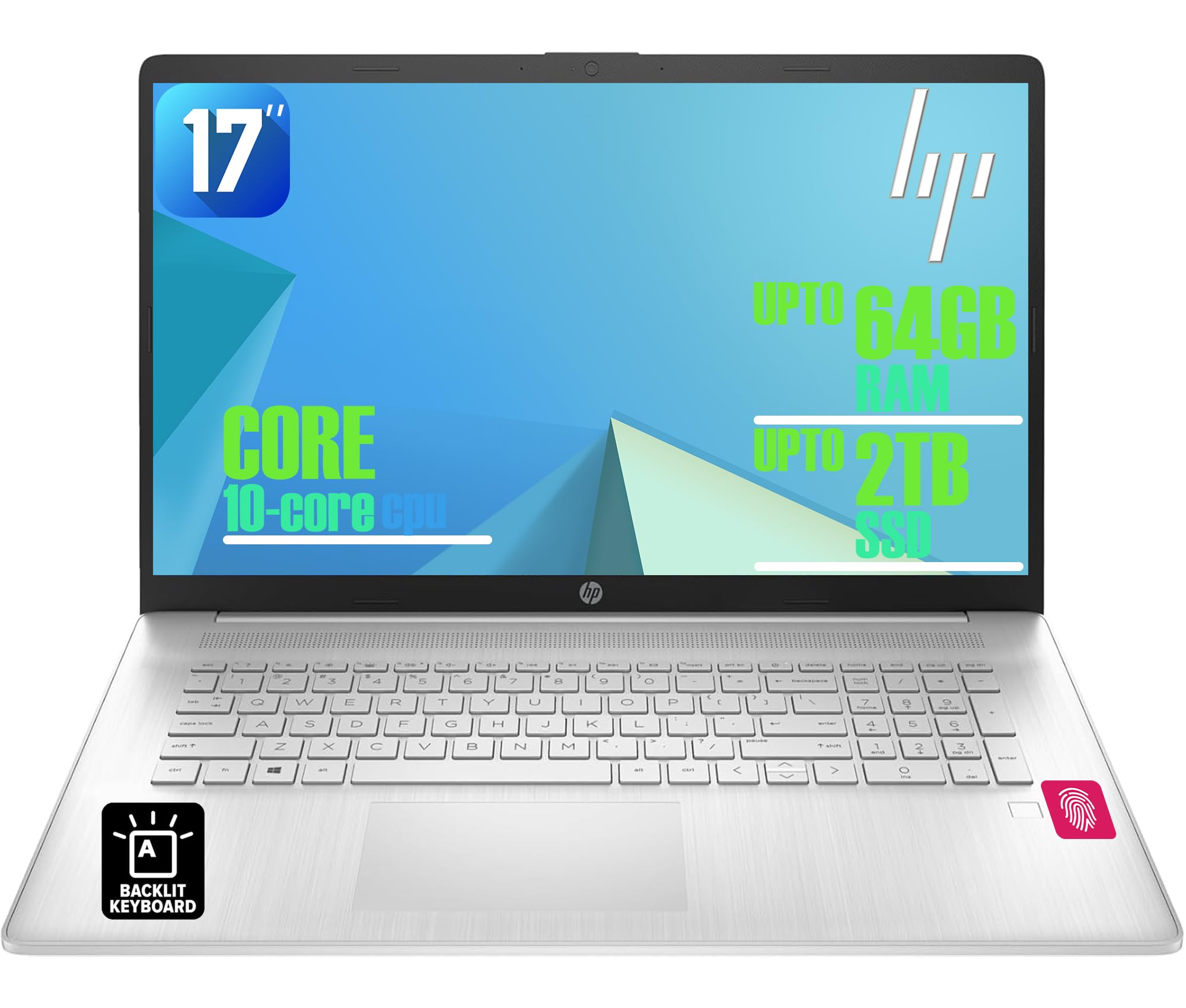
Figure 1: HP 17-inch Business Laptop (Silver)
2. Configuración
2.1 Desembalaje e inspección inicial
Carefully remove the laptop and all accessories from the packaging. Check for any visible damage. The package should include the HP 17-inch laptop, a power adapter, and documentation.
2.2 Conexión a la alimentación
- Connect the power adapter to the AC smart pin port on the side of the laptop.
- Conecte el adaptador de corriente a una toma de pared.
- Deje que la computadora portátil se cargue durante al menos 30 minutos antes del uso inicial, o hasta que el indicador de batería muestre carga suficiente.
2.3 Arranque inicial y configuración de Windows
- Abra la tapa de la computadora portátil y presione el botón de encendido, generalmente ubicado en la parte superior derecha del teclado.
- Sigue las instrucciones en pantalla para completar la configuración de Windows 11 Home. Esto incluye seleccionar la región, el idioma, conectarte a una red Wi-Fi y crear una cuenta de usuario.
2.4 Conexión de periféricos
Su computadora portátil HP ofrece varios puertos para conectar dispositivos externos:
- Puertos USB: Use the USB 3.2 Gen 1 Type-C port or the two USB 3.2 Gen 1 Type-A ports for connecting external drives, mice, keyboards, or other USB accessories.
- HDMI: Conecte un monitor externo o un proyector mediante el puerto HDMI 1.4.
- Audio: Plug headphones or an external microphone into the 3.5mm headphone/microphone combo jack.

Figura 2: Lado view illustrating available ports (USB Type-C, USB Type-A, HDMI, Headphone/microphone combo, AC smart pin)
3. Operación de su computadora portátil
3.1 Gestión de energía
- Encendido: Presione el botón de encendido.
- Modo de sueño: Cierre la tapa o seleccione “Suspender” en el menú Inicio.
- Cerrar: Seleccione “Apagar” en el menú Inicio.
- Reanudar: Seleccione “Reiniciar” en el menú Inicio.
3.2 Teclado y panel táctil
The laptop features a full-size backlit keyboard with a numeric keypad. Use the function keys (Fn) in combination with other keys for specific actions like adjusting screen brightness, volume, or toggling the keyboard backlight.
The integrated touchpad supports multi-touch gestures for navigation. Refer to Windows settings for customizing touchpad behavior.

Figure 3: Backlit keyboard with numeric keypad and integrated fingerprint reader
3.3 Lector de huellas dactilares
The integrated fingerprint reader allows for secure and quick login using Windows Hello. To set up, navigate to Configuración > Cuentas > Opciones de inicio de sesión y siga las instrucciones para registrar su huella digital.
3.4 Conectividad inalámbrica
- Wifi: The laptop supports Realtek Wi-Fi 6 (2x2). To connect to a wireless network, click the Wi-Fi icon in the taskbar, select your desired network, and enter the password if required.
- Bluetooth: Bluetooth 5.3 is integrated for connecting wireless accessories like headphones or mice. Enable Bluetooth from Configuración > Bluetooth y dispositivos and pair your devices.
3.5 Visualización y Webleva
The 17.3-inch HD+ anti-glare display provides a clear viewing experience. The HP True Vision 720p HD webcam with dual microphones is suitable for video calls and online meetings.
QuickDrop de 3.6 HP
HP QuickDrop allows for wireless file transfer between your laptop and mobile devices without needing cables. Install the HP QuickDrop app on both your laptop and mobile device and follow the in-app instructions to pair and transfer files.

Figure 4: HP QuickDrop for wireless file transfer between laptop and phone
4. Mantenimiento
4.1 Limpieza de su computadora portátil
- Pantalla: Utilice un paño suave y sin pelusa ligeramenteampLimpie con agua o un limpiador de pantallas. No rocíe el líquido directamente sobre la pantalla.
- Teclado y chasis: Utilice un paño suave y seco. Para la suciedad difícil, un paño ligeramente seco.amp cloth can be used, ensuring no liquid enters the device. Compressed air can help remove debris from between keys.
4.2 Cuidado de la batería
The laptop is equipped with a 41Wh Lithium-Ion Battery. To maximize battery lifespan:
- Evite temperaturas extremas.
- No descargue completamente la batería periódicamente.
- Utilize HP Fast Charge, which can charge the battery from 0 to 50% in approximately 45 minutes.

Figure 5: Battery life indicator (Up to 8 hours wireless streaming)
4.3 Actualizaciones de software
Revise e instale periódicamente las actualizaciones de Windows para asegurarse de que su sistema cuente con los últimos parches de seguridad y mejoras de rendimiento. Vaya a Configuración > Actualización de Windows para gestionar actualizaciones.
5. Solución de problemas
Esta sección aborda problemas comunes que puede encontrar con su computadora portátil HP.
5.1 Problemas de energía
- La computadora portátil no enciende: Asegúrese de que el adaptador de corriente esté bien conectado tanto a la laptop como a una toma de corriente que funcione. Compruebe si el indicador luminoso del adaptador está encendido. Pruebe con otra toma de corriente.
- La batería no se carga: Verify the power adapter connection. Check battery health in Windows settings.
5.2 Problemas de visualización
- No hay imagen en la pantalla: Asegúrese de que la computadora portátil esté encendida. Si hay un monitor externo conectado, intente desconectarlo o presionar Fn + F4 (or the corresponding display toggle key) to switch display output.
- Pantalla oscura: Adjust brightness using the function keys (e.g., Fn + F2 / F3) or through Windows settings.
5.3 Problemas de conectividad
- Wi-Fi no se conecta: Asegúrate de que el Wi-Fi esté habilitado en la configuración de Windows. Reinicia el router y la laptop. Busca controladores de red actualizados.
- El dispositivo Bluetooth no se empareja: Ensure Bluetooth is enabled on both the laptop and the device. Make sure the device is in pairing mode.
5.4 Problemas generales de rendimiento
- Rendimiento lento: Close unnecessary applications. Check for malware. Ensure sufficient free space on the SSD.
- El sistema se congela: Prensa Ctrl + Alt + Supr to open Task Manager and end unresponsive tasks. If unresponsive, perform a hard shutdown by holding the power button for several seconds.
6. Especificaciones
The following table outlines the key technical specifications for the HP 17-inch Business Laptop (Model: HP laptop).
| Característica | Especificación |
|---|---|
| Marca | HP |
| Nombre del modelo | HP laptop |
| Procesador | Intel Core i5-1334U de 13.ª generación (10 núcleos, hasta 4.6 GHz) |
| Sistema operativo | Inicio de Windows 11 |
| Mostrar | 17.3-inch HD+ (1366x768) Anti-glare, 250 nits |
| Gráficos | Gráficos Intel Iris Xe (integrados) |
| Memoria RAM | Up to 64GB DDR4 SDRAM 3200 MHz |
| Almacenamiento | Up to 2TB NVMe M.2 SSD |
| Conectividad inalámbrica | Realtek Wi-Fi 6 (2x2), Bluetooth 5.3 |
| Puertos | 1x USB 3.2 Gen 1 Type-C, 2x USB 3.2 Gen 1 Type-A, 1x HDMI 1.4, 1x Headphone/microphone combo jack |
| Teclado | Teclado retroiluminado de tamaño completo con teclado numérico |
| Seguridad | Lector de huellas dactilares |
| Cámara | Cámara HD de 720p con obturador de privacidad |
| Batería | 41Wh Lithium-Ion (HP Fast Charge) |
| Dimensiones (L x An x Al) | 15.78" x 10.15" x 0.81" (aprox.) |
| Peso | 4.6 libras (aprox.) |
| Color | Plata natural |

Figure 6: Laptop dimensions (15.78" W x 10.15" D x 0.78" H) and weight (4.60 lbs)
7. Garantía y soporte
7.1 Garantía del fabricante
Your HP laptop is covered by a manufacturer's warranty. Please refer to the warranty documentation included with your product for specific terms, conditions, and duration. Keep your proof of purchase for warranty claims.
7.2 Soporte técnico
Para obtener asistencia técnica, descargas de controladores o más soporte, visite el soporte oficial de HP. website. You will typically need your product's serial number or model number to access specific support resources.
Soporte en línea: https://support.hp.com