
1. Introducción
The Fender Mustang LTX100 is a 100-watt modeling combo amplifier designed for guitarists seeking versatile tone and performance. This ampcaracterísticas más duraderas 25 amp models, 25 studio-quality effects, and 100 preset slots for extensive sound customization. It is equipped with a 12-inch Celestion G12FSD-100 speaker, an integrated color display with a chromatic tuner, Bluetooth audio streaming, and USB-C connectivity for recording and app control. This manual provides essential information for the proper setup, operation, and maintenance of your Mustang LTX100 ampmás duradero.

Figure 1.1: Fender Mustang LTX100 AmpLificador con accesorios incluidos.
2. Información de seguridad
Please read and understand all safety instructions before operating your Fender Mustang LTX100 amplificador. Conserve este manual para futuras consultas.
- ADVERTENCIA: To reduce the risk of fire or electric shock, do not expose this appliance to rain or moisture. Do not remove the cover. Refer servicing to qualified personnel only.
- PRECAUCIÓN: Para evitar descargas eléctricas, no utilice este enchufe (polarizado) con un cable de extensión, receptáculo u otro tomacorriente a menos que las clavijas se puedan insertar completamente para evitar la exposición de las mismas.
- ADVERTENCIA: Este producto contiene sustancias químicas que el estado de California reconoce como causantes de cáncer, defectos de nacimiento u otros daños reproductivos.
- Asegúrese de que amplifier is connected to a grounded power outlet.
- Do not block ventilation openings. Maintain adequate space around the ampFiltro para un flujo de aire adecuado.
- Evite colocar el amplifier near heat sources such as radiators, heat registers, stoves, or other apparatus (including ampificadores) que producen calor.
- Proteja el cable de alimentación para que no sea pisado ni aplastado, especialmente en los enchufes, receptáculos y en el punto donde sale del aparato.
- Desenchufe este aparato durante tormentas eléctricas o cuando no lo utilice durante períodos prolongados.
3. Configuración
3.1 Desembalaje y colocación
Retire con cuidado el amplifier and all accessories from the packaging. Inspect the unit for any signs of damage. Place the amplifier on a stable, level surface, ensuring adequate space for ventilation.
3.2 Conexión de alimentación
- Asegúrese de que ampEl interruptor de encendido del generador está en la posición APAGADO.
- Connect the provided power cord to the INPUT POWER receptacle on the rear panel of the ampmás duradero.
- Plug the other end of the power cord into a suitable grounded AC power outlet.
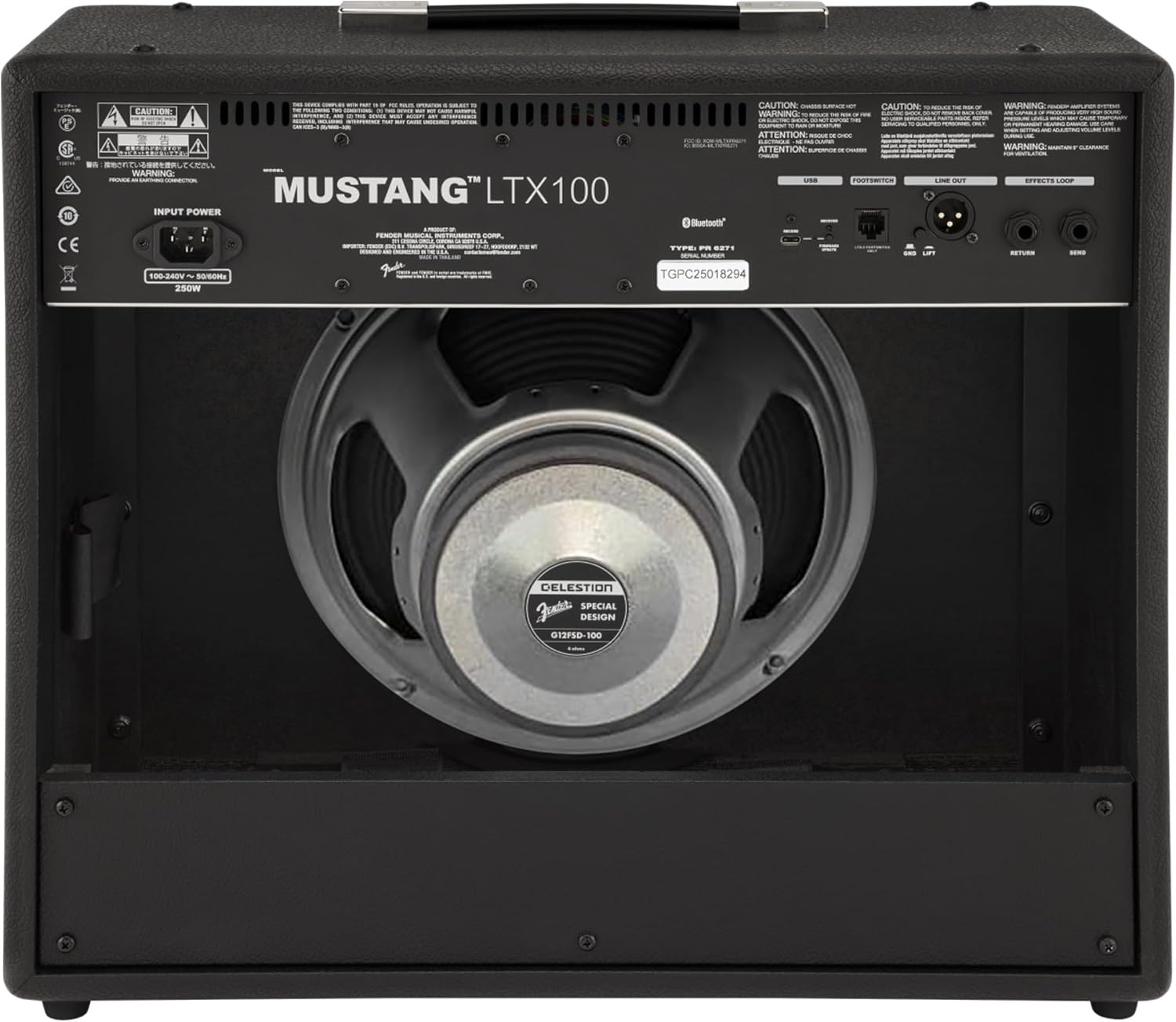
Figura 3.1: Conexiones del panel trasero
3.3 Instrument and Accessory Connections
- Entrada del instrumento: Connect your guitar using a standard 1/4-inch instrument cable to the INPUT jack on the front panel.
- Entrada auxiliar: For connecting external audio devices (e.g., MP3 player, phone), use a 3.5mm stereo cable to the AUX input on the front panel.
- Salida de auriculares: For silent practice, connect headphones to the HEADPHONE OUT jack on the rear panel.
- Salida de línea XLR: For connecting to a PA system or recording interface, use XLR cables to the LINE OUT jacks on the rear panel. A ground lift switch is provided to eliminate hum.
- Bucle de efectos: External effects pedals can be connected via the SEND and RETURN jacks on the rear panel.
- USB-C: Connect to a computer for recording, firmware updates, and Fender Tone 3.0 app control.
4. Instrucciones de funcionamiento
4.1 Controles del panel frontalview

Figura 4.1: Controles del panel frontal
- ENTRADA: Conector de 1/4 de pulgada para conectar tu guitarra.
- Auxiliar: Entrada estéreo de 3.5 mm para dispositivos de audio externos.
- GANAR: Controls the input level and amount of overdrive/distortion for the selected amp modelo.
- VOLUMEN: Adjusts the output level of the selected amp modelo.
- TRIPLICAR: Ajusta la respuesta de alta frecuencia.
- MEDIO: Ajusta la respuesta de frecuencia media.
- BAJO: Ajusta la respuesta de baja frecuencia.
- DOMINAR: Controla el volumen de salida general del ampmás duradero.
- MONITOR: Color LCD screen for navigating menus, selecting amp models, effects, and viewing tuner.
- ENCODER KNOB: Used to scroll through menus and adjust parameters on the display. Press to select.
- ESPALDA: Vuelve al menú o pantalla anterior.
- AHORRAR: Stores current settings as a preset.
- MENÚ: Accesses the main menu for system settings, global parameters, and more.
- GRIFO: Used for setting delay and modulation effect tempos. Hold to activate the chromatic tuner.
- ENCENDIDO/APAGADO: Interruptor de encendido para el ampmás duradero.
4.2 Encendido y funcionamiento básico
- Ensure all connections are secure and the MASTER volume is set to a low level.
- Press the ON/OFF switch to power on the amplifier. The display will illuminate.
- Seleccione una amp model and effect using the encoder knob and display.
- Adjust the GAIN, VOLUME, TREBLE, MIDDLE, and BASS knobs to shape your desired tone.
- Gradually increase the MASTER volume to achieve the desired listening level.
4.3 Utilizando Amp Modelos y efectos
The Mustang LTX100 offers 25 distinct amp models and 25 studio-quality effects. Use the encoder knob to browse through the available options on the display. Once an amp model or effect is selected, its parameters can be adjusted using the encoder knob or the dedicated tone knobs (Treble, Middle, Bass) if applicable.
4.4 preajustes
El amplifier comes with 70 factory presets and allows for 100 user-defined presets. To save your custom settings:
- Dial in your desired amp model, effects, and tone settings.
- Presione el botón GUARDAR.
- Use the encoder knob to select a user preset slot.
- Press the encoder knob to confirm and save your preset.
4.5 Transmisión de audio por Bluetooth
Para transmitir audio desde un dispositivo móvil:
- Activa el Bluetooth en tu dispositivo móvil.
- En el amplifier, navigate to the Bluetooth menu via the display.
- Select "Pair New Device" and choose "Mustang LTX100" from your device's Bluetooth list.
- Once paired, you can play audio through the ampmás duradero.
4.6 Fender Tone 3.0 App
The Fender Tone 3.0 app (available for iOS and Android) provides wireless control over your amplifier. It allows you to edit, save, and share presets, as well as access additional features. Connect your amplifier to your mobile device via Bluetooth to use the app.
5. Mantenimiento
5.1 Limpieza
- Siempre desconecte el ampDesconecte el dispositivo de la toma de corriente antes de limpiarlo.
- Utilice un paño suave y seco para limpiar las superficies exteriores.
- No utilice limpiadores abrasivos, disolventes o ceras, ya que pueden dañar el acabado.
- Avoid spraying liquids directly onto the ampmás duradero.
5.2 Almacenamiento
- Almacenar el amplifier in a dry, cool environment, away from direct sunlight and extreme temperatures.
- If storing for an extended period, cover the ampamplificador para protegerlo del polvo.
6. Solución de problemas
| Problema | Posible causa | Solución |
|---|---|---|
| Sin poder | Cable de alimentación no conectado; Toma de corriente no activa; Ampinterruptor de encendido del elevador apagado | Verifique la conexión del cable de alimentación; Pruebe la toma de corriente con otro dispositivo; Asegúrese de que el interruptor de encendido esté encendido |
| Sin sonido | Instrument cable faulty/disconnected; Guitar volume off; Amplifier volume/master low; Headphones connected | Check/replace instrument cable; Turn up guitar volume; Increase amplifier volume/master; Disconnect headphones |
| Sonido distorsionado | Gain too high; Master volume too high; Faulty cable/instrument | Reduce GAIN; Reduce MASTER volume; Test with different cable/instrument |
| Problemas de conexión Bluetooth | El dispositivo no está en modo de emparejamiento; Amplifier not discoverable; Interference | Ensure device is in pairing mode; Re-initiate pairing on amplifier; Move closer to amplifier; Restart both devices |
7. Especificaciones
| Característica | Detalle |
|---|---|
| Nombre del modelo | Mustang LTX100 |
| Número de modelo | 2311800000 |
| Potencia de salida | 100 vatios |
| Vocero | 1 x 12″ Celestion G12FSD-100 |
| Amp Modelos | 25 |
| Efectos | 25 (distortion, overdrive, compression, modulation, delay, reverb, octave, etc.) |
| Ajustes preestablecidos | 70 factory presets + 100 user slots |
| Mostrar | Color LCD with onboard chromatic tuner |
| Conectividad | Bluetooth audio, USB-C bidirectional audio |
| Salidas | XLR line out (with ground lift), headphone out |
| Entradas | 1/4″ instrument input, 3.5 mm aux input |
| Soporte de aplicaciones | Fender Tone 3.0 app (iOS/Android) |
| Construcción | Combinación amplifier, rugged build |
| Peso del artículo | 26.4 libras |
| Dimensiones del producto | 22.3 x 19.9 x 12.3 pulgadas |
| Material | Metal |
| Fuente de poder | Eléctrico con cable |
8. Garantía y soporte
For detailed warranty information, product registration, and technical support, please visit the official Fender website. You can also find FAQs, software updates, and additional resources there.
Official Fender Store: Fender Store on Amazon