
Introducción
The Roku Select Series 40-Inch 1080p Full HD Smart TV is designed to provide a seamless and enjoyable streaming experience. This manual provides essential information for setting up, operating, maintaining, and troubleshooting your television. Enjoy bright Full HD picture quality, clear sound, and access to a wide range of entertainment options.
¿Qué hay en la caja?
Verifique que todos los componentes estén presentes antes de comenzar la configuración.
- Roku Select Series 40-Inch Full HD TV
- Roku Voice Remote with batteries
- Soportes de TV y tornillos
- Cable de alimentación
- Guía de inicio rápido (este manual)

Image: Contents of the Roku TV box, showing the television, remote control, stand components, and power cable.
Configuración
1. Colocación del soporte para TV
- Coloque con cuidado el televisor con la pantalla hacia abajo sobre una superficie suave y limpia para evitar daños.
- Alinee los soportes del televisor con los orificios para tornillos en la parte inferior del televisor.
- Asegure cada soporte con los tornillos provistos usando un destornillador Phillips.
2. Montaje en pared (opcional)
This TV supports VESA wall mounts with a standard of 200 x 300 mm. Refer to your wall mount's instructions for proper installation. Ensure the wall mount can support the TV's weight of 10.4 pounds (without stand).
3. Conexión de dispositivos
Your Roku TV offers multiple connectivity options:
- HDMI: 3 ports available for connecting gaming consoles, Blu-ray players, or other HDMI-enabled devices. HDMI 1 supports ARC.
- USB: 1 USB 2.0 port for media playback or connecting compatible accessories.
- S/PDIF (óptico): Para salida de audio digital a una barra de sonido o un sistema de cine en casa.
- AV (Compuesto): For older devices using red, white, and yellow cables.
- Antena/Cable: Para conectar una antena para transmisiones por aire o una conexión de TV por cable.

Imagen: Trasera view of the Roku TV displaying the HDMI, USB, optical, and AV input ports.
4. Conexión de alimentación
Connect the provided power cable to the TV and then to a power outlet (110 VAC 60 Hz).
5. Configuración inicial y conexión de red
Upon first power-on, follow the on-screen instructions to set up your Roku TV. This includes connecting to your Wi-Fi network (Bluetooth and Wi-Fi connectivity are supported) and linking to a Roku account. Automatic software updates will ensure you have the latest features.
Instrucciones de funcionamiento
1. Navegación en la pantalla de inicio de Roku
The Roku home screen provides quick access to all your entertainment. You can easily move apps around to customize your viewExperiencia de aprendizaje.

Image: The Roku TV home screen showing a grid of streaming applications like Netflix, Disney+, and Prime Video, along with navigation menus.
2. Uso del control remoto por voz
The included Roku Voice Remote allows for easy navigation and control. Use your voice to search across thousands of apps, play entertainment, and control streaming functions. The remote requires 2 AAA batteries.

Image: Close-up of the Roku Voice Remote, highlighting buttons for power, volume, voice search, and dedicated app shortcuts.
3. Transmisión y aplicaciones
Access a world of entertainment with pre-installed apps like Netflix, Prime Video, Disney+, Hulu, and Apple TV+. The Streaming Store offers thousands more. Roku also provides over 500 free TV channels, including live in-season shows, movies, weather, and local news.
4. Configuración de imagen
Optimiza tu viewExperiencia con diversas configuraciones de imagen:
- Imagen inteligente de Roku: Automatically cleans up incoming TV signals, optimizes them, and selects the best picture mode.
- Modos de imagen: Choose from presets like Movie, Standard, Vivid, Sports, or Low Power.
- Imagen personalizada: Adjust backlight, brightness, contrast, sharpness, color, and tint manually.
5. Configuración de sonido
The Roku TV features Dolby Audio for clear speech and louder sound. Adjust sound modes (Standard, Dialogue, Movie, Music, Night, Auto) or customize settings for volume mode, speech clarity, bass, and treble.
6. Bluetooth Headphone Mode
Connect your favorite wireless headphones via Bluetooth to enjoy audio privately without disturbing others.

Image: A person using Bluetooth headphones while watching the Roku TV, illustrating the private listening feature.
7. Integración de hogares inteligentes
Enjoy easy voice control with Roku Voice, Siri, Alexa, or Google Assistant. Effortlessly share videos, photos, and music from your Apple devices to your smart TV with Apple AirPlay.
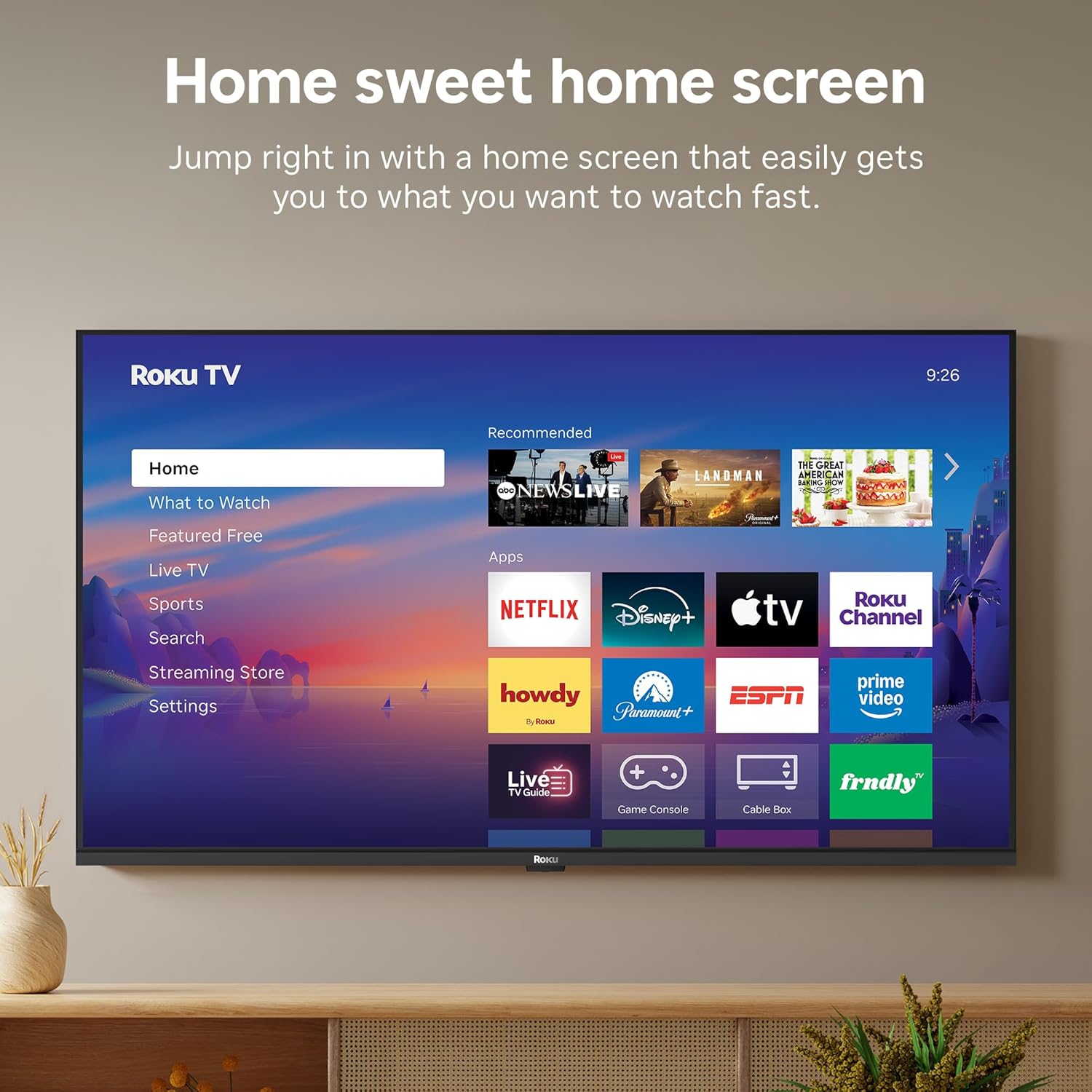
Image: A smart speaker positioned near the Roku TV, illustrating the TV's compatibility with voice assistants like Alexa for smart home control.
8. Temporizador de sueño
The TV includes a sleep timer function, allowing you to set the TV to automatically turn off after a specified duration (e.g., 30 minutes, 1 hour, 1.5 hours, 2 hours, 3 hours).
Mantenimiento
To ensure the longevity and optimal performance of your Roku TV, follow these maintenance guidelines:
- Limpieza: Use a soft, dry cloth to clean the screen and TV cabinet. Avoid abrasive cleaners or solvents.
- Actualizaciones de software: Your Roku TV receives automatic software updates to provide the newest apps and features. Ensure your TV is connected to the internet for these updates.
- Ventilación: Asegúrese de que haya suficiente ventilación alrededor del televisor para evitar el sobrecalentamiento. No bloquee las aberturas de ventilación.
Solución de problemas
If you encounter issues with your Roku TV, try the following basic troubleshooting steps:
- Sin energía: Compruebe que el cable de alimentación esté bien conectado tanto al televisor como a la toma de corriente. Pruebe con otra toma.
- Sin imagen/sonido: Verifique que la fuente de entrada seleccionada sea la correcta. Revise todas las conexiones de cable (HDMI, AV, etc.).
- Sin conexión a Internet: Restart your Wi-Fi router and modem. Go to Settings > Network > Check connection on your TV to diagnose network issues.
- El control remoto no responde: Replace the batteries in the Roku Voice Remote. Ensure there are no obstructions between the remote and the TV.
- Asuntos Generales: Intente reiniciar el televisor desenchufándolo de la toma de corriente durante 30 segundos y luego volviéndolo a enchufar.
Presupuesto
| Característica | Detalle |
|---|---|
| Marca | Roku |
| Nombre del modelo | Roku 40" Select Series FHD |
| Número de modelo | 40R3E5 |
| Tamaño de pantalla | 40 pulgadas |
| Tecnología de visualización | CONDUJO |
| Resolución | 1080p Full HD |
| Frecuencia de actualización | 60 Hz |
| Características especiales | Bluetooth Headphone Mode, Dolby Audio, Voice Remote, Roku Smart Picture |
| Tecnología de conectividad | Bluetooth, Wi-Fi, Infrarrojos |
| Interfaz de hardware | 3x HDMI, 1x USB, S/PDIF (Optical) |
| Dimensiones del producto (Pr. x An. x Al.) | 7.1" de profundidad x 35.1" de ancho x 21.9" de alto |
| Peso del artículo (sin soporte) | 10.4 libras |
| Estándar de montaje VESA | 200 x 300 mm |
| Sistema operativo | Sistema operativo Roku |
| Potencia de salida del altavoz | 14 vatios |
| Tecnología de control parental | Chip V |
| Código Postal | 829610009476 |
Garantía y soporte
Roku warrants the hardware against defects in materials and workmanship under normal use for a period of one (1) year from the date of purchase ("Warranty Period"), provided it is used in accordance with the provided documentation. If a defect is determined during the Warranty Period, Roku's sole obligation and your exclusive remedy will be to either repair or replace the unit with a new or rebuilt device, at its option.
For important information about warranty returns and replacements, or additional details regarding product returns, please visit the official Roku support site. You may also return a device within thirty (30) days from the date of purchase from Roku, or within the applicable return period if purchased from an authorized reseller or distributor.
Vídeo oficial del producto
Video: An official product video from Roku, Inc. showcasing the features and user experience of the 2026 Roku TV Select Series.