
1. Introducción
The GODIYMODULES SMC05 is an integrated stepper and servo motor driver controller designed for precise control of motor rotation, speed, and angle. Featuring a 1.8-inch color screen and intuitive knob operation, this module supports a wide range of applications requiring accurate motor positioning and speed regulation. It offers multiple control modes and communication options for versatile integration into various systems.
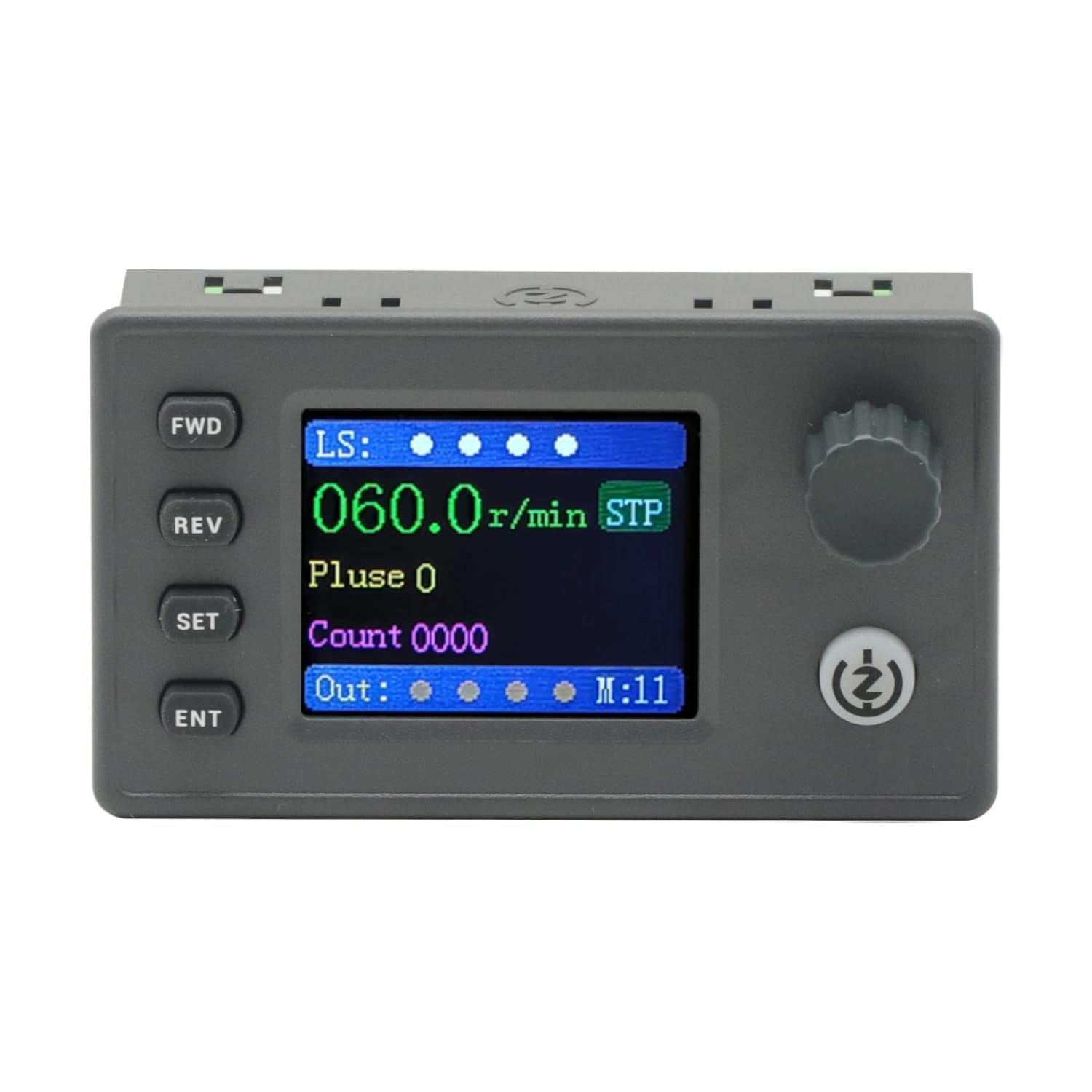
Figure 1: The SMC05 Stepper/Servo Motor Driver Controller, highlighting its 1.8-inch color screen, knob operation, and shortcut buttons.
2. Características del producto
- Control integrado: Combines stepper motor driver and servo motor control functionalities.
- Amplio Voltage Rango: Operates with a working voltagy de 12-24V.
- Diseño compacto: Product dimensions are 83x48x35.5mm.
- Señales de salida: Features 4 output channels with 0V output voltage.
- Señales de entrada: Includes 4 limit inputs and 3 extended key interfaces.
- High Pulse Frequency: Supports motor pulse frequencies from 1Hz to 200,000Hz.
- Pantalla a color: Equipped with a 1.8-inch color screen for clear information display.
- Volumen de pulsotage: Motor pulse voltage is 0V output, collector output form.
- Comunicación: Supports Modbus protocol via serial port/485.
- Modos múltiples: Supports 20 different motion control modes.
- Soporte de idiomas: Display in both Chinese and English.

Figure 2: Key features of the SMC05 controller, including support for various modes and input/output capabilities.
3. Configuración e instalación
3.1 Fuente de alimentación y conexiones
Asegúrese de que el volumen de trabajotage is within the specified range of 12-24V DC. Connect the power supply to the designated terminals. The controller features various input and output interfaces for connecting limit switches, expansion buttons, and motor drives.

Figura 3: detallada view of the SMC05 controller's extension interface, indicating connections for power, limit switches, expansion buttons, communication, and motor outputs.
3.2 Cableado de motores
Proper wiring of the stepper or servo motor drive is crucial for correct operation. Refer to the wiring diagrams provided to ensure all connections are secure and correctly aligned with the motor and power source.

Figura 4: Example wiring diagram for connecting the SMC05 controller to a microstep driver and a stepper motor.
4. Instrucciones de funcionamiento
The SMC05 controller features a user-friendly interface with a 1.8-inch color screen, a rotary knob, and several control buttons for easy operation and parameter adjustment.
4.1 Panel de control terminadoview

Figure 5: Front panel layout of the SMC05 controller with labels for all buttons, the rotary knob, and display indicators.
- FWD Button: Initiates forward rotation.
- Botón REV: Initiates reverse rotation.
- Botón de ajuste: Enters the settings menu or exits current settings.
- Botón ENT: Confirma selecciones o ingresa a submenús.
- Botón giratorio: Adjusts parameters such as speed, pulse count, and navigates menus.
- Botón de inicio / parada: Starts or stops motor operation.
- Pantalla de visualización: Shows current speed, pulse count, motion mode, and various indicators.
4.2 Funcionamiento básico
- Encendido: Connect the 12-24V DC power supply. The screen will light up.
- Configuración de parámetros: Presione el COLOCAR button to enter the settings menu. Use the rotary knob to navigate through options like Acción, Motor, y Sistema. Prensa Otorrinolaringología Para seleccionar.
- Adjusting Speed/Pulse: Dentro de la Acción or Motor settings, you can adjust parameters such as forward pulse, forward speed, reverse pulse, and reverse speed using the rotary knob.
- Starting Motor: Una vez configurados los parámetros, presione el botón Iniciar/Detener button to begin motor operation. The motor will rotate according to the configured speed and direction.
- Cambio de dirección: Utilice el Delantero y RDO buttons to change the motor's rotation direction during operation.
- Stopping Motor: Presione el Iniciar/Detener button again to halt motor movement.
4.3 Advanced Features Demonstration
The following video demonstrates various operational aspects and advanced features of the SMC05 controller, including interface navigation, stepper motor control, use of expansion buttons, limit switches, and output control, as well as servo motor drive integration.
Video 1: Demonstration of the SMC05 controller's interface, stepper motor drive, expansion button functionality, limit switch activation, output control, and servo motor drive operation.
5. Especificaciones
| Característica | Especificación |
|---|---|
| Dimensiones del producto | 3.27 x 1.89 x 1.4 pulgadas (83 x 48 x 35.5 mm) |
| Peso del artículo | 3.27 onzas |
| Vol de trabajotage | 12-24V DC |
| Señal de salida | 4 channels, 0V output voltage |
| Entrada de señal | 4 limit inputs, 3 extended key interfaces |
| Frecuencia de pulso del motor | 1Hz - 200,000Hz |
| Tipo de pantalla | Pantalla a color de 1.8 pulgadas |
| Volumen del pulso del motortage | Salida de 0 V, forma de salida de colector |
| Protocolo de comunicación | Modbus (serial port/485) |
| Componentes incluidos | 1PCS SMC05 Controller |
6. Mantenimiento
To ensure the longevity and optimal performance of your SMC05 controller, follow these maintenance guidelines:
- Mantenga el dispositivo limpio y libre de polvo y residuos. Utilice un paño suave y seco para limpiarlo.
- Evite exponer el controlador a temperaturas extremas, humedad o luz solar directa.
- Asegúrese de que todas las conexiones estén seguras y libres de corrosión. Revise periódicamente el cableado para detectar signos de desgaste o daños.
- No intente abrir la casing o modificar los componentes internos, ya que esto puede anular la garantía y causar daños.
7. Solución de problemas
If you encounter issues with your SMC05 controller, refer to the following common troubleshooting steps:
- Sin energía: Verifique la conexión de la fuente de alimentación y asegúrese de que proporcione el volumen correcto.tage (12-24V DC). Verify the power adapter is functioning.
- El motor no se mueve:
- Ensure the motor is correctly wired to the driver and the driver to the controller.
- Check if the motor parameters (speed, pulse) are set correctly on the controller.
- Verify that the Start/Stop button has been pressed to initiate movement.
- Check for any active limit switch inputs that might be preventing movement.
- Incorrect Speed/Direction: Review the speed and direction settings in the controller's menu. Ensure the FWD/REV buttons are used appropriately.
- Problemas de visualización: If the screen is blank or shows errors, try restarting the device. If the problem persists, contact support.
- Communication Errors (Modbus): Verify the serial port/485 connections and ensure the communication parameters (baud rate, parity, etc.) are correctly configured on both the controller and the connected device.
For persistent issues not resolved by these steps, please contact GODIYMODULES customer support.
8. Garantía y soporte
Information regarding specific warranty terms for the GODIYMODULES SMC05 controller is not available in the provided product data. Please refer to the product packaging or the manufacturer's official websitio para obtener información detallada sobre la garantía.
For technical support, troubleshooting assistance, or inquiries about the product, please contact GODIYMODULES customer service through their official channels.