
1. Producto terminadoview
The DOOMAY Digital Alarm Clock Model 6221 is designed for bedside use, featuring a clear VA LCD display. It includes dual alarm settings, a 9-minute snooze function, and a weekend mode. The clock displays time, date, day of the week, and indoor temperature. It offers adjustable brightness, multiple alarm sounds, and volume levels. Power options include a Type-C adapter and battery backup.

Imagen: Frente view of the DOOMAY Digital Alarm Clock Model 6221, displaying time, date, and temperature.
2. Contenido del paquete
- DOOMAY Digital Alarm Clock Model 6221
- Cable USB tipo C
- Adaptador de corriente (enchufe de pared)
- 2 pilas AAA (de respaldo)
- Manual de usuario (este documento)
3. Configuración
3.1 Encendido del reloj
The clock can be powered via the included Type-C adapter for continuous operation or by batteries for backup during power outages. For optimal performance and continuous display, it is recommended to keep the clock plugged in.
- Primary Power (Adapter): Connect the Type-C USB cable to the clock's DC 5V port and the other end to the power adapter. Plug the adapter into a wall outlet.
- Copia de seguridad de la batería: Open the battery compartment on the back of the clock. Insert 2 AAA batteries (included), ensuring correct polarity. These batteries will preserve your settings during power interruptions and allow the alarm to function, but the display will not be continuously lit when running on battery power alone.

Image: Illustration showing the clock powered by a wall adapter for continuous use and the battery compartment for backup power.
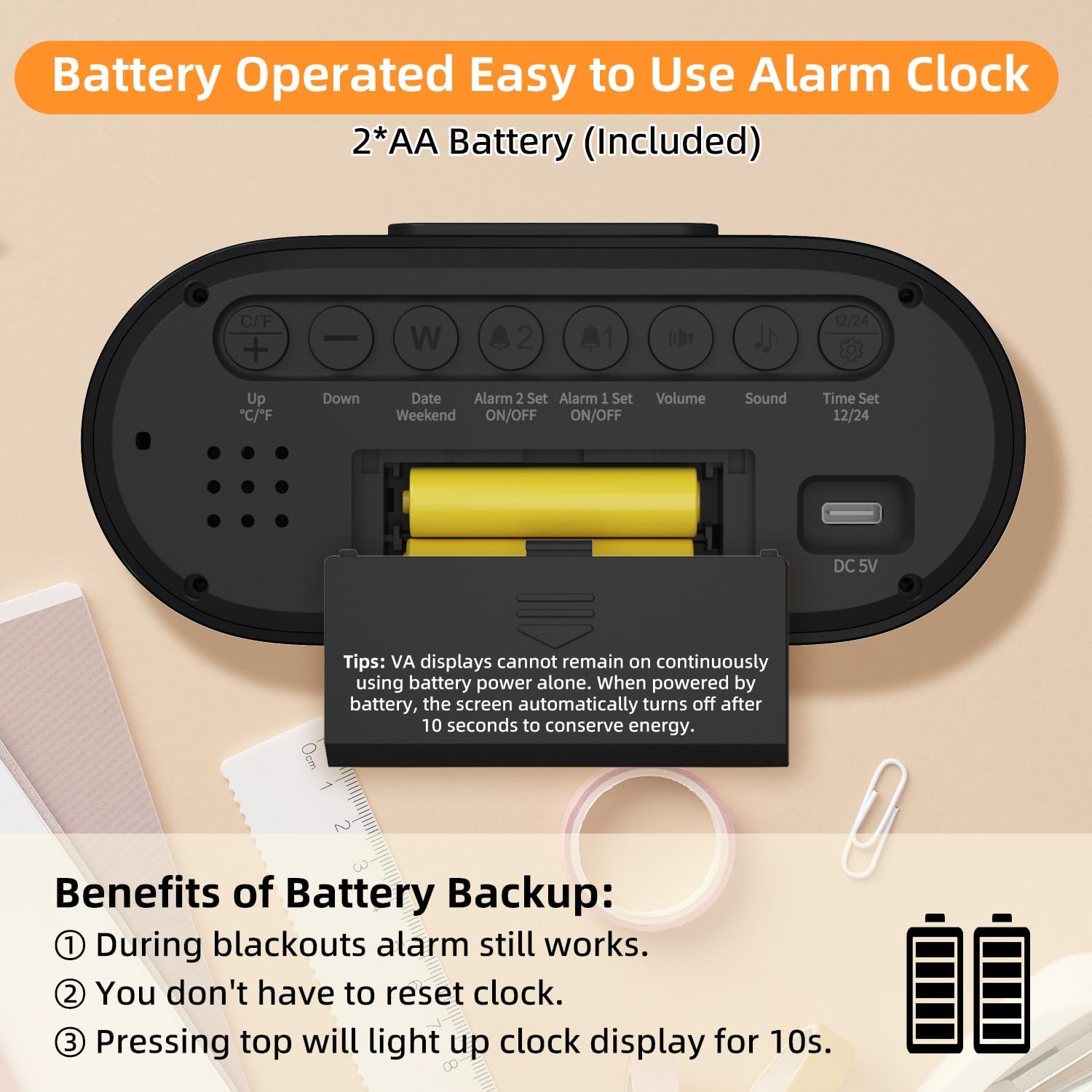
Imagen: Trasera view of the alarm clock, highlighting the battery compartment and labeled control buttons for setup.
4. Instrucciones de funcionamiento
4.1 Configuración de fecha y hora
Para configurar la fecha y hora actuales:
- Presione el "Time Set 12/24" Botón en la parte posterior del reloj para ingresar al modo de configuración de la hora.
- Utilice el "Up °C/°F" y "Abajo" Botones para ajustar la hora.
- Prensa "Time Set 12/24" again to move to minute adjustment, then use "Arriba" y "Abajo" botones.
- Continuar presionando "Time Set 12/24" para recorrer las configuraciones de año, mes y día, ajustando cada una con el "Arriba" y "Abajo" botones.
- Prensa "Time Set 12/24" Una última vez para salir del modo de configuración.
- Para cambiar entre el formato de 12 horas y 24 horas, presione el botón "Time Set 12/24" Botón fuera del modo de configuración.

Image: The clock display showing both 12-hour (AM/PM) and 24-hour time formats.
4.2 Configuración de alarma
El reloj cuenta con dos alarmas independientes (Alarma 1 y Alarma 2).
- Configurar una alarma:
- Presione el "Alarm 1 Set ON/OFF" or "Alarm 2 Set ON/OFF" Botón para seleccionar la alarma que desea configurar. El icono de la alarma parpadeará.
- Utilice el "Up °C/°F" y "Abajo" Botones para ajustar la hora.
- Press the respective alarm set button again to move to minute adjustment, then use "Arriba" y "Abajo" botones.
- Press the alarm set button one last time to confirm and exit setting mode.
- Activación/desactivación de alarmas: Presione el "Alarm 1 Set ON/OFF" or "Alarm 2 Set ON/OFF" button briefly outside of setting mode to toggle the alarm on or off. An alarm icon will appear on the display when active.
- Modo fin de semana: Presione el "Date Weekend" button to activate or deactivate weekend mode. When active, alarms will only sound from Monday to Friday.
- Función de repetición: Cuando suene una alarma, presione el botón grande "POSTEAR/LUZ" button on top of the clock to activate a 9-minute snooze. The alarm will sound again after 9 minutes.
- Cómo detener una alarma: To stop an alarm completely, press any button on the back of the clock. If no button is pressed, the alarm will sound for 2 minutes, snooze for 9 minutes, and repeat this cycle 3 times before turning off automatically.

Image: The clock displaying two separate alarm times, indicating its dual alarm capability.

Image: A hand pressing the top snooze button on the clock, illustrating the 9-minute snooze feature.

Image: The clock display indicating "WEEKEND" mode is active, meaning alarms are suspended for the weekend.
4.3 Configuración de pantalla
Adjust the display to your preference:
- Ajuste de brillo: When the clock is plugged in, press the large "POSTEAR/LUZ" button on top to cycle through 4 brightness levels (Off, Dim, Medium, Bright). The display will remain continuously lit at the selected brightness. When operating on battery power, pressing this button will illuminate the display for 10 seconds.
- Unidad de temperatura: Presione el "Up °C/°F" button on the back to switch the temperature display between Celsius (°C) and Fahrenheit (°F).

Image: Four panels illustrating the different brightness levels (Off, Dim, Medium, Bright) of the clock display when plugged in.

Image: The clock display showing temperature in both Celsius and Fahrenheit, with an icon indicating the switch function.
4.4 Configuración de sonido
Customize your alarm experience:
- Ajuste de volumen: Presione el "Volumen" button on the back to cycle through 3 alarm volume levels (Low: 65dB, Medium: 75dB, High: 85dB).
- Selección de tono de llamada: Presione el "Sonido" button on the back to choose from 4 available alarm sounds (standard beeps and 3 music ringtones).

Image: The clock display alongside graphics illustrating three volume levels and four distinct alarm sound options.
5. Mantenimiento
- Limpieza: Limpie el reloj con un paño suave y seco. No utilice limpiadores abrasivos ni disolventes.
- Reemplazo de batería: Replace AAA batteries when the low battery indicator appears on the display or if the clock fails to maintain settings during a power outage.
- Almacenamiento: Si va a guardar el reloj durante un período prolongado, retire las pilas para evitar fugas.
6. Solución de problemas
| Problema | Posible causa | Solución |
|---|---|---|
| Display is blank or intermittent. | No enchufado, sin energíatage, low batteries. | Ensure Type-C adapter is securely plugged in. Check power outlet. Replace AAA batteries. Note: Display is not continuously lit on battery power alone. |
| La alarma no suena. | Alarm not activated, volume too low, weekend mode active. | Verify alarm icon is displayed. Adjust alarm volume. Deactivate weekend mode if necessary. |
| La hora/fecha es incorrecta. | Incorrectly set, battery backup failed. | Follow instructions in Section 4.1 to reset time and date. Ensure backup batteries are fresh. |
| La pantalla es demasiado brillante/oscura. | Es necesario ajustar el nivel de brillo. | Presione el "POSTEAR/LUZ" button to cycle through brightness levels (when plugged in). |
7. Especificaciones
- Modelo: 6221
- Tipo de pantalla: VA LCD Digital
- Tamaño de pantalla: 4.55 pulgadas
- Dimensiones: 5.58" de ancho x 2.56" de alto
- Fuente de energía: Type-C USB (DC 5V) / 2 x AAA Batteries (backup)
- Características de la alarma: Dual Alarms, 9-Minute Snooze, Weekend Mode
- Niveles de volumen: 3 (65dB, 75dB, 85dB)
- Tonos: 4 tipos
- Niveles de brillo: 4 (Off, Dim, Medium, Bright - when plugged in)
- Características adicionales: Time (12H/24H), Date, Day of Week, Indoor Temperature (°C/°F)
- Material: Plástico
8. Garantía y soporte
For warranty information or technical support, please refer to the contact details provided on the product packaging or visit the official DOOMAY websitio. Guarde su recibo de compra para reclamos de garantía.