
1. Introducción
Thank you for choosing the Reobiux A20H-1P Dual Lens 6MP Wi-Fi Outdoor Security Camera. This manual provides essential information for setting up, operating, and maintaining your security camera. Please read it thoroughly before use to ensure proper functionality and safety. This camera is designed to provide comprehensive surveillance for your home, garden, garage, or office with advanced features like dual lenses, 2.5K resolution, 360° PTZ, and smart detection.
2. Producto terminadoview
2.1 Características principales
- Dual Lens & 5x Zoom: Equipped with a dual-lens PTZ platform, supporting 360° rotation and dynamic tracking for complete coverage without blind spots.
- Resolución 2.5K y visión nocturna en color: Features 2.5K resolution and 14 white LEDs plus dual infrared light sources, ensuring clear color images even in low light conditions up to 30 meters.
- Detección de IA y seguimiento automático: Automatically tracks movement when an intruder triggers the alarm, sending real-time alerts to your smartphone.
- Two-Way Audio & Active Alarm: Supports remote real-time communication, allowing interaction with visitors or deterring intruders with bright light flashes and an 80dB siren.
- 2.4G/5G Wi-Fi & Dual Storage: Offers fast wired or wireless connection (2.4G/5G Wi-Fi) and supports storage on a Micro SD card (up to 128GB, not included) or cloud service (subscription required).
2.2 Contenido del paquete
Por favor revise el paquete para ver los siguientes artículos:
- Reobiux Outdoor Camera (A20H-1P) x 1
- Manual de instrucciones x 1
- Installation Template/View x1
- Cable de alimentación de 1.6 m x 1
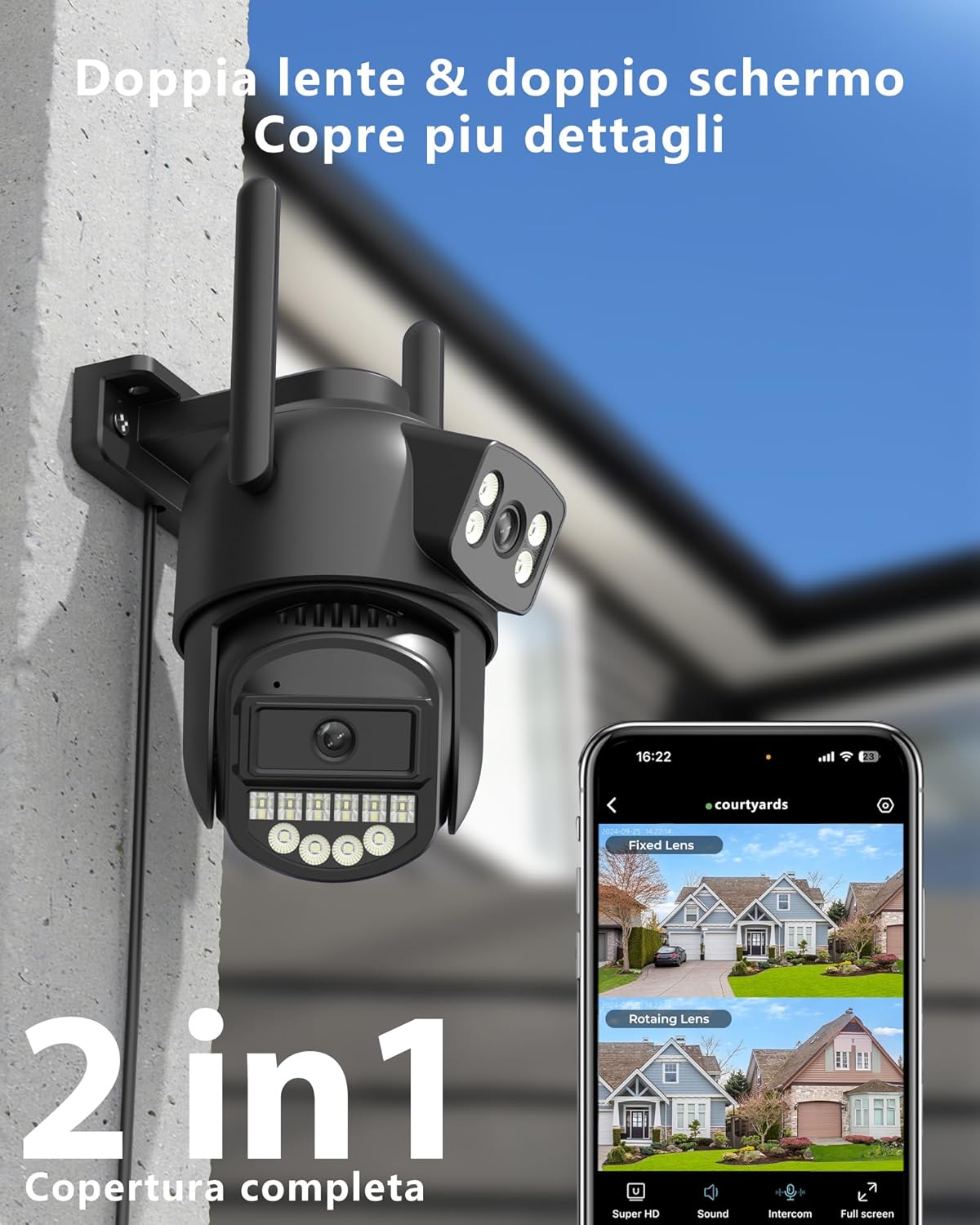
Image: Reobiux A20H-1P Dual Lens 6MP Wi-Fi Outdoor Security Camera, showing its dual lens design and antennas.

Image: Illustration of the dual lens system providing comprehensive security for a property, highlighting 3MP+3MP resolution.
3. Guía de configuración
3.1 Descarga e instalación de aplicaciones
To use your Reobiux camera, you need to download the Aplicación O-KAM Pro on your smartphone or tablet. The app is available on both Google Play Store and Apple App Store.
- Scan the QR code provided in the quick start guide or search for "O-KAM Pro" in your device's app store.
- Descargue e instale la aplicación.
- Regístrese para obtener una cuenta o inicie sesión si ya tiene una.

Image: Screenshots of the O-KAM Pro app interface, indicating compatibility with Google Play and App Store.
3.2 Conexión de la cámara
Your camera supports both 2.4GHz and 5GHz Wi-Fi networks, as well as a wired Ethernet connection for flexible installation.
- Encendido: Connect the camera to a power source using the provided 1.6m power cable. The camera will initiate its self-test and indicator lights will flash.
- Agregar dispositivo en la aplicación: Open the O-KAM Pro App, tap the "+" icon to add a new device. Follow the on-screen instructions.
- Conexión Wi-Fi: Select your 2.4GHz or 5GHz Wi-Fi network and enter the password. Ensure your phone is connected to the same network during setup. The camera will connect automatically.
- Conexión Ethernet (opcional): If you prefer a wired connection, connect an Ethernet cable from your router to the camera's RJ45 port. The app will detect the camera automatically.
- Finalizar la configuración: Once connected, name your camera and set up any initial preferences.

Image: Diagram illustrating the coverage differences between 2.4GHz (wider coverage, lower speed) and 5GHz (reduced coverage, faster speed) Wi-Fi, and the camera's Ethernet port.
3.3 Montaje de la cámara
Use the provided installation template and screws to securely mount the camera in your desired outdoor or indoor location. Ensure the camera has a clear field of view and is within Wi-Fi range or near an Ethernet port.
- Choose a mounting location that offers optimal surveillance and protection from direct impact.
- Use the installation template to mark drill holes.
- Perfore los agujeros e inserte los anclajes de pared si es necesario.
- Secure the camera bracket with screws.
- Ajuste el ángulo de la cámara según sea necesario.
4. Instrucciones de funcionamiento
4.1 en vivo View y control PTZ
Once connected, open the O-KAM Pro App to access the live view of your camera. The app displays both fixed and rotating lens views.
- Lente Fijo View: Provides a static overview of a specific area.
- Lente giratoria View: Allows you to pan (horizontal) and tilt (vertical) the camera remotely for a 360° panoramic view. Use the directional controls in the app.
- Zoom digital: Pinch to zoom on the live feed to magnify details up to 5x.

Imagen: Split view showing the fixed lens capturing a child playing in a garden and the PTZ lens focusing on a car, demonstrating 2.5K resolution.

Image: A car with an enlarged view of its license plate, illustrating the 2.5K resolution and 5x digital zoom capability for clear detail identification.
4.2 Modos de visión nocturna
La cámara ofrece capacidades avanzadas de visión nocturna:
- Visión nocturna infrarroja: Automatically activates in low light, providing clear black and white images.
- Visión nocturna en color: Utilizes the 14 white LEDs to illuminate the area, providing full-color video even in complete darkness. This mode can be activated manually or set to trigger upon motion detection.

Image: Split image showing a garage and patio in daylight on one side and in black and white night vision on the other, highlighting the 30m maximum night vision distance with 14 LEDs.

Image: Three panels comparing a house exterior in daylight, infrared night vision (black and white), and color night vision, demonstrating the camera's versatile night viewopciones de ing.
4.3 Audio bidireccional
El micrófono y el altavoz integrados permiten una comunicación bidireccional en tiempo real.
- Toque el ícono del micrófono en la aplicación para hablar a través de la cámara.
- Escuche el audio del entorno de la cámara a través de su teléfono.

Image: A delivery person at a door, with speech bubbles indicating two-way audio communication via the camera.
4.4 Detección inteligente y alarmas
The camera features advanced AI for person and vehicle recognition, reducing false alarms.
- Detección de personas y vehículos: The camera can differentiate between humans, vehicles, and other moving objects.
- Seguimiento automático: When a person is detected, the camera's rotating lens will automatically follow their movement.
- Alarma de sonido y luz: Upon detection, the camera can emit bright light flashes and an 80dB siren to deter intruders.
- Notificaciones en tiempo real: Receive instant alerts on your smartphone when motion is detected.

Image: A child on a skateboard, with an overlay highlighting AI person recognition and automatic tracking with 99% precision.

Image: An intruder being deterred by the camera's sound and light alarm, indicating an 80dB siren.

Image: A person reacting to a camera's alarm and light, with a smartphone notification showing an alert, illustrating immediate notification and active defense.

Image: Multiple blurred figures of intruders being followed by the camera's automatic tracking feature, with a red tracking box.
4.5 Grabación y almacenamiento
La cámara admite grabación continua 24 horas al día, 7 días a la semana y grabación activada por eventos.
- Tarjeta micro SD: Insert a Micro SD card (up to 128GB, not included) into the designated slot. The app will automatically overwrite older recordings when the card is full.
- Almacenamiento en la nube: Subscribe to the cloud storage service via the O-KAM Pro App for secure, off-site storage of your recordings.
- Reproducción: Acceder a foo grabadotage a través de la función de reproducción de la aplicación.

Image: A close-up of the camera's SD card slot, with icons indicating 24/7 recording, Micro SD card storage (up to 128GB), and cloud storage options.
4.6 Compartir con la familia
You can share access to your camera with family members through the O-KAM Pro App, allowing multiple users to view la transmisión en vivo y recibir alertas.
- En la aplicación, navegue hasta la configuración de la cámara y busque la opción "Compartir dispositivo".
- Invite family members by entering their O-KAM Pro account details.
- They will receive an invitation to view La cámara.

Image: A colorful world map with circular images of people using smartphones, and a smartphone displaying camera feeds, illustrating the family sharing feature.
5. Mantenimiento
Regular maintenance ensures optimal performance and longevity of your Reobiux camera.
- Limpieza: Limpie suavemente las lentes y el cuerpo de la cámara con un paño suave.amp cloth. Avoid using harsh chemicals or abrasive materials that could scratch the lenses.
- Conexión de energía: Periodically check the power cable for any signs of wear or damage. Ensure it is securely connected.
- Señal WiFi: Monitor the Wi-Fi signal strength in the app to ensure a stable connection. If the signal is weak, consider repositioning the camera or your Wi-Fi router.
- Gestión de tarjetas SD: If using an SD card, ensure it is functioning correctly. The camera automatically overwrites old data, so manual deletion is generally not required unless you wish to clear specific footage.
- Actualizaciones de firmware: Check the O-KAM Pro App regularly for firmware updates. Keeping your camera's firmware up-to-date ensures you have the latest features and security enhancements.
6. Solución de problemas
If you encounter issues with your Reobiux camera, refer to the following common problems and solutions:
| Problema | Posible solución |
|---|---|
| La cámara no se conecta a Wi-Fi | Ensure your Wi-Fi network is 2.4GHz or 5GHz. Check Wi-Fi password. Move camera closer to router. Restart camera and router. |
| Mala calidad de imagen | Clean the camera lens. Ensure sufficient lighting. Check network stability. Adjust resolution settings in the app. |
| Sin alertas de detección de movimiento | Verify motion detection settings are enabled in the app. Adjust sensitivity. Ensure camera has a clear view of the detection area. Check app notification settings on your phone. |
| El audio bidireccional no funciona | Check microphone and speaker permissions for the app on your phone. Ensure camera's microphone and speaker are not obstructed. Adjust volume settings. |
| La tarjeta SD no graba | Ensure the SD card is inserted correctly and is not full. Format the SD card through the app (this will erase all data). Try a different compatible SD card. |
| Cámara fuera de línea | Check power supply. Verify Wi-Fi or Ethernet connection. Restart camera. If using Wi-Fi, check router status. |
For further assistance, please refer to the in-app help section or contact Reobiux customer support.
7. Especificaciones
| Característica | Detalle |
|---|---|
| Marca | Reobiux |
| Nombre del modelo | A20H |
| Tecnología de conectividad | 2.4/5G WIFI, Wired (Ethernet), Onvif, Rtsp |
| Características especiales | Dual Lens, Local Recording, HD Resolution, PTZ Technology, Night Vision |
| Entorno de uso | Al aire libre, en interiores |
| Dispositivos compatibles | Computadora de escritorio, computadora portátil, teléfono inteligente, tableta |
| Nivel de resistencia al agua | IP66 (impermeable) |
| Factor de forma | Bala |
| Método de control | Aplicación |
| Resolución de captura de video | 2.5K |
| Codificación de vídeo | H.265 |
| Rango de visión nocturna | 30 metros |
| Tipo de visión nocturna | Color de la noche |
| Cantidad de LED IR | 14 |
| Memoria Flash Máxima Soportada | 128 GB (Micro SD) |
| Fuente de alimentación | Eléctrico cableado |
| Volumentage | 12 voltios |
| Quétage | 5 vatios |
| Pilas necesarias | No |
| Viewángulo de ing | 270 grados (PTZ) |
| Tipo de enfoque | Enfoque automático |
| Tipo de zoom | Zoom digital |
| Relación de zoom | 5x |
| Tecnología de sensores ópticos | CMOS |
| Dimensiones del artículo | 12 x 12 x 10 cm |
| País natal | Porcelana |

Image: The Reobiux A20H-1P camera mounted outdoors in the rain, highlighting its IP66 waterproof rating.

Image: A diagram illustrating the IP66 waterproof rating, showing the camera functioning normally in temperatures from -30°C to +50°C and in rainy conditions.
8. Garantía y soporte
Reobiux is committed to providing reliable products and excellent customer service.
- Garantía: Your Reobiux A20H-1P camera comes with a standard manufacturer's warranty. Please refer to the product packaging or the Reobiux official webSitio para conocer los términos y condiciones específicos de la garantía.
- Atención al cliente: Reobiux offers real-time chat support and aims to respond to all messages within 24 hours during business days.
- Recursos en línea: Visita el Tienda Reobiux en Amazon or the official Reobiux website for FAQs, updated manuals, and additional support.

Image: An illustration of a customer service representative with a headset and laptop, symbolizing 24/7 availability and quick response times for support.