
VEDINDUST 2025102103
Manual del usuario del adaptador divisor HDMI VEDINDUST Extender 4K a 60 Hz a HDMI dual
Modelo: 2025102103
1. Introducción
The VEDINDUST HDMI Splitter Extend is designed to connect a single HDMI source, such as a laptop or PC, to two HDMI displays simultaneously. This device supports both screen extension and duplication modes, allowing for enhanced multitasking or mirrored content display. It is compatible with Windows and macOS operating systems and supports resolutions up to 4K@60Hz on one output and 1080P@60Hz on the other.
This manual provides detailed instructions for setting up, operating, and troubleshooting your HDMI splitter to ensure optimal performance.
2. Contenido del paquete
Verifique que todos los artículos enumerados a continuación estén incluidos en su paquete:
- VEDINDUST HDMI Splitter Extend Unit
- Cable HDMI
- USB-A 3.0 Cable
- Manual de usuario

Figura 2.1: Package Contents. The image displays the VEDINDUST HDMI Splitter unit, one HDMI cable, one USB-A 3.0 cable, and a user manual, representing all items included in the product packaging.
3. Producto terminadoview
The VEDINDUST HDMI Splitter Extend features a robust aluminum casing for optimal heat dissipation and electromagnetic compatibility, ensuring durability and stable performance. It is designed for easy connection and operation.
3.1 Disposición del dispositivo
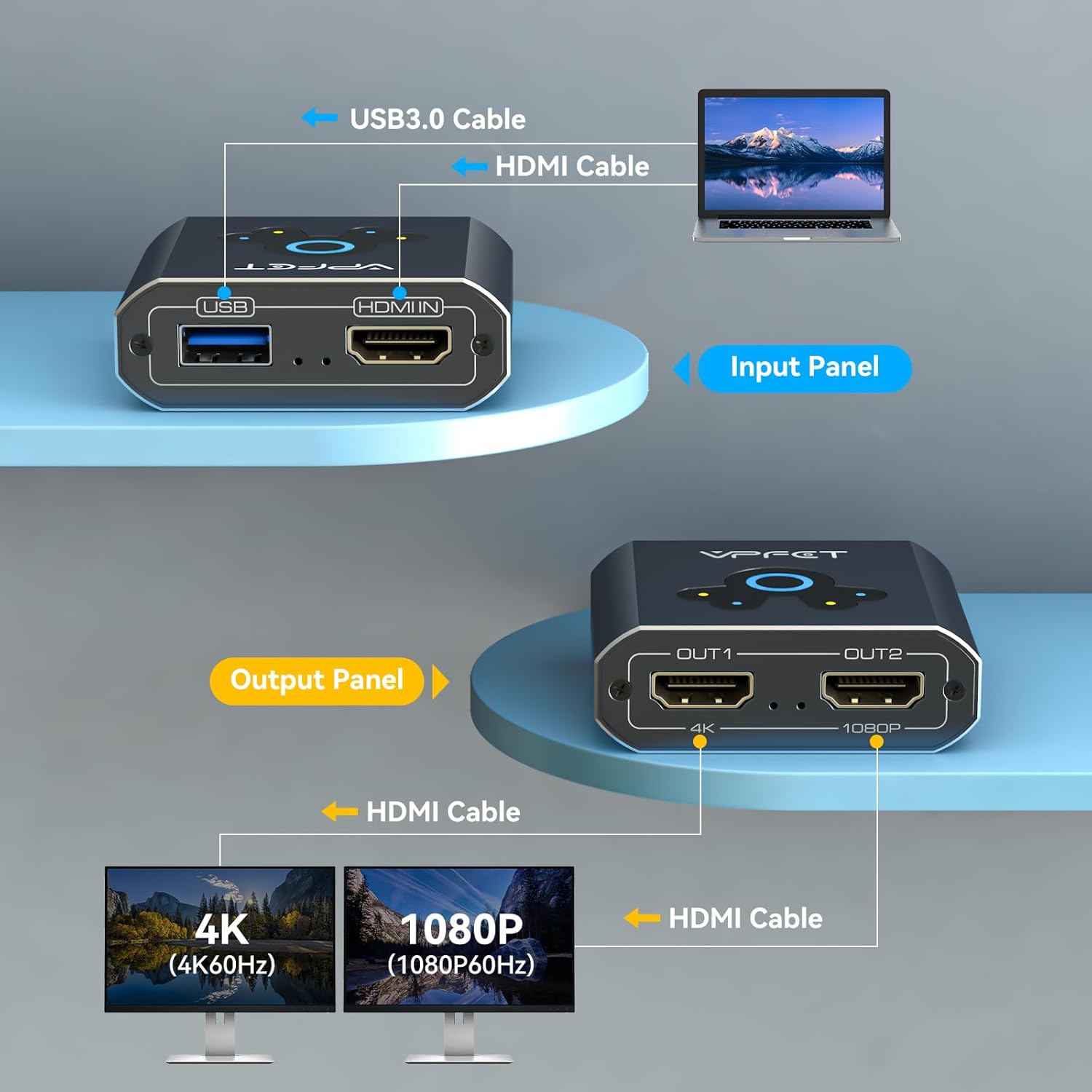
Figura 3.1: Input and Output Panels. This diagram illustrates the connections on the device: the input side features a USB 3.0 port and an HDMI IN port, while the output side provides two HDMI OUT ports, clearly marked for their maximum supported resolutions (OUT1 for 4K, OUT2 for 1080P).
- Puerto HDMI IN: Connects to the HDMI output of your computer (laptop or desktop).
- Puerto USB 3.0: Connects to a USB port on your computer. This connection is essential for power and driver installation, which determines the output resolution.
- HDMI OUT1 Port: Connects to your primary display. Supports up to 4K@60Hz resolution.
- HDMI OUT2 Port: Connects to your secondary display. Supports up to 1080P@60Hz resolution.
3.2 Dispositivos compatibles

Figura 3.2: Compatible Input and Output Devices. This image clarifies that the splitter is compatible with PC and laptop input sources, and monitors, TVs, and projectors as output displays. It explicitly states that HDMI source devices other than computers are not supported.
The splitter is designed for use with computers (laptops and desktop PCs) as input sources. It is compatible with various output displays including monitors, televisions, and projectors. Please note that it does not support HDMI source devices other than computers (e.g., gaming consoles, media players).
4. Instrucciones de configuración
Follow these steps to properly set up your VEDINDUST HDMI Splitter Extend:
Figura 4.1: Installation Driver Steps. This visual guide outlines the four essential steps for setting up the HDMI splitter, emphasizing the critical driver installation process for both Windows and macOS systems.
- Conecte el cable USB: Connect the provided USB-A 3.0 cable from the splitter's USB port to an available USB port on your computer. This connection is crucial for both power and driver functionality.
- Instalación del controlador:
- Para sistemas Windows: After connecting the USB cable, your computer should automatically recognize the device and prompt for driver installation. If not, manually locate and run the driver file from the virtual disk that appears.
- Para sistemas macOS: After connecting the USB cable, install and open the 'USB Display.app'. This application must remain running in the background for the splitter to function correctly.
Importante: The USB connection and driver installation are mandatory for the device to operate and achieve the specified resolutions.
- Conectar cables HDMI: Connect an HDMI cable from your computer's HDMI output to the HDMI IN port on the splitter. Then, connect HDMI cables from the splitter's OUT1 and OUT2 ports to your respective monitors, TVs, or projectors.
- Encendido: Ensure all devices (computer and displays) are powered on.
5. Instrucciones de funcionamiento
Once the splitter is set up, you can configure your display settings on your computer for either screen extension or duplication.
5.1 modos de visualización

Figura 5.1: Supported Display Modes. This image demonstrates the three primary display configurations: extending the desktop across three screens (A-B-C), extending with one duplicated screen (A-B-B), and mirroring the primary display across all screens (A-A-A), all supported on Windows and macOS.
- Screen Duplication (Mirror Mode): Both connected monitors will display the exact same content as your computer's primary screen. This is useful for presentations or sharing content.
- Screen Extension (Extend Mode): Your computer's desktop will be extended across the two connected monitors, allowing you to have different content on each screen. This is ideal for multitasking and increasing tu espacio de trabajo.
5.2 Configuración de los ajustes de pantalla
To switch between duplication and extension modes, you must adjust the display settings within your computer's operating system:
- Para Windows: Right-click on your desktop, select 'Display settings', and then choose 'Extend these displays' or 'Duplicate these displays' as needed. You can also rearrange the displays.
- Para macOS: Go to 'System Settings' (or 'System Preferences'), then 'Displays'. Here you can arrange your displays and select 'Mirror Displays' or use them as separate extended desktops.
5.3 Salida de resolución

Figura 5.2: HDMI Dual Display Adapter Output. This image illustrates the maximum resolution capabilities of each output port: OUT1 supports up to 4K@60Hz, while OUT2 supports up to 1080P@60Hz, allowing for a dual-monitor setup with varying display qualities.
- SALIDA1: Supports a maximum resolution of 4K@60Hz. To achieve 4K@60Hz output, ensure both the HDMI cable and the USB cable are connected to a compatible USB 3.0 port on your computer.
- SALIDA2: Supports a maximum resolution of 1080P@60Hz.
The output resolution is also dependent on the USB version connected to your computer. When connected to a computer's USB 3.0 port, the maximum resolution for OUT1 is 4K@60Hz and for OUT2 is 1080P@60Hz. When connected to a USB 2.0 port, the maximum resolution for both outputs will be limited to 720P.
6. Solución de problemas
If you encounter issues with your VEDINDUST HDMI Splitter Extend, please refer to the following common solutions:
- Sin pantalla/pantalla negra:
- Asegúrese de que todos los cables HDMI y USB estén conectados de forma segura.
- Verify that the USB cable is connected to your computer and the necessary drivers are installed and running (especially for macOS, ensure 'USB Display.app' is active).
- Check your computer's display settings to ensure the external monitors are detected and configured for either extend or duplicate mode.
- Pruebe con diferentes cables HDMI o monitores para descartar periféricos defectuosos.
- Incorrect Resolution/Lower Resolution Than Expected:
- Confirm that the USB cable is connected to a USB 3.0 port on your computer for optimal resolution (1080P for USB 3.0, 720P for USB 2.0).
- Ensure the driver is correctly installed and updated.
- Verify that your monitors support the desired resolution.
- Remember that OUT1 supports up to 4K@60Hz, while OUT2 supports up to 1080P@60Hz.
- Flickering Screen or Unstable Connection:
- Ensure the USB cable provides sufficient power. Try connecting to a different USB port or using a powered USB hub if available.
- Verifique si hay interferencias de otros dispositivos electrónicos.
- Actualice los controladores gráficos de su computadora.
- Problemas de instalación del controlador:
- For Windows, try running the driver installation file como administrador.
- For macOS, ensure you have granted necessary permissions for the 'USB Display.app' to run.
- Deshabilite temporalmente el software antivirus durante la instalación si interfiere.
7. Especificaciones
| Marca | VEDINDUSTRIA |
| Número de modelo | 2025102103 |
| Dimensiones | 20 x 13.2 x 3.8 cm |
| Peso | 150 gramos |
| Puertos de entrada | 1x HDMI IN, 1x USB 3.0 |
| Puertos de salida | 2x HDMI OUT (OUT1, OUT2) |
| Max Resolution (OUT1) | 4K a 60 Hz |
| Max Resolution (OUT2) | 1080P @ 60Hz |
| Video Bandwidth (OUT1) | Hasta 18 Gbps |
| Video Bandwidth (OUT2) | Hasta 3.2 Gbps |
| Dispositivos compatibles | PC, Laptop, TV, Monitor, Projector |
| Sistemas operativos | Windows XP/7/8/10/11, macOS |
| Material | Aluminio Casing |
8. Garantía y soporte
VEDINDUST is committed to providing high-quality products and customer satisfaction. While specific warranty details are not provided in this manual, if you encounter any issues with your VEDINDUST HDMI Splitter Extend, please contact our customer support team immediately.
Our professional support staff will assist you with troubleshooting and provide a suitable solution. Please refer to the contact information provided on the product packaging or the official VEDINDUST webSitio de soporte.
Ask a question about this manual
Ask about setup, troubleshooting, compatibility, parts, safety, or missing instructions. Manuals+ will review the question and use this page’s manual context to help answer it.