
1. Introducción
This manual provides detailed instructions for the installation, operation, and maintenance of your Hikity 4+64G Android Car Radio. This unit is designed to enhance your driving experience with advanced features such as wireless CarPlay, Android Auto, a 9-inch Incell touchscreen, Bluetooth 5.0, GPS navigation, FM/RDS radio, and rear camera support. It is specifically compatible with Fiat Doblo models from 2010-2015 and Opel Combo models from 2011-2018.

Imagen: Más alláview of the Hikity Android Car Radio's key features and user interface.
2. Información de seguridad
Please read all safety instructions carefully before installation and operation. Improper installation or use can lead to damage to the device, vehicle, or personal injury. Always consult a professional for installation if you are unsure.
- No opere el dispositivo de una manera que lo distraiga de la conducción.
- Asegúrese de que todo el cableado esté conectado correctamente para evitar cortocircuitos o peligros eléctricos.
- Mantenga el dispositivo alejado del agua y del calor excesivo.
- Utilice únicamente accesorios especificados por el fabricante.
3. Contenido del paquete
Verifique que todos los artículos enumerados a continuación estén incluidos en su paquete:
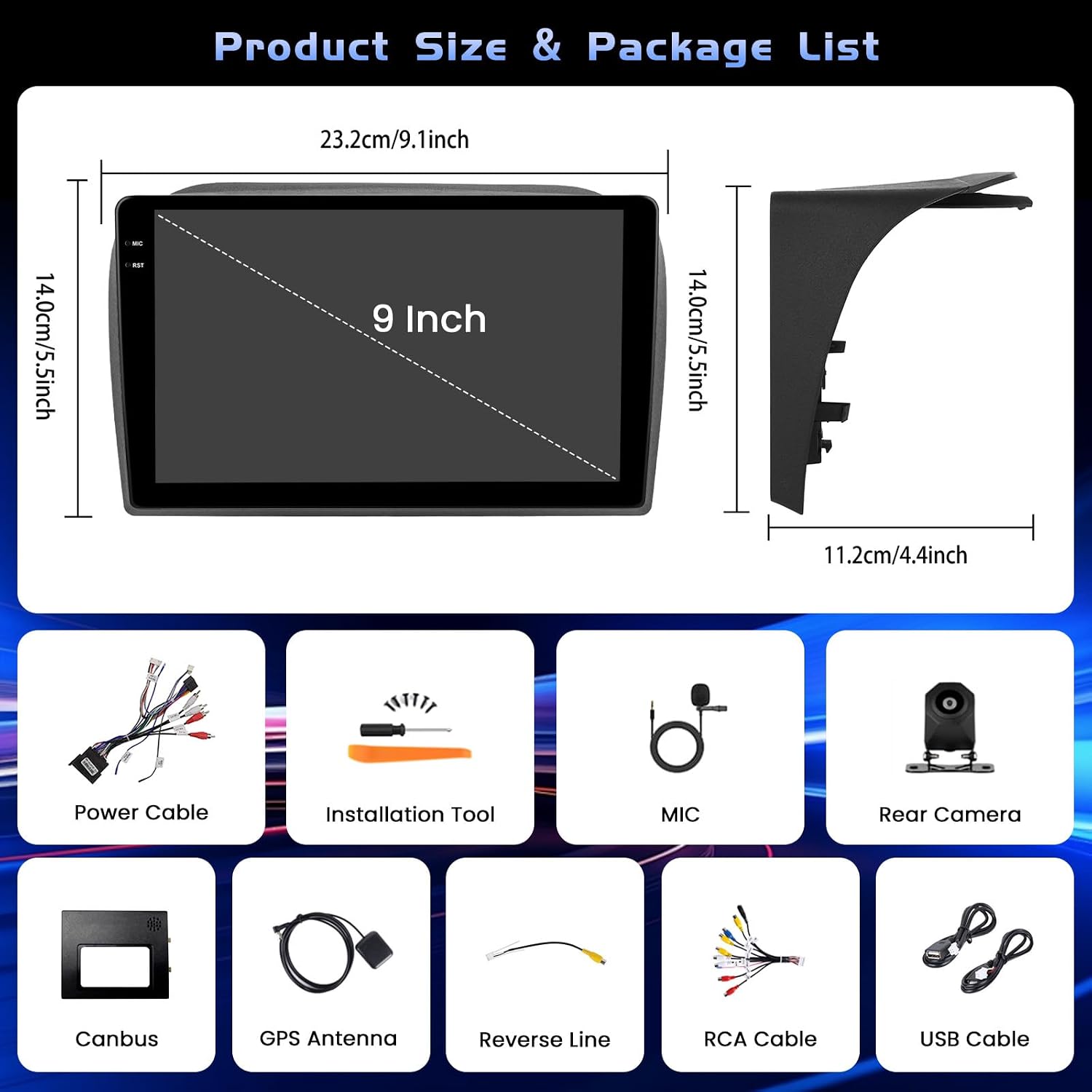
Imagen: Dimensiones del producto y representación visual de todos los accesorios incluidos.
- 1 radio para coche Android
- 1 x cable de alimentación
- 1 x Antena GPS
- 1 x Input Cable for Reversing Camera
- Cable 1 x RCA
- 2 x Cables USB
- 2 x soportes de montaje
- 4 x Tornillos
- 1 x Manual de instrucciones
- 1 x cámara de marcha atrás
- 1 x micrófono
- 1 x bus CAN
4. Configuración e instalación
Una instalación correcta es crucial para un rendimiento óptimo. Si no tiene experiencia en la instalación de sistemas de audio para automóviles, le recomendamos buscar ayuda profesional.
4.1 Instalación general

Imagen: Antes y después de la instalación. view of the car radio in a compatible vehicle dashboard.
The unit is designed for a seamless fit in Fiat Doblo (2010-2015) and Opel Combo (2011-2018) models. Ensure the dashboard opening matches the unit's dimensions before proceeding.
4.2 Wire Harness Connection
Connect the main power cable, RCA cables, USB cables, reversing input cable, and GPS antenna to their respective ports on the back of the head unit. Refer to the diagram for correct connections.

Image: Detailed diagram for connecting the main wire harness components.
4.3 Cableado de la cámara de marcha atrás
Connect the reversing camera as shown in the diagram. The backup input cable must be plugged in, even if the camera is not in use, to avoid affecting Bluetooth and WiFi signal reception.

Image: Wiring instructions for the reversing camera system.
4.4 Configuración del control del volante (SWC)
To enable steering wheel controls, connect the RX/TX cable and configure settings via the Canbus Box. Navigate to: Ajustes > Configuración de fábrica (1234) > Ajustes de lata.

Imagen: Instrucciones para configurar los controles del volante.
5. Instrucciones de funcionamiento
5.1 Sistema y rendimiento de Android
The unit features a 4GB RAM and 64GB ROM configuration, ensuring stable processing and quick switching between applications like maps and music. The latest Android system provides a responsive and smooth user experience.
5.2 Funciones de visualización
The 9-inch Incell touchscreen offers a resolution of 1280 x 720 pixels, displaying vivid and clear colors. The Incell technology makes the screen thinner, brighter, sharper in sunlight, and smoother to touch.

Image: Explanation of Incell screen advantages.
The unit supports multiple UI designs and a split-screen display mode, allowing you to easily switch between maps, media, and contacts simultaneously.

Imagen: Examples of different user interfaces and split-screen mode.
5.3 Connectivity (CarPlay, Android Auto, Bluetooth, WiFi)
Enjoy seamless integration with your smartphone via wireless or wired CarPlay/Android Auto. This allows for hands-free calls, music playback, and navigation.

Image: Wired and wireless connectivity options including CarPlay, Android Auto, and Mirror Link.
Bluetooth 5.0 ensures stable connections for hands-free calling and clear music streaming. The integrated 5G WiFi provides fast data transmission for online navigation and media playback.

Image: Bluetooth, SWC, FM RDS, and EQ features.
5.4 Navegación GPS
The built-in GPS supports both online and offline maps, offering voice guidance and real-time traffic information to ensure a smooth journey.

Image: Features including WiFi, GPS navigation, and AHD backup camera.
Radio FM/RDS 5.5
The FM/RDS tuner provides access to radio stations, music, news, and traffic announcements with high clarity.
Cámara de respaldo AHD de 5.6 pulgadas
The included AHD backup camera offers a 1280*720 resolution with super night vision, waterproof design (IP68), and reversing reference lines for safer parking maneuvers.
6. Mantenimiento
Para garantizar la longevidad y el rendimiento óptimo de su radio para automóvil Hikity, siga estas pautas de mantenimiento:
- Limpieza: Utilice un paño suave y seco para limpiar la pantalla y el exterior. Evite limpiadores abrasivos o disolventes.
- Actualizaciones de software: Periodically check for software updates to ensure the system runs efficiently and securely.
- Condiciones ambientales: Evite exponer la unidad a temperaturas extremas o a la luz solar directa durante períodos prolongados.
7. Solución de problemas
Si encuentra algún problema con la radio de su automóvil, consulte los siguientes pasos de solución de problemas comunes:
- Sin energía: Revise todas las conexiones eléctricas y los fusibles. Asegúrese de que el encendido del vehículo esté activado.
- Sin sonido: Verifique las conexiones de los altavoces, la configuración del volumen y la selección de la fuente de audio.
- La pantalla táctil no responde: Intente reiniciar la unidad. Si el problema persiste, podría ser necesario restablecer la configuración de fábrica (consulte la configuración).
- Pérdida de señal GPS: Asegúrese de que la antena GPS esté correctamente instalada y tenga una vista clara. view del cielo.
- Problemas de conexión Bluetooth: Delete previous pairings on both the radio and your phone, then attempt to pair again.
Para problemas más complejos, comuníquese con el servicio de atención al cliente.
8. Especificaciones
| Característica | Especificación |
|---|---|
| Dimensiones del producto | 25.5 x 18.5 x 10 cm |
| Peso del producto | 1.68 kilogramos |
| Número de modelo del fabricante | Hikity-A8076A4291H6MI2-EU20 |
| Tecnología de conectividad | Bluetooth, WiFi |
| Tipo de controlador | Androide |
| Características especiales | 4+64G, 5G WiFi, Incell Touchscreen (1280x720), CarPlay, Android Auto, Bluetooth 5.0, GPS Navigation, FM RDS, Customizable Homepage App, Split Screen |
| Dispositivos compatibles | Amplificador, Smartphone |
| Tipo de conector | Conector de 3.5 mm, RCA |
| Modo de salida de audio | Estéreo |
| Codificación de vídeo | MKV/RMVB/AVI/MP4/MDV |
| Potencia de salida | 45 vatios (180 vatios en total) |
| Número de canales | 4 |
| Internet Applications | Blockbuster, Browser, Netflix, Pandora, iTunes |
| Tipo de salida de audio | Oradores |
| Formatos compatibles | AVI, WAV, WMA |
9. Garantía y soporte
9.1 Información de garantía
Este producto viene con un Garantía de 12 meses. This warranty covers manufacturing defects and ensures online consultation support with a 24-hour response time.
9.2 Atención al cliente
For any questions, technical assistance, or warranty claims, please contact Hikity Tech Hub. Our support team is available to assist you.

Image: How to contact customer support.
Puede comunicarse con nosotros por correo electrónico a: hikityservices@163.com
Nuestro objetivo es responder a todas las consultas dentro de las 24 horas.