
Introducción
This manual provides detailed instructions for the installation, operation, and maintenance of your JOYING JY-HT142N4 car stereo system. Designed specifically for the Honda Civic 2012, this unit integrates advanced features such as wireless CarPlay, Android Auto, GPS navigation, and a 9-inch IPS touchscreen display. Please read this manual thoroughly before installation and use to ensure proper function and to maximize your user experience.
Configuración e instalación
The JOYING JY-HT142N4 car stereo is designed for a plug-and-play installation in the Honda Civic 2012. It supports OEM amplifiers, subwoofers, reverse cameras, and steering wheel controls. All necessary cables are supplied to facilitate a straightforward installation process without requiring cable cutting.
Contenido del paquete
Antes de comenzar la instalación, verifique que todos los componentes estén presentes:
- 9" radio unit (1)
- Single Din Cage (1)
- Left & Right Bracket (1 pair)
- Antena WiFi (1)
- Antena GPS (1)
- Antena 4G (2)
- Micrófono externo (1)
- Cable USB (2)
- AR Cable (1)
- Screen Ribbon Cable (1)
- Cable de alimentación (1)
- Manual de usuario (1)
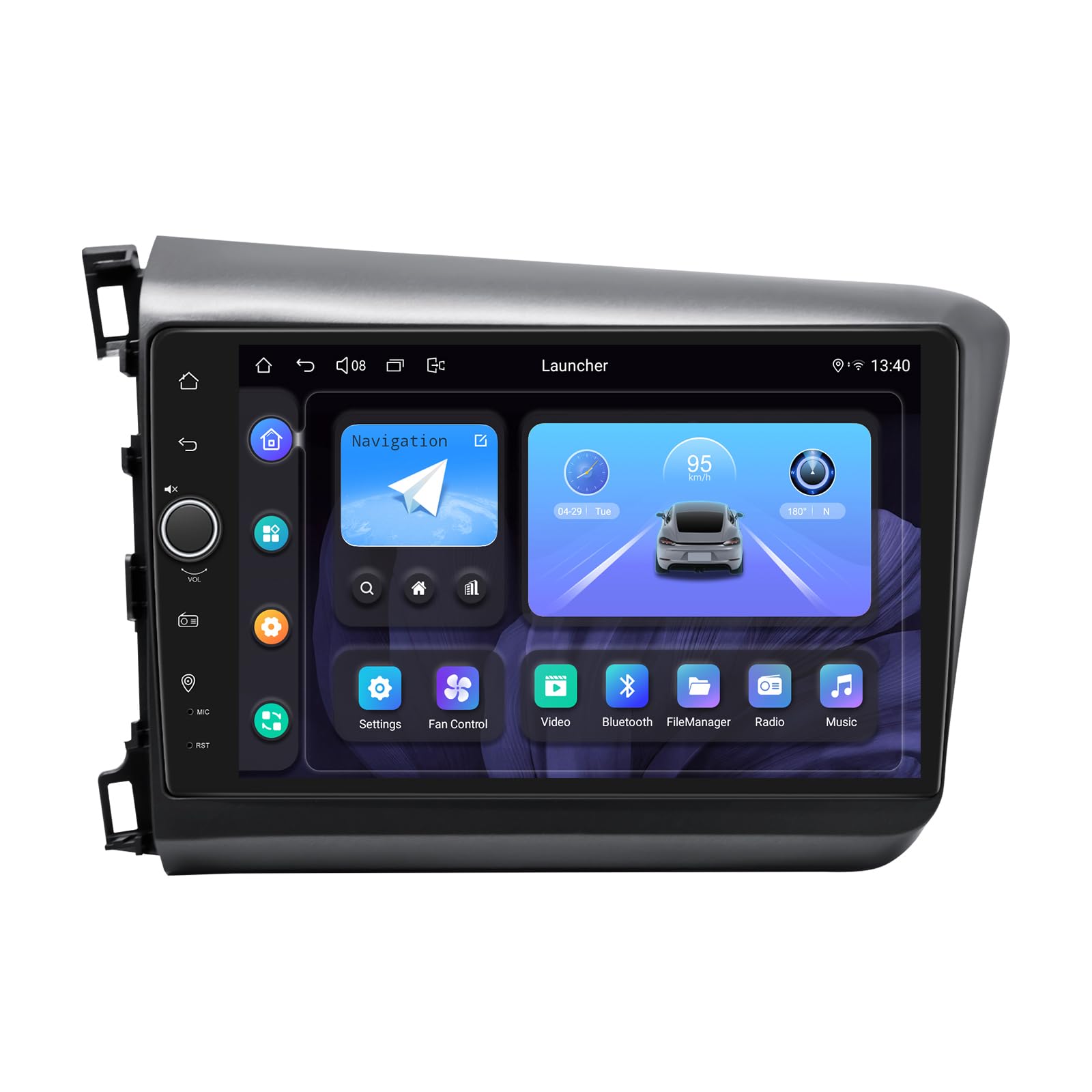
Image: The JOYING JY-HT142N4 car stereo unit, showcasing its 9-inch display and Android 13 operating system, designed for the Honda Civic 2012.
Comprobación de compatibilidad
Ensure your vehicle's dashboard configuration matches the compatible designs. This unit is designed for specific Honda Civic 2012 models.

Image: Visual guide indicating compatible and incompatible dashboard configurations for the Honda Civic 2012. Dashboards with a standard radio or premium audio system are compatible, while those with a factory navigation system are not.
CAN Bus Protocol Setting
If your vehicle is equipped with a CAN bus system, it is crucial to set the communication protocol switch on the back of the unit to the 'CAN' position. This ensures proper communication between the car stereo and your vehicle's systems.

Image: Close-up of the rear of the car stereo unit, highlighting the CAN bus protocol switch. Ensure the white button is set to the 'CAN' side for vehicles with CAN bus.
Instrucciones de funcionamiento
CarPlay inalámbrico y Android Auto
The unit supports both wireless CarPlay and Android Auto for seamless smartphone integration. Connect your mobile phone via USB cable or Bluetooth to share your phone's apps on the larger screen, enabling navigation, hands-free calls, and music playback.

Image: Displays the user interface for both Apple CarPlay and Android Auto, showing how smartphone applications are mirrored and controlled on the car stereo screen.
Navegación GPS
The system features precise GPS navigation with included GPS antennas for enhanced satellite signal reception. This ensures faster and more accurate real-time navigation. Offline maps are supported; you can download map data for specific areas and use them without an internet connection. You can also synchronize mobile phone map data via CarPlay or Android Auto.
Funciones de audio
Experience high-quality sound with the built-in TDA7851 DSP chip and a 48-band graphic equalizer. The unit provides 4x50W maximum output power and supports aftermarket amplifiers with 4 audio outputs, 1 SUB output, Fiber Optical output, and SPDIF Coaxial output for ultimate sound quality.

Image: Illustrates the audio features, including the TDA7851 DSP chip, 48-band graphic equalizer, 4x50W max output, and various audio outputs for aftermarket amplifier support.
Video: Demonstrates the user interface for various in-car navigation and entertainment system features, including Bluetooth, equalizer settings, and FM radio. This video provides a general overview of the system's capabilities.
Bluetooth 5.1
With Bluetooth 5.1, enjoy wireless audio streaming and hands-free calling through the built-in microphone, ensuring a safer driving experience without distractions.
Módulo 4G
Insert a SIM card into the built-in 4G module for internet access. Note that this module supports data connectivity but not phone calls or SMS messages. Supported bands include FDD-LTE: B2/B4/B5/B7/B12/B13/B14/B17/B25/B26/B38/B66/B71 and TDD-LTE: B41.
Multitarea en pantalla dividida
The unit supports split-screen functionality, allowing you to run two applications simultaneously. To use, tap the recent apps icon, then select the split-screen function for the desired app, and choose a second app from the recent list.

Image: Illustrates the process of activating and using the split-screen multitasking feature, showing two applications running side-by-side on the display.
Configuraciones personalizadas
Customize your car stereo experience with various personalized settings, including changeable car boot logos, customizable wallpapers, adjustable screen brightness, and changeable button colors.

Image: Displays the personalized settings interface, showing options for car boot logo, customizable wallpapers, adjustable screen brightness, and changeable button colors.
Salida HDMI
The HDMI output provides a full digital image and sound interface, allowing for synchronized output of uncompressed audio and video signals to external displays, such as headrest monitors. This enables passengers to watch movies while the driver uses the main screen for navigation.

Image: Demonstrates the HDMI output feature, showing the car stereo connected to rear projection screens for passenger entertainment and the unit's HDMI output port.
Otras características
- Arranque rápido: Quick startup time for immediate use.
- Imagen en imagen: View content in a smaller window while using another application.
- 3 puertos USB: Para conectar varios dispositivos USB.
- Ranura para tarjeta micro SD: Para almacenamiento adicional.
- Ranura para tarjeta SIM 4G: Para conectividad de datos móviles.

Image: Icons illustrating additional features such as Fast Boot, GPS Navigation, AM/FM Radio, Hands-free Call, Picture-in-Picture, 3 USB Ports, Micro SD Card Slot, and 4G SIM Card Slot.
Mantenimiento
Para garantizar la longevidad y el rendimiento óptimo de su estéreo para automóvil JOYING, siga estas pautas de mantenimiento:
- Limpieza de pantalla: Utilice un paño suave y sin pelusa para limpiar suavemente la pantalla táctil. Para manchas difíciles, limpie ligeramenteampEnjuague el paño con agua o un limpiador de pantallas. Evite productos químicos agresivos o materiales abrasivos.
- Limpieza general: Mantenga la unidad y el área circundante del tablero libres de polvo y residuos. Use un cepillo suave o aire comprimido para limpiar las rejillas de ventilación y los puertos.
- Control de temperatura: The unit features a dual heat sink design for superior heat dissipation. Avoid blocking the ventilation openings to maintain proper airflow and prevent overheating. The system can be configured to set a warning value for CPU temperature, activating the cooling fan automatically if exceeded.

Image: Diagram illustrating the upgraded dual heat sink cooling system with integrated fans, designed to improve temperature control and performance stability.
WiFi Signal Optimization
The unit includes an independent WiFi antenna to ensure stable signal quality and fast internet access. Ensure the antenna is properly connected and positioned for optimal reception.

Image: Close-up of the rear of the unit showing the connection point for the independent WiFi antenna, which supports 802.11a/b/g/n/AC standards across 2.4GHz/5GHz spectral bands.
Solución de problemas
If you encounter issues with your JOYING car stereo, refer to the following common problems and solutions:
- Sin energía: Revise todas las conexiones eléctricas y los fusibles. Asegúrese de que la unidad esté correctamente colocada en su arnés.
- Sin sonido: Verify speaker connections. Check audio settings, including volume levels and equalizer settings. Ensure external ampLos amplificadores (si se utilizan) están encendidos y conectados correctamente.
- Pérdida de señal GPS: Ensure the GPS antenna is securely connected and has a clear line of sight to the sky. Avoid placing it under metal objects.
- Problemas de conectividad Bluetooth: Asegúrate de que el Bluetooth esté activado tanto en el estéreo del coche como en tu dispositivo móvil. Intenta desvincular y volver a vincular los dispositivos.
- La pantalla táctil no responde: Perform a soft reset of the unit (refer to the device's specific reset procedure, often a small reset button). If the issue persists, contact support.
- CarPlay/Android Auto no se conecta: Ensure your phone's operating system is up to date. Try connecting with a different USB cable if using a wired connection. Verify that the CarPlay/Android Auto app is enabled on the head unit.
For persistent issues not covered here, please contact JOYING customer support.
Presupuesto
| Marca | ALEGRIA |
| Nombre del modelo | JY-HT142 |
| Número de modelo | JY-HT142N4 |
| Tipo de servicio del vehículo | Honda Civic 2012 |
| Tamaño de pantalla | 9 pulgadas |
| Tipo de pantalla | LED, Capacitive Touchscreen |
| Sistema operativo | Androide 13 |
| Capacidad de almacenamiento de memoria | 64 GB |
| Tecnología de conectividad | Bluetooth 5.1, Ethernet, USB, Wi-Fi (5G), 4G Module |
| Supported Navigation Systems | BeiDou, GLONASS, GPS |
| Modo de salida de audio | Stereo, Optical Fiber, Coaxial Digital |
| Características especiales | Wireless CarPlay, Android Auto, Touchscreen, DSP Chip, 48-Band Graphic Equalizer, HDMI Output, Split-screen, Fast Boot |
| Componentes incluidos | 9" radio, Single Din Cage, Brackets, WiFi Antenna, GPS Antenna, 4G Antennas, External Mic, USB Cables, AR Cable, Screen Ribbon Cable, Power Cable, User Manual |
| Dimensiones del artículo L x W x H | 9" de largo x 9" de ancho x 9" de alto |

Image: Displays the dimensions of the 9-inch radio unit and a detailed view of the rear panel with all connection ports labeled, including USB, HDMI, optical, and various audio inputs/outputs.
Información de garantía
The JOYING JY-HT142N4 car stereo comes with a 2 año de garantía from the date of purchase. This warranty covers manufacturing defects and malfunctions under normal use. Please retain your proof of purchase for warranty claims. For detailed terms and conditions, refer to the warranty card included in your package or contact JOYING customer support.
Atención al cliente
For technical assistance, troubleshooting, or any questions regarding your JOYING JY-HT142N4 car stereo, please contact JOYING customer support. You can typically find contact information on the official JOYING website or through the retailer where you purchased the product. When contacting support, please have your model number (JY-HT142N4) and purchase details readily available.