
1. Introducción
This manual provides comprehensive instructions for the setup, operation, and maintenance of your FIFINE BM38W RGB Microphone Boom Arm. Please read this guide thoroughly before use to ensure proper functionality and longevity of the product.
2. ¿Qué hay en la caja?
- FIFINE BM38W RGB Microphone Boom Arm
- C-Clamp para montaje en escritorio
- Adaptador rosca 3/8”
- Adaptador rosca 5/8”
- USB-A/Type-C cable for RGB power
3. Características principales
- Construcción de acero de alta resistencia: The BM38W features thickened reinforced steel for stability, supporting microphones up to 3.3 lbs (1.5KG) without wobbling or sagging.
- Controllable RGB Modes: Offers 9+ RGB lighting effects to enhance your desk setup. Short-press to switch modes/colors, long-press for 5 seconds to turn on/off.
- Compatibilidad universal: Includes 3/8” thread screw and 5/8” adapter for compatibility with most microphones.
- Ajuste multiángulo: Features a 360° swivel base and a 180° flexible arm for precise microphone positioning.
- Configuración sin herramientas: Designed for easy installation without drilling or additional tools. The silicone pad on the C-clamp protects your desk.
4. Instrucciones de configuración
- Conecte el C-Clamp: Fije firmemente el C-clamp to your desk. Ensure the silicone pad is positioned to protect the desk surface. The clamp supports desks up to 2.1 inches thick.
- Insertar el brazo articulado: Insert the base of the boom arm into the designated hole on the C-clamp. Hand-tighten the knob to secure it.
- Monte su micrófono: Attach your microphone to the 3/8” thread screw on the boom arm. Use the included 5/8” adapter if your microphone requires it.
- Connect RGB Power: Connect the provided USB-A/Type-C cable from the boom arm to a USB port on your computer or a power adapter to activate the RGB lighting.

Figure 4.1: Illustration of the C-clamp installation on a desk.

Figure 4.2: Step-by-step guide for tool-free installation.

Figure 4.3: Microphone thread adapters for broad compatibility.
Setup Video Guides
Vídeo 4.1: Una re honestaview of the FIFINE microphone boom arm stand, including unboxing and setup demonstration.
Video 4.2: Demonstration of the boom arm's setup and its ability to hold various microphones securely.
5. Instrucciones de funcionamiento
5.1 Control de iluminación RGB
The boom arm features integrated RGB lighting with multiple modes. To control the lighting:
- Change Modes/Colors: Short-press the RGB button located on the boom arm to cycle through the available lighting effects and colors.
- Encender/Apagar: Long-press the RGB button for 5 seconds to turn the lighting on or off.

Figure 5.1: RGB lighting controls and effects.

Figura 5.2: Iluminación RGB dinámica en acción.
5.2 Adjustments and Positioning
The boom arm offers flexible positioning to suit your needs:
- Base giratoria de 360°: The base allows for full rotation, enabling you to swing the arm into or out of position effortlessly.
- 180° Flexible Arm: The articulated arm sections can be adjusted 180 degrees to achieve your desired microphone height and distance.
- Diseño plegable: When not in use, the arm can be folded flat against your desk to save space.

Figura 5.3: Capacidades de ajuste de múltiples ángulos.

Figura 5.4: Diseño plegable para un almacenamiento cómodo.
5.3 Escenarios de uso
The FIFINE BM38W is ideal for various applications:
- Podcasting: Position your microphone perfectly for clear audio recording.
- Juego de azar: Keep your microphone out of the way while ensuring optimal voice pickup during gameplay.
- Transmisión: Enhance your live streams with professional microphone placement and dynamic RGB lighting.
- Grabación: Achieve precise microphone angles for studio-quality audio capture.
Video 5.1: Demonstration of the microphone stand's utility for streaming setups.
Vídeo 5.2: Showcasing the boom arm's benefits for gaming and streaming.
Video 5.3: Highlighting the boom arm's versatility for content creators.
6. Especificaciones
| Característica | Detalle |
|---|---|
| Marca | FIFINA |
| Nombre del modelo | BM38W |
| Color | Blanco |
| Material | Acero aleado |
| Tipo de base | Clamp |
| Microphone Stand Thread Size | 3/8 inch, 5/8 Inch |
| Recomendación de peso máximo | 3.3 libras (1.5 kg) |
| Efectos de iluminación RGB | 9+ modes (Static Single Color, Multicolored Flicker, Single-colored Flowing, Multi-colored Flowing, RGB Stacking, Multi-colored Breathing, Dual-channels Flowing, Multi-colored Gradient, Rainbow Flowing) |

Figure 6.1: Weight capacity of the boom arm.
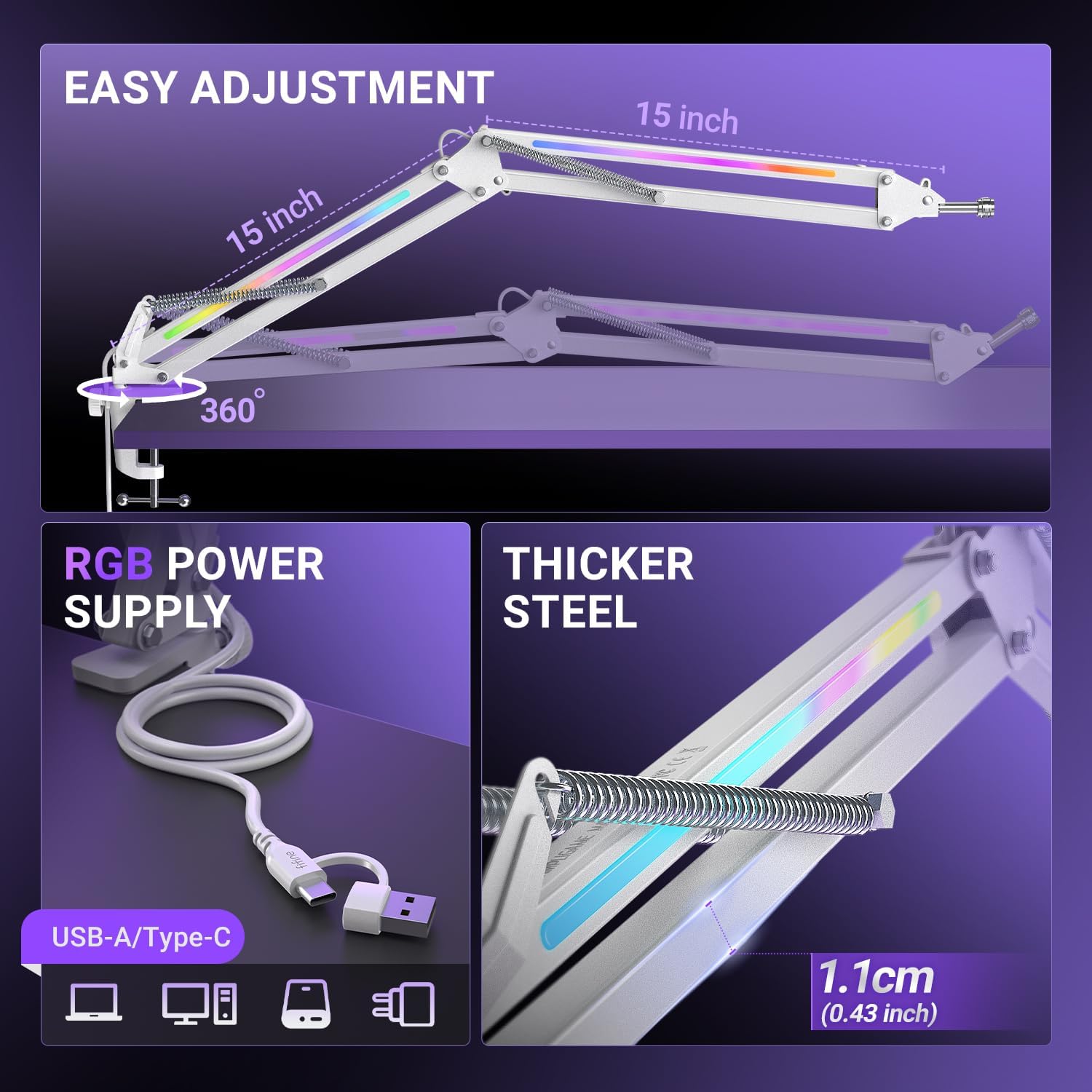
Figure 6.2: RGB power connection and steel thickness.
7. Mantenimiento
- Limpieza: Wipe the boom arm with a soft, dry cloth to remove dust and debris. Avoid using harsh chemicals or abrasive cleaners.
- Articulaciones: Periodically check the tightness of all screws and joints. Tighten if necessary to maintain stability.
- Sistema de organización de cables: Ensure the USB cable for RGB lighting is not excessively bent or strained, especially when adjusting the arm, to prevent damage.
8. Solución de problemas
- Boom Arm Sagging: Ensure your microphone's weight does not exceed the 3.3 lbs (1.5KG) capacity. Check that all adjustment knobs and the C-clamp están firmemente apretados.
- Las luces RGB no funcionan: Verify that the USB-A/Type-C cable is securely connected to both the boom arm and a powered USB port. Try a different USB port or power source. Long-press the RGB button for 5 seconds to ensure it is turned on.
- Dificultad para ajustar el brazo: Loosen the adjustment knobs slightly before attempting to reposition the arm. Re-tighten once the desired position is achieved.
9. Garantía y soporte
This FIFINE BM38W RGB Microphone Boom Arm comes with a garantía de un año from the date of purchase. For warranty claims, technical support, or any product-related inquiries, please contact FIFINE customer service through their official webSitio web o al minorista donde compró el producto. Conserve su comprobante de compra para validar la garantía.