
1. Introducción
Thank you for choosing the PETLIBRO PLAF103 Automatic Pet Feeder. This device is designed to provide scheduled and portion-controlled meals for your cats, dogs, and small animals, ensuring they maintain a consistent feeding routine. Featuring dual-band Wi-Fi connectivity (2.4GHz & 5GHz), app control, and freshness preservation, this feeder simplifies pet care. Please read this manual thoroughly before use to ensure proper operation and maintenance.
2. Información de seguridad
- Use only dry kibble with a diameter between 2-15mm. Do not use wet pet food or kibble larger than 15mm.
- Reemplace la bolsa desecante cada dos semanas para mantener la frescura de los alimentos.
- Do not wash the feeder base. The electronic components are located in the base and can be damaged by water.
- Wipe all detachable parts dry completely before reassembly and use.
- Este producto está destinado únicamente para uso en interiores.
- Mantenga el comedero fuera del alcance de los niños y las mascotas para evitar que se active accidentalmente o se dañe.
- Ensure the power adapter is securely connected and use the recommended power source.
3. Contenido del paquete
Verifique que todos los artículos estén presentes en el paquete:
- Wi-Fi Automatic Pet Feeder x 1
- Cargador x 1
- Bolsa desecante x 1
- Guía rápida x 1
- Manual de usuario x 1
4. Características del producto
- Conectividad Wi-Fi de doble banda: Supports both 2.4GHz and 5GHz Wi-Fi networks for stable connection and remote control via the PETLIBRO app.
- Alimentación programada: Program up to 10 meals per day with 1-48 portions per meal (1/12 cup each).
- Conservación de la frescura: Features a secure twist-lock lid, patented rotor, silicone sealing strip, and a desiccant bag to keep food dry and fresh.
- Llamadas de comidas personalizadas: Record up to 10 custom voice messages (≤10s) to play at meal times.
- Alertas inteligentes: Receive real-time app notifications for low food levels, low battery, or food jams.
- Diseño anti-atascos: An infrared sensor prevents food from jamming the dispenser outlet, ensuring reliable feeding.
- Fuente de alimentación dual: Operates with an adapter and can use battery backup (not included) for uninterrupted feeding during power outages.
- Fácil limpieza: Removable food tank and stainless steel bowl are washable for hygiene.
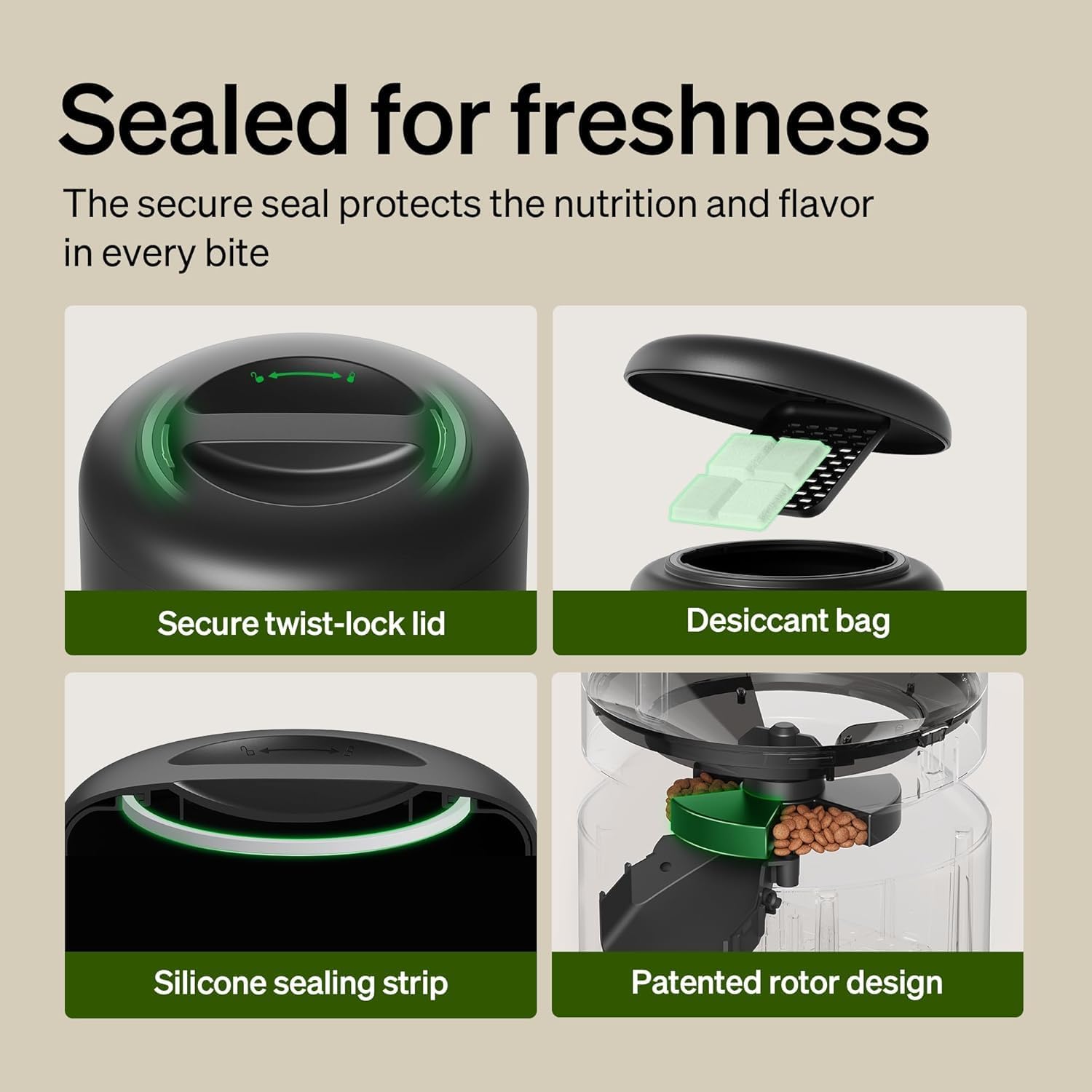
Image: The PETLIBRO PLAF103 feeder displaying support for both 5GHz and 2.4GHz Wi-Fi networks.

Imagen: Detallada view of the feeder's freshness features, including the secure twist-lock lid, desiccant bag compartment, silicone sealing strip, and patented rotor design.

Image: Illustration of the anti-stuck structure with a 45-degree angular design and a wide food outlet, alongside an app notification indicating a 'Rotor Stuck' alert.

Image: The feeder's control panel showing indicator lights for low food storage level and low battery, accompanied by an app notification for 'Food levels are low'.

Image: The feeder connected to a power adapter with batteries installed, illustrating how food dispensing continues during a power outage. Note: Batteries are not included.

Image: Close-up of the high-quality 304 stainless steel bowl, designed for hygiene and to prevent chin acne. The bowl is detachable for cleaning.
5. Configuración
5.1 Asamblea
- Unpack all components and ensure they are clean and dry.
- Insert the stainless steel bowl into the feeder base.
- Place the food tank onto the base and twist the lid to secure it.
- Open the lid and insert a fresh desiccant bag into its designated compartment. Close the lid securely.
- Fill the food tank with dry kibble (2-15mm diameter).
5.2 Conexión de alimentación
- Conecte el adaptador de corriente al alimentador y enchúfelo a una toma de pared.
- For battery backup, install 3 D-cell batteries (not included) into the battery compartment at the bottom of the feeder.
5.3 Instalación de la aplicación y conexión Wi-Fi
- Descargue la aplicación PETLIBRO desde App Store (iOS) o Google Play Store (Android).
- Crea una cuenta o inicia sesión.
- Follow the in-app instructions to add your PLAF103 feeder. Ensure your phone is connected to a 2.4GHz or 5GHz Wi-Fi network during setup.
6. Instrucciones de funcionamiento
6.1 Programación de comidas

Image: A cat eating from the feeder, with a smartphone screen displaying the PETLIBRO app's meal scheduling interface, showing feeding times and amounts.
- Open the PETLIBRO app and select your feeder.
- Vaya a la sección 'Programación'.
- Tap to add a new meal time. Set the desired time and the number of portions (1-48).
- Guarde la programación. El comedero dispensará comida automáticamente a las horas programadas.
6.2 Dispensación manual

Image: A dog eating from the feeder, with a smartphone screen displaying the PETLIBRO app's manual feeding interface, allowing for immediate food dispensing with a tap.
- From the app's main screen, tap the 'Feed Now' button.
- Select the number of portions you wish to dispense immediately.
- Confirmar la acción.
6.3 Recording Voice Messages

Image: A puppy approaching the feeder, with a speech bubble showing a personalized voice message, 'Hey, baby, it's time to eat!', indicating the voice recording feature.
- In the PETLIBRO app, go to the 'Voice' or 'Meal Call' section.
- Tap to record a new message (up to 10 seconds).
- You can set the message to play at specific meal times and adjust the volume.
6.4 Viewing Feeding Logs
- The app provides a history of dispensed meals, including time and portion size.
- This allows you to monitor your pet's daily intake and feeding routine.
7. Mantenimiento
7.1 Limpieza
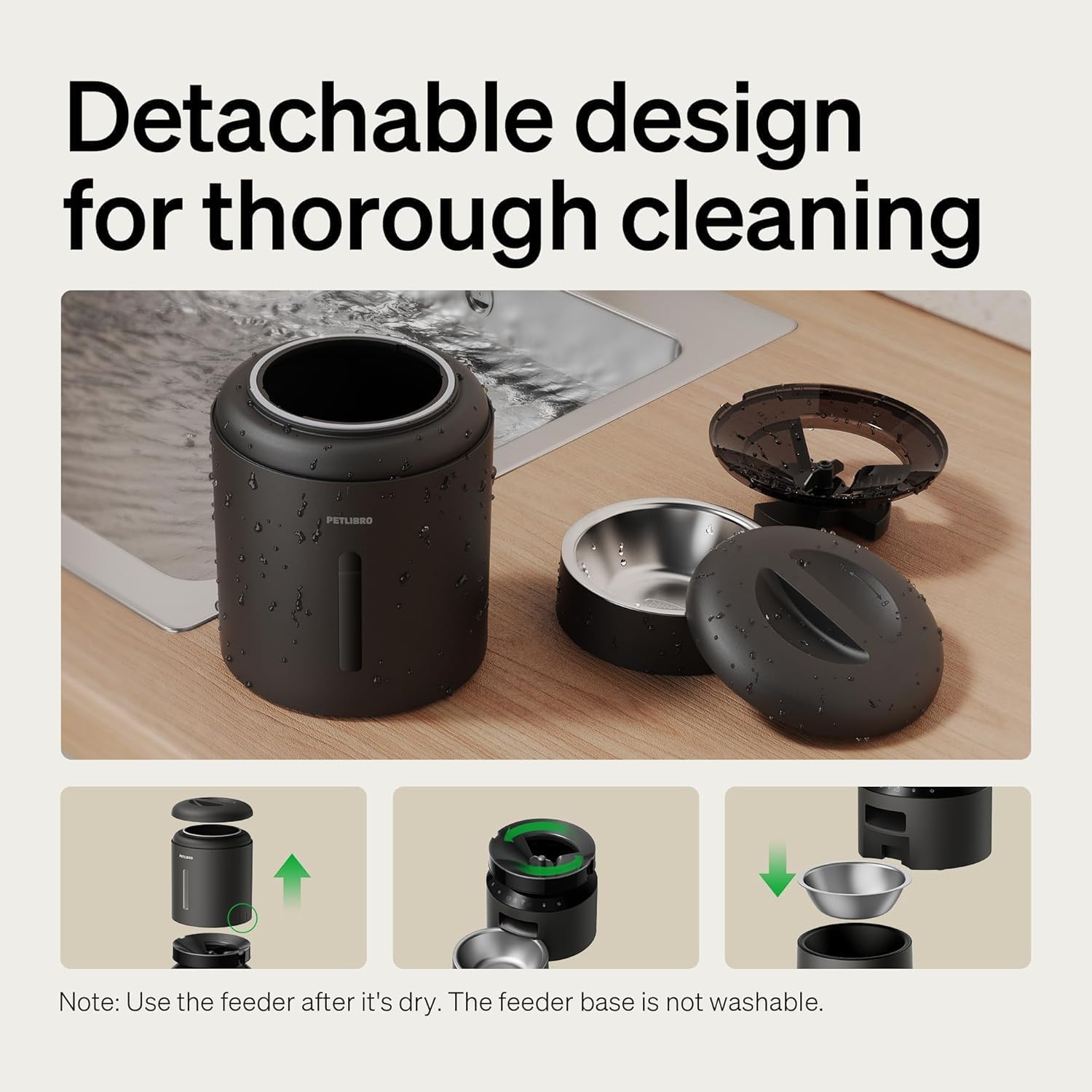
Image: The PETLIBRO PLAF103 feeder disassembled into its detachable components (food tank, lid, bowl, rotor) for thorough cleaning. Note: The feeder base is not washable.
- Desconecte el adaptador de corriente antes de limpiarlo.
- Retire el tanque de alimentos, la tapa y el recipiente de acero inoxidable.
- Wash these detachable parts with mild soap and water.
- Enjuague bien y asegúrese de que todas las piezas estén completamente secas antes de volver a ensamblar.
- Limpie la base del alimentador con un paño limpio y seco.amp paño. No sumerja la base en agua.
7.2 Reemplazo de la bolsa desecante
- The desiccant bag helps absorb moisture to keep food fresh.
- It is recommended to replace the desiccant bag every two weeks.
- New desiccant bags can be purchased from PETLIBRO's official channels.
8. Solución de problemas
- El comedero no dispensa: Check for food jams at the outlet. The infrared sensor will stop dispensing if blocked. Clear any obstructions. Ensure the food tank is not empty.
- Sin energía: Verify the power adapter is securely plugged in. If using battery backup, check battery levels and replace if necessary.
- Problemas de conectividad de aplicaciones: Ensure your Wi-Fi network is stable and within range. Confirm your phone is connected to the correct 2.4GHz or 5GHz network during setup. Restart the app and the feeder if issues persist.
- Comida no fresca: Ensure the lid is securely twisted and the silicone sealing strip is properly seated. Replace the desiccant bag every two weeks.
9. Especificaciones
| Número de modelo | PLAF103 |
| Dimensiones (L x An x Al) | 15.5" x 15.5" x 14.1" |
| Peso | 9.4 libras |
| Capacidad | 5 litros |
| Material | Acrilonitrilo Butadieno Estireno, Acero Inoxidable |
| Especies objetivo | Gatos, perros, animales pequeños |
| Tamaño de las croquetas | 2-15mm diameter (dry kibble only) |
| Soporte de Wi-Fi | 2.4 GHz y 5 GHz |
| Fuente de poder | Adapter (included), 3 x D-cell batteries (not included) |
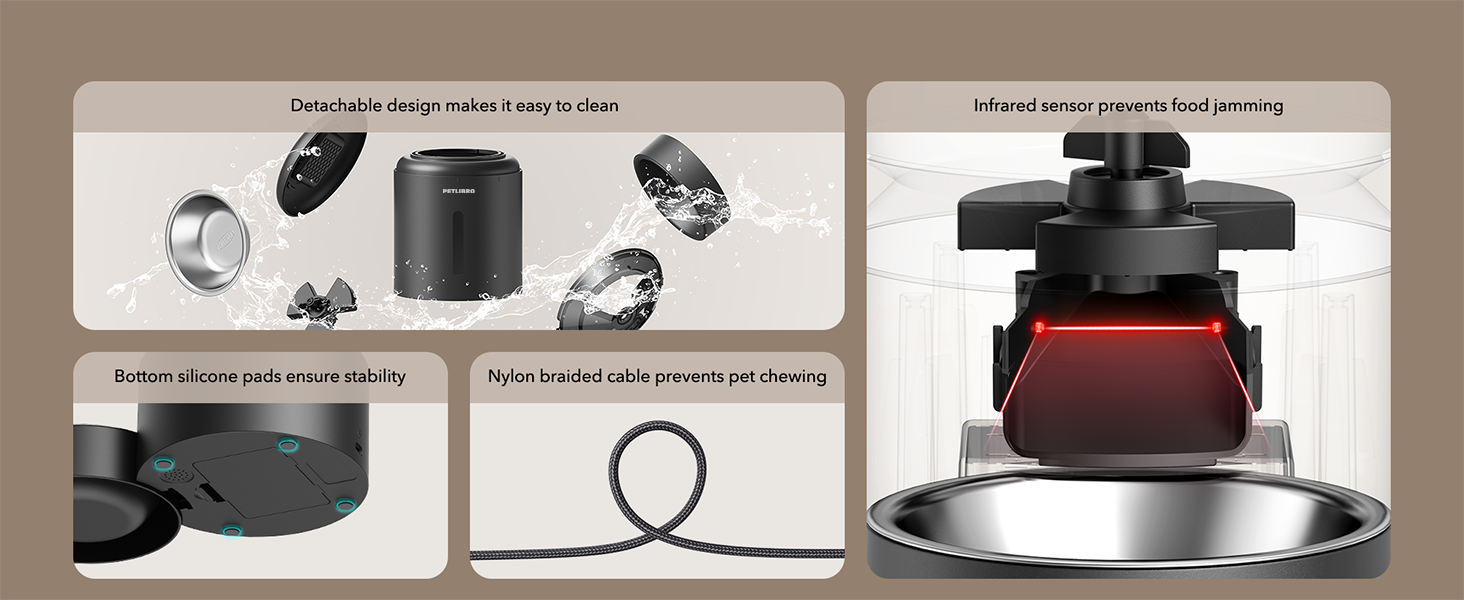
Image: Visual guide for recommended kibble size (2-15mm) and compatible food types including dry food, freeze-dried food, mixed food, and air-dried food.
10. Garantía y soporte
PETLIBRO products come with a standard warranty. For specific warranty details, please refer to the warranty card included in your package or visit the official PETLIBRO website. If you encounter any issues or have questions regarding your PLAF103 Automatic Pet Feeder, please contact PETLIBRO customer support through the app or their official webSitio para obtener ayuda.