
Introducción
The NICRON L74 is a high-performance rechargeable flashlight designed for versatility and durability. It features a powerful 1000-lumen output, a 90° rotatable head for flexible illumination, a magnetic tail for hands-free use, and a two-way clip for secure attachment. Built with robust aluminum alloy and rated IP65 waterproof, the L74 is suitable for various environments and activities, from everyday carry to outdoor adventures and emergency situations. This manual provides essential information for the safe and effective use of your NICRON L74 flashlight.
Información de seguridad
- No mire directamente el haz de luz para evitar lesiones en los ojos.
- Mantener fuera del alcance de los niños.
- Asegúrese de que la batería esté insertada con la polaridad correcta.
- Do not disassemble the flashlight head or battery.
- Utilice únicamente baterías y cables de carga recomendados.
- Evite exponer la linterna a temperaturas extremas o a la luz solar directa durante períodos prolongados.
Contenido del paquete
Verifique que todos los artículos estén presentes en su paquete:
- NICRON L74 Flashlight
- Batería recargable (preinstalada)
- Cable de carga USB-C
- Manual de instrucciones

Configuración
1. Battery Installation and Initial Use
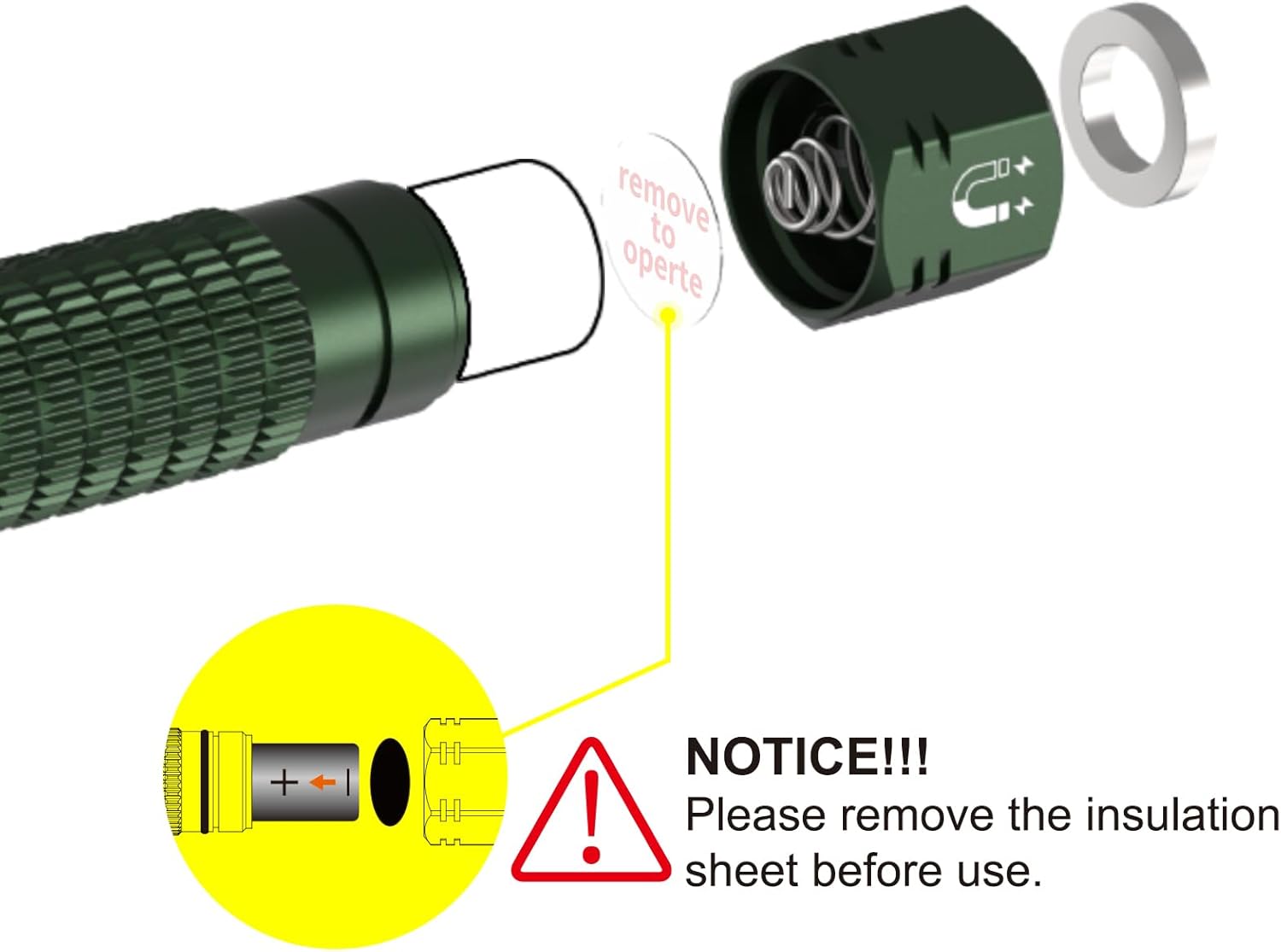
Before first use, it is essential to remove the insulating sheet from the battery compartment to allow the flashlight to function.
- Desenrosque la tapa trasera de la linterna.
- Remove the yellow insulating sheet located between the battery and the contact point.
- Ensure the rechargeable battery is inserted with the positive (+) end facing towards the flashlight head.
- Enrosque de nuevo firmemente la tapa de la cola.
2. Carga de la batería
The NICRON L74 features a built-in 900mAh rechargeable battery and supports USB-C charging. It is also compatible with a standard AA battery for alternative power.
- Locate the USB-C charging port on the flashlight head.
- Connect the provided USB-C cable to the flashlight and a power source (e.g., USB wall adapter, computer USB port).
- The indicator light will show red while charging and turn green when fully charged.

Instrucciones de funcionamiento
1. Power On/Off and Brightness Modes
The flashlight features multiple brightness levels and special modes for various situations.
- Encendido/apagado: Long press the side switch to turn the flashlight on or off.
- Brillo del ciclo: With the flashlight on, short press the side switch to cycle through brightness modes: Moonlight > Low > Medium > High.
- Modo estroboscópico: Double-click the side switch from any state to activate Strobe mode.
- Modo SOS: Triple-click the side switch from any state to activate SOS mode.
- Modo Memoria: The flashlight will remember the last used brightness mode (excluding Strobe and SOS) when turned off and on again.
- Función de bloqueo: Double-click and hold the side switch for 2 seconds to activate or deactivate the lockout function. The flashlight will blink twice to confirm.
2. 90° Rotatable Head
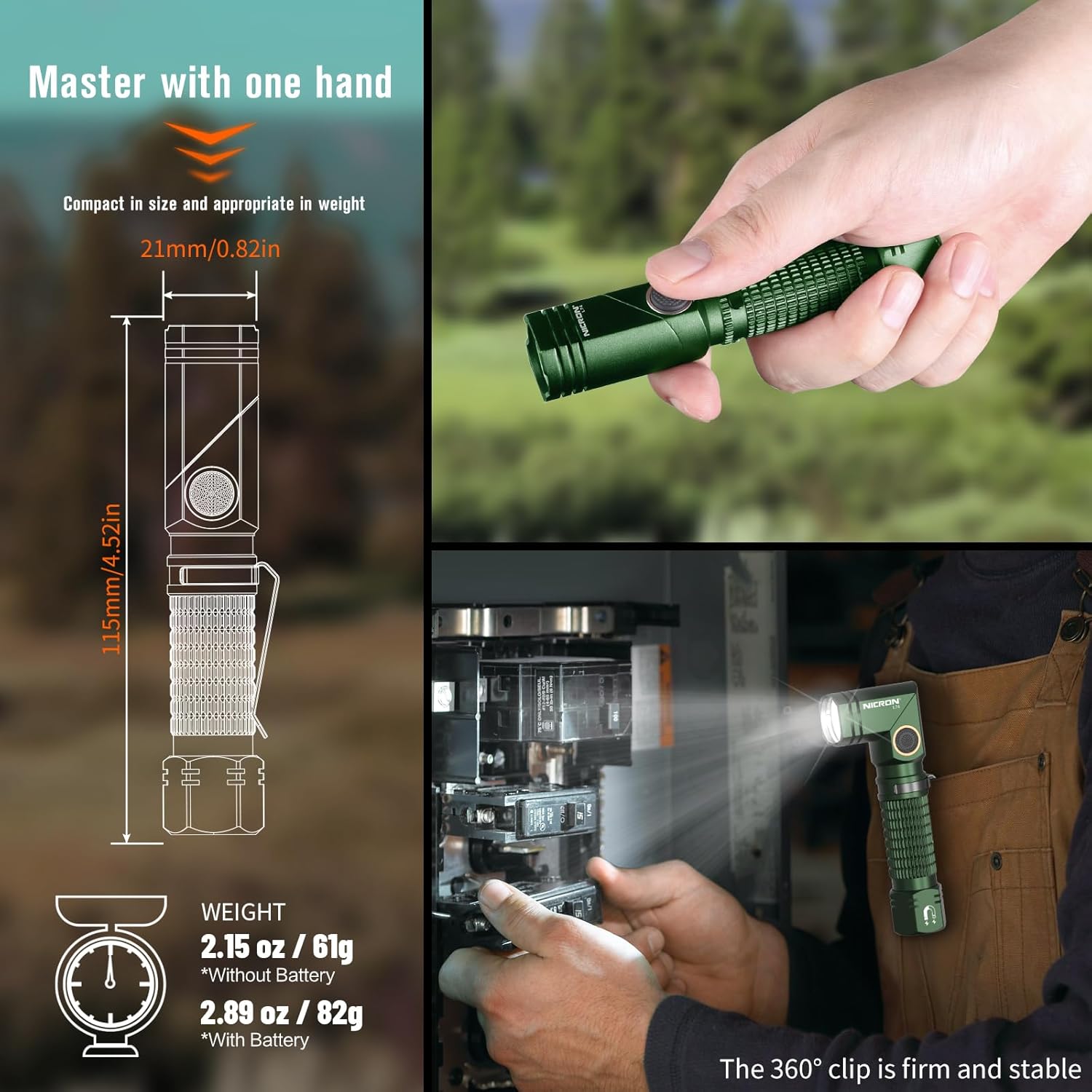
The unique 90° rotatable head allows for flexible light direction, converting the flashlight from a standard handheld light to an L-shaped work light or headlamp (with optional accessories).
3. Magnetic Tail and 2-Way Clip
Enhance hands-free operation and portability with the integrated magnetic tail and reversible clip.
- Cola magnética: The strong magnetic base allows the flashlight to be securely attached to any metal surface, providing convenient hands-free illumination.
- 2-Way Clip: The durable 360° reversible clip enables easy attachment to belts, pockets, backpack straps, or other gear for stable and convenient carrying.


Mantenimiento
- Limpieza: Limpie el cuerpo de la linterna con un paño suave.amp Paño. No utilice limpiadores abrasivos ni disolventes.
- Cuidado de la batería: Recharge the battery regularly, even if not in use, to maintain optimal performance and extend its lifespan. Store the flashlight with a partially charged battery if not used for extended periods.
- juntas tóricas: Periodically check and lubricate the O-rings with silicone grease to maintain the IP65 waterproof rating. Replace damaged O-rings as needed.
- Resistencia al agua: The flashlight is IP65 waterproof, meaning it is protected against dust and low-pressure water jets. It is not designed for submersion. Ensure the USB-C port cover is securely closed to maintain water resistance.

Solución de problemas
- La linterna no enciende:
- Ensure the insulating sheet has been removed from the battery compartment (refer to Setup section).
- Check if the battery is charged. If not, connect the flashlight to a power source using the USB-C cable.
- Verifique que la batería esté insertada con la polaridad correcta.
- If the lockout function is active (flashlight blinks when trying to turn on), double-click and hold the side switch for 2 seconds to deactivate it.
- La salida de luz es tenue o parpadea:
- La batería puede estar baja. Recargue la batería.
- Asegúrese de que los contactos de la batería estén limpios y libres de residuos.
- Ingreso de agua:
- Ensure all caps and covers, especially the USB-C port cover, are securely tightened or closed.
- Verifique que las juntas tóricas no presenten daños o estén colocadas correctamente.
Presupuesto
| Característica | Especificación |
|---|---|
| Salida máxima | 1000 lúmenes |
| Distancia máxima del haz | 138 metros |
| Tiempo de ejecución máximo | 58 horas (modo luz de luna) |
| Tipo de batería | Rechargeable Lithium Ion (900mAh) / AA Battery |
| Cargando | USB-C |
| Resistencia al agua | IP65 |
| Resistencia al impacto | 1 metros |
| Material | Aleación de aluminio |
| Dimensiones (L x An x Al) | 115 mm (4.52 pulgadas) x 21 mm (0.82 pulgadas) x 21 mm (0.82 pulgadas) |
| Peso (con batería) | 82 g (2.89 onza) |

Garantía y soporte
Información de garantía
The NICRON L74 flashlight comes with a 2-year limited manufacturer's warranty. This warranty covers defects in materials and workmanship under normal use. Please retain your proof of purchase for warranty claims.
Atención al cliente
For technical assistance, warranty claims, or product inquiries, please contact NICRON customer support through the retailer where the product was purchased or visit the official NICRON websitio para detalles de contacto.


