
1. Introducción
Gracias por la compraasing the DEPSTECH DS620-TL Triple Lens Endoscope Camera. This device is designed for visual inspection in hard-to-reach areas, featuring a 1080P triple-lens camera, a 5-inch IPS monitor, and an IP67 waterproof semi-rigid cable. This manual provides essential information for safe and effective use of your endoscope camera.
2. Producto terminadoview
2.1 Características principales
- 1080P Triple Lens Camera: Equipped with three cameras (front, side B, side C) for multi-angle inspection.
- Monitor IPS de 5 pulgadas: Provides clear, real-time images with excellent color reproduction.
- Sonda impermeable IP67: The 7.9mm diameter semi-rigid cable is waterproof, suitable for wet environments.
- Luces LED ajustables: Features 8+1+1 high-brightness LED chips with adjustable intensity for optimal illumination.
- 5M Semi-Rigid Cable: Offers flexibility and durability for navigating various spaces.
- Batería recargable: Built-in battery provides approximately 2-3 hours of continuous operation.
2.2 Contenido del paquete
Asegúrese de que todos los artículos estén presentes en el paquete:
- DEPSTECH DS620-TL Endoscope Camera
- Cable de carga tipo C
- Accesorios de gancho e imán
- Storage Drawstring Bag
- Manual de usuario

Figura 2.2: Accesorios incluidos y unidad principal.
3. Información de seguridad
- No utilice el dispositivo en entornos con gases inflamables o explosivos.
- Mantenga el dispositivo alejado de campos electromagnéticos fuertes.
- Avoid direct exposure of the camera lens to strong light sources.
- No intente desmontar ni modificar el dispositivo. Las reparaciones solo deben ser realizadas por personal autorizado.
- Asegúrese de que el dispositivo esté completamente cargado antes de usarlo para evitar interrupciones durante la inspección.
- Clean the probe and lens after each use, especially after contact with liquids or corrosive substances.
4. Configuración
4.1 Carga del dispositivo
Connect the provided Type-C charging cable to the device's charging port and a suitable USB power adapter (not included). The charging indicator will show the charging status. A full charge typically takes 2-3 hours.
4.2 Inserción de una tarjeta Micro SD
To save photos and videos, a Micro SD card (Class 10/Class 10 or higher, 8-32GB) is required (not included). Locate the Micro SD card slot on the side of the monitor unit and insert the card until it clicks into place.
4.3 Colocación de accesorios
The endoscope comes with hook and magnet attachments. These can be screwed onto the tip of the camera probe for retrieving small objects or maneuvering in tight spaces.

Figure 4.3: Magnet and hook attachments for the probe.
5. Instrucciones de funcionamiento
5.1 Encendido / Apagado
Press and hold the power button (usually located on the side or front panel) for a few seconds to turn the device on. The screen will display the DEPSTECH logo. To power off, press and hold the power button again.

Figure 5.1: Monitor button layout and functions.
5.2 Switching Lenses
The DS620-TL features a triple-lens system. Press the lens switch button (often labeled with a camera icon or 'M') to cycle between Front Camera A, Side Camera B, and Side Camera C. This allows for comprehensive viewing without repositioning the probe.

Figure 5.2: Triple lens camera detail.
5.3 Ajuste del brillo del LED
Use the up/down arrow buttons on the monitor to adjust the brightness of the LED lights on the camera probe. There are multiple levels of brightness to suit different inspection environments.
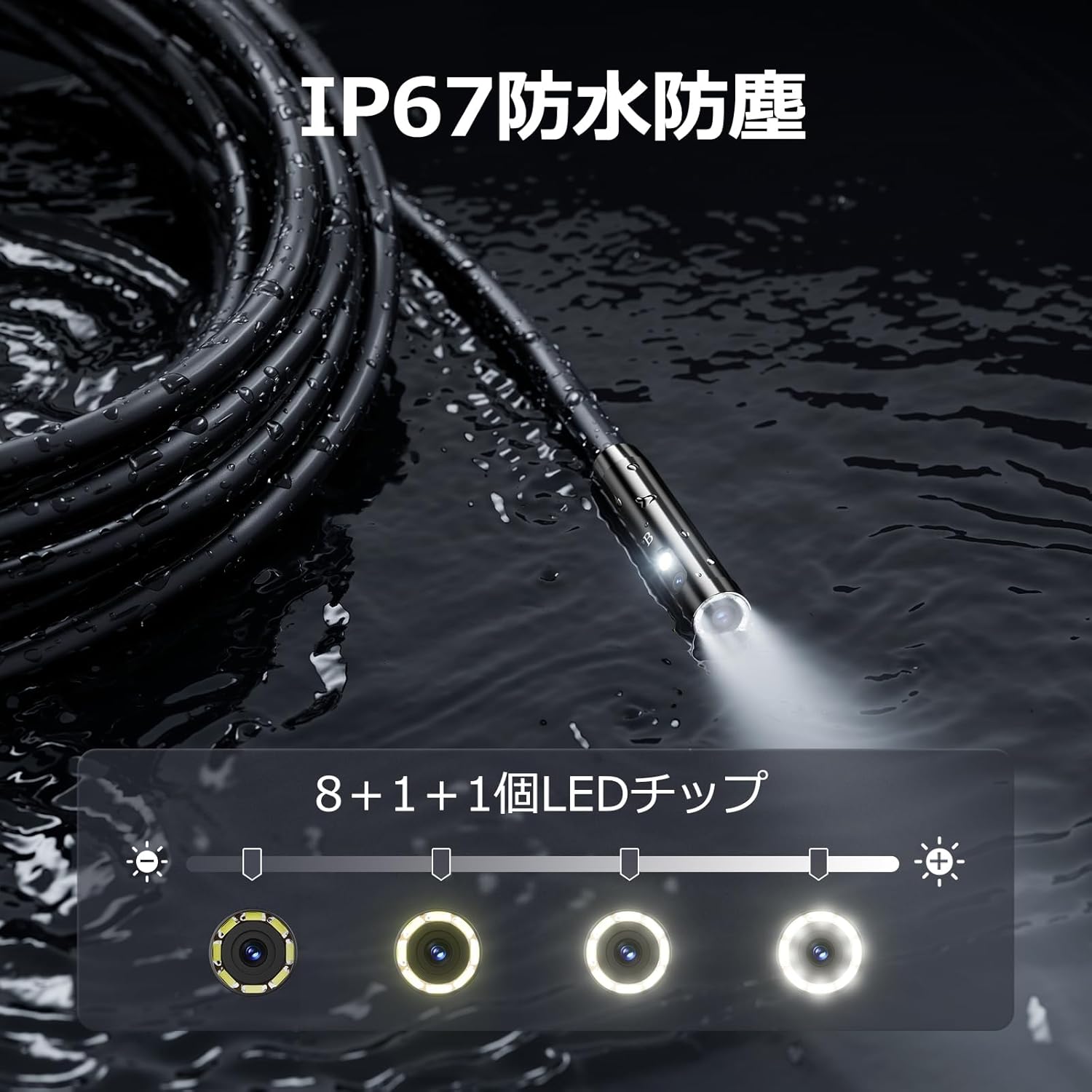
Figure 5.3: IP67 waterproof probe with adjustable LED illumination.
5.4 Tomar fotografías y grabar vídeos
Press the photo/video button (usually a camera icon) to capture a still image. To record video, press and hold the photo/video button; press again to stop recording. Ensure a Micro SD card is inserted to save your media.

Figure 5.4: Monitor interface for photo and video capture.
5.5 Rotación de pantalla
Press the screen rotation button (often a circular arrow icon) to rotate the image on the monitor by 180 degrees. This is useful when the probe is in an inverted position.
5.6 Aplicaciones prácticas
The DS620-TL is suitable for various tasks including home appliance maintenance, pipe inspection, wall wiring checks, and automotive repairs.

Figure 5.6: Various inspection scenarios for the endoscope.
5.7 Vídeo de demostración del producto
Video 5.7: A demonstration of the DEPSTECH DS620-TL endoscope camera in use, showcasing sus características y aplicaciones.
6. Mantenimiento
6.1 Limpieza de la sonda y la lente
After each use, especially in dirty or wet conditions, gently wipe the camera probe and lens with a soft, dry cloth. For stubborn dirt, a slightly damp Se puede usar un paño y secarlo. No utilice limpiadores abrasivos ni disolventes.
6.2 Almacenamiento
Store the endoscope camera in a cool, dry place, away from direct sunlight and extreme temperatures. Use the provided drawstring bag for protection. Ensure the cable is coiled neatly without sharp bends.
6.3 Cuidado de la batería
To prolong battery life, avoid fully discharging the device frequently. If storing for an extended period, charge the battery to approximately 50% every three months.
7. Solución de problemas
7.1 No hay imagen en la pantalla
- Asegúrese de que el dispositivo esté encendido y completamente cargado.
- Check if the camera cable is securely connected to the monitor unit.
- Ajuste el brillo del LED para garantizar una iluminación adecuada en el área de inspección.
7.2 No se pueden grabar fotos/videos
- Verify that a compatible Micro SD card (Class 10/Class 10 or higher, 8-32GB) is inserted correctly.
- Check if the Micro SD card has sufficient free space.
- Ensure the Micro SD card is not locked (read-only).
- Intente formatear la tarjeta Micro SD (esto borrará todos los datos).
7.3 El dispositivo no se carga
- Ensure the Type-C charging cable is properly connected to both the device and the power source.
- Intente utilizar un adaptador de corriente USB o un cable de carga diferente.
- Verifique que el puerto de carga no tenga residuos ni daños.
If you encounter issues not listed here or if the problem persists, please contact DEPSTECH customer support.
8. Especificaciones
| Característica | Especificación |
|---|---|
| Marca | DEPSTECH |
| Nombre del modelo | DS620TL-JP |
| Color | Negro |
| Nivel de impermeabilidad | IP67 |
| Tipo de medio | SD Memory Card (8-32GB, Class 10/Class 10 or higher recommended) |
| File Formato | MP4, MOV, AVI, JPEG, RAW |
| Formato de captura de video | MP4 |
| Viewtipo de buscador | IPS |
| Tipo de sensor | CMOS |
| Resolución del sensor fotográfico | 2.1 MP |
| Función de enfoque | Enfoque fijo |
| Enfoque automático | No |
| Duración media de la batería | 2 horas |
| Componentes incluidos | Type-C Cable, Attachments, Storage Drawstring Bag |
| Garantía del fabricante | 2 años |
| País natal | Porcelana |
9. Garantía y soporte
9.1 Garantía del fabricante
The DEPSTECH DS620-TL comes with a 24-month manufacturer warranty. Your order number serves as proof of purchase for warranty claims.
9.2 Atención al cliente
For any inquiries, technical assistance, or warranty claims, please contact our dedicated support team:
- Correo electrónico: soporte@depstech.com
- Tiempo de respuesta: We aim to respond to all inquiries within 24 hours. For requests submitted on weekends or holidays, a response will be provided on the next business day.

Figure 9.2: DEPSTECH support details.