
1. Introducción
The WALI PTT001-B Adjustable Computer Monitor Stand is designed to enhance your workspace by providing an ergonomic viewing position and improved organization. This stand is suitable for most flat screen displays, laptops, and printers, supporting a maximum weight of 44 lbs (20kg).
Las características principales incluyen:
- Diseño ergonómico: Raises your monitor or laptop to a comfortable viewing height, reducing strain on your neck and back.
- Ventilated Platform: Features a sturdy platform with vented holes to prevent device overheating and maintain optimal performance.
- Organización mejorada: Creates additional storage space underneath the stand, helping to keep your desk clean and clutter-free.
- Construcción duradera: Made from durable plastic with rubber pads to prevent slipping and protect your work surface.

Image 1.1: The WALI PTT001-B monitor stand in use, supporting a monitor and a printer, demonstrating its versatility and space-saving design.

Image 1.2: Visual comparison illustrating the ergonomic benefits of using the monitor stand to achieve a proper viewing angle and reduce neck and back strain.
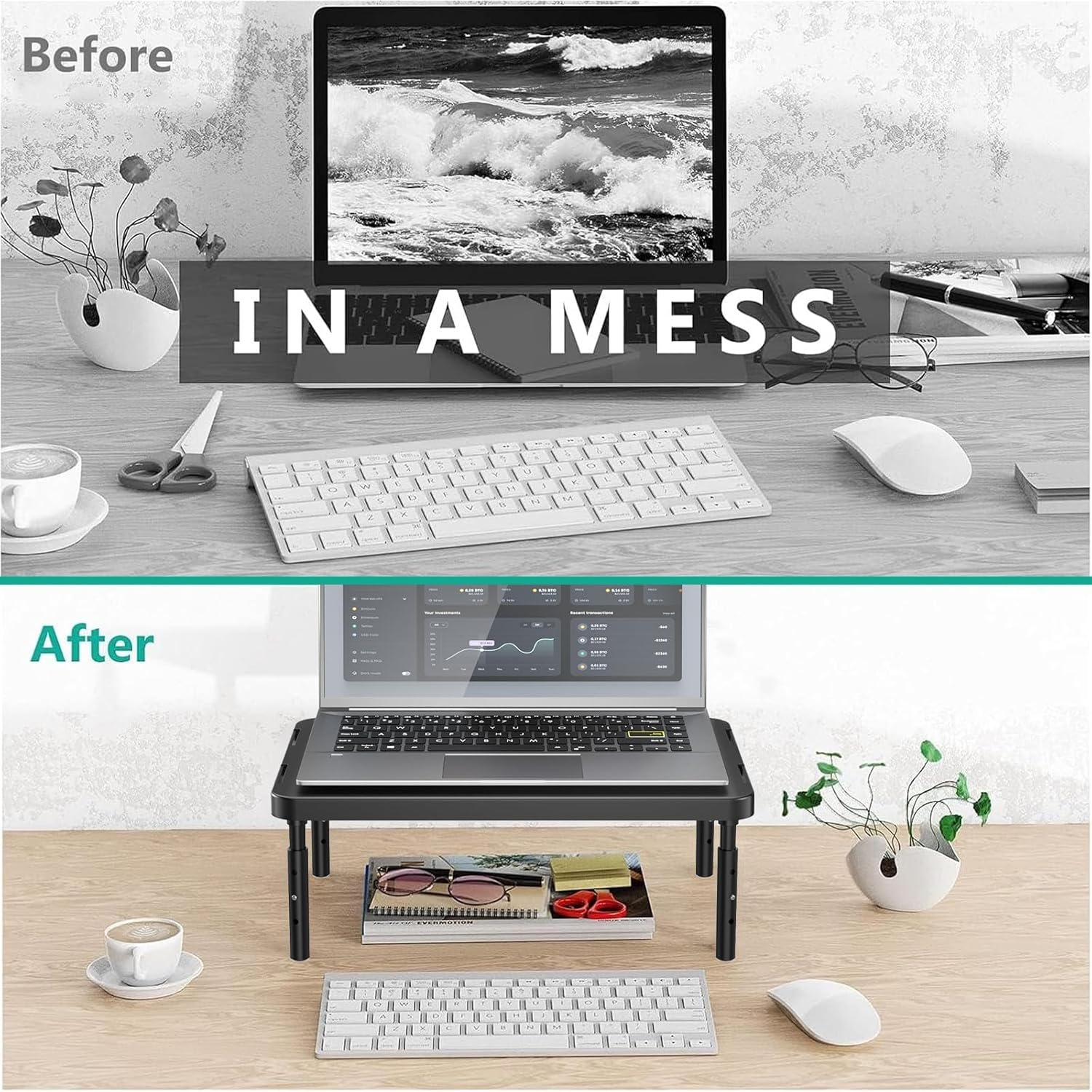
Image 1.3: A visual representation of a desk before and after implementing the monitor stand, highlighting the increased storage space and improved organization.
2. Instrucciones de configuración
The WALI PTT001-B monitor stand is designed for quick and easy assembly. Follow these steps to set up your stand:
- Unpack all components: You should find one main platform and four adjustable legs.
- Locate the threaded holes on the underside of the main platform.
- Take one adjustable leg and align its threaded end with one of the holes on the platform.
- Gently screw the leg into the platform by turning it clockwise until it is securely fastened. Do not overtighten.
- Repita este proceso para las tres patas restantes.
- Ensure all four legs are firmly attached and the stand is stable before placing any devices on it.

Image 2.1: A visual guide demonstrating the straightforward process of screwing the adjustable legs into the main platform for assembly.
3. Operation (Height Adjustment)
The WALI PTT001-B monitor stand features three adjustable height settings to customize your viewExperiencia de ing. Para ajustar la altura:
- Identify the small silver button on each leg. This button controls the height adjustment mechanism.
- Press the button on one leg firmly. While holding the button, slide the inner part of the leg up or down to your desired height. You will feel it click into place at one of the three predefined settings (4.5 inches, 5.3 inches, or 6.1 inches).
- Release the button to lock the leg at the chosen height.
- Repita este proceso para las cuatro patas, asegurándose de que todas estén colocadas a la misma altura para mayor estabilidad.
- Always ensure the stand is level and stable after adjusting the height before placing any equipment on it.

Image 3.1: A detailed illustration of the adjustable legs, highlighting the button mechanism and the three distinct height options available for customization.
4. Mantenimiento
To ensure the longevity and optimal performance of your WALI PTT001-B monitor stand, follow these simple maintenance guidelines:
- Limpieza: Limpie el soporte periódicamente con un paño suave.amp cloth to remove dust and debris. Avoid using harsh chemicals or abrasive cleaners, as these may damage the finish.
- Inspección: Periodically check all leg connections to ensure they remain tight and secure. If any looseness is detected, re-tighten the legs by screwing them clockwise.
- Capacidad de peso: Do not exceed the maximum weight capacity of 44 lbs (20kg) to prevent damage to the stand and potential injury.
- Colocación: Place the stand on a flat, stable surface to ensure proper balance and prevent tipping.
5. Solución de problemas
If you encounter any issues with your WALI PTT001-B monitor stand, please refer to the following common troubleshooting tips:
- El soporte es inestable:
- Ensure all four legs are screwed in tightly and are set to the same height.
- Verify that the surface on which the stand is placed is flat and stable.
- Dificultad para ajustar la altura:
- Make sure the adjustment button on each leg is fully depressed before attempting to slide the leg.
- Check for any obstructions or debris within the leg mechanism.
- Sobrecalentamiento del dispositivo:
- Ensure the vented holes on the platform are not blocked by your device or other objects to allow for proper airflow.
If these steps do not resolve your issue, please contact WALI customer support for further assistance.
6. Especificaciones
| Característica | Detalle |
|---|---|
| Número de modelo | PTT001-B |
| Material | Plástico |
| Color | Negro mate |
| Dimensiones de la plataforma | 14.6 x 9.3 pulgadas |
| Alturas ajustables | 4.5 pulgadas, 5.3 pulgadas, 6.1 pulgadas |
| Capacidad máxima de peso | Lbs 44 (20kg) |
| Características especiales | Adjustable height, Ventilated platform, Rubber pads |

Image 6.1: Visual representation of the product dimensions and maximum weight capacity.
7. Garantía y soporte
WALI is committed to providing high-quality products and excellent customer service. Your WALI PTT001-B monitor stand comes with dedicated customer support.
- Atención al cliente: Experienced and US-based customer support is available to assist you 7 days a week. For any questions or concerns, please reach out via email.
- Información de garantía: For detailed warranty information, please refer to the product packaging or contact WALI customer support directly.