
1. Introducción
Thank you for choosing the Philips SPK7818 Dual Mode Wireless Ergonomic Silent Mouse. This manual provides essential information for setting up, operating, and maintaining your new mouse. Please read it carefully to ensure optimal performance and longevity of your device.
The Philips SPK7818 mouse offers versatile connectivity with both 2.4GHz wireless and Bluetooth (3.0 and 5.0) modes, allowing connection to up to three devices simultaneously. Its ergonomic design and silent clicks provide a comfortable and quiet user experience, while adjustable DPI settings up to 3200 ensure precise control.
2. Contenido del paquete
Por favor revise el paquete para ver los siguientes artículos:
- 1x Philips SPK7818 Wireless Mouse
- 1 cable de carga USB-C (1.5 m)
- 1x USB 2.4GHz Wireless Receiver (stored inside the mouse)
- 1x Manual de usuario y tarjeta de garantía
- 1x Internal Rechargeable Lithium Battery (pre-installed)

Image: Retail packaging of the Philips SPK7818 wireless mouse, showing the mouse and its features on the box.
3. Producto terminadoview
The Philips SPK7818 mouse is designed for comfort and efficiency, featuring 8 functional buttons, silent click technology, and an ergonomic shape that fits comfortably in the hand.
Características principales:
- Conectividad de modo dual: Seamlessly switch between 2.4GHz wireless and Bluetooth 3.0/5.0.
- Emparejamiento de múltiples dispositivos: Connect to up to three devices simultaneously and switch with a single button.
- DPI ajustable: Five DPI levels (800, 1200, 1600, 2400, 3200) for precise cursor control.
- Diseño ergonómico: Contoured shape for comfortable right-hand use, reducing strain during long periods.
- Clics silenciosos: Reduced click noise for a quiet working environment.
- Batería recargable: Built-in 450 mAh lithium battery provides extended use on a single charge.
- Amplia compatibilidad: Supports Windows, Linux, and Mac OS.

Imagen: de arriba hacia abajo view of the Philips SPK7818 mouse, showing the scroll wheel, DPI button, and left/right click buttons.

Imagen: Lateral view of the Philips SPK7818 mouse, highlighting its ergonomic contour and the two programmable side buttons.

Image: Diagram illustrating key features of the Philips SPK7818 mouse, including silent clicks, ergonomic design, rechargeable battery, 15m range, optical sensor, and USB dongle storage.
4. Configuración
4.1. Cargar el ratón
Before first use, it is recommended to fully charge the mouse. The Philips SPK7818 features a built-in 450 mAh rechargeable lithium battery.
- Conecte el cable de carga USB-C provisto al puerto de carga en la parte frontal del mouse.
- Conecte el otro extremo del cable USB-C a una fuente de alimentación USB (por ejemplo, puerto USB de computadora, adaptador de pared USB).
- The LED indicator on the mouse will show charging status. It will typically turn off or change color when fully charged.
4.2. Conexión inalámbrica de 2.4 GHz
For a stable and fast wireless connection, use the 2.4GHz USB receiver.
- Locate the USB 2.4GHz wireless receiver. It is typically stored in a compartment on the underside of the mouse.
- Inserte el receptor USB en un puerto USB disponible en su computadora.
- Deslice el interruptor de encendido en la parte inferior del mouse a la posición '2.4G'.
- The mouse should automatically connect to your computer. No additional drivers are usually required for Windows, Linux, or Mac OS.

Image: The Philips SPK7818 mouse demonstrating plug-and-play wireless connection with its USB dongle.
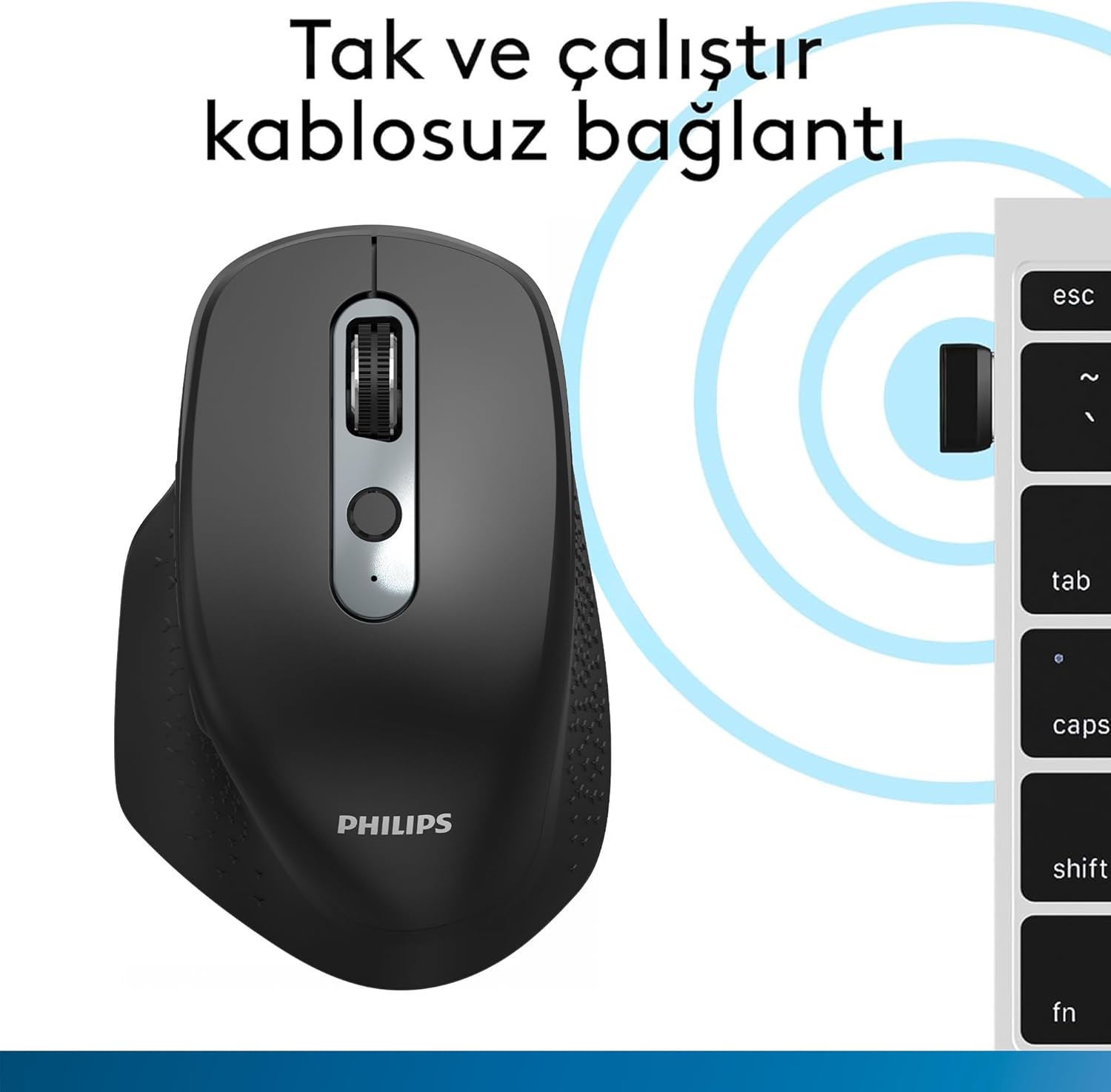
Image: Underside of the Philips SPK7818 mouse, showing the dedicated storage slot for the USB 2.4GHz wireless receiver.
4.3. Conexión Bluetooth (BT3.0 / BT5.0)
The mouse supports two Bluetooth channels for connecting to different devices.
- Slide the power switch on the underside of the mouse to either the 'BT1' or 'BT2' position.
- Press and hold the Bluetooth pairing button (usually located near the power switch or channel switch) for 3-5 seconds until the LED indicator starts flashing, indicating pairing mode.
- En su computadora o dispositivo, vaya a la configuración de Bluetooth y busque nuevos dispositivos.
- Select "Philips SPK7818" from the list of available devices to pair.
- Una vez emparejado, el indicador LED dejará de parpadear y permanecerá fijo durante unos segundos antes de apagarse.
- Repeat these steps for the second Bluetooth channel ('BT2') if you wish to connect to another device.

Image: The Philips SPK7818 mouse demonstrating universal compatibility with various operating systems including Windows, macOS, Chrome OS, Linux, and Android.
5. Instrucciones de funcionamiento
5.1. Ajuste de DPI
The mouse features a dedicated DPI button to cycle through five sensitivity levels, allowing you to adjust cursor speed to your preference.
- Locate the DPI button, usually positioned below the scroll wheel.
- Press the DPI button to cycle through the available sensitivity settings: 800, 1200, 1600, 2400, and 3200 DPI.
- Each press will change the DPI level, and you can observe the change in cursor speed on your screen.

Image: Diagram showing the Philips SPK7818 mouse and its five adjustable DPI settings: 800, 1200, 1600, 2400, and 3200.
5.2. Conmutación entre múltiples dispositivos
To switch between connected devices (2.4GHz, BT1, BT2):
- Locate the channel switch button on the underside of the mouse.
- Press the button to cycle through the connected channels: 2.4G, BT1, and BT2.
- The corresponding LED indicator will light up briefly to confirm the selected channel.
6. Mantenimiento
6.1. Limpieza
To keep your mouse clean and functioning properly:
- Utilice un paño suave y seco para limpiar la superficie del mouse.
- Para suciedad difícil, ligeramente dampEnjuague el paño con agua o una solución limpiadora suave. Evite productos químicos agresivos.
- No permita que entren líquidos en los componentes internos del ratón.
- Limpie periódicamente el sensor óptico en la parte inferior con un hisopo de algodón para garantizar un seguimiento preciso.
6.2. Cuidado de la batería
Para maximizar la vida útil de la batería recargable incorporada:
- Evite descargar completamente la batería con frecuencia.
- Cargue el mouse cuando aparezca el indicador de batería baja.
- Si va a guardar el ratón durante un período prolongado, cárguelo al 50 % aproximadamente y guárdelo en un lugar fresco y seco.
7. Solución de problemas
If you encounter issues with your Philips SPK7818 mouse, please refer to the following common solutions:
| Problema | Posible causa | Solución |
|---|---|---|
| El ratón no responde (2.4 GHz) | Low battery, receiver not connected, incorrect mode selected. | Charge the mouse. Ensure the USB receiver is securely plugged in. Switch the mouse to 2.4G mode. Try a different USB port. |
| El ratón no responde (Bluetooth) | Low battery, not paired, incorrect mode selected, Bluetooth off on device. | Charge the mouse. Ensure Bluetooth is enabled on your device. Switch the mouse to the correct BT channel (BT1/BT2). Re-pair the mouse if necessary. |
| El movimiento del cursor es errático o irregular | Sensor óptico sucio, superficie inadecuada, batería baja. | Clean the optical sensor. Use the mouse on a clean, non-reflective surface or a mouse pad. Charge the mouse. |
| El ratón se desconecta con frecuencia | Interferencia, distancia del receptor/dispositivo, batería baja. | Reduce distance between mouse and receiver/device. Remove obstacles. Charge the mouse. Avoid using near other wireless devices that may cause interference. |
| No se puede cambiar entre dispositivos | Incorrect button press, device not properly paired. | Ensure you are pressing the correct channel switch button. Verify that all devices are properly paired to their respective channels (2.4G, BT1, BT2). |
8. Especificaciones
Detailed technical specifications for the Philips SPK7818 mouse:
- Marca: PHILIPS
- Modelo: SPK7818
- Color: Negro
- Tecnología de conectividad: Conexión inalámbrica de 2.4 GHz, Bluetooth 3.0, Bluetooth 5.0
- Tecnología de detección de movimiento: Óptico
- Número de botones: 8
- Niveles de DPI: 800, 1200, 1600, 2400, 3200 (ajustable)
- Orientación de la mano: Diseño ergonómico para diestros
- Dispositivos compatibles: Computadora portátil, computadora de escritorio
- Compatibilidad del sistema operativo: Microsoft Windows 7, Windows 8, Windows 10 or higher; Linux V1.24 or higher; Mac OS 10.5 or higher
- Fuente de energía: Batería de litio recargable de 450 mAh incorporada
- Alcance inalámbrico: Up to 15 meters (2.4GHz mode), Up to 10 meters (Bluetooth mode)
- Peso del producto: 122 gramos (incluida la batería)
- Dimensiones del producto (L x An x Al): 11.8 cm x 7.7 cm x 4.6 cm
- País natal: Porcelana

Image: Diagram illustrating the physical dimensions (length, width, height) and weight of the Philips SPK7818 mouse.
9. Garantía y soporte
9.1. Información de garantía
This Philips SPK7818 mouse is covered by a Philips Turkey Guarantee. Please refer to the warranty card included in your package for specific terms and conditions, including the warranty period and coverage details.
9.2. Atención al cliente
For technical assistance, troubleshooting beyond this manual, or warranty claims, please contact Philips customer support in your region. Contact details can typically be found on the Philips official websitio o en su tarjeta de garantía.