
Producto terminadoview
The Baseus 45W Ultra Slim 10000mAh Power Bank (Model E00310) is a portable charging solution designed for various electronic devices. It features built-in USB-C cables for convenience and supports 45W fast charging. This power bank is CCC certified and suitable for travel due to its compact size and airline-approved capacity.
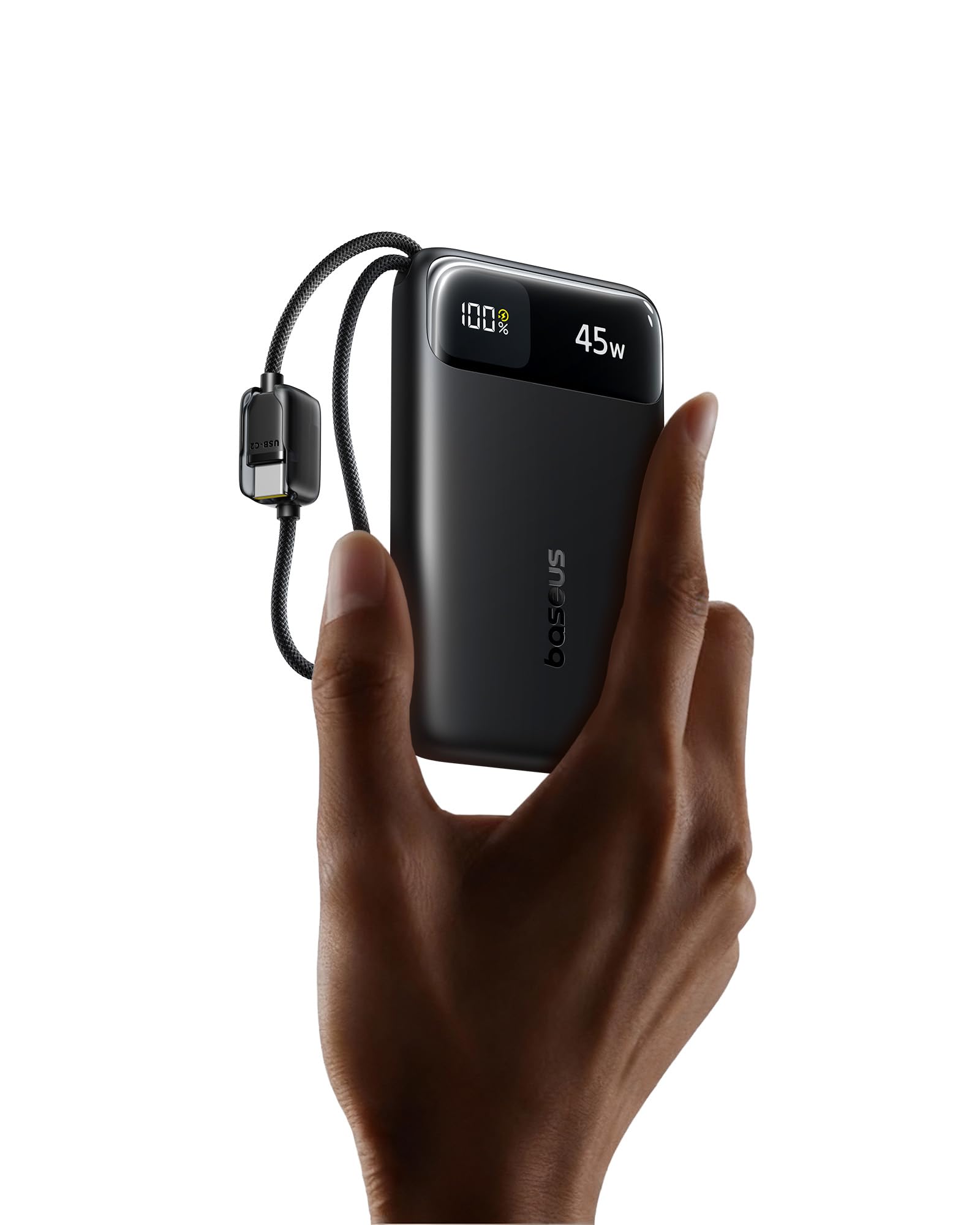
Características principales
- Ultra-Slim & Portable Design: Measures 4.3 × 2.6 × 0.7 inches and weighs 7 oz, making it easy to carry.
- 10,000 mAh de alta capacidad: Proporciona múltiples cargas para teléfonos inteligentes y otros dispositivos.
- Carga de alta velocidad de 45 W: Delivers fast charging for compatible devices, boosting an iPhone 17 Pro to 67% and a Samsung S25 Ultra to 60% in approximately 30 minutes.
- Dual Built-in USB-C Cables: Eliminates the need for external cables, offering convenience and tangle-free use. Cables are tested for durability.
- Four-in-One Charging: Features two built-in USB-C cables, one USB-C port, and one USB-A port, allowing simultaneous charging of up to four devices.
- 30W Rapid Input: Enables quick recharging of the power bank itself.
- Control de temperatura NTC: Built-in sensors monitor temperature for safe operation during high-speed charging.
- Múltiples protecciones de seguridad: Guards against overcurrent, overvoltage, overheating, over-discharge, and short circuits.
- Aprobado por la aerolínea: Suitable for air travel due to its capacity and compact build.

Guía de configuración
Carga inicial del banco de energía
- Connect one of the built-in USB-C cables or an external USB-C cable to the power bank's USB-C input port.
- Plug the other end of the cable into a compatible USB wall charger (30W or higher recommended for rapid charging).
- La pantalla digital del banco de energía mostrará el estado de carga y el porcentaje actual de batería.tage.
- Charge the power bank until it reaches 100% for optimal initial use.

Instrucciones de funcionamiento
Cargando sus dispositivos
- Uso de cables USB-C integrados:
- Pull out one of the built-in USB-C cables from the power bank.
- Connect the USB-C end to your compatible device (e.g., smartphone, tablet).
- The power bank will automatically begin charging your device. The digital display will show the remaining battery level and output wattage.
- Using USB-C or USB-A Ports:
- Connect your device's charging cable to either the USB-C output port or the USB-A output port on the power bank.
- Conecte el otro extremo del cable a su dispositivo.
- La carga comenzará automáticamente.
- Carga simultánea: The power bank supports charging up to four devices concurrently using its two built-in USB-C cables, one USB-C port, and one USB-A port.

Información de la pantalla digital
La pantalla digital integrada proporciona información en tiempo real:
- Porcentaje de bateríatage: Muestra el nivel de carga restante del banco de energía.
- Salida/Entrada Wattage: Displays the current power output when charging devices or input wattage when recharging the power bank.

Mantenimiento y cuidado
- Limpieza: Utilice un paño suave y seco para limpiar la superficie de la batería externa. Evite utilizar productos químicos agresivos o materiales abrasivos.
- Almacenamiento: Guarde el banco de energía en un lugar fresco y seco, alejado de la luz solar directa, temperaturas extremas y humedad.
- Estado de la batería: Para una duración óptima de la batería, cargue completamente el banco de energía al menos una vez cada tres meses si no lo usa con regularidad.
- Cuidado de cables: Avoid excessive bending or pulling of the built-in cables to prevent damage.
Solución de problemas
- El banco de energía no carga los dispositivos:
- Ensure the power bank itself has sufficient charge. Check the digital display.
- Verifique que los cables de carga estén conectados de forma segura tanto al banco de energía como a su dispositivo.
- Intente utilizar un cable o puerto diferente en el banco de energía.
- Confirme que su dispositivo sea compatible con las especificaciones de salida del banco de energía.
- El banco de energía no se recarga:
- Ensure the wall charger is functioning correctly and provides adequate power (30W recommended).
- Check the connection of the charging cable to both the power bank and the wall charger.
- Pruebe con un cargador de pared o cable diferente.
- Power bank becomes warm during use:
- It is normal for the power bank to generate some heat during charging or discharging, especially during high-speed operations.
- If the power bank becomes excessively hot, disconnect it immediately and allow it to cool down. Ensure it is used in a well-ventilated area.
- The built-in NTC temperature control system is designed to prevent overheating. If persistent excessive heat occurs, contact customer support.

Especificaciones del producto
| Marca | Baseus |
| Número de modelo | E00310 |
| Capacidad de la batería | 10000 miliamp Horas (mAh) |
| Tipo de conector | USB tipo A, USB tipo C |
| Fuente de poder | Batería |
| Volumentage | 5 voltios |
| Número de puertos | 4 (2x Built-in USB-C, 1x USB-C, 1x USB-A) |
| Peso del artículo | 7.16 onzas |
| Item Dimensions (L x W x Th) | 4.33" x 2.67" x 0.7" |
| Características especiales | Portable, Lightweight, Ultra Slim, 45W Fast Charging, Built-in Two USB-C Cables, CCC Certified, Pocket Size, Smart Display, Low Current Mode |
| Fabricante | Shenzhen Baseus Technology Co., Limitado. |
Información de seguridad
- No exponga el banco de energía a temperaturas extremas (calor o frío), luz solar directa o alta humedad.
- Evite dejar caer, golpear o desmontar el dispositivo.
- Mantener alejado del agua y líquidos inflamables.
- No lo use si el banco de energía está dañado, hinchado o tiene fugas.
- Mantener fuera del alcance de los niños.
- Deseche el producto de manera responsable de acuerdo con las regulaciones locales.
Garantía y soporte
This Baseus power bank comes with a Garantía del fabricante de 2 año.
For technical support, warranty claims, or further inquiries, please contact Baseus customer service or visit the official Baseus Brand Store:
Vídeo del producto
Presentación oficial del producto en vídeoasing the features and usage of the Baseus Enerfill FC11 45W 10000mAh Power Bank.